Linux Admin Automation
Overview
Linux administrators and DevOps engineers repeat the same host questions every day: Is the disk full? Is the important service up? Who can log in? Doing that by hand on many servers is slow and easy to get wrong. Linux admin automation means small Bash scripts that gather facts safely, print a clear report, and exit with a useful code — without deleting users, changing packages, or restarting production by accident.
This is Tutorial 12 in Module 12: Linux Administration of the REBASH Academy Shell Scripting for DevOps Engineers series. It is written for Linux administrators, DevOps engineers, Site Reliability Engineering (SRE), and platform engineers. By the end, you will have a read-mostly health report script under ~/rebash-shell/lab12 that you can show in an interview or attach to a change ticket.
In production, the safe pattern is check first, change second. Scripts that only read (df, id, systemctl is-active when permitted) are fine on shared practice hosts. Scripts that create users, purge packages, or restart services need change control. Cloud images, jump servers, and Continuous Integration (CI) runners all benefit from the same idea: collect evidence, then decide.
Prerequisites
- Process Automation — Signals and Traps
- Bash 4.2+ on Linux (Ubuntu 22.04/24.04 practice VM preferred)
- Optional: permission to run
systemctl(user or via sudo) for service checks
Learning Objectives
By the end of this tutorial, you will be able to:
- Explain why admin scripts should default to read-mostly checks
- Collect disk, user, and optional service facts with Bash
- Write a report file with clear
OK/WARN/FAILstyle lines - Exit non-zero when a threshold fails (for monitoring or CI)
- Avoid destructive admin actions in unattended scripts unless explicitly required
Architecture
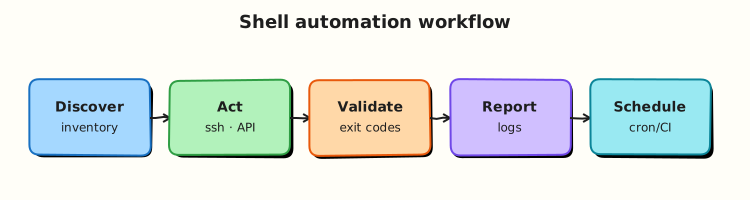
Admin automation sits between operators (or schedulers) and host facts. The script reads system state, writes a report, and returns an exit code. Changes (if any) stay behind explicit flags and change tickets.
Theory
What it is
Linux admin automation uses shell scripts to perform (or prepare) common operations work: disk usage, service health, user inventory, log size checks, and backup wrappers. The tools are familiar — df, du, getent, id, systemctl, package managers — wrapped with set -euo pipefail, clear output, and safe defaults.
Why it matters
Manual checks do not scale across fleets. A small report script can run from cron, a jump host, or CI against a practice VM and produce the same evidence every time. Mistakes matter: an unattended script that runs userdel or apt-get purge can cause an outage. Prefer read-mostly automation for monitoring; keep mutating actions behind confirmation or a --apply flag.
How it works
- Fingerprint the host — hostname, date, who ran the script.
- Disk —
df -P(portable) ordf -h; parse use% and warn above a threshold. - Users — count login-capable shells from
getent passwd; never dump password hashes. - Services — if
systemctlworks,is-active/is-enabledfor named units; if not permitted, recordSKIP. - Report + exit code — write a text report; exit
0if healthy, non-zero if a check failed.
use=$(df -P / | awk 'NR==2 {gsub(/%/,"",$5); print $5}')
if (( use >= 90 )); then echo "FAIL disk_root=${use}%"; exit 1; fi
Package installs, user creation, and service restarts belong in separate, reviewed playbooks — not in a default health script.
Key concepts and comparisons
| Check | Typical commands | Safe default |
|---|---|---|
| Disk | df -P, df -h | Read-only |
| Users | getent passwd, id | Read-only; no /etc/shadow dump |
| Services | systemctl is-active | Read-only status |
| Packages | dpkg -l / rpm -q | Query only |
| Mutating admin | useradd, systemctl restart | Explicit --apply + ticket |
| Pattern | Prefer when | Avoid when |
|---|---|---|
| Report script | Monitoring, tickets, CI smoke | Silent success with no file |
| Threshold + exit code | Alerting wrappers | Always exiting 0 |
| Optional systemctl | Mixed laptop/VM rights | Failing hard if systemd missing |
--apply for changes | Controlled remediation | Default destructive behaviour |
Common pitfalls
- Restarting services from a “check” script by habit.
- Parsing
df -hhuman units instead ofdf -Pfor maths. - Printing secrets or shadow-related data into reports.
- Assuming
systemctlalways works (containers, restricted users). - Making scripts non-idempotent so every cron run changes the host.
Hands-on Lab
Objective
Build a read-mostly host health script that checks disk usage, summarises users, optionally checks a service with systemctl, and writes host-report.txt under ~/rebash-shell/lab12.
Prerequisites
bash,df,awk,getent- Optional:
systemctl(user session or sudo) for the service check
Lab environment
Workspace: ~/rebash-shell/lab12
mkdir -p ~/rebash-shell/lab12 && cd ~/rebash-shell/lab12
set -euo pipefail
hostname | tee hostname.txt
whoami | tee runner.txt
df -P / | tee df-root.txt
Expected output
hostname.txt, runner.txt, and df-root.txt exist.
Real-world scenario
Your team wants a lightweight morning check on practice Ubuntu VMs before demos. The script must not change the system. It should warn if root disk use is high, list how many login users exist, and note whether ssh / ssh.service is active when systemctl is allowed. Output goes into a report file for the ticket.
Step-by-step tasks
Task 1 – Write the health report script
Create host-health.sh:
#!/usr/bin/env bash
set -euo pipefail

ROOT="$(cd "$(dirname "${BASH_SOURCE[0]}")" && pwd)"
REPORT="${1:-$ROOT/host-report.txt}"
DISK_WARN="${DISK_WARN:-80}"
DISK_FAIL="${DISK_FAIL:-90}"
SERVICE="${SERVICE:-ssh.service}"
STATUS=0

{
  echo "=== REBASH host health ==="
  echo "host=$(hostname)"
  echo "when=$(date -u +%Y-%m-%dT%H:%M:%SZ)"
  echo "runner=$(whoami)"
  echo

  # Disk (portable df)
  use=$(df -P / | awk 'NR==2 {gsub(/%/,"",$5); print $5}')
  echo "disk_root_use_percent=${use}"
  if (( use >= DISK_FAIL )); then
    echo "disk_root=FAIL threshold=${DISK_FAIL}"
    STATUS=1
  elif (( use >= DISK_WARN )); then
    echo "disk_root=WARN threshold=${DISK_WARN}"
    STATUS=1
  else
    echo "disk_root=OK"
  fi
  echo

  # Users (login-capable shells — read-only)
  login_users=$(getent passwd | awk -F: '$7 ~ /(bash|sh|zsh|fish)$/ {print $1}' | wc -l | tr -d ' ')
  total_users=$(getent passwd | wc -l | tr -d ' ')
  echo "users_total=${total_users}"
  echo "users_login_shells=${login_users}"
  echo "users=OK"
  echo

  # Service (optional)
  if command -v systemctl >/dev/null 2>&1; then
    if systemctl is-active --quiet "$SERVICE" 2>/dev/null; then
      echo "service_${SERVICE}=OK active"
    elif systemctl status "$SERVICE" >/dev/null 2>&1; then
      state=$(systemctl is-active "$SERVICE" 2>/dev/null || echo unknown)
      echo "service_${SERVICE}=WARN state=${state}"
      STATUS=1
    else
      # Try short name ssh if unit missing
      if systemctl is-active --quiet ssh 2>/dev/null; then
        echo "service_ssh=OK active"
      else
        echo "service_${SERVICE}=SKIP (unit not available or not permitted)"
      fi
    fi
  else
    echo "service_${SERVICE}=SKIP (systemctl not found)"
  fi

  echo
  echo "overall_exit=${STATUS}"
} | tee "$REPORT"

exit "$STATUS"
Run:
Expected output
host-health.sh is executable.
Task 2 – Run the report and assert fields
cd ~/rebash-shell/lab12
set -euo pipefail

# Disk thresholds high enough that a normal practice VM stays OK/WARN only by policy
DISK_WARN=95 DISK_FAIL=99 ./host-health.sh host-report.txt || true
test -s host-report.txt
grep -q '^host=' host-report.txt
grep -q '^disk_root_use_percent=' host-report.txt
grep -Eq '^disk_root=(OK|WARN|FAIL)' host-report.txt
grep -q '^users_login_shells=' host-report.txt
grep -Eq '^service_.+=(OK|WARN|SKIP)' host-report.txt
grep -q '^overall_exit=' host-report.txt
cp host-report.txt host-report-okpath.txt
Expected output
Report contains host, disk, users, and service lines.
Task 3 – Prove fail path with a low disk threshold
Force a failure without changing the real disk by lowering thresholds.
cd ~/rebash-shell/lab12
set -euo pipefail

set +e
DISK_WARN=1 DISK_FAIL=2 ./host-health.sh host-report-fail.txt
ec=$?
set -e
echo "exit_code=$ec" | tee fail-exit.txt
test "$ec" -ne 0
grep -Eq 'disk_root=(WARN|FAIL)' host-report-fail.txt

tar -czf admin-evidence.tgz \
  hostname.txt runner.txt df-root.txt \
  host-health.sh host-report-okpath.txt host-report-fail.txt fail-exit.txt
ls -l admin-evidence.tgz | tee evidence-ls.txt
Expected output
Script exits non-zero; fail report shows WARN or FAIL for disk; archive exists.
Validation steps
-
./host-health.shwriteshost-report.txt - Report includes disk percent and user counts
- Service line is
OK,WARN, orSKIP(not a crash) - Low thresholds produce a non-zero exit
-
admin-evidence.tgzexists under~/rebash-shell/lab12
Common errors and fixes
| Error | Cause | Fix |
|---|---|---|
df parse empty | Unexpected df format | Use df -P / as in the lab |
systemctl permission denied | Restricted user | Expect SKIP; do not require sudo for the lab |
| Always exit 0 | Thresholds never checked | Assert fail path with DISK_FAIL=2 |
| Huge report with secrets | Dumped shadow or env | Only print counts and status lines |
awk locale issues | Thousands separators | Use df -P numeric percent |
Challenge exercise
Extend host-health.sh with a memory line using /proc/meminfo (MemAvailable / MemTotal as a percent free). Add mem_available_percent= and mem=OK|WARN when free memory is below 10%. Keep the script read-only. Save sample output as host-report-mem.txt.
Learning outcomes
- Built a read-mostly admin report script
- Used portable disk parsing and safe user counts
- Handled optional
systemctlwithout hard failure - Proved both healthy and failing exit paths
Cleanup
cd ~/rebash-shell/lab12
set -euo pipefail
# Keep the script and evidence if you want; otherwise:
# rm -f host-report*.txt fail-exit.txt admin-evidence.tgz *.txt
# Optional: rm -f host-health.sh
Validation
- Lab finished under
~/rebash-shell/lab12/with evidence files - You can explain why health scripts should default to read-only
- You can parse root disk use and fail on a threshold
- You know when to use
SKIPinstead of failing for missingsystemctl
Code Walkthrough
In real operations, admin automation usually follows this order:
- Fingerprint — host, time, runner
- Read facts — disk, users, services (no mutations)
- Compare thresholds — warn/fail with clear labels
- Write a report file — stdout alone is easy to lose in cron
- Exit codes for callers — monitoring and CI need non-zero on failure
Mutating steps (restart, useradd, package install) stay behind explicit flags and tickets.
Security Considerations
- Do not dump
/etc/shadow, SSH private keys, or cloud metadata credentials into reports - Prefer the invoking user’s rights; avoid passwordless broad sudo in check scripts
- Quote all paths; never
evalhostnames or unit names from untrusted input - Limit who can read report files if they include inventory details
- Separate “observe” scripts from “change” scripts in repositories
Common Mistakes
Restarting services inside a health check
A flapping check can cause an outage loop. Fix: status only; remediation in a separate reviewed script.
Parsing human-readable df -h for maths
Gi and localisation break thresholds. Fix: use df -P and integer percent.
Always exiting zero
Monitoring thinks the host is fine. Fix: non-zero on FAIL/WARN when used as a gate.
Creating users from a cron “report”
Unattended identity changes are dangerous. Fix: inventory only unless --apply is set and audited.
Best Practices
- One report format the team can grep (
key=valuelines) - Environment variables for thresholds (
DISK_WARN,DISK_FAIL) - Idempotent and read-mostly by default
- Log runner identity and timestamp on every run
- Run ShellCheck on admin scripts before merge
Troubleshooting
| Symptom | Likely cause | Fix |
|---|---|---|
| Empty disk percent | Wrong df line | df -P / \| awk 'NR==2 …' |
| Service always SKIP | No systemd or rights | Expected on some containers; document it |
| Cron mail spam | Noisy stdout | Write file; mail only on non-zero |
| False FAIL on disk | Threshold too low | Tune DISK_WARN / DISK_FAIL per host size |
| Permission denied on tee | Bad report path | Write under $HOME or the lab directory |
Summary
Linux admin automation should gather host facts safely, write a clear report, and return a useful exit code. Keep the default path read-mostly: disk, users, optional service status. Put restarts and account changes behind explicit control. Next, check endpoints from the shell in Networking Automation with Shell.
Interview Questions
1. Why should a default host-health script avoid systemctl restart?
Reveal answer
Health checks run often (cron, CI, manual). Restarting on every check can cause flaps, dropped connections, and hide real failures. Prefer is-active / is-failed in the check script, and keep remediation in a separate, reviewed procedure with a change ticket.
2. How do you parse root disk usage reliably in Bash?
Reveal answer
Use df -P / for portable POSIX output, take the second line, strip % from the use column, and compare as an integer. Avoid parsing df -h human units for thresholds.
3. What should the script do if systemctl is missing or not permitted?
Reveal answer
Record SKIP (or similar) and continue other checks, unless the service check is mandatory for that environment. Failing the whole report on a developer laptop without systemd access makes the tool unusable. Production VM images that must run sshd can treat missing active state as FAIL.
4. How would you prove a disk threshold works in a lab without filling the disk?
Reveal answer
Temporarily lower DISK_WARN / DISK_FAIL (for example fail at 2%) so a normal host trips the gate, capture the non-zero exit code and report lines, then restore normal thresholds. Never fill a real root filesystem to test.
5. Which user facts are safe to put in a report, and which are not?
Reveal answer
Safe: counts, usernames of login shells, id for the runner. Unsafe: password hashes, API tokens, private keys, full home directory listings with secrets. Least privilege applies to data as well as actions.
6. How do exit codes from admin scripts help monitoring?
Reveal answer
Callers (cron wrappers, CI, Node exporter textfile patterns, simple alert scripts) treat non-zero as failure. Document the contract: 0 healthy, 1 threshold breach, 2 usage error. Without that, automation cannot alert correctly.
7. When would you move from a Bash report script to Ansible or a proper exporter?
Reveal answer
Move when you manage many hosts with shared desired state, need richer inventory, or need continuous metrics. Keep Bash for small local checks and bootstrap. Interviewers like “right tool for scale” — not “Bash forever” or “Ansible for one df”.
Related Tutorials
- Shell Scripting for DevOps Engineers – Overview
- Process Automation — Signals and Traps (previous)
- Networking Automation with Shell (next)
- Production Shell Scripting (related)
References
df(1)— report file system disk spacegetent(1)— name service lookupsystemctl(1)— control the systemd system manager- Track index: Shell Scripting for DevOps Engineers