Input, Output, Redirection, and Pipes
Overview
Every Linux process speaks through three standard streams: stdin (file descriptor 0, input), stdout (1, normal output), and stderr (2, diagnostics). Shell scripting builds on that model with echo / printf, read, redirection operators that send streams to files, and pipes (|) that connect one command’s stdout to the next command’s stdin.
Ops scripts stay trustworthy when data and diagnostics stay separate. If you print progress on stdout, a downstream grep or jq may parse garbage. If you omit pipefail, a pipeline can look successful when an early stage failed and the last command exited zero — a classic false green in Continuous Integration (CI). Tools such as tee help you both save a log file and watch output live. Here-documents (<<EOF) feed multi-line input without creating temporary files by hand.
This is Tutorial 4 in Module 4: Input & Output of the REBASH Academy Shell Scripting for DevOps Engineers series. It is written for Linux administrators, DevOps engineers, Site Reliability Engineering (SRE), and platform engineers. By the end you will redirect streams correctly, build a pipe with tee, and use a here-document in a small evidence pack.
Prerequisites
- Variables, Quoting, and Arithmetic
- Comfort with
set -euo pipefailand quoted expansions - Practice Ubuntu 22.04/24.04 with Bash
Learning Objectives
By the end of this tutorial, you will be able to:
- Explain stdin, stdout, and stderr and choose where messages should go
- Redirect stdout and stderr to files (
>,>>,2>,&>/2>&1) - Build pipelines with
|and useteeto capture output - Enable
pipefailand prove a failing stage fails the pipeline - Feed multi-line input with a here-document (
<<)
Architecture
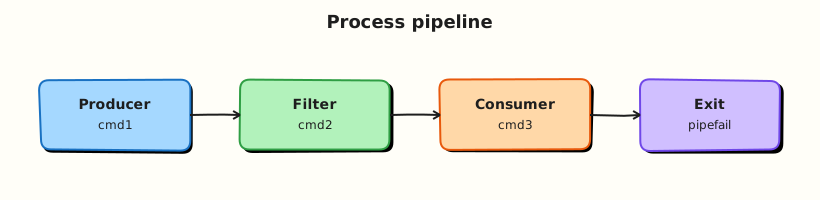
Streams connect commands, files, and humans. Redirection attaches streams to files; pipes attach stdout of one process to stdin of the next; tee splits a stream to a file and onward.

Theory
What it is
| Stream | FD | Typical use |
|---|---|---|
| stdin | 0 | Input (read, piped data) |
| stdout | 1 | Data for the next tool or capture |
| stderr | 2 | Errors, usage, progress for humans/logs |
Common operators:
| Operator | Meaning |
|---|---|
> file | Write stdout (truncate) |
>> file | Append stdout |
2> file | Write stderr |
2>&1 | Send stderr to the same place as stdout |
&> file | Bash: redirect both (use carefully for portability) |
\| | Pipe stdout to next stdin |
tee file | Copy stdin to file and to stdout |
<< EOF | Here-document body until EOF |
Why it matters
Monitoring and CI often capture stdout as the artefact and treat a zero exit as health. Mixed streams create flaky parsers. Pipelines without pipefail hide broken producers. Here-documents keep config snippets next to the script so reviewers see the input in Git instead of chasing separate temp files on a jump server.
How it works
- Write data to stdout; write diagnostics to stderr (
>&2). - Redirect when you need files:
cmd >out.txt 2>err.txt. - Pipe to compose tools:
cmd1 | cmd2 | tee capture.txt. - Fail honestly with
set -o pipefail(already inset -euo pipefail). - Feed blocks with
<<'EOF'(quoted marker = no expansion) or<<EOF(expansion on).
Process substitution (<(cmd)) is a Bash feature that presents command output as a temporary file path — useful for diff <(cmd1) <(cmd2). Prefer it when both sides are commands; use a here-document when you need literal multi-line text in the script.
Key concepts and comparisons
| Goal | Prefer | Avoid |
|---|---|---|
| Machine-readable data | stdout | Mixing progress on stdout |
| Human/CI diagnostics | stderr | Hiding errors only in stdout logs |
| Save and view | tee | Only > when you still need the pipe |
| Honest pipelines | set -o pipefail | Checking only the last command |
| Literal multi-line input | <<'EOF' | Unquoted <<EOF when $vars must stay literal |
Common pitfalls
- Redirecting with
>before testing, and truncating a good log by mistake. - Writing
cmd > file 2>&1order wrong so stderr does not follow stdout. - Forgetting
pipefail, sofalse | trueexits 0. - Using unquoted
<<EOFand expanding secrets accidentally. - Capturing passwords on stdout in “debug” redirects committed to tickets.
Hands-on Lab
Objective
Under ~/rebash-shell/lab04, separate stdout/stderr, use tee and pipes, prove pipefail, and build a here-document based report for a change ticket.
Prerequisites
- Ubuntu 22.04/24.04 with Bash
- Modules 2–3 skills (strict mode, quoting)
- No root required
Lab environment
Workspace: ~/rebash-shell/lab04
mkdir -p ~/rebash-shell/lab04 && cd ~/rebash-shell/lab04
set -euo pipefail
whoami | tee lab-user.txt
Expected output
workspace exists; lab-user.txt written.
Real-world scenario
A health-check job prints OK on stdout for a load balancer probe, but engineers also need a log file and clear errors on stderr. A previous pipeline reported green even when grep found nothing useful because pipefail was off. You rebuild the I/O pattern with proof.
Step-by-step tasks
Task 1 – Split stdout and stderr
Create streams.sh:
#!/usr/bin/env bash
set -euo pipefail

printf 'RESULT=ok\n'
printf 'progress: starting checks\n' >&2
printf 'progress: checks done\n' >&2
Run:
cd ~/rebash-shell/lab04
set -euo pipefail

chmod +x streams.sh

./streams.sh >stdout.txt 2>stderr.txt
grep -q 'RESULT=ok' stdout.txt
grep -q 'progress: starting checks' stderr.txt
# stdout must not contain progress lines
grep -q 'progress' stdout.txt && exit 1 || true

# Merge for a single log when needed
./streams.sh >merged.txt 2>&1
grep -q 'RESULT=ok' merged.txt
grep -q 'progress: checks done' merged.txt
Expected output
stdout.txt has only the result line; stderr.txt has progress; merged.txt contains both.
Task 2 – Pipes, tee, and pipefail
cd ~/rebash-shell/lab04
set -euo pipefail

printf 'alpha\nbeta\ngamma\n' > sample.txt

# tee saves a copy while piping onward
grep -E 'a' sample.txt | tee grep-a.txt | wc -l | tee count-a.txt
grep -q 'alpha' grep-a.txt
grep -q 'gamma' grep-a.txt
test "$(cat count-a.txt | tr -d ' ')" = "2"

# Without pipefail, a failing producer can be masked
set +o pipefail
set +e
false | true
rc_masked=$?
set -e
set -o pipefail
echo "masked_exit=$rc_masked" | tee pipe-masked.txt
test "$rc_masked" -eq 0

# With pipefail, the pipeline fails
set +e
false | true
rc_pf=$?
set -e
echo "pipefail_exit=$rc_pf" | tee pipe-pipefail.txt
test "$rc_pf" -ne 0
Expected output
count-a.txt is 2; masked exit is 0; pipefail exit is non-zero.
Task 3 – Variable-expanded report (and optional process substitution)
Build report.txt from shell variables (same outcome as an unquoted here-document with expansion):
Run:
cd ~/rebash-shell/lab04
set -euo pipefail

host="$(hostname -s)"
ts="$(date -u +%Y-%m-%dT%H:%M:%SZ)"

{
  printf 'REBASH lab04 I/O report\n'
  printf 'host=%s\n' "$host"
  printf 'timestamp_utc=%s\n' "$ts"
  printf 'stdout_lines=%s\n' "$(wc -l < stdout.txt | tr -d ' ')"
  printf 'stderr_lines=%s\n' "$(wc -l < stderr.txt | tr -d ' ')"
} > report.txt

grep -q "host=${host}" report.txt
test -s report.txt

# Process substitution: compare two command outputs without temp files
diff -u <(printf 'alpha\nbeta\n') <(printf 'alpha\nbeta\n') | tee diff-same.txt
test ! -s diff-same.txt

diff -u <(printf 'alpha\n') <(printf 'beta\n') >diff-diff.txt 2>&1 || true
grep -E '^\+|^-' diff-diff.txt | tee diff-markers.txt
test -s diff-markers.txt

tar -czf io-evidence.tgz \
  lab-user.txt stdout.txt stderr.txt merged.txt \
  grep-a.txt count-a.txt pipe-masked.txt pipe-pipefail.txt \
  report.txt diff-markers.txt
ls -l io-evidence.tgz | tee evidence-ls.txt
Expected output
report.txt includes host and timestamp; identical process-substitution diff is empty; differing diff has markers; evidence archive exists.
Validation steps
- stdout/stderr split proven with separate files
-
teecaptured intermediate pipe output -
pipefailchanges pipeline exit status vs masked case - Here-document report exists and lists host/time
-
io-evidence.tgzexists under~/rebash-shell/lab04
Common errors and fixes
| Error | Cause | Fix |
|---|---|---|
Empty stderr.txt | Messages went to stdout | Use printf ... >&2 |
pipefail still 0 | set -o pipefail not active | Confirm with set -o | grep pipefail |
| Here-doc expanded secrets | Unquoted EOF with $SECRET in body | Use <<'EOF' for literal bodies |
tee: broken pipe | Downstream closed early | Often OK; check pipeline design |
Challenge exercise
Write probe.sh that prints RESULT=ok or RESULT=fail on stdout, writes a timestamped line to probe.log via tee -a on stderr progress, accepts an optional argument ok|fail (default ok), exits 0 for ok and 1 for fail, and builds probe-report.txt with a here-document summarising the last run. Keep set -euo pipefail.
Learning outcomes
- Separated data (stdout) from diagnostics (stderr)
- Used pipes and
teewith honestpipefailbehaviour - Built a here-document report and compared streams with process substitution
Cleanup
cd ~/rebash-shell/lab04
rm -f diff-same.txt
# Keep evidence archive and key logs, or:
# rm -rf ~/rebash-shell/lab04
Validation
- Lab finished under
~/rebash-shell/lab04/with evidence files - You can explain stdout vs stderr and common redirect operators
- You can explain why
pipefailmatters in CI - You can write a here-document and know when to quote the delimiter
Code Walkthrough
Production I/O patterns usually follow this order:
- Decide the contract — what is data (stdout) vs logs (stderr)
- Redirect for artefacts —
>out 2>errorteewhen you still need a pipe - Compose with pipes — small tools, one job each
- Keep
pipefailon — already part ofset -euo pipefail - Embed templates — here-documents for reports and unit file snippets
- Compare command output — process substitution when both sides are commands
Order matters for merges: cmd >file 2>&1 sends both to file. cmd 2>&1 >file does not do what most people expect for merging into file.
Security Considerations
- Do not redirect secrets into world-readable files under
/tmp - Prefer
<<'EOF'when the body must not expand variables - Scrub logs before attaching them to tickets
- Avoid
curl ... 2>&1into logs that store tokens from verbose HTTP clients - Limit permissions on captured artefacts (
chmod 600for sensitive outputs)
Common Mistakes
Progress messages on stdout
Parsers and probes break. Fix: printf '...' >&2 for progress; keep stdout clean.
Missing pipefail
CI goes green when an early stage failed. Fix: set -euo pipefail and test with false | true.
Truncating logs with > during debug
Evidence disappears. Fix: use >> or a new timestamped file name.
Wrong redirect order when merging
stderr still hits the terminal. Fix: remember cmd >file 2>&1.
Best Practices
- One clear stdout contract per script (data or
RESULT=lines) - Always enable
pipefailin ops scripts - Use
tee -afor append-only run logs - Quote here-document delimiters unless you need expansion
- Keep pipelines short enough to read; break into steps when debugging
Troubleshooting
| Symptom | Likely cause | Fix |
|---|---|---|
| Empty capture file | Redirected the wrong FD | Check > vs 2> |
| Pipeline exit 0 but bad data | No pipefail | Enable it; assert on content |
| Here-doc includes unwanted values | Unquoted delimiter | Use <<'EOF' |
diff noise in process substitution | Locale/newline differences | Normalise with printf / sort |
| Lost stderr in CI | Runner captures only stdout | Merge deliberately with 2>&1 when needed |
Summary
Stdout carries data; stderr carries diagnostics; redirection and pipes connect tools; tee keeps a copy; pipefail keeps CI honest; here-documents embed multi-line input. Next, make decisions with tests and branches in Control Flow — Conditionals.
Interview Questions
1. What is the difference between stdout and stderr, and where should a usage message go?
Reveal answer
stdout (FD 1) is the normal data stream for capture and pipes. stderr (FD 2) is for diagnostics. A usage message should go to stderr so it does not corrupt data on stdout. In Bash, print with printf 'Usage: ...\n' >&2.
2. Explain cmd >out.txt 2>err.txt versus cmd >out.txt 2>&1.
Reveal answer
The first sends stdout to out.txt and stderr to err.txt separately. The second redirects stdout to out.txt, then points stderr at the same place stdout currently goes — so both end up in out.txt. Order matters: write the stdout redirect before 2>&1 when merging into a file.
3. Why does set -o pipefail matter in CI pipelines?
Reveal answer
Without pipefail, the exit status of a pipeline is the status of the last command. false | true can exit 0 even though false failed. With pipefail, any failed stage fails the pipeline. That prevents false-green builds when an early grep or curl fails.
4. What does tee do, and when do you use tee -a?
Reveal answer
tee reads stdin and writes it both to a file and to stdout, so you can save a log and still pipe onward. tee -a appends to the file instead of overwriting — useful for long-running job logs across multiple steps.
5. When should you quote the here-document delimiter as <<'EOF'?
Reveal answer
Quote the delimiter when the body must be literal — no parameter expansion, command substitution, or arithmetic. Use unquoted <<EOF only when you intentionally want "$variables" in the body expanded as the document is written.
6. How is process substitution <(cmd) different from a pipe?
Reveal answer
A pipe connects stdout of one command to stdin of the next in a linear chain. Process substitution presents command output as a file-like path, which helps commands that need a filename argument (for example diff file1 file2). Example: diff -u <(cmd1) <(cmd2). It is a Bash feature, not portable POSIX sh.
7. A health probe must print only OK on success for a load balancer. How do you log details without breaking the probe?
Reveal answer
Print OK (or RESULT=ok) on stdout, and send detailed progress to stderr or to a log file with tee. The load balancer captures stdout; engineers still get diagnostics in logs. Do not mix free-form logs onto stdout.
Related Tutorials
- Shell Scripting for DevOps Engineers – Overview
- Variables, Quoting, and Arithmetic (previous)
- Control Flow — Conditionals (next)
References
- GNU Bash manual — Redirections
- GNU Bash manual — Pipelines
tee(1)— Ubuntu man-pages- ShellCheck
- Track index: Shell Scripting for DevOps Engineers