File Operations in Shell
Overview
Most ops scripts create folders, find files, copy or move them, and clean up temporary files. Bash does not replace cp, mv, find, or mkdir — it orchestrates them safely. You will use mkdir -p, guarded find, cp/mv with checks, mktemp for unique temp paths, and an optional lock file so two cron jobs do not run the same work at once. Practice stays under ~/rebash-shell/lab09 so you never touch production data by mistake.
On jump servers and Continuous Integration (CI) agents, unsafe file ops are a common outage class: mv over an unexpected path, rm -rf on a variable that expanded empty, or two backups writing the same destination. Site Reliability Engineering (SRE) and platform teams expect scripts that create parents with mkdir -p, write to temp files then rename, and prove what was copied.
In production, prefer: allow-listed base directories, mktemp under $TMPDIR, mv for atomic publish when on the same filesystem, and a lock (for example flock or a lock directory) for overlapping schedules. Never invent temp names with fixed strings like /tmp/myjob.txt on a shared host.
This is Tutorial 9 in Module 9: File Operations of the REBASH Academy Shell Scripting for DevOps Engineers series. It is written for Linux administrators, DevOps engineers, SRE, and platform engineers. By the end, you will have a small staging-and-publish script with evidence for a change ticket.
Prerequisites
- Arrays and String Manipulation
- Bash 4.2+ and coreutils (
mkdir,cp,mv,find,mktemp) - Optional:
flock(fromutil-linux, present on Ubuntu)
Learning Objectives
By the end of this tutorial, you will be able to:
- Create directory trees with
mkdir -pand verify with tests - Use
findwith clear roots and predicates (not unbounded/searches) - Copy and move files safely with existence checks and
--for odd names - Create temp files/dirs with
mktempand clean them up - Optionally take a lock file/
flockso concurrent runs do not clash
Architecture
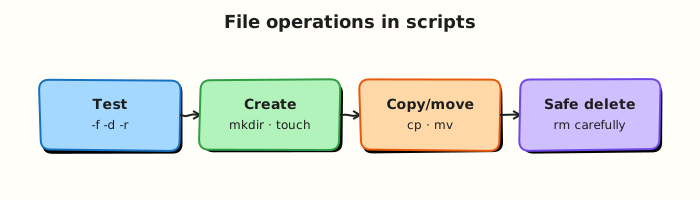
Scripts discover files, stage work in temp space, then publish into a target tree — optionally under a lock so only one writer runs.
Theory
What it is
Directory ops — mkdir -p path creates parents as needed; [[ -d path ]] tests directories.
Discovery — find ROOT -type f -name '*.log' lists matches under a known root.
Copy / move — cp duplicates; mv renames or relocates (atomic replace when staying on one filesystem).
Temp files — mktemp / mktemp -d create unique names.
Locks — flock or exclusive mkdir lockdirs serialise jobs.
base="$HOME/rebash-shell/lab09"
mkdir -p "$base/staging" "$base/published"
tmp="$(mktemp -d "$base/tmp.XXXXXX")"
Why it matters
CI artefacts, config drops, and backup jobs are all file choreography. A script that writes directly to the final path can leave a half-written file if it is killed. A job without a lock can interleave two writers. find / without limits can load a server and touch files you must not change. Safe patterns keep automation predictable and reviewable.
How it works
- Fix a base directory — never trust a relative path from an unknown cwd alone;
cdto the lab root or use absolute paths. mkdir -p— create staging and destination trees.find— start from a narrow root; filter with-type,-name,-mtimeas needed.- Stage then publish — write under
mktemp -d, thenmvinto place. - Lock (optional) — wrap the critical section with
flockor a lock directory.
src_root="./incoming"
find "$src_root" -type f -name '*.conf' -print

tmpdir="$(mktemp -d)"
cp -- "$src" "$tmpdir/file.conf"
mv -- "$tmpdir/file.conf" "./published/file.conf"
rmdir "$tmpdir" 2>/dev/null || rm -rf "$tmpdir"
Safe mv/cp habits: quote paths; use -- before paths that may start with -; test sources with [[ -f ]]; avoid cp to a path you have not created parents for (mkdir -p first).
Key concepts and comparisons
| Tool | Role | Caution |
|---|---|---|
mkdir -p | Create tree | Still check you are under the intended base |
find | Discover | Bound the root; avoid find / in labs |
cp | Duplicate | Overwrites by default if target exists |
mv | Rename / publish | Cross-device mv copies then deletes |
mktemp | Unique temp | Always clean up in trap for long scripts |
flock | Serialise | Needs a lock file path both jobs share |
| Pattern | Prefer when |
|---|---|
Write temp + mv | Publishing a config that readers must see whole |
cp -a | Preserving mode/times for backups |
| Lock file | Cron overlap risk |
Common pitfalls
- Using a fixed
/tmp/job.txtname on a shared host (collisions / symlink attacks). - Running
find /or unquoted variables inrm -rf. - Forgetting
mkdir -pbefore writing a nested destination. - Relying on
mvatomicity across filesystems (it is not atomic then). - Leaving temp directories behind when the script fails mid-way (use
trap).
Hands-on Lab
Objective
Under ~/rebash-shell/lab09, create an incoming tree, find *.conf files, stage them with mktemp -d, publish with mv, take an optional flock, and pack evidence.
Prerequisites
- Bash,
find,mktemp,cp,mv flockrecommended (util-linuxon Ubuntu)
Lab environment
Workspace: ~/rebash-shell/lab09
mkdir -p ~/rebash-shell/lab09/{incoming,published,out}
cd ~/rebash-shell/lab09
set -euo pipefail
bash --version | head -n1 | tee out/bash-version.txt
command -v mktemp | tee out/mktemp-path.txt
Expected output
out/bash-version.txt and out/mktemp-path.txt are non-empty.
Real-world scenario
A small app drops config snippets into incoming/. Your job must copy only *.conf files into published/, never two runs at once, and leave a manifest for the change ticket. Temps must be unique so parallel agents on the same host do not clash.
Step-by-step tasks
Task 1 – Seed incoming files and discover with find
cd ~/rebash-shell/lab09
set -euo pipefail

mkdir -p incoming/app-a incoming/app-b
printf 'port=8080\n' > incoming/app-a/app.conf
printf 'port=8081\n' > incoming/app-b/app.conf
printf 'ignore me\n' > incoming/app-a/readme.txt

find ./incoming -type f -name '*.conf' | sort | tee out/found-confs.txt
test "$(wc -l <out/found-confs.txt | tr -d ' ')" -eq 2
grep -F 'app.conf' out/found-confs.txt
! grep -F 'readme.txt' out/found-confs.txt
Expected output
exactly two *.conf paths listed; readme.txt absent.
Task 2 – Stage with mktemp, safe cp/mv, publish
Create publish-confs.sh:
#!/usr/bin/env bash
set -euo pipefail
root="$(cd "$(dirname "$0")" && pwd)"
cd "$root"
mkdir -p published out

tmpdir="$(mktemp -d "$root/out/stage.XXXXXX")"
cleanup() { rm -rf "$tmpdir"; }
trap cleanup EXIT

: > out/published-manifest.txt
while IFS= read -r -d '' f; do
  base="$(basename "$(dirname "$f")")"
  dest_dir="published/$base"
  mkdir -p "$dest_dir"
  stage="$tmpdir/${base}.conf"
  cp -- "$f" "$stage"
  mv -- "$stage" "$dest_dir/app.conf"
  printf '%s -> %s\n' "$f" "$dest_dir/app.conf" | tee -a out/published-manifest.txt
done < <(find ./incoming -type f -name '*.conf' -print0)

test -f published/app-a/app.conf
test -f published/app-b/app.conf
grep -F 'app-a' out/published-manifest.txt
Run:
Expected output
published/app-a/app.conf and published/app-b/app.conf exist; manifest lists both mappings; temp stage directory is removed by trap.
Task 3 – Optional lock with flock and evidence pack
Create locked-publish.sh:
#!/usr/bin/env bash
set -euo pipefail
root="$(cd "$(dirname "$0")" && pwd)"
cd "$root"
mkdir -p out
lockfile="$root/out/publish.lock"

if ! command -v flock >/dev/null 2>&1; then
  printf 'flock_missing=1\n' | tee out/lock-status.txt
  exit 0
fi

# Hold the lock while we re-run publish (serialised section)
(
  flock -n 9 || { printf 'lock_busy=1\n' | tee out/lock-status.txt; exit 1; }
  printf 'lock_acquired=1\n' | tee out/lock-status.txt
  ./publish-confs.sh
) 9>"$lockfile"

grep -q 'lock_acquired=1' out/lock-status.txt
Run:
cd ~/rebash-shell/lab09
set -euo pipefail

chmod +x locked-publish.sh
./locked-publish.sh

tar -czf out/fileops-evidence.tgz \
  out/bash-version.txt out/mktemp-path.txt out/found-confs.txt \
  out/published-manifest.txt out/lock-status.txt \
  published/app-a/app.conf published/app-b/app.conf
ls -l out/fileops-evidence.tgz | tee out/evidence-ls.txt
Expected output
lock-status.txt shows lock_acquired=1 (or flock_missing=1 if flock is unavailable); evidence archive is not empty.
Validation steps
-
findlists exactly the two*.conffiles underincoming/ -
publish-confs.shcreatespublished/app-a/app.confandpublished/app-b/app.conf - Temp stage directories under
out/stage.*are gone after a successful run - Evidence archive exists under
~/rebash-shell/lab09/out/
Common errors and fixes
| Error | Cause | Fix |
|---|---|---|
No such file or directory on publish | Missing mkdir -p | Create published/$base first |
find picks readme.txt | Wrong -name | Use -name '*.conf' |
| Temp dirs left behind | No trap / failed early | trap cleanup EXIT |
flock: command not found | Minimal image | Install util-linux or skip lock path |
| Overwrote wrong file | Relative cwd drift | cd to script root as in the lab |
Challenge exercise
Write safe-backup.sh that: creates backup/ with mkdir -p, copies every published app.conf to backup/<app>-app.conf.$(date -u +%Y%m%d), uses mktemp -d for staging, and refuses to run if out/publish.lock is already held (flock -n failure must exit 1 with a clear stderr message). Prove with a second listing in out/backup-manifest.txt.
Learning outcomes
- Discovered files with a bounded
find - Staged with
mktempand published withmv - Applied an optional
flockand packed ticket evidence
Cleanup
cd ~/rebash-shell/lab09
set -euo pipefail
rm -f out/publish.lock
# Keep published/ and out/ for review, or:
# rm -rf ~/rebash-shell/lab09
Validation
- Lab finished under
~/rebash-shell/lab09/with evidence archive - You can explain why
mktempbeats fixed/tmpnames - You can explain stage-then-
mvfor safer publishes - You know one risk of unbounded
find /or unlocked cron overlap
Code Walkthrough
Production file operations in shell usually follow this order:
- Resolve a base directory — script root or explicit
--root - Create destinations —
mkdir -pbefore writes - Discover narrowly —
findunder that base only - Stage → publish —
mktempthenmv/ checkedcp - Serialise if needed —
flockaround the critical section; clean temps withtrap
Long-running agents should also log every source→destination pair to a manifest.
Security Considerations
- Never
rm -rfon an unvalidated variable; refuse empty roots - Prefer
mktempover predictable temp names on multi-user hosts - Do not follow unexpected symlinks into sensitive trees — consider
find -P/ carefulcp -Ppolicy - Lock files should live on local disk, not on broken network mounts when possible
- Least privilege: this lab needs only home-directory write access
Common Mistakes
Fixed temp filenames in /tmp
Parallel jobs and symlink tricks collide. Fix: mktemp / mktemp -d and private directories under the job root when possible.
find / in a maintenance script
Huge I/O and accidental matches. Fix: start from an allow-listed root.
Writing the final file in place
Readers see partial content. Fix: write temp, then mv into place on the same filesystem.
No lock on overlapping cron
Two writers corrupt output. Fix: flock or an exclusive lock directory.
Best Practices
- Manifest every publish (
source -> dest) for tickets and audits - Use
--before arbitrary path arguments trapcleanup for temp directories- Prefer absolute paths after resolving script location
- Test overwrite behaviour explicitly (
cp/mvonto existing files)
Troubleshooting
| Symptom | Likely cause | Fix |
|---|---|---|
| Destination missing | No mkdir -p | Create parent dirs first |
find returns nothing | Wrong root / pattern | Check cwd and -name |
Cross-device mv slow / non-atomic | Different filesystems | Stage on the destination filesystem |
| Lock always busy | Stale process / crashed holder | Inspect holders; remove stale lock only when safe |
| Temps accumulate | Missing trap | Add EXIT cleanup |
Summary
File operations in shell are about safe choreography: narrow find, mkdir -p, mktemp, checked cp/mv, and locks when jobs overlap. Prove every publish with a manifest. Next, parse file contents with Text Processing in Shell Scripts.
Interview Questions
1. Why is mktemp safer than redirecting to /tmp/myjob.conf?
Reveal answer
Fixed names collide when two jobs run together and can be targeted with symlink attacks on shared /tmp. mktemp creates a unique name with safe permissions. Always clean up with trap so failures do not leave sensitive leftovers.
2. How does write-to-temp then mv improve config publishes?
Reveal answer
Readers either see the old file or the new file, not a half-written file, when mv is on the same filesystem (rename is atomic). Writing directly to the live path can expose partial content if the process is killed. Cross-filesystem mv copies then deletes — plan staging on the destination filesystem when atomicity matters.
3. What makes a find invocation dangerous in production scripts?
Reveal answer
Unbounded roots (/), missing -type filters, or acting on results with rm without a dry-run can touch the wrong files and create heavy disk load. Prefer an allow-listed root, clear predicates (-name, -mtime), and a manifest before destructive actions.
4. How would you stop two cron invocations from publishing at once?
Reveal answer
Wrap the critical section with flock on a lock file, or use an exclusive mkdir lockdir. If the lock cannot be acquired, exit non-zero (or skip with a logged reason). Do not rely on “the job is usually fast enough”.
5. Why use cp -- "$src" "$dest" / mv -- …?
Reveal answer
Paths can start with - and be interpreted as options. -- ends option parsing so the next argument is always a path. Combine with quoting for spaces.
6. What should a publish script leave for a change ticket?
Reveal answer
A manifest of source→destination, timestamps, tool versions if relevant, and proof that unexpected files (for example readme.txt) were ignored. An evidence tar of manifests plus sample outputs is enough for many reviews.
7. When is cp -a preferable to plain cp?
Reveal answer
When you need to preserve mode, ownership (if permitted), and timestamps — typical for backups or promoting a tree. For single config files where you intentionally set mode afterward, plain cp plus chmod may be clearer. State the choice in the script comments.
Related Tutorials
- Shell Scripting for DevOps Engineers – Overview
- Arrays and String Manipulation (previous)
- Text Processing in Shell Scripts (next)
- Linux Admin Automation
References
mktemp(1)— Ubuntu man-pagesfind(1)flock(1)- Track index: Shell Scripting for DevOps Engineers