GitHub Actions Basics: Workflows, Jobs, and Steps
Overview
A GitHub Actions workflow is a YAML contract: when something happens in Git, which jobs run, on which runner, in what order, with what permissions. Module 1 mapped the lifecycle; this module teaches the building blocks — events, jobs, steps, actions, expressions, and variables — so you can read and write production workflows confidently.
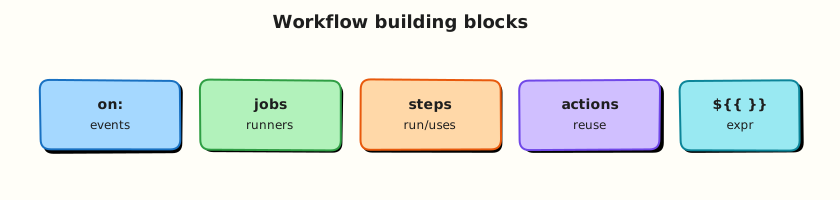
Every workflow file lives under .github/workflows/. Events decide when it runs. Jobs group steps that share one runner workspace. Steps are the smallest unit — a shell command or a reusable action from the marketplace. Expressions (${{ }}) inject context such as branch name, commit SHA, and matrix values at runtime.
This is Tutorial 2 in Module 2: GitHub Actions Basics of the REBASH Academy GitHub Actions for Cloud & DevOps Engineers series. By the end you will complete a ci.yml with checkout and shell steps, validate YAML structure offline, and understand the context objects available in expressions.
Prerequisites
- CI/CD Fundamentals and GitHub Actions
- Git basics
- Python 3 with PyYAML (or
pip install pyyaml) - Optional: GitHub CLI (
gh) for optional live runs
Learning Objectives
By the end of this tutorial, you will be able to:
- Structure a workflow file with
name,on,permissions,jobs, andsteps - Choose appropriate trigger events for CI versus manual operations
- Use
actions/checkoutandrun:steps with fail-fast shell patterns - Reference
github,env, andvarscontext in expressions safely - Validate workflow YAML locally before pushing to GitHub
Architecture
Workflow files react to events; jobs execute on runners; steps call actions or shell commands; context flows into expressions.
Theory
What it is
A workflow is a YAML file (.yml or .yaml) in .github/workflows/. Required top-level keys for most workflows:
| Key | Purpose |
|---|---|
name | Display name in the Actions UI |
on | Events and filters that trigger runs |
jobs | Named units of work |
permissions | Scopes for the GITHUB_TOKEN (recommended) |
A job runs on one runner. All steps in a job share the same workspace directory ($GITHUB_WORKSPACE). Jobs can depend on each other with needs:.
A step is either:
run:— shell command (default shell depends on OS: bash on Linux/macOS, pwsh on Windows)uses:— reusable action (for exampleactions/checkout@v4)
An action packages reusable logic — either from the marketplace, your organisation, or a local path (./.github/actions/my-action).
Why it matters
Without a clear mental model, workflows become copy-paste soup: wrong event filters, jobs that never run, expressions that evaluate to empty strings, and secrets printed in logs. Platform teams publish golden templates — minimal CI, Docker build, Terraform plan — so product engineers inherit correct structure.
Expressions let one workflow serve many branches and matrix combinations without duplicating files. Variables (repository, environment, organisation) separate configuration from logic — rotate a URL in Settings instead of editing YAML across fifty repositories.
How it works
Events (on:) — common triggers:
| Event | Typical use |
|---|---|
push | CI on branch commits |
pull_request | CI on PRs (uses merge ref) |
workflow_dispatch | Manual run with optional inputs |
schedule | Cron-based jobs (UTC) |
release | Publish on GitHub Release |
Filters narrow triggers:
on:
  push:
    branches: [main, 'release/**']
    paths:
      - 'src/**'
      - '.github/workflows/ci.yml'
  pull_request:
    branches: [main]
Job defaults:
Expressions wrap dynamic values. In documentation samples below, expressions are shown wrapped for MkDocs compatibility:
Context objects (most used):
| Context | Examples |
|---|---|
github | github.repository, github.ref, github.event_name, github.sha |
env | Variables set in env: blocks |
vars | Repository / organisation variables (non-secret) |
secrets | Encrypted secrets (never log) |
runner | runner.os, runner.arch |
needs | Outputs from dependent jobs |
Variables versus secrets:
| Type | Storage | Visible in logs? |
|---|---|---|
vars.* | Settings → Variables | Yes (non-sensitive config) |
secrets.* | Settings → Secrets | No (masked when possible) |
env: in workflow | YAML / runtime | Depends — do not put secrets in plain env |
Key concepts and comparisons
| Pattern | When to use |
|---|---|
| Single job CI | Small repos; lint + test in one runner |
| Multi-job CI | Separate lint, test, build for clearer failures and parallelism |
needs: chain | Test only after lint passes; deploy only after test |
if: on job/step | Skip deploy on fork PRs; run only on main |
run: vs uses: | |
|---|---|
run: | Custom shell logic; full control |
uses: | Pin community or internal reusable steps |
Common pitfalls
pull_requestvspull_request_target— the latter runs with base branch context and elevated risk for forks; avoid unless you understand the security model.- Missing checkout — the runner workspace starts empty; most jobs need
actions/checkoutfirst. - Expression syntax — use
${{ }}inside YAML strings; compare with${{ github.ref == 'refs/heads/main' }}not shell==alone inif:. - Unpinned actions —
@mainmoves; pin@v4or a commit SHA. - Wrong shell — multiline scripts need
set -euo pipefailin bash for fail-fast behaviour.
Hands-on Lab
Objective
Complete .github/workflows/ci.yml with checkout, environment variables, a context-aware shell step, and offline YAML validation under ~/rebash-github-actions/module-02.
Prerequisites
- Completed Module 1 lab or equivalent
- Python 3 with PyYAML
- Bash
Lab environment
mkdir -p ~/rebash-github-actions/module-02 && cd ~/rebash-github-actions/module-02
set -euo pipefail
Real-world scenario
Your team’s first production workflow must run on every pull request to main, checkout code, print the commit context, run unit tests from a stub script, and fail if tests fail — all reviewable in YAML before the first push.
Step-by-step tasks
Task 1 – Create project layout and stub test script
Create the directory layout, then add the test script and README.
cd ~/rebash-github-actions/module-02
set -euo pipefail
mkdir -p demo-app/tests .github/workflows
Create demo-app/tests/run-tests.sh:
#!/usr/bin/env bash
set -euo pipefail
echo "Running stub unit tests..."
test -f ../README.md || { echo "README missing"; exit 1; }
echo "ALL TESTS PASSED"
Create demo-app/README.md:
# Demo app for Module 2 CI lab

Minimal fixture used by the CI workflow stub. Run tests locally:

```bash
cd demo-app/tests && ./run-tests.sh
```
Run and verify:
cd ~/rebash-github-actions/module-02
chmod +x demo-app/tests/run-tests.sh
test -x demo-app/tests/run-tests.sh
grep -q 'ALL TESTS PASSED' demo-app/tests/run-tests.sh
Expected output
Script is executable; grep succeeds.
Task 2 – Write the CI workflow
Create .github/workflows/ci.yml:
name: Module 2 CI
on:
  pull_request:
    branches: [main]
  push:
    branches: [main]
  workflow_dispatch:

permissions:
  contents: read

env:
  APP_NAME: rebash-demo

jobs:
  ci:
    runs-on: ubuntu-latest
    steps:
      - name: Checkout
        uses: actions/checkout@v4

      - name: Show context
        env:
          REF_NAME: ${{ github.ref_name }}
          SHA_SHORT: ${{ github.sha }}
        run: |
          set -euo pipefail
          echo "Repository: ${{ github.repository }}"
          echo "Event: ${{ github.event_name }}"
          echo "Ref: ${REF_NAME}"
          echo "SHA: ${SHA_SHORT:0:7}"
          echo "${{ env.APP_NAME }}" > context.txt
          test -s context.txt

      - name: Run tests
        working-directory: demo-app/tests
        run: |
          set -euo pipefail
          ./run-tests.sh | tee test-output.txt
          grep -q 'ALL TESTS PASSED' test-output.txt
Validate offline:
cd ~/rebash-github-actions/module-02
set -euo pipefail
grep -q 'actions/checkout@v4' .github/workflows/ci.yml
grep -q 'github.ref_name' .github/workflows/ci.yml
grep -q 'working-directory: demo-app/tests' .github/workflows/ci.yml
Expected output
All greps succeed.
Task 3 – Validate YAML structure
cd ~/rebash-github-actions/module-02
set -euo pipefail
python3 -c "
import yaml
with open('.github/workflows/ci.yml') as f:
    doc = yaml.safe_load(f)
assert doc['name'] == 'Module 2 CI'
assert 'pull_request' in doc['on']
assert 'ci' in doc['jobs']
steps = doc['jobs']['ci']['steps']
assert any('checkout' in s.get('uses', '').lower() for s in steps)
assert doc['permissions']['contents'] == 'read'
print('structure OK')
"
Expected output
structure OK
Task 4 – Simulate workflow shell steps locally
cd ~/rebash-github-actions/module-02
set -euo pipefail

export APP_NAME=rebash-demo
echo "${APP_NAME}" > context.txt
test -s context.txt
grep -q 'rebash-demo' context.txt

cd demo-app/tests
./run-tests.sh | tee ../../test-output.txt
grep -q 'ALL TESTS PASSED' ../../test-output.txt
echo "local simulation OK"
Expected output
local simulation OK
Optional — run on GitHub:
Validation steps
-
demo-app/tests/run-tests.shexits 0 locally -
.github/workflows/ci.ymlpasses Python structure asserts - Workflow contains checkout, context step, and test step
-
permissions: contents: readis set -
context.txtandtest-output.txtprove local simulation
Common errors and fixes
| Error | Cause | Fix |
|---|---|---|
yaml.scanner.ScannerError | Tab characters in YAML | Replace tabs with spaces (2-space indent) |
| Tests fail — README missing | Wrong working directory | Use working-directory: demo-app/tests or adjust path |
| Expression literal in log | Forgot expression syntax | Use ${{ github.ref_name }} in YAML, not $GITHUB_REF_NAME alone in env: mapping |
| Action not found | Typo in uses: | Pin actions/checkout@v4 exactly |
Challenge exercise
Add a job lint that runs before ci using needs: — the lint job echoes "lint ok" and writes lint-passed.txt. Update structure validation to assert two jobs and the needs relationship.
Learning outcomes
- Created a multi-step CI workflow with checkout and shell steps
- Used
githubcontext andenvin expressions - Validated YAML structure with Python asserts
- Simulated runner steps locally without a GitHub push
Cleanup
# Retain ~/rebash-github-actions/module-02 for Module 3+
# rm -f context.txt test-output.txt  # optional
Validation
- Lab completed under
~/rebash-github-actions/module-02/ - You can name five
github.*context properties and their purpose - You can explain when to use
varsversussecrets - You can describe what happens if checkout is omitted
Code Walkthrough
- Start with triggers — match
on:to the feedback loop you want (PR for CI, dispatch for ops). - Set permissions first — default read-only; add scopes per job if needed.
- Checkout early — first step in almost every build job.
- Fail fast in shell —
set -euo pipefailand explicittest/grepasserts. - Pin actions —
@v4minimum; commit SHA for highest supply-chain assurance.
Security Considerations
- Use
pull_requestfor external contributions; avoidpull_request_targetunless you need base-branch secrets and accept the risk model. - Never echo
secrets.*or mask bypass patterns; GitHub masks known secrets but custom encoding can leak. - Restrict
workflow_dispatchinputs — validate and sanitise before use in shell commands. - Limit
permissions:—contents: readsuffices for most CI jobs. - Review third-party actions — prefer verified creators and pinned versions.
Common Mistakes
Forgetting actions/checkout
The runner workspace is empty at job start. Fix: Add uses: actions/checkout@v4 before steps that read repository files.
Using shell syntax inside expressions
if: github.ref == 'refs/heads/main' is expression syntax; if: [ "$(git branch)" = main ] in the wrong field fails silently or skips unexpectedly. Fix: Use ${{ }} expressions in if:, env:, and with: — shell logic inside run: only.
Pinning actions to a moving branch
@main can change without notice. Fix: Pin major version tags or full commit SHAs.
Best Practices
- One workflow file per concern (CI, release, deploy) when triggers and permissions differ.
- Use
env:at workflow or job level for shared non-secret configuration. - Name steps clearly — logs become searchable incident evidence.
- Add
timeout-minuteson long jobs to avoid hung runners consuming quota. - Validate YAML in CI with
actionlintor Python before merge.
Troubleshooting
| Symptom | Likely cause | Fix |
|---|---|---|
| Workflow not triggered on PR | PR targets wrong branch or path filter excludes files | Check on.pull_request.branches and paths |
| Expression shows empty | Wrong context property or typo | Compare with contexts reference |
| Step cannot find file | Missing checkout or wrong working-directory | Add checkout; set path relative to workspace root |
Permission denied pushing tags | Token lacks contents: write | Add scoped permissions only on the job that needs write |
| Fork PR secrets missing | Expected — secrets not exposed to fork workflows | Use pull_request workflows without secrets or use approval gates |
Summary
Workflows combine events, jobs, steps, and actions with expressions for dynamic behaviour. Module 2’s lab gives you a validated CI skeleton. Next, GitHub-hosted and Self-hosted Runners explains where those jobs actually execute.
Interview Questions
1. What is the difference between a job and a step?
Reveal answer
A job is a logical unit scheduled on one runner — all its steps share the same workspace and runner environment. A step is a single action within that job: either a run: shell command or a uses: action. Jobs can run in parallel (unless linked by needs:); steps within a job run sequentially.
2. When would you use workflow_dispatch inputs?
Reveal answer
Manual operations that need parameters: choosing an environment, specifying a version tag, or rerunning a deploy for a particular artefact. Inputs appear in the Actions UI when triggering manually. Validate inputs in the workflow before passing them to shell commands to avoid injection.
3. Explain github.ref versus github.ref_name.
Reveal answer
github.ref is the full ref (for example refs/heads/main or refs/pull/42/merge). github.ref_name is the short name (main or 42/merge). Use ref_name for display and simple branch comparisons; use full ref when comparing against refs/heads/* patterns in expressions.
4. Why pin actions/checkout@v4 instead of @main?
Reveal answer
@main is a moving target — the action author can push breaking changes without your review. @v4 pins to a major version line that receives compatible fixes. For highest assurance, pin the full commit SHA. Supply-chain attacks on popular actions make pinning a production requirement.
5. What permissions does a typical read-only CI job need?
Reveal answer
permissions: contents: read at workflow or job level. That allows checkout and reading repository contents. Add pull-requests: read if using the API for PR comments. Avoid granting write scopes unless a step publishes packages, creates releases, or pushes commits.
6. How do repository variables differ from secrets?
Reveal answer
Variables (vars.*) store non-sensitive configuration — API base URLs, feature flags, environment names. They appear in logs. Secrets store credentials and tokens; GitHub masks them in logs when possible. Use variables for config you want visible in debugging; secrets for anything that grants access.
7. A step runs but the job shows success despite test failures — why?
Reveal answer
The shell step likely did not propagate exit codes — perhaps a piped command (cmd | tee) where only tee's exit code counts, or missing set -e. Fix: Use set -euo pipefail, append | tee carefully with pipefail, or use explicit test/grep -q asserts that exit non-zero on failure.
Related Tutorials
- CI/CD Fundamentals and GitHub Actions
- GitHub-hosted and Self-hosted Runners
- Workflow Syntax: Matrix and Reusable Workflows