Kubernetes Deployments with GitHub Actions
Overview
Container images from Module 7 mean nothing until something applies them to a cluster. Kubernetes deployments via GitHub Actions typically use kubectl (manifest apply) or Helm (chart upgrade) from a runner with cluster credentials — often a self-hosted runner in the Virtual Private Cloud (VPC) or OIDC-authenticated cloud role.
This module covers workflow structure, kubeconfig handling without committing secrets, deployment validation, and rollback checklists SRE teams use when a release degrades service.
This is Tutorial 8 in Module 8: Kubernetes Deployments of the REBASH Academy GitHub Actions for Cloud & DevOps Engineers series.
Prerequisites
- Docker Pipelines with GitHub Actions
- Kubernetes introduction
- Python 3 with PyYAML
- Optional: kind for local cluster validation
Learning Objectives
By the end of this tutorial, you will be able to:
- Structure kubectl and Helm deploy workflow stubs with environment gates
- Store kubeconfig or use OIDC without long-lived keys in YAML
- Validate Kubernetes manifests offline with dry-run or Python
- Document a rollback checklist for failed deployments
- Explain when GitHub-hosted versus self-hosted runners suit cluster access
Architecture
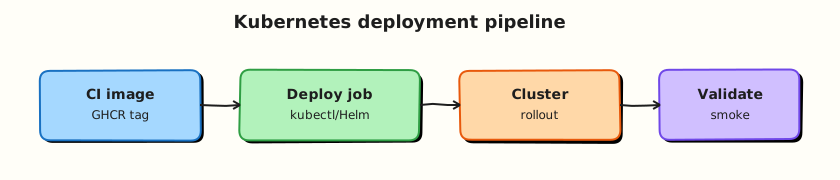
CI builds and pushes an image; deploy workflow applies manifests or Helm releases; validation checks Ready replicas; rollback reverses to previous revision.
Theory
What it is
kubectl deploy pattern:
jobs:
  deploy:
    runs-on: ubuntu-latest
    environment: staging
    steps:
      - uses: actions/checkout@v4
      - name: Configure kubeconfig
        env:
          KUBE_CONFIG: ${{ secrets.KUBE_CONFIG_STAGING }}
        run: |
          mkdir -p ~/.kube
          echo "$KUBE_CONFIG" > ~/.kube/config
          chmod 600 ~/.kube/config
      - name: Apply manifests
        run: kubectl apply -f k8s/ --namespace=staging
      - name: Wait for rollout
        run: kubectl rollout status deployment/myapp -n staging --timeout=120s
Prefer OIDC + cloud IAM over base64 kubeconfig secrets where the cloud provider supports it (Amazon Elastic Kubernetes Service (EKS), Google Kubernetes Engine (GKE), Azure Kubernetes Service (AKS)).
Helm pattern:
- name: Helm upgrade
  run: |
    helm upgrade --install myapp ./charts/myapp \
      --namespace staging \
      --set image.tag=${{ github.sha }} \
      --wait --timeout 5m
Deployment validation:
kubectl rollout status— Deployment reached minimum Ready replicaskubectl get pods— no CrashLoopBackOff- HTTP smoke test against Ingress or port-forward (Module 12)
Why it matters
Manual kubectl apply from engineer laptops bypasses audit trails and drift detection. Pipeline deploys tie every cluster change to a Git SHA, use environment approvals for production, and leave logs for incident review.
Rollback speed separates good SRE practice from chaos — knowing kubectl rollout undo versus helm rollback versus redeploying previous image tag must be documented before an outage, not invented during one.
How it works
- Build job (Module 7) pushes
ghcr.io/org/app:SHA. - Deploy workflow triggers on
workflow_dispatchor push tomainwithenvironment: productiongate. - Runner with cluster access updates image tag in manifest or Helm values.
- Rollout waits for Ready condition; smoke test optional.
- On failure, rollback restores previous Deployment revision or Helm release.
Self-hosted runners often required when the Kubernetes API server is private. GitHub-hosted runners can deploy to public endpoints or cloud APIs via OIDC without static kubeconfig.
GitOps alternative: Argo CD or Flux sync from Git — Actions updates manifest repo rather than calling kubectl directly (see GitOps).
Key concepts and comparisons
| Tool | Best for | Rollback |
|---|---|---|
| kubectl apply | Flat manifests, learning | kubectl rollout undo deployment/NAME |
| Helm | Parameterised releases, charts | helm rollback RELEASE REVISION |
| Kustomize | Overlay per environment | Revert Git commit; re-apply |
| Runner choice | Cluster access |
|---|---|
| GitHub-hosted + public API | Possible with care |
| Self-hosted in VPC | Private API endpoints |
| OIDC to cloud | Temporary creds; no kubeconfig file |
Common pitfalls
- Committing kubeconfig or service account keys to the repository.
- Applying
:latestimage tag — rollbacks ambiguous; pin SHA. - No
rollout statuswait — pipeline green while pods crash. - Production deploy from feature branch workflow.
- Missing namespace
--namespace— deploys todefaultaccidentally.
Hands-on Lab
Objective
Create Kubernetes manifests, kubectl and Helm deploy workflow stubs, a rollback check script, and offline validation under ~/rebash-github-actions/module-08.
Prerequisites
- Modules 1–7
- Python 3 with PyYAML
- Optional: kind cluster for live apply
Lab environment
mkdir -p ~/rebash-github-actions/module-08/{k8s,charts/demo-app/templates,.github/workflows} && cd ~/rebash-github-actions/module-08
set -euo pipefail
Real-world scenario
Platform SRE requires every service deploy through GitHub Actions with staging environment approval, manifest validation in CI, and a rollback shell script operators can run when error rates spike after release.
Step-by-step tasks
Task 1 – Write Deployment and Service manifests
Create k8s/deployment.yaml:
apiVersion: apps/v1
kind: Deployment
metadata:
  name: rebash-demo
  labels:
    app: rebash-demo
spec:
  replicas: 2
  selector:
    matchLabels:
      app: rebash-demo
  template:
    metadata:
      labels:
        app: rebash-demo
    spec:
      securityContext:
        runAsNonRoot: true
        runAsUser: 101
      containers:
        - name: web
          image: ghcr.io/example/rebash-demo:PLACEHOLDER_SHA
          ports:
            - containerPort: 8080
          readinessProbe:
            httpGet:
              path: /
              port: 8080
            initialDelaySeconds: 3
            periodSeconds: 5
          resources:
            requests:
              cpu: 50m
              memory: 64Mi
            limits:
              cpu: 200m
              memory: 128Mi
Create k8s/service.yaml:
apiVersion: v1
kind: Service
metadata:
  name: rebash-demo
spec:
  selector:
    app: rebash-demo
  ports:
    - port: 80
      targetPort: 8080
  type: ClusterIP
Validate offline:
cd ~/rebash-github-actions/module-08
set -euo pipefail
grep -q 'kind: Deployment' k8s/deployment.yaml
grep -q 'runAsNonRoot: true' k8s/deployment.yaml
grep -q 'kind: Service' k8s/service.yaml
python3 -c "import yaml; yaml.safe_load(open('k8s/deployment.yaml')); yaml.safe_load(open('k8s/service.yaml')); print('manifests OK')"
Expected output
manifests OK
Task 2 – kubectl deploy workflow stub
Create .github/workflows/k8s-deploy-kubectl.yml:
name: Deploy to Kubernetes (kubectl stub)
on:
  workflow_dispatch:
    inputs:
      image_tag:
        description: Image tag (Git SHA)
        required: true
        default: PLACEHOLDER_SHA
permissions:
  contents: read
jobs:
  deploy:
    runs-on: ubuntu-latest
    environment: staging
    steps:
      - uses: actions/checkout@v4
      - name: Patch image tag in manifest
        run: |
          set -euo pipefail
          sed "s/PLACEHOLDER_SHA/${{ github.event.inputs.image_tag }}/g" k8s/deployment.yaml > k8s/deployment.rendered.yaml
          grep -q "ghcr.io/example/rebash-demo:${{ github.event.inputs.image_tag }}" k8s/deployment.rendered.yaml
      - name: Validate manifest structure (offline)
        run: |
          set -euo pipefail
          python3 -c "import yaml; yaml.safe_load(open('k8s/deployment.rendered.yaml'))"
          echo "kubectl dry-run stub OK"
      - name: Apply (live cluster — optional)
        if: false
        run: kubectl apply -f k8s/deployment.rendered.yaml -f k8s/service.yaml --namespace=staging
Validate offline:
cd ~/rebash-github-actions/module-08
set -euo pipefail
grep -q 'environment: staging' .github/workflows/k8s-deploy-kubectl.yml
grep -q 'deployment.rendered.yaml' .github/workflows/k8s-deploy-kubectl.yml
python3 -c "import yaml; yaml.safe_load(open('.github/workflows/k8s-deploy-kubectl.yml')); print('kubectl workflow OK')"
Expected output
kubectl workflow OK
Task 3 – Helm chart stub and workflow
Create charts/demo-app/Chart.yaml:
apiVersion: v2
name: demo-app
description: REBASH Module 8 stub chart
type: application
version: 0.1.0
appVersion: "1.0.0"
Create charts/demo-app/values.yaml:
replicaCount: 2
image:
  repository: ghcr.io/example/rebash-demo
  tag: PLACEHOLDER_SHA
service:
  port: 80
Create charts/demo-app/templates/deployment.yaml:
apiVersion: apps/v1
kind: Deployment
metadata:
  name: {{ .Release.Name }}
spec:
  replicas: {{ .Values.replicaCount }}
  selector:
    matchLabels:
      app: {{ .Release.Name }}
  template:
    metadata:
      labels:
        app: {{ .Release.Name }}
    spec:
      containers:
        - name: web
          image: "{{ .Values.image.repository }}:{{ .Values.image.tag }}"
          ports:
            - containerPort: 8080
Create .github/workflows/k8s-deploy-helm.yml:
name: Deploy with Helm (stub)
on:
  workflow_dispatch:
permissions:
  contents: read
jobs:
  deploy:
    runs-on: ubuntu-latest
    environment: staging
    steps:
      - uses: actions/checkout@v4
      - name: Validate chart files exist
        run: |
          set -euo pipefail
          test -f charts/demo-app/Chart.yaml
          test -f charts/demo-app/values.yaml
          grep -q 'PLACEHOLDER_SHA' charts/demo-app/values.yaml
      - name: Helm upgrade (offline stub)
        run: |
          set -euo pipefail
          echo "helm upgrade --install demo-app ./charts/demo-app --set image.tag=abc123 --wait"
          echo "helm-stub-ok" > helm-stub.txt
          test -s helm-stub.txt
Validate offline:
cd ~/rebash-github-actions/module-08
set -euo pipefail
grep -q 'demo-app' charts/demo-app/Chart.yaml
python3 -c "import yaml; yaml.safe_load(open('.github/workflows/k8s-deploy-helm.yml')); print('helm workflow OK')"
Expected output
helm workflow OK
Task 4 – Rollback check script and offline render test
Create rollback-check.sh:
#!/usr/bin/env bash
set -euo pipefail
NAMESPACE="${NAMESPACE:-staging}"
DEPLOY="${DEPLOY:-rebash-demo}"
{
  echo "# Rollback check evidence — Module 8"
  echo "namespace=${NAMESPACE}"
  echo "deployment=${DEPLOY}"
  echo ""
  echo "## kubectl rollback commands"
  echo "kubectl rollout history deployment/${DEPLOY} -n ${NAMESPACE}"
  echo "kubectl rollout undo deployment/${DEPLOY} -n ${NAMESPACE}"
  echo "kubectl rollout status deployment/${DEPLOY} -n ${NAMESPACE} --timeout=120s"
  echo ""
  echo "## Helm rollback commands"
  echo "helm history demo-app -n ${NAMESPACE}"
  echo "helm rollback demo-app <PREVIOUS_REVISION> -n ${NAMESPACE}"
  echo ""
  echo "## Redeploy known-good image"
  echo "kubectl set image deployment/${DEPLOY} web=ghcr.io/example/rebash-demo:<GOOD_SHA> -n ${NAMESPACE}"
  echo ""
  echo "## Post-rollback"
  echo "incident_ticket=required with bad SHA and good SHA"
  echo "freeze_deploy_workflow=until root cause found"
} | tee rollback-evidence.txt
grep -q 'rollout undo' rollback-evidence.txt
grep -q 'helm rollback' rollback-evidence.txt
echo 'rollback-check.sh OK'
Run and archive:
cd ~/rebash-github-actions/module-08
set -euo pipefail
chmod +x rollback-check.sh
./rollback-check.sh

sed 's/PLACEHOLDER_SHA/testsha123/g' k8s/deployment.yaml > k8s/deployment.rendered.yaml
grep -q 'testsha123' k8s/deployment.rendered.yaml
python3 -c "import yaml; d=yaml.safe_load(open('k8s/deployment.rendered.yaml')); assert d['kind']=='Deployment'; print('render OK')"

tar -czf module-08-evidence.tgz k8s/ charts/ .github/workflows/ rollback-check.sh rollback-evidence.txt
ls -l module-08-evidence.tgz | tee evidence.txt
Expected output
rollback-check.sh OK; render OK; tarball created.
Optional — kind validation:
# kind create cluster --name rebash-gha
# kubectl apply -f k8s/deployment.rendered.yaml -f k8s/service.yaml
# kubectl rollout status deployment/rebash-demo --timeout=60s
# kind delete cluster --name rebash-gha
Validation steps
- Deployment manifest includes non-root securityContext and readinessProbe
- kubectl workflow renders manifest with input image tag
- Helm chart contains Chart.yaml, values.yaml, and template
-
rollback-check.shemitsrollback-evidence.txtwith kubectl and Helm rollback commands - Offline render replaces PLACEHOLDER_SHA successfully
Common errors and fixes
| Error | Cause | Fix |
|---|---|---|
| YAML parse error in manifest | Tabs or wrong indent | Use 2-space indent; validate with Python |
| sed placeholder not replaced | Wrong delimiter in image line | Match PLACEHOLDER_SHA exactly in manifest |
| Rollout hangs | Probe failing | Check readiness path and port match container |
| Forbidden from cluster | RBAC or wrong namespace | Verify RoleBinding and --namespace |
Challenge exercise
Add a validate job that runs on every pull request — Python-load all files in k8s/ and fail if PLACEHOLDER_SHA remains (ensuring only deploy job patches tag). Create .github/workflows/k8s-validate.yml.
Learning outcomes
- Authored production-style Deployment and Service manifests
- Built kubectl and Helm deploy workflow stubs with environment gate
- Built rollback check script with kubectl and Helm command evidence
- Validated manifests offline without live cluster
Cleanup
# kind delete cluster --name rebash-gha 2>/dev/null || true
# Retain module-08 artefacts for the course
Validation
- Lab completed under
~/rebash-github-actions/module-08/ - You can explain when self-hosted runners are required for deploy
- You can describe kubectl versus Helm rollback commands
- You can name three post-deploy validation checks
Code Walkthrough
- Pin image SHA — never deploy floating tags to production.
- Environment gate —
environment: productionwith required reviewers. - Render then apply — patch manifests in CI; keep templates in Git.
- Wait for rollout —
kubectl rollout statusor Helm--wait. - Document rollback before deploy — checklist in repo next to workflows.
Security Considerations
- Store kubeconfig as environment secret — never commit; prefer OIDC to cloud.
- Limit deploy workflow to
mainand protected branches. - Use dedicated Kubernetes service account with Role scoped to target namespace.
- Audit deploy job logs — who triggered
workflow_dispatchand which SHA. - Disable automatic deploy from fork pull requests.
Common Mistakes
Applying manifests without namespace
Resources land in default. Fix: Always pass -n staging or set metadata.namespace in manifests.
Skipping rollout status
Pipeline succeeds while pods crash loop. Fix: Add kubectl rollout status --timeout=... or Helm --wait.
Kubeconfig secret in workflow logs
Echo or debug prints expose cluster credentials. Fix: Write file silently; chmod 600; never cat kubeconfig in logs.
Best Practices
- Separate validate (PR) and deploy (main/dispatch) workflows.
- Use Helm or Kustomize for environment overlays — avoid three copies of YAML.
- Record deployed SHA in GitHub Deployment API for traceability.
- Run smoke tests after rollout before closing the change ticket.
- Practice rollback in staging quarterly — validate checklist still works.
Troubleshooting
| Symptom | Likely cause | Fix |
|---|---|---|
| ImagePullBackOff | Wrong tag or registry auth | Verify GHCR pull secret; confirm tag exists |
| CrashLoopBackOff | App error or wrong port | kubectl logs; align probe port |
| Forbidden on apply | RBAC insufficient | Grant deploy Role in namespace |
| Helm release pending | Previous op stuck | helm rollback or delete pending secret |
| Private API timeout | Hosted runner cannot reach API | Use self-hosted runner in VPC |
Summary
Kubernetes deployments from GitHub Actions combine manifest or Helm discipline, environment gates, rollout validation, and documented rollback. Module 8’s lab keeps cluster apply optional while proving YAML and workflow structure offline. Continue to Terraform Pipelines with GitHub Actions for Infrastructure as Code automation.
Interview Questions
1. How do you deploy to a private Kubernetes API from GitHub Actions?
Reveal answer
Use a self-hosted runner inside the VPC or network that can reach the API server, or cloud-provider OIDC to obtain temporary credentials without a static kubeconfig. GitHub-hosted runners cannot reach private endpoints unless exposed via public load balancer (usually avoided). Store kubeconfig as an environment secret only when OIDC is unavailable.
2. kubectl apply versus helm upgrade — when to choose each?
Reveal answer
kubectl suits flat manifests, GitOps repos, and simple services. Helm suits parameterised releases, rollbacks via revision history, and chart dependencies. Platform teams often standardise on Helm or Kustomize overlays; Actions validates and triggers; cluster sync may be GitOps-driven.
3. What validation should run before production deploy?
Reveal answer
YAML schema validation, policy checks (OPA/Kyverno if available), image vulnerability scan, staging deploy success, and smoke tests. In workflow: render manifests, kubectl apply --dry-run=server when cluster available, then apply with rollout status wait.
4. How do you rollback a Deployment quickly?
Reveal answer
kubectl rollout undo deployment/NAME -n NAMESPACE reverts to previous ReplicaSet. For Helm: helm rollback RELEASE REVISION. Fastest recovery often redeploying last known-good image SHA via kubectl set image. Document commands in rollback checklist before incidents.
5. Why use environment: production in the deploy job?
Reveal answer
GitHub environments add protection rules — required reviewers, wait timers, environment-scoped secrets — and deployment history. Production credentials and approvals attach to the environment, not every workflow run.
6. What is the risk of using pull_request_target for deploy jobs?
Reveal answer
It runs in base repository context with access to secrets while checking out untrusted fork code — RCE can steal production kubeconfig. Fix: Never deploy from pull_request_target with secrets; use internal PRs or manual dispatch from trusted refs only.
7. How do you prove a deploy succeeded beyond a green workflow job?
Reveal answer
Check Kubernetes Ready replicas (rollout status), run HTTP smoke tests against the service, verify metrics (error rate, latency) return to baseline, and confirm the running image tag matches intended SHA via kubectl get pod -o jsonpath='{.spec.containers[*].image}'.
Related Tutorials
- Docker Pipelines with GitHub Actions
- Terraform Pipelines with GitHub Actions
- Production Pipelines and Environments