GitHub-hosted and Self-hosted Runners
Overview
Every GitHub Actions job runs on a runner — a machine that executes your steps. GitHub-hosted runners are ephemeral virtual machines maintained by GitHub (ubuntu-latest, windows-latest, macos-latest). Self-hosted runners are agents you install on your own hardware, virtual machines, Kubernetes nodes, or cloud instances — required when jobs need private network access, specialised hardware, or cost control at scale.
Choosing the wrong runner causes queued jobs, security incidents (untrusted code on shared agents), or surprise bills. This module teaches labels, runner groups, autoscaling notes, and a decision framework you can defend in a design review.
This is Tutorial 3 in Module 3: Runners of the REBASH Academy GitHub Actions for Cloud & DevOps Engineers series. The lab produces a runner decision matrix and sample workflows with runs-on labels validated offline.
Prerequisites
- GitHub Actions Basics
- Basic Linux administration (systemd, user accounts)
- Optional: Docker for containerised runner patterns
Learning Objectives
By the end of this tutorial, you will be able to:
- Compare GitHub-hosted versus self-hosted runners for cost, security, and network access
- Configure
runs-onwith labels for OS, size, and custom tags - Explain runner groups and organisation-level isolation
- Sketch autoscaling patterns for self-hosted fleets
- Document a runner decision matrix for a sample application
Architecture
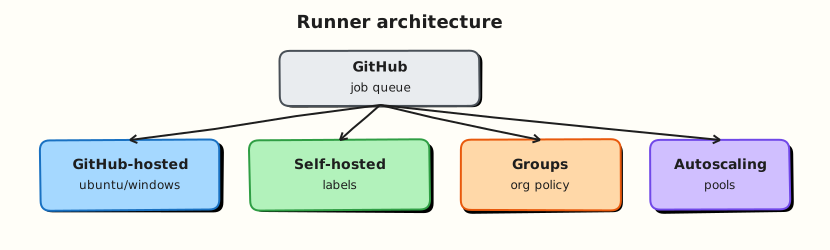
GitHub’s scheduler matches job runs-on labels to available runners; hosted runners are ephemeral; self-hosted runners register with labels and groups.
Theory
What it is
A runner listens for jobs from GitHub, claims work matching its labels, prepares a workspace, runs steps, and reports results.
GitHub-hosted runners:
| Label | Image (approximate) | Notes |
|---|---|---|
ubuntu-latest | Current Ubuntu LTS | Default for Linux CI |
ubuntu-24.04 | Pinned Ubuntu version | Reproducible builds |
windows-latest | Current Windows Server | .NET, PowerShell |
macos-latest | Current macOS | Apple builds; higher minute cost |
Hosted runners are ephemeral — fresh VM per job (with cached tool paths). You cannot SSH in for debugging; use log streaming and tmate actions sparingly in non-production.
Self-hosted runners:
Install the runner agent on your machine; register with a repository, organisation, or enterprise. Assign labels (for example self-hosted, linux, gpu, prod-network). Jobs target labels via runs-on: [self-hosted, linux, prod-network].
Runner groups (organisation / enterprise) control which repositories may use which runners — essential for isolating production-network agents from public fork workflows.
Why it matters
Some workloads cannot run on GitHub-hosted runners:
- Deploy to resources inside a private Virtual Private Cloud (VPC)
- Access on-prem artefact repositories or license servers
- Require GPUs, large memory, or persistent caches
- Must keep build artefacts inside a compliance boundary
Self-hosted runners also reduce minute costs at high volume — but you become responsible for patching, scaling, and securing the agents. An compromised runner with production network access is a high-impact incident.
How it works
- Job specifies
runs-on: ubuntu-latest(or custom labels). - GitHub scheduler finds an idle runner matching all required labels.
- Runner downloads the job payload, checks out code, executes steps.
- Job completes; hosted runner is recycled; self-hosted runner returns to idle (or is torn down if ephemeral).
Autoscaling patterns for self-hosted:
| Pattern | Mechanism | Best for |
|---|---|---|
| Static fleet | Fixed VMs always online | Steady load, low latency |
| VM scale set | Cloud auto-scaling group + runner registration | Variable CI load |
| Kubernetes operators | Actions Runner Controller (ARC) scales pods | Cloud-native platforms |
| Ephemeral runners | New VM per job, deregister after | Strong isolation |
Security model:
- Treat self-hosted runners as untrusted execution for public repository forks unless you use approval gates.
- Prefer ephemeral self-hosted runners for sensitive networks — destroy after each job.
- Separate labels for
ci(internet-facing) anddeploy-prod(production VPC).
Key concepts and comparisons
| Factor | GitHub-hosted | Self-hosted |
|---|---|---|
| Operations | Zero | You patch, scale, monitor |
| Network | Public internet | Your VPC / on-prem |
| Isolation | Strong per job | Depends on your design |
| Cost model | Per-minute billing | Infrastructure + ops time |
| Custom hardware | Limited sizes | Any CPU/GPU/disk |
| Label example | Meaning |
|---|---|
ubuntu-latest | GitHub-hosted Linux |
self-hosted | Required for all self-hosted |
linux / windows | OS family |
x64 / arm64 | Architecture |
gpu-a100 | Custom capability tag |
Common pitfalls
- Missing
self-hostedlabel — custom labels alone do not register the runner unlessself-hostedis included. - Sharing production-network runners with untrusted fork PR workflows.
- Non-ephemeral runners retaining secrets or workspace files between jobs.
- Label typos — job queues forever with no matching runner.
- Autoscaling lag — spike of jobs waits for new runners to register.
Hands-on Lab
Objective
Produce a runner decision matrix as validated YAML for three application profiles and write sample workflows with appropriate runs-on labels, validated offline under ~/rebash-github-actions/module-03.
Prerequisites
- Modules 1–2 completed
- Python 3 with PyYAML
Lab environment
mkdir -p ~/rebash-github-actions/module-03/.github/workflows && cd ~/rebash-github-actions/module-03
set -euo pipefail
Real-world scenario
Platform engineering must encode which workloads stay on GitHub-hosted runners and which require self-hosted agents in the production VPC. You deliver the matrix YAML and stub workflows for each profile before procurement approves runner VMs.
Step-by-step tasks
Task 1 – Write the runner decision matrix
Create runner-matrix.yaml:
# Runner decision matrix — REBASH Module 3
profiles:
  - id: A
    workload: Open-source library CI (lint and unit test)
    runner_choice: GitHub-hosted
    runs_on: [ubuntu-latest]
    rationale: No private resources; lowest ops
  - id: B
    workload: Internal microservice deploy to private EKS
    runner_choice: Self-hosted (VPC)
    runs_on: [self-hosted, linux, eks-deploy]
    rationale: kubectl to private API endpoint
  - id: C
    workload: ML training batch (GPU)
    runner_choice: Self-hosted (GPU pool)
    runs_on: [self-hosted, linux, gpu-a100]
    rationale: GitHub-hosted has no suitable GPU
rules:
  - Default to GitHub-hosted until a concrete requirement blocks it
  - Production-network runners never serve public fork PRs without approval gates
  - Prefer ephemeral self-hosted instances per job where budget allows
  - Document label contract in platform runbook before teams adopt
Validate offline:
cd ~/rebash-github-actions/module-03
set -euo pipefail
python3 -c "
import yaml
with open('runner-matrix.yaml') as f:
    doc = yaml.safe_load(f)
labels = {p['id']: p['runs_on'] for p in doc['profiles']}
assert labels['A'] == ['ubuntu-latest']
assert 'eks-deploy' in labels['B']
assert any('ephemeral' in r.lower() for r in doc['rules'])
print('runner-matrix.yaml OK')
"
wc -l runner-matrix.yaml | tee matrix-lines.txt
Expected output
runner-matrix.yaml OK; non-zero line count in matrix-lines.txt.
Task 2 – Hosted CI workflow (Profile A)
Create .github/workflows/profile-a-hosted-ci.yml:
name: Profile A — hosted CI
on:
  pull_request:
  workflow_dispatch:
permissions:
  contents: read
jobs:
  ci:
    runs-on: ubuntu-latest
    steps:
      - uses: actions/checkout@v4
      - name: Lint and test stub
        run: |
          set -euo pipefail
          echo "hosted-ci-ok" > hosted-marker.txt
          test -s hosted-marker.txt
Validate offline:
cd ~/rebash-github-actions/module-03
set -euo pipefail
grep -q 'runs-on: ubuntu-latest' .github/workflows/profile-a-hosted-ci.yml
python3 -c "import yaml; yaml.safe_load(open('.github/workflows/profile-a-hosted-ci.yml')); print('profile-a OK')"
Expected output
profile-a OK
Task 3 – Self-hosted deploy workflow (Profile B)
Create .github/workflows/profile-b-self-hosted-deploy.yml:
name: Profile B — VPC deploy stub
on:
  workflow_dispatch:
permissions:
  contents: read
  id-token: write
jobs:
  deploy:
    runs-on: [self-hosted, linux, eks-deploy]
    environment: production
    steps:
      - uses: actions/checkout@v4
      - name: Validate deploy context (offline stub)
        run: |
          set -euo pipefail
          echo "Would kubectl apply to private EKS here"
          echo "deploy-stub-ok" > deploy-marker.txt
          test -s deploy-marker.txt
Validate offline:
cd ~/rebash-github-actions/module-03
set -euo pipefail
grep -q 'self-hosted' .github/workflows/profile-b-self-hosted-deploy.yml
grep -q 'eks-deploy' .github/workflows/profile-b-self-hosted-deploy.yml
python3 -c "import yaml; yaml.safe_load(open('.github/workflows/profile-b-self-hosted-deploy.yml')); print('profile-b OK')"
Expected output
profile-b OK
Task 4 – Validate label contract and archive
Create label-contract.txt:
Required labels for platform runners:
- self-hosted (mandatory for custom runners)
- linux | windows (OS)
- eks-deploy | gpu-a100 (capability)
Jobs must list ALL required labels in runs-on array.
Validate and archive:
cd ~/rebash-github-actions/module-03
set -euo pipefail
grep -q 'mandatory' label-contract.txt
python3 -c "
import yaml, glob
files = glob.glob('.github/workflows/profile-*.yml')
assert len(files) >= 2
for f in files:
    doc = yaml.safe_load(open(f))
    for job in doc['jobs'].values():
        assert 'runs-on' in job
print('all workflows have runs-on')
"
tar -czf module-03-evidence.tgz runner-matrix.yaml label-contract.txt .github/workflows/
ls -l module-03-evidence.tgz | tee evidence.txt
Expected output
all workflows have runs-on; tarball created.
Optional — register a self-hosted runner:
# On a lab VM (requires repo admin):
# mkdir actions-runner && cd actions-runner
# curl -o actions-runner-linux-x64.tar.gz -L https://github.com/actions/runner/releases/download/v2.321.0/actions-runner-linux-x64-2.321.0.tar.gz
# tar xzf actions-runner-linux-x64.tar.gz
# ./config.sh --url https://github.com/ORG/REPO --token TOKEN --labels self-hosted,linux,eks-deploy
# ./run.sh
Validation steps
-
runner-matrix.yamlcovers hosted, VPC, and GPU profiles and parses with Python - Profile A uses
ubuntu-latest - Profile B uses
[self-hosted, linux, eks-deploy] - All workflow YAML files parse
- Label contract documents mandatory
self-hostedlabel
Common errors and fixes
| Error | Cause | Fix |
|---|---|---|
| Job queued indefinitely | No runner with matching labels | Verify runner online and labels include all tags in runs-on |
| Runner not picking jobs | Wrong repo/org registration | Re-register runner at correct level |
| Fork PR ran on prod runner | Missing runner group restriction | Limit runner group to trusted repositories |
| YAML list parsed as string | Missing brackets for multiple labels | Use runs-on: [self-hosted, linux] |
Challenge exercise
Add Profile C workflow targeting [self-hosted, linux, gpu-a100] with a stub step that writes gpu-job-ok.txt. Extend the Python check to assert three profile workflows exist.
Learning outcomes
- Documented when to choose hosted versus self-hosted runners
- Created workflows with correct
runs-onlabel arrays - Captured label contract and autoscaling guidance
- Validated YAML offline without live runners
Cleanup
# Retain module-03 artefacts for the course
# If you registered a test runner: ./config.sh remove --token TOKEN
Validation
- Lab completed under
~/rebash-github-actions/module-03/ - You can explain runner groups and why they matter for production networks
- You can list three reasons to choose self-hosted over hosted
- You can describe the security risk of non-ephemeral production runners
Code Walkthrough
- Default hosted — prove the workload fits public runners before requesting self-hosted capacity.
- Label contract — platform team publishes allowed labels; product teams reference them in
runs-on. - Isolate networks — separate runner pools for CI and production deploy.
- Ephemeral where possible — new VM or container per job reduces cross-contamination.
- Monitor queue time — alert when jobs wait longer than SLO; scale the fleet.
Security Considerations
- Never attach production VPC runners to repositories that accept untrusted fork workflows without approval.
- Run self-hosted agents as non-root; use dedicated service accounts with least-privilege cloud roles.
- Patch runner OS and agent software on a schedule — they execute arbitrary code from PRs.
- Use runner groups to restrict which repositories can target sensitive labels.
- Rotate registration tokens; audit runner inventory regularly.
Common Mistakes
Omitting the self-hosted label
Custom labels alone do not identify a self-hosted runner to the scheduler. Fix: Include self-hosted in every self-hosted runs-on array.
Reusing production runners for public CI
Fork pull requests can execute malicious code on the runner. Fix: Separate pools; require manual approval for fork workflows; use ephemeral runners.
Permanent runners with cached credentials
Workspace and environment may leak between jobs. Fix: Ephemeral runners or aggressive cleanup scripts; never store long-lived keys on disk.
Best Practices
- Pin hosted runner versions (
ubuntu-24.04) when reproducibility matters. - Document runner labels in a central platform catalogue.
- Autoscale on queue depth, not CPU alone — CI bursts are spiky.
- Use
timeout-minuteson self-hosted jobs to release stuck agents. - Test runner registration in a sandbox organisation before production rollout.
Troubleshooting
| Symptom | Likely cause | Fix |
|---|---|---|
| Job stuck “Queued” | Label mismatch or offline runner | gh runner list or org Settings → Actions → Runners |
| Runner shows offline | Agent service stopped | Restart run.sh or systemd unit |
| Wrong OS tools installed | Runner OS differs from assumption | Match labels; use container jobs or consistent AMI |
| Duplicate runners claim jobs | Overlapping labels on shared pool | Use unique labels per pool |
| High cost on macOS | macOS minutes multiplier | Move non-Apple builds to Linux |
Summary
Runners are where workflows become reality — choose GitHub-hosted for simplicity and self-hosted for network, hardware, or cost requirements. Labels and runner groups encode your platform contract. Next: Workflow Syntax: Matrix and Reusable Workflows.
Interview Questions
1. When should you choose self-hosted runners over GitHub-hosted?
Reveal answer
When jobs need private network access (internal APIs, on-prem clusters), specialised hardware (GPU, large RAM), compliance boundaries that forbid GitHub-hosted execution, or cost optimisation at very high minute volumes. If none apply, hosted runners reduce operational burden.
2. What happens if runs-on specifies a label no runner has?
Reveal answer
The job stays in Queued state indefinitely until a matching runner registers or the run is cancelled. GitHub requires all listed labels to match one runner. Typos in custom labels are a common cause — verify runner registration labels in repository or organisation settings.
3. Explain runner groups at organisation level.
Reveal answer
Runner groups control which repositories can use a set of self-hosted runners. Platform teams place production-network runners in a restricted group accessible only to trusted repos, preventing a public fork-enabled repository from scheduling jobs on agents inside the VPC.
4. What is an ephemeral self-hosted runner?
Reveal answer
A runner provisioned for a single job (or short lifetime) and destroyed afterward. This limits credential leakage and workspace contamination between jobs. Patterns include cloud VMs spawned by lambdas or Kubernetes pods managed by Actions Runner Controller (ARC).
5. Why is macOS CI more expensive on GitHub-hosted runners?
Reveal answer
GitHub bills macOS minutes at a higher multiplier than Linux because Apple-licensed infrastructure costs more to operate. Use macOS runners only for builds that genuinely require Xcode or macOS-specific tooling; cross-compile or test on Linux where possible.
6. How do labels interact with matrix jobs?
Reveal answer
Each matrix combination produces a job instance with the same runs-on unless you include matrix variables in the label expression. For example, runs-on: ${{ matrix.os }} requires runners labelled ubuntu-24.04 and windows-latest respectively — plan runner capacity for every matrix axis.
7. What security risk do self-hosted runners introduce for open-source repositories?
Reveal answer
External contributors can open pull requests that run workflows on your self-hosted runners, potentially executing malicious code inside your network. Mitigations: do not attach sensitive runners to public repos, require maintainer approval for fork workflows, use ephemeral runners, and isolate networks.