CI/CD Fundamentals and GitHub Actions
Overview
Teams ship broken software when builds depend on tribal knowledge: “works on my machine,” undocumented deploy steps, and green checkboxes that never meant “safe to release.” Continuous Integration (CI) and Continuous Delivery (CD) turn every meaningful Git change into an automated, repeatable proof of health — and keep a releasable artefact ready when policy says go.
GitHub Actions is GitHub’s built-in CI/CD engine. Workflows live under .github/workflows/ as YAML files reviewed in pull requests, triggered by GitHub events, and executed on runners (GitHub-hosted or self-hosted). You do not need a separate Jenkins controller or GitLab Runner to start — the forge and the pipeline share one identity model.
This is Tutorial 1 in Module 1: CI/CD Fundamentals of the REBASH Academy GitHub Actions for Cloud & DevOps Engineers series — written for Cloud, DevOps, Platform, and Site Reliability Engineering (SRE) engineers. By the end you will distinguish CI from Continuous Delivery and Continuous Deployment, map the workflow lifecycle, and leave a stage map plus stub workflow under ~/rebash-github-actions/module-01.
Prerequisites
- Git — commits, branches, and pull requests
- Comfortable editing YAML in a terminal editor
- Python 3 (for offline YAML validation in the lab)
- No live GitHub repository required for this tutorial’s lab
Learning Objectives
By the end of this tutorial, you will be able to:
- Define CI, Continuous Delivery, and Continuous Deployment with concrete examples
- Map GitHub event → workflow → job → step → runner
- Sketch the workflow lifecycle from trigger to conclusion
- Decide when GitHub Actions is sufficient versus when you need self-hosted runners or another CI product
- Produce a CI/CD stage map and stub workflow under
~/rebash-github-actions/module-01
Architecture
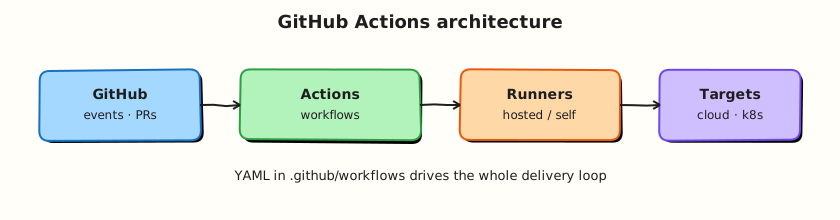
GitHub receives source events; workflows select jobs; runners execute steps; status and artefacts return to the pull request and branch protection rules.
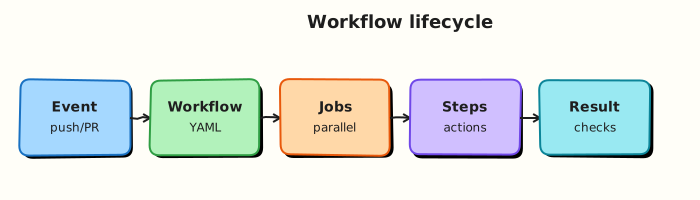
The lifecycle from trigger to completion is covered in the Theory section and illustrated in gha-workflow-lifecycle.svg.
Theory
What it is
Continuous Integration (CI) means every push or pull request runs a known script: checkout, install dependencies, compile or lint, run tests, and report status back to GitHub. The goal is a shared automated truth about branch health — not “it worked on my laptop.”
Continuous Delivery means the pipeline also produces a releasable artefact (container image, package, binary) and can deploy to staging or production, but a person or policy still decides when to promote. Continuous Deployment removes that release button for paths you trust: every green change on the main branch deploys without a manual click. Most enterprises use Continuous Delivery for production and Continuous Deployment only for lower environments.
GitHub Actions implements that automation as YAML workflows under .github/workflows/. A workflow reacts to events (push, pull_request, schedule, workflow_dispatch, and many more). Workflows contain jobs; jobs contain steps. Steps run shell commands or reusable actions. A runner (GitHub-hosted or self-hosted) executes each job in an isolated workspace.
| Term | Meaning |
|---|---|
| Workflow | One automation definition — a YAML file |
| Event | GitHub signal that may start a workflow run |
| Job | Unit of work on one runner; steps share a workspace |
| Step | Shell command or marketplace action inside a job |
| Runner | Machine that executes the job |
| Workflow run | One execution instance of a workflow for an event |
Why it matters
Manual builds and “SSH and hope” deploys fail at scale: environments drift, rollbacks depend on memory, and security reviews cannot inspect a console click. Pipelines make every change reviewable (checks on the pull request), repeatable (same YAML, different commit context), and auditable (job logs and artefacts).
Platform and SRE teams standardise reusable workflows so product squads inherit lint, test, scan, and deploy patterns instead of inventing CI per repository. In cloud work, the same mental model later covers OpenID Connect (OIDC) to AWS, Azure, or Google Cloud, container builds, and Infrastructure as Code (IaC) plans — without leaving Git.
How it works
Mental model: GitHub event → workflow selected → jobs queued → runners execute steps → status / artefacts back to GitHub.
- You push or open a pull request; GitHub evaluates every workflow file under
.github/workflows/. - Matching
on:filters create a workflow run; jobs that passif:conditions are queued. - Available runners (hosted labels such as
ubuntu-latest, or self-hosted labels) pick up jobs. - Each job checks out the repository (usually via
actions/checkout), runs steps in order, and streams logs. - Job conclusions roll up to the workflow; optional artefacts, deployments, and required status checks update the pull request and branch protection.
Workflow lifecycle stages:
| Stage | What happens |
|---|---|
| Trigger | Event matches on: — push, PR, schedule, manual dispatch |
| Queue | GitHub schedules jobs; concurrency rules may cancel or queue |
| Start | Runner claims the job; workspace is prepared |
| Execute | Steps run sequentially; failures stop the job unless continue-on-error |
| Complete | Job conclusion (success, failure, cancelled, skipped) recorded |
| Report | Status checks, artefacts, deployments, and notifications updated |
You do not need a paid GitHub plan for early labs: public repositories and free private minutes cover learning. Later modules introduce self-hosted runners when you need private networks, GPUs, or longer jobs.
Key concepts and comparisons
| Practice | You get | Typical gate |
|---|---|---|
| Continuous Integration | Fast feedback on every change | Required checks on pull requests |
| Continuous Delivery | Always releasable artefact | Manual or environment approval |
| Continuous Deployment | Auto-promote when green | Strong tests plus progressive delivery |
| Without CI/CD | With GitHub Actions |
|---|---|
| “Works on my machine” | Same runner image for every pull request |
| Unreviewed production changes | Workflow YAML in the pull request diff |
| Rebuild from memory after outage | Re-run or redeploy from a known Git SHA |
| Option | Strength | Trade-off |
|---|---|---|
| GitHub Actions | Tight GitHub identity, marketplace, OIDC | Minutes quota on private repos; some on-prem toolchains need self-hosted runners |
| GitLab CI | Pipeline next to GitLab merge requests | Best when GitLab is already the forge |
| Jenkins (self-managed) | Flexible agents, private networks, shared libraries | You operate the control plane |
Common pitfalls
- CI is not “the runner” — GitHub schedules; runners execute.
- A green workflow is not a production release unless you designed deploy jobs and environment gates that way.
- Continuous Delivery and Continuous Deployment are not synonyms — know which one your organisation actually runs.
- Free-tier minutes are finite on private repositories — lint locally and cache dependencies later to save quota.
- Copy-pasting random marketplace actions without pinning versions is a supply-chain risk (covered in security modules).
Hands-on Lab
Objective
Encode CI/CD stages and the GitHub Actions workflow lifecycle as validated YAML, write a minimal stub workflow under ~/rebash-github-actions/module-01, and prove all artefacts with shell asserts. No live GitHub push is required.
Prerequisites
- Bash shell with
grep,test,python3 - Write access to your home directory
- Optional:
yamllintor actionlint for extra validation
Lab environment
Workspace: ~/rebash-github-actions/module-01
mkdir -p ~/rebash-github-actions/module-01 && cd ~/rebash-github-actions/module-01
set -euo pipefail
pwd | tee pwd-start.txt
Expected output
pwd-start.txt ends with module-01.
Real-world scenario
Your platform team is standardising on GitHub Actions next sprint. Before anyone pushes workflows to production repositories, you must agree on CI versus CD language, encode which stages belong in which workflow as machine-readable YAML, and leave a stub .github/workflows/ci.yml that Module 2 will extend with real events and expressions.
Step-by-step tasks
Task 1 – Map CI stages to CD stages
Encode a stage map in YAML that separates “prove the change” from “ship the change.”
Create ci-cd-stages.yaml:
# CI/CD stage map — REBASH GitHub Actions Module 1
continuous_integration:
  trigger: every pull request or push to feature branches
  stages:
    - id: checkout
      description: fetch Git SHA into runner workspace
    - id: lint
      description: static analysis and format checks
    - id: unit-test
      description: fast tests; fail the workflow on red
    - id: build
      description: compile or package proof (no deploy)
continuous_delivery:
  trigger: main or release branch
  stages:
    - id: package
      description: versioned artefact (image, JAR, tarball)
    - id: deploy-staging
      description: automated or gated by environment
    - id: approve-production
      description: required reviewer or policy gate
    - id: deploy-production
      description: explicit job with scoped credentials
continuous_deployment:
  optional: true
  stages:
    - id: auto-promote
      description: green main deploys without manual click (only where policy allows)
github_actions_mapping:
  - stages: [lint, unit-test]
    job_name: ci
  - stages: [package]
    job_name: build-artefact
  - stages: [deploy-staging]
    job_name: deploy-staging
  - stages: [deploy-production]
    job_name: deploy-production
Validate offline:
cd ~/rebash-github-actions/module-01
set -euo pipefail
python3 -c "
import yaml
with open('ci-cd-stages.yaml') as f:
    doc = yaml.safe_load(f)
assert 'continuous_integration' in doc
assert 'continuous_delivery' in doc
assert any(s['id'] == 'deploy-production' for s in doc['continuous_delivery']['stages'])
assert doc['github_actions_mapping'][-1]['job_name'] == 'deploy-production'
print('ci-cd-stages.yaml OK')
"
wc -l ci-cd-stages.yaml | tee stage-map-lines.txt
Expected output
ci-cd-stages.yaml OK; stage-map-lines.txt shows a non-zero line count.
Task 2 – Encode the workflow lifecycle
Create workflow-lifecycle.yaml:
# GitHub Actions workflow lifecycle
reference_diagram: docs/assets/excalidraw/gha-workflow-lifecycle.svg
stages:
  - id: trigger
    actor: GitHub (event)
    evidence: Actions tab shows new run
  - id: queue
    actor: GitHub scheduler
    evidence: Job status Queued
  - id: start
    actor: Runner
    evidence: Job status In progress
  - id: execute
    actor: Runner steps
    evidence: Step logs stream
  - id: complete
    actor: Runner and GitHub
    evidence: Job conclusion badge
  - id: report
    actor: GitHub
    evidence: PR check, artefacts, deployment record
Validate offline:
cd ~/rebash-github-actions/module-01
set -euo pipefail
python3 -c "
import yaml
with open('workflow-lifecycle.yaml') as f:
    doc = yaml.safe_load(f)
ids = [s['id'] for s in doc['stages']]
assert ids[0] == 'trigger' and ids[-1] == 'report'
assert 'gha-workflow-lifecycle' in doc['reference_diagram']
print('workflow-lifecycle.yaml OK')
"
Expected output
workflow-lifecycle.yaml OK
Task 3 – Write a minimal stub workflow
Create a workflow that uses workflow_dispatch (manual trigger) so you can validate structure offline without pushing.
Create .github/workflows/ci.yml:
name: REBASH Module 1 CI stub
on:
  workflow_dispatch:
  push:
    branches: [main]
permissions:
  contents: read
jobs:
  ci:
    runs-on: ubuntu-latest
    steps:
      - uses: actions/checkout@v4
      - name: Prove workspace
        run: |
          set -euo pipefail
          mkdir -p out
          echo "ci-stub-ok" > out/marker.txt
          test -s out/marker.txt
          cat out/marker.txt
Validate offline:
cd ~/rebash-github-actions/module-01
set -euo pipefail
mkdir -p .github/workflows
test -f .github/workflows/ci.yml
grep -q 'workflow_dispatch' .github/workflows/ci.yml
grep -q 'actions/checkout@v4' .github/workflows/ci.yml
grep -q 'runs-on: ubuntu-latest' .github/workflows/ci.yml
python3 -c "import yaml; yaml.safe_load(open('.github/workflows/ci.yml')); print('workflow OK')"
Expected output
Prints workflow OK; file exists under .github/workflows/.
Task 4 – Dry-run shell steps and archive evidence
Prove the run: block works locally, then bundle artefacts.
cd ~/rebash-github-actions/module-01
set -euo pipefail

mkdir -p out
echo "ci-stub-ok" > out/marker.txt
test -s out/marker.txt
grep -q 'ci-stub-ok' out/marker.txt

tar -czf module-01-evidence.tgz \
  ci-cd-stages.yaml \
  workflow-lifecycle.yaml \
  .github/workflows/ci.yml \
  out/marker.txt
ls -l module-01-evidence.tgz | tee evidence.txt
Expected output
module-01-evidence.tgz exists; evidence.txt shows its size.
Optional — push to GitHub:
Validation steps
-
ci-cd-stages.yamllists CI and CD stages separately and parses with Python -
workflow-lifecycle.yamldocuments trigger through report -
.github/workflows/ci.ymlparses with Python YAML - Local
out/marker.txtcontainsci-stub-ok -
module-01-evidence.tgzarchives the artefacts
Common errors and fixes
| Error | Cause | Fix |
|---|---|---|
ModuleNotFoundError: yaml | PyYAML not installed | pip install pyyaml or use python3 -m pip install pyyaml |
workflow OK fails | Indentation error in YAML | Recreate Task 3 workflow file; tabs are invalid in YAML |
grep fails on stage map | Typo in stage map YAML | Recreate Task 1 file; confirm Python validation passes |
| Workflow not visible on GitHub | Not pushed or Actions disabled | Push file; check Settings → Actions |
Challenge exercise
Add a second job named report with needs: ci that echoes a summary line and appends a row to out/lifecycle-evidence.txt. Keep YAML valid and re-run the Python parse check. Do not add secrets — use plain echo only.
Learning outcomes
- Separated CI proof stages from CD ship stages in validated YAML
- Encoded the six lifecycle stages from trigger to report
- Produced a parseable stub workflow with checkout and a shell step
- Archived evidence for Module 2 to extend
Cleanup
# Keep stubs under ~/rebash-github-actions/module-01 for the course track
# rm -rf ~/rebash-github-actions/module-01/out   # optional temp dir only
Validation
- Lab commands run under
~/rebash-github-actions/module-01/ - You can explain CI versus Continuous Delivery versus Continuous Deployment in your own words
- You can draw event → workflow → job → step → runner without looking at notes
- You can describe one production failure mode (for example treating a green CI job as an automatic production release)
Code Walkthrough
Production practice for CI/CD fundamentals with GitHub Actions:
- Inspect before you change — read existing workflows, branch protection, and required checks before editing YAML.
- Prefer reversible changes — workflow files in Git; pin action versions; tag releases for rollback.
- Capture evidence — job logs, artefact hashes, and deployment records for handovers and incident review.
- Use modern triggers —
pull_requestfor CI,workflow_dispatchfor controlled reruns, environments for production gates. - Least privilege — set top-level
permissions:to read-only; open write scopes only where a job needs them.
Keep runbooks short enough to follow under pressure. Automate checks; keep humans for release judgement.
Security Considerations
- Treat workflow YAML as code — review changes in pull requests like application logic.
- Set explicit
permissions:blocks; default tokens are broader than most CI jobs need. - Never commit secrets; use GitHub Secrets and OIDC (Module 5) for cloud authentication.
- Restrict who can edit
.github/workflows/via branch protection and CODEOWNERS. - Audit third-party actions before pinning — prefer verified publishers and semantic version tags.
Common Mistakes
Treating a green CI workflow as a production release
CI proves the change builds and tests; production deploy requires separate jobs, environments, and approvals. Fix: Add explicit deploy stages and environment protection rules.
Confusing Continuous Delivery with Continuous Deployment
Delivery keeps a human or policy gate; deployment removes it. Fix: Document which path your organisation uses and encode gates in workflow environment: blocks.
Running untrusted pull request workflows with write tokens
Fork pull requests can exfiltrate secrets if workflows run with elevated permissions. Fix: Use pull_request (not pull_request_target) for external contributions; restrict secrets and permissions.
Best Practices
- Encode every stage map row as a named job — makes failures obvious in the Actions UI.
- Pin marketplace actions to full commit SHA or major version tags (
@v4, not@main). - Use
concurrencygroups to cancel superseded runs on the same branch. - Separate CI workflows (fast feedback) from CD workflows (deploy) when promotion rules differ.
- Document lifecycle stages in the repository README so new engineers know where to look when a run stalls.
Troubleshooting
| Symptom | Likely cause | Fix |
|---|---|---|
| Workflow not listed in Actions tab | YAML syntax error or wrong path | File must be .github/workflows/*.yml; validate with Python or actionlint |
| Run shows “Skipped” | if: condition false or path filter mismatch | Check on.push.paths, branch filters, and job-level if: |
| All jobs queued forever | No available runners or org policy block | Verify billing, runner labels, and org Actions policy |
| PR check never appears | Workflow not required in branch protection | Add check name under branch protection rules |
| Minutes exhausted | Private repo quota used | Optimise with caching (Module 6); use self-hosted runners for heavy jobs |
Summary
CI/CD fundamentals define why automation exists: prove every change, keep releasable artefacts ready, and gate production deliberately. GitHub Actions maps those stages to versioned YAML workflows executed on runners with full audit trails. Continue to GitHub Actions Basics: Workflows, Jobs, and Steps to deepen events, expressions, and variables.
Interview Questions
1. What is the difference between Continuous Integration, Continuous Delivery, and Continuous Deployment?
Reveal answer
Continuous Integration runs automated build and test on every meaningful change to catch defects early. Continuous Delivery extends CI by always keeping a releasable artefact and automating deploy up to production, with a human or policy gate before prod. Continuous Deployment removes that gate for trusted paths — every green mainline change ships automatically. Most enterprises use delivery for production and deployment only for lower environments.
2. What is the relationship between a workflow, a job, and a step?
Reveal answer
A workflow is one YAML file triggered by events. It contains one or more jobs, each running on a single runner with a shared workspace. Each job contains ordered steps — either run: shell commands or uses: marketplace actions. Job conclusions roll up to the workflow run status shown on pull requests.
3. A workflow is not starting on push — what do you verify first?
Reveal answer
Check the on: block: branch filters (branches: / branches-ignore:), path filters, and whether the push target matches. Confirm Actions is enabled for the repository. Open the Actions tab for skipped workflows. Validate YAML indentation — syntax errors often prevent registration. Ensure the workflow file is on the default branch or the pushed branch.
4. Why set top-level permissions: even for simple CI?
Reveal answer
The default GITHUB_TOKEN can write packages, issues, and more depending on repository settings. Explicit permissions: contents: read follows least privilege — if a step is compromised or a third-party action misbehaves, the blast radius stays smaller. Production workflows should declare minimal scopes and add write permissions only on jobs that need them.
5. When do you choose workflow_dispatch over push triggers?
Reveal answer
Use workflow_dispatch for manual, on-demand runs: rerunning deploys, testing workflow changes safely, or operations that should not fire on every commit. Use push or pull_request for continuous feedback on code changes. Many teams combine both — CI on every PR, deploy on dispatch or on merge to main with environment gates.
6. How does GitHub Actions compare to a self-managed Jenkins controller for a 200-engineer organisation?
Reveal answer
Actions wins when GitHub is already the source of truth: zero controller operations, native OIDC, and tight pull request integration. Jenkins wins when you need deep private-network agents, exotic toolchains, multi-SCM estates, or a central platform team owning shared libraries across many forges. Hybrid setups are common — Actions for most repos, self-hosted runners or Jenkins for specialised pipelines.
7. What happens during the “queue” stage of the workflow lifecycle?
Reveal answer
After an event matches on:, GitHub creates a workflow run and evaluates which jobs should run (respecting if: and needs:). Jobs wait for an available runner matching runs-on labels. concurrency rules may cancel in-progress runs or queue new ones. The job shows “Queued” until a runner claims it — delays here often indicate runner capacity or label mismatches.