Production Pipelines and Environments
Overview
Production delivery needs more than a green build on main. GitHub Environments (staging, production) add required reviewers, wait timers, and scoped secrets. Promotion moves tested artefacts forward; rollback redeploys a prior version; blue/green and canary strategies reduce downtime and blast radius when releases go wrong.
This is Tutorial 15 in Module 15: Production Pipelines of the REBASH Academy GitHub Actions for Cloud & DevOps Engineers series — written for Cloud, DevOps, Platform, and SRE engineers.
Prerequisites
- Composite Actions and Reusable Workflows
- Multi-Cloud Deployments with GitHub Actions
- Testing in GitHub Actions
Learning Objectives
By the end of this tutorial, you will be able to:
- Configure GitHub Environments with protection rules and secrets
- Model staging → production promotion in one workflow graph
- Implement manual approval gates before production deploy
- Document rollback using prior tag or Helm revision
- Explain blue/green and canary at a high level for Actions-driven deploys
Architecture
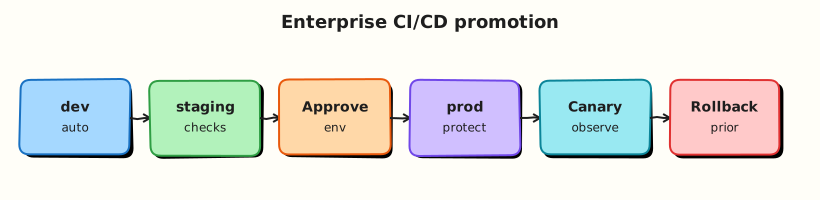
Build once; deploy to staging automatically; production requires environment approval and promotion of the same artefact digest.
Theory
What it is
| Concept | Purpose |
|---|---|
| Environment | Named target (staging, production) with rules + secrets |
| Protection rules | Required reviewers, wait timer, deployment branches |
| Promotion | Same artefact/image digest advances after staging success |
| Rollback | Redeploy last known-good version (tag, Helm rev, prior stack) |
| Blue/green | Two stacks; switch traffic atomically |
| Canary | Route small % traffic to new version; increase if healthy |
Jobs declare environment: production to trigger protection UI and inject environment secrets.
Why it matters
Auto-deploying every merge to production removes human judgement for high-risk changes. Shared staging catches integration issues. Rollback without a documented path extends incidents. Blue/green and canary limit user impact during partial failures.
How it works
- Build job — produce immutable artefact (container digest, Terraform plan ID).
- Deploy staging —
environment: staging, automatic onmain. - Smoke tests — validate staging (Module 12).
- Deploy production —
environment: production, waits for required reviewers. - Rollback job —
workflow_dispatchwithversion:input redeploys prior tag (documented runbook). - Blue/green note — Actions updates inactive stack, runs health checks, switches Service/Ingress or load balancer target group.
- Canary note — progressive weight increase (service mesh, ALB weights, Flagger) with automated metric gates.
Example production gate (documentation):
deploy-production:
  needs: [deploy-staging, smoke]
  runs-on: ubuntu-latest
  environment:
    name: production
    url: https://app.example.com
  steps:
    - run: echo "Deploy digest ${{ needs.build.outputs.digest }}"
Key concepts and comparisons
| Strategy | Downtime | Complexity | Rollback speed |
|---|---|---|---|
| Rolling (default K8s) | Low | Low | Redeploy prior RS |
| Blue/green | Very low | Medium | Switch traffic back |
| Canary | Minimal | High | Reduce canary weight |
| Recreate | Higher | Low | Redeploy old version |
Common pitfalls
- Different image tag in staging vs production — not true promotion.
- Production environment without required reviewers — cosmetic gate only.
- Rollback workflow shares production credentials without extra approval.
- Skipping smoke tests after staging deploy.
- Conflating GitHub Environment with cloud environment account — naming collision confusion.
Hands-on Lab
Objective
Author a promotion workflow with staging and production environments (YAML stubs), encode deployment strategies as YAML, and validate structure offline.
Prerequisites
- Python 3 with PyYAML
Lab environment
Workspace: ~/rebash-github-actions/module-15
mkdir -p ~/rebash-github-actions/module-15/.github/workflows && cd ~/rebash-github-actions/module-15
set -euo pipefail
Real-world scenario
Release managers require automatic staging deploy on main, manual approval for production, same artefact digest promoted, and a rollback workflow_dispatch job backed by validated strategy YAML.
Step-by-step tasks
Task 1 – Promotion workflow with environments
Create .github/workflows/promote.yml:
name: Promote
on:
  push:
    branches: [main]
  workflow_dispatch:

permissions:
  contents: read

jobs:
  build:
    runs-on: ubuntu-latest
    outputs:
      digest: ${{ steps.meta.outputs.digest }}
    steps:
      - uses: actions/checkout@v4
      - id: meta
        run: |
          echo "digest=sha256:lab-$(git rev-parse --short HEAD)" >> "$GITHUB_OUTPUT"

  deploy-staging:
    needs: build
    runs-on: ubuntu-latest
    environment:
      name: staging
      url: https://staging.example.com
    steps:
      - run: echo "Deploy ${{ needs.build.outputs.digest }} to staging"

  smoke-staging:
    needs: deploy-staging
    runs-on: ubuntu-latest
    steps:
      - run: echo "Smoke check staging"
      - run: test 0 -eq 0

  deploy-production:
    needs: [build, smoke-staging]
    runs-on: ubuntu-latest
    environment:
      name: production
      url: https://app.example.com
    steps:
      - run: echo "Deploy SAME digest ${{ needs.build.outputs.digest }} to production"
Validate offline:
cd ~/rebash-github-actions/module-15
set -euo pipefail
python3 -c "import yaml; yaml.safe_load(open('.github/workflows/promote.yml')); print('promote workflow OK')"
grep -q 'environment:' .github/workflows/promote.yml
grep -q 'deploy-production' .github/workflows/promote.yml
Expected output
promote workflow OK; staging and production environments referenced.
Task 2 – Rollback workflow stub
Create .github/workflows/rollback.yml:
name: Rollback
on:
  workflow_dispatch:
    inputs:
      target-tag:
        description: 'Prior release tag to redeploy (e.g. v1.2.3)'
        required: true

permissions:
  contents: read

jobs:
  rollback:
    runs-on: ubuntu-latest
    environment: production
    steps:
      - uses: actions/checkout@v4
        with:
          ref: ${{ inputs.target-tag }}
      - run: echo "Rollback deploy for tag ${{ inputs.target-tag }}"
      - run: echo "In Kubernetes: helm rollback or kubectl rollout undo"
Validate offline:
cd ~/rebash-github-actions/module-15
set -euo pipefail
python3 -c "import yaml; yaml.safe_load(open('.github/workflows/rollback.yml')); print('rollback workflow OK')"
grep -q 'workflow_dispatch' .github/workflows/rollback.yml
Expected output
rollback workflow OK
Task 3 – Deployment strategies as YAML
Create deployment-strategies.yaml:
# Deployment strategies (Module 15)
strategies:
  blue_green:
    description: Maintain blue (current) and green (new) stacks
    steps:
      - deploy green with new digest
      - run health checks on green
      - switch Service or Ingress to green
    rollback: switch traffic back to blue without rebuild
  canary:
    description: Route small traffic percentage to new version
    initial_weight_percent: 10
    watch: [error_rate, latency_slo]
    abort_on: alert_fires
    tools: [Flagger, Argo Rollouts, mesh traffic split, ALB weights]
github_environments:
  staging:
    deploy_trigger: auto on main
  production:
    required_reviewers: true
    promotion: same digest from build job output
Validate offline:
cd ~/rebash-github-actions/module-15
set -euo pipefail
python3 -c "
import yaml
with open('deployment-strategies.yaml') as f:
    doc = yaml.safe_load(f)
assert 'blue_green' in doc['strategies']
assert doc['github_environments']['production']['promotion'] == 'same digest from build job output'
print('deployment-strategies.yaml OK')
"
Expected output
deployment-strategies.yaml OK
Task 4 – Offline validation bundle
Create validate-module-15.sh:
#!/usr/bin/env bash
set -euo pipefail
python3 -c "import yaml; yaml.safe_load(open('.github/workflows/promote.yml')); yaml.safe_load(open('.github/workflows/rollback.yml')); yaml.safe_load(open('deployment-strategies.yaml'))"
grep -q 'needs: build' .github/workflows/promote.yml
grep -q 'SAME digest' .github/workflows/promote.yml
echo 'module-15 validation passed'
Run and archive:
cd ~/rebash-github-actions/module-15
set -euo pipefail
chmod +x validate-module-15.sh
./validate-module-15.sh | tee validation.txt
tar -czf module-15-evidence.tgz .github/workflows/*.yml deployment-strategies.yaml validate-module-15.sh
ls -l module-15-evidence.tgz | tee evidence.txt
Expected output
module-15 validation passed
Validation steps
- Promotion workflow deploys staging before production
- Production job uses
environment: production - Build output digest referenced in both deploy jobs
- Rollback workflow accepts target tag input
-
deployment-strategies.yamldefines blue/green and canary and parses with Python
Common errors and fixes
| Error | Cause | Fix |
|---|---|---|
| Production deploy without approval | Environment rules not set | Add required reviewers in Settings |
| Staging/prod different builds | Rebuild in prod job | Pass digest artefact from build |
| Rollback checks out wrong ref | Input tag typo | Validate tag exists; protect tags |
| Smoke skipped | Missing needs | Chain smoke between staging and prod |
| Environment secret missing | Secret on wrong scope | Add secrets to production environment |
Challenge exercise
Add concurrency: group: production with cancel-in-progress: false on production deploy in promote.yml. Extend validate-module-15.sh to grep for the concurrency block.
Learning outcomes
- Modelled staging → production promotion graph
- Authored rollback dispatch workflow
- Encoded blue/green and canary strategies as validated YAML
- Enforced same-digest promotion pattern
Cleanup
Validation
- Lab completed under
~/rebash-github-actions/module-15/ - You can configure environment protection rules in GitHub UI
- You can explain promotion vs rebuild
- You can describe rollback without rebuilding
Code Walkthrough
- Build once — digest/tag is promotion unit.
- Staging automatic — catch integration issues early.
- Production gated — environment reviewers + smoke pass.
- Rollback input — prior tag checked out and redeployed.
- Strategy docs — blue/green/canary owned by deploy tooling + runbooks.
Security Considerations
- Production environment secrets must not be available to pull request workflows.
- Rollback workflow needs same approval rigour as forward deploy.
- Environment URLs should not leak internal-only hostnames publicly.
- Audit deployment events in GitHub Deployments API / audit log.
- Separate cloud roles for staging vs production (Module 10).
Common Mistakes
Rebuild for production with :latest
Staging tested digest ≠ production image. Fix: promote build output.
Environment without reviewers
Approval button is theatre. Fix: required reviewers + branch restrictions.
No rollback workflow
Incident extends while building hotfix pipeline. Fix: documented rollback dispatch.
Canary without metrics
Traffic shift blind. Fix: SLO gates and automatic abort.
Best Practices
- Use deployment branches (only
maindeploys production). - Record deployment in GitHub Environments history for audit.
- Pair Actions promotion with GitOps for drift control where needed.
- Run game days: practice rollback quarterly.
- Keep staging representative of production topology.
Troubleshooting
| Symptom | Likely cause | Fix |
|---|---|---|
| Waiting for approval stuck | Reviewer unavailable | Backup reviewers; break-glass process |
| Staging OK, prod fail | Config/secret drift | Align env vars; separate accounts by design |
| Rollback does not heal | DB migration forward-only | Expand rollback runbook; backward-compatible migrations |
| Double production deploy | Missing concurrency | Add concurrency group |
| Wrong URL in environment | Typo in url: field | Fix environment URL metadata |
Summary
Production pipelines use GitHub Environments for approvals, promote immutable artefacts from staging to production, and document rollback plus blue/green/canary strategies. Next: Troubleshooting GitHub Actions.
Interview Questions
1. What do GitHub Environment protection rules provide?
Reveal answer
Required reviewers, wait timers, deployment branch filters, and environment-scoped secrets — so production deploy jobs pause for approval and use the correct credentials.
2. What is promotion vs rebuilding for production?
Reveal answer
Promotion deploys the same artefact digest tested in staging; rebuilding production risks shipping different bits than were validated.
3. How should rollback work in a tag-based release model?
Reveal answer
Redeploy a prior SemVer tag or prior Helm revision — checkout/ref that tag in a controlled rollback workflow with production environment approval.
4. When is blue/green preferable to rolling updates?
Reveal answer
When you need instant traffic switch and fast rollback without waiting for gradual pod replacement — at the cost of double infrastructure during cutover.
5. What is the purpose of smoke tests between staging and production?
Reveal answer
They verify the deployed artefact is minimally healthy in a production-like environment before human approval spends production risk budget.
6. Why use concurrency on production deploy jobs?
Reveal answer
Prevents overlapping production deploys that could leave the system in an inconsistent state or race shared resources.
7. How do Environments relate to cloud accounts?
Reveal answer
They are GitHub-side gates and secret scopes — you still map staging/production environments to separate cloud accounts/subscriptions via OIDC roles and variables.
8. What is a canary deployment's main risk if metrics are ignored?
Reveal answer
A bad release affects a subset of users initially, but without SLO monitoring the team may promote a failing version to 100% traffic.
Related Tutorials
- Multi-Cloud Deployments with GitHub Actions
- Kubernetes Deployments with GitHub Actions
- Troubleshooting GitHub Actions