Multi-Cloud Deployments with GitHub Actions
Overview
Production teams deploy to Amazon Web Services (AWS), Microsoft Azure, and Google Cloud Platform (GCP) from the same repository. GitHub Actions authenticates with OpenID Connect (OIDC) so jobs receive short-lived cloud credentials — no long-lived access keys in repository secrets. This tutorial compares the three OIDC patterns as YAML stubs you validate offline; you adapt trust policies and role names to your accounts later.
This is Tutorial 10 in Module 10: Cloud Deployments of the REBASH Academy GitHub Actions for Cloud & DevOps Engineers series — written for Cloud, DevOps, Platform, and SRE engineers.
Prerequisites
- Terraform Pipelines with GitHub Actions
- Secrets, Variables, and OIDC
- Basic familiarity with one cloud provider's console (optional for the lab)
Learning Objectives
By the end of this tutorial, you will be able to:
- Configure OIDC trust for AWS, Azure, and GCP from GitHub Actions
- Compare federation patterns in a single reference table
- Author deploy workflow stubs without embedding real cloud credentials
- Explain least-privilege role design per environment
- Choose when multi-cloud CI is worth the operational cost
Architecture
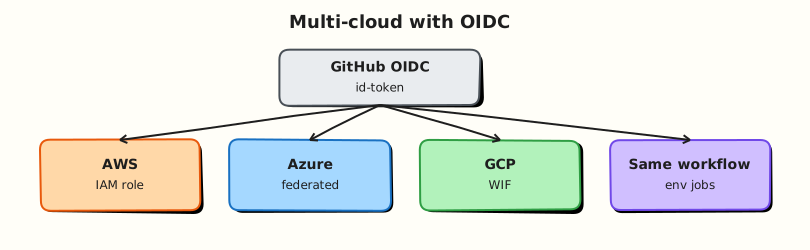
GitHub mints a job JWT; each cloud provider validates issuer and subject, then returns temporary credentials.
Theory
What it is
Multi-cloud deployment from GitHub Actions means one repository can target AWS (Elastic Container Service (ECS), Elastic Kubernetes Service (EKS)), Azure (Azure Kubernetes Service (AKS)), and GCP (Google Kubernetes Engine (GKE), Cloud Run) using provider-specific OIDC actions. Each cloud maps the GitHub JWT subject (sub) and audience (aud) to a role, service principal, or workload identity.
| Cloud | GitHub action (typical) | Cloud identity | Notes |
|---|---|---|---|
| AWS | aws-actions/configure-aws-credentials | IAM role via OIDC | role-to-assume + aws-region |
| Azure | azure/login | App registration / federated credential | client-id, tenant-id, subscription-id |
| GCP | google-github-actions/auth | Workload Identity Federation | workload_identity_provider, service_account |
No real credentials in this lab — stubs use placeholder ARNs and IDs you replace in your sandbox.
Why it matters
Long-lived access keys in GitHub secrets leak through logs, forks, and compromised workflows. OIDC ties credentials to a specific repository, ref, and environment. Multi-cloud teams need a consistent pattern (permissions, environments, concurrency) even when cloud APIs differ.
How it works
- Workflow sets
permissions: id-token: writeandcontents: read(minimum for OIDC). - Cloud admin configures trust: GitHub issuer
https://token.actions.githubusercontent.com, audience, and subject filters (repo, environment, branch). - Job runs cloud login action → temporary credentials in environment.
- Deploy step uses cloud CLI (
aws,az,gcloud) or Infrastructure as Code (IaC) with those credentials. - Production deploys use GitHub Environments with required reviewers.
Example AWS OIDC block (documentation — wrap expressions for MkDocs):
permissions:
  id-token: write
  contents: read

- uses: aws-actions/configure-aws-credentials@v4
  with:
    role-to-assume: arn:aws:iam::123456789012:role/github-actions-deploy
    aws-region: eu-west-1
Key concepts and comparisons
| Concern | AWS | Azure | GCP |
|---|---|---|---|
| Trust anchor | IAM OIDC provider | Entra ID federated credential | Workload Identity Pool |
| Subject claim | repo:ORG/REPO:ref:refs/heads/main | Same pattern via credential subject | Attribute mapping from JWT |
| Typical deploy target | ECS, EKS, Lambda | AKS, App Service | GKE, Cloud Run |
| Secret alternative | Avoid AWS_ACCESS_KEY_ID | Avoid client secret | Avoid JSON key in secrets |
Common pitfalls
- Missing
id-token: write→ OIDC step fails silently or with opaque errors. - Trust policy too broad (
repo:ORG/*:*) → any repository in the org can assume production roles. - Fork pull requests receiving cloud credentials → exfiltration risk; use
pull_request_targetonly with extreme care. - Different regions/subscriptions hard-coded in every workflow instead of environment variables.
- Assuming one OIDC role can admin all three clouds — keep roles per cloud and per environment.
Hands-on Lab
Objective
Author three OIDC deploy workflow stubs (AWS, Azure, GCP), validate YAML offline, and produce a multi-cloud OIDC matrix YAML — without real cloud credentials.
Prerequisites
- Python 3 with PyYAML
- Optional:
actionlintfor extended workflow linting
Lab environment
Workspace: ~/rebash-github-actions/module-10
mkdir -p ~/rebash-github-actions/module-10/.github/workflows && cd ~/rebash-github-actions/module-10
set -euo pipefail
python3 --version | tee python-version.txt
Real-world scenario
A platform team standardises multi-cloud deploy workflows. You deliver reviewed YAML stubs and a validated comparison matrix before cloud admins wire trust policies in each account.
Step-by-step tasks
Task 1 – AWS OIDC deploy stub
Create .github/workflows/deploy-aws-stub.yml:
name: Deploy AWS (stub)
on:
  workflow_dispatch:

permissions:
  id-token: write
  contents: read

jobs:
  deploy:
    runs-on: ubuntu-latest
    environment: staging
    steps:
      - uses: actions/checkout@v4
      - name: Configure AWS credentials (OIDC)
        uses: aws-actions/configure-aws-credentials@v4
        with:
          role-to-assume: arn:aws:iam::000000000000:role/PLACEHOLDER-github-actions
          aws-region: eu-west-1
      - name: Prove AWS CLI context (stub)
        run: |
          aws sts get-caller-identity || echo "OIDC not configured — stub only"
Validate offline:
cd ~/rebash-github-actions/module-10
set -euo pipefail
python3 -c "import yaml; yaml.safe_load(open('.github/workflows/deploy-aws-stub.yml')); print('aws stub OK')"
grep -q 'id-token: write' .github/workflows/deploy-aws-stub.yml
Expected output
aws stub OK; OIDC permission present.
Task 2 – Azure and GCP OIDC stubs
Create .github/workflows/deploy-azure-stub.yml:
name: Deploy Azure (stub)
on:
  workflow_dispatch:

permissions:
  id-token: write
  contents: read

jobs:
  deploy:
    runs-on: ubuntu-latest
    environment: staging
    steps:
      - uses: actions/checkout@v4
      - name: Azure login (OIDC)
        uses: azure/login@v2
        with:
          client-id: PLACEHOLDER-CLIENT-ID
          tenant-id: PLACEHOLDER-TENANT-ID
          subscription-id: PLACEHOLDER-SUBSCRIPTION-ID
      - name: Prove Azure CLI context (stub)
        run: |
          az account show || echo "OIDC not configured — stub only"
Create .github/workflows/deploy-gcp-stub.yml:
name: Deploy GCP (stub)
on:
  workflow_dispatch:

permissions:
  id-token: write
  contents: read

jobs:
  deploy:
    runs-on: ubuntu-latest
    environment: staging
    steps:
      - uses: actions/checkout@v4
      - name: Authenticate to Google Cloud (OIDC)
        uses: google-github-actions/auth@v2
        with:
          workload_identity_provider: projects/PLACEHOLDER/locations/global/workloadIdentityPools/POOL/providers/PROVIDER
          service_account: gha-deploy@PLACEHOLDER.iam.gserviceaccount.com
      - name: Prove gcloud context (stub)
        run: |
          gcloud auth list || echo "OIDC not configured — stub only"
Validate offline:
cd ~/rebash-github-actions/module-10
set -euo pipefail
python3 -c "
import yaml, pathlib
for p in pathlib.Path('.github/workflows').glob('deploy-*-stub.yml'):
    yaml.safe_load(open(p))
    print(p.name, 'OK')
"
Expected output
All three stub files parse successfully.
Task 3 – Multi-cloud OIDC matrix
Create multi-cloud-oidc.yaml:
# Multi-cloud OIDC comparison (Module 10 lab)
clouds:
  aws:
    github_permission: id-token write
    login_action: aws-actions/configure-aws-credentials
    cloud_trust: IAM OIDC provider and role trust
    lab_placeholder: role ARN
    production_gate: environment production with reviewers
  azure:
    github_permission: id-token write
    login_action: azure/login
    cloud_trust: Federated credential on app registration
    lab_placeholder: client, tenant, and subscription IDs
    production_gate: environment production with reviewers
  gcp:
    github_permission: id-token write
    login_action: google-github-actions/auth
    cloud_trust: Workload Identity Pool and SA binding
    lab_placeholder: WIF provider and service account
    production_gate: environment production with reviewers
trust_subjects:
  examples:
    - repo:my-org/my-app:environment:production
    - repo:my-org/my-app:ref:refs/heads/main
  rule: Never use wildcard repo subjects for production roles
Validate and archive:
cd ~/rebash-github-actions/module-10
set -euo pipefail
python3 -c "
import yaml
with open('multi-cloud-oidc.yaml') as f:
    doc = yaml.safe_load(f)
assert set(doc['clouds'].keys()) == {'aws', 'azure', 'gcp'}
assert 'Workload Identity' in doc['clouds']['gcp']['cloud_trust']
for cloud in doc['clouds'].values():
    assert cloud['github_permission'] == 'id-token write'
print('multi-cloud-oidc.yaml OK')
"
tar -czf module-10-evidence.tgz .github/workflows/*.yml multi-cloud-oidc.yaml
ls -l module-10-evidence.tgz | tee evidence.txt
Expected output
multi-cloud-oidc.yaml OK; comparison matrix and evidence archive created.
Task 4 – Validate permissions pattern across stubs
cd ~/rebash-github-actions/module-10
set -euo pipefail

for f in .github/workflows/deploy-*-stub.yml; do
  grep -q 'environment: staging' "$f" || { echo "missing environment in $f"; exit 1; }
  grep -q 'workflow_dispatch' "$f" || { echo "missing dispatch in $f"; exit 1; }
done
echo 'all stubs follow staging + manual dispatch pattern'
Expected output
all stubs follow staging + manual dispatch pattern
Validation steps
- Three cloud stub workflows parse with PyYAML
- Each stub requests
id-token: write - Each stub uses
environment: staging(production pattern documented) -
multi-cloud-oidc.yamlcovers AWS, Azure, and GCP and parses with Python
Common errors and fixes
| Error | Cause | Fix |
|---|---|---|
Could not assume role | Trust policy mismatch | Align sub/aud with GitHub docs |
| Azure login fails | Wrong tenant or federated credential | Verify app registration subject |
| GCP permission denied | SA not bound to WIF pool | Add iam.workloadIdentityUser binding |
| Credentials on fork PR | Over-permissive on: pull_request | Restrict to pull_request from same repo or plan-only |
| Missing id-token permission | Omitted permissions block | Add id-token: write at workflow or job level |
Challenge exercise
Add a reusable workflow cloud-login.yml with workflow_call inputs for cloud: aws|azure|gcp that calls the correct login action. Validate with Python that all three cloud keys exist in multi-cloud-oidc.yaml.
Learning outcomes
- Authored OIDC deploy stubs for three clouds
- Compared trust patterns in validated YAML matrix
- Validated workflows offline without cloud credentials
- Applied environment gating consistently
Cleanup
# Keep stubs under ~/rebash-github-actions/module-10 for portfolio review
ls ~/rebash-github-actions/module-10/.github/workflows/
Validation
- Lab completed under
~/rebash-github-actions/module-10/ - You can explain OIDC vs static keys for each cloud
- You can describe a safe trust subject for production
- You can name one production failure mode (fork exfiltration, broad trust)
Code Walkthrough
- OIDC first — default to federation; static keys only as temporary bridge.
- Environment gates — staging vs production roles and reviewers.
- Stub before prod — validate YAML structure before cloud admin changes.
- One role per purpose — deploy ≠ Terraform state admin ≠ read-only plan.
- Manual dispatch for stubs — prevent accidental runs until trust exists.
Security Considerations
- Trust policies must pin repository, ref, and environment — avoid org-wide wildcards for production.
- Never pass cloud credentials to jobs triggered from fork pull requests.
- Rotate and audit federated credentials like any IAM change.
- Separate read-only plan roles from deploy roles (Module 9 pattern).
- Log
get-caller-identity/account showoutput for audit trails (no secrets in logs).
Common Mistakes
Static admin keys in repository secrets
Keys leak and rarely rotate. Fix: OIDC roles with least privilege per environment.
Trust policy repo:ORG/*
Any repo in the org can assume the role. Fix: pin repo:ORG/REPO:environment:production.
Missing environment protection on production deploy
Any maintainer can deploy. Fix: required reviewers and wait timers on production.
Copy-paste region/subscription across clouds
Deploys hit wrong account. Fix: environment variables per cloud and environment.
Best Practices
- Centralise cloud account IDs and regions in GitHub variables (
vars.*), not hard-coded in ten workflows. - Use concurrency groups per environment to prevent overlapping deploys.
- Document trust policy changes in Infrastructure as Code where your org allows.
- Test OIDC in staging before promoting trust to production subjects.
- Prefer GitOps (Argo CD / Flux) for multi-cluster when push CD from Actions does not scale.
Troubleshooting
| Symptom | Likely cause | Fix |
|---|---|---|
Not authorized to perform sts:AssumeRole | IAM trust mismatch | Fix sub/aud in role trust |
Azure AADSTS error | Federated credential subject | Update credential subject filter |
GCP Permission denied on WIF | Pool/provider mapping | Verify attribute mapping |
| Works locally, fails in CI | Missing permissions block | Add id-token: write |
| Wrong account deployed | Variable typo | Assert account ID in deploy step |
Summary
Multi-cloud GitHub Actions deploys share one OIDC mindset with cloud-specific login actions and trust configuration. Stubs and comparison tables let you review structure before touching real accounts. Next: Security Scanning and Supply Chain.
Interview Questions
1. Why prefer OIDC over access keys in GitHub Actions?
Reveal answer
OIDC mints short-lived credentials per job tied to repository, ref, and environment trust — reducing long-lived secret sprawl and enabling fine-grained IAM policies without storing keys in GitHub.
2. What GitHub permission does OIDC require?
Reveal answer
permissions: id-token: write (at workflow or job level) so GitHub can issue the JWT the cloud provider validates.
3. How do AWS, Azure, and GCP differ in OIDC setup?
Reveal answer
AWS uses an IAM OIDC identity provider and role trust; Azure uses Entra ID federated credentials on an app registration; GCP uses Workload Identity Federation mapping the JWT to a service account.
4. Why gate production deploys with GitHub Environments?
Reveal answer
Environments add required reviewers, wait timers, and environment-scoped secrets — so production deploys need explicit approval and cannot use staging credentials accidentally.
5. What is the fork pull request exfiltration risk?
Reveal answer
Workflows triggered by fork pull requests may run untrusted code with access to secrets or OIDC if misconfigured. Restrict secrets/OIDC to trusted refs or use pull-request workflows that do not checkout untrusted code with credentials.
6. When is multi-cloud CI not worth it?
Reveal answer
When operational overhead (three trust models, three audit trails, divergent runbooks) exceeds benefit — a single primary cloud with abstraction (Terraform/Kubernetes) often simplifies delivery.
7. What should a deploy job log for audit without leaking secrets?
Reveal answer
Cloud account/subscription/project ID, role name, region, artefact version or image digest, and environment name — not tokens or keys.
8. How does Module 9 Terraform OIDC relate to Module 10 deploy OIDC?
Reveal answer
Same federation mechanism; different IAM roles — plan roles are read-only on pull requests, deploy roles are write-capable and environment-gated on protected branches.
Related Tutorials
- Secrets, Variables, and OIDC
- Terraform Pipelines with GitHub Actions
- Kubernetes Deployments with GitHub Actions