Docker Pipelines with GitHub Actions
Overview
Most cloud-native applications ship as container images. GitHub Actions integrates with Docker Buildx for multi-stage builds, layer caching, and multi-architecture manifests. GitHub Container Registry (GHCR) stores images alongside your repository with native GITHUB_TOKEN or personal access token authentication.
This module teaches production Docker pipeline structure: Dockerfile discipline, workflow permissions, build-push-action stubs, and metadata labels — all validatable offline without pushing to a live registry on every task.
This is Tutorial 7 in Module 7: Docker Pipelines of the REBASH Academy GitHub Actions for Cloud & DevOps Engineers series.
Prerequisites
- Artifacts and Caching
- Docker introduction
- Python 3 with PyYAML
- Optional: local Docker Engine for extended validation
Learning Objectives
By the end of this tutorial, you will be able to:
- Write a multi-stage Dockerfile suitable for CI build
- Configure workflow permissions for GHCR push (
packages: write) - Stub a Buildx workflow with metadata and cache references
- Validate Dockerfile and workflow YAML offline
- Explain when to use
docker/build-push-actionversus rawdocker build
Architecture
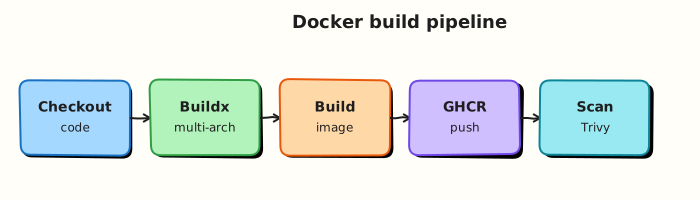
Source code enters Buildx; layers cache via GitHub Actions cache; tagged images push to GHCR for Kubernetes or cloud deploy modules.
Theory
What it is
A Docker pipeline workflow typically:
- Checks out source
- Sets up QEMU (optional, multi-arch) and Buildx
- Logs in to GHCR (
docker/login-action) - Builds and pushes with tags and labels (
docker/build-push-action) - Optionally scans the image (Module 11)
GHCR image naming:
Minimal Dockerfile (multi-stage):
FROM node:20-alpine AS build
WORKDIR /app
COPY package*.json ./
RUN npm ci --omit=dev
COPY . .
RUN npm run build

FROM nginx:1.27-alpine
COPY --from=build /app/dist /usr/share/nginx/html
EXPOSE 80
Why it matters
Building images on developer laptops produces non-reproducible artefacts. CI builds from locked Dockerfiles on clean runners, tags with Git SHA, and pushes to a registry Kubernetes modules pull from. Without standard pipeline structure, teams embed credentials in docker login shell one-liners and disable layer caching — slow and insecure.
How it works
Workflow permissions for GHCR:
Build and push stub:
- name: Login to GHCR
uses: docker/login-action@v3
with:
registry: ghcr.io
username: ${{ github.actor }}
password: ${{ secrets.GITHUB_TOKEN }}
- name: Build and push
uses: docker/build-push-action@v6
with:
context: .
push: true
tags: ghcr.io/${{ github.repository }}:${{ github.sha }}
cache-from: type=gha
cache-to: type=gha,mode=max
Metadata labels (Open Container Initiative (OCI) standard) via docker/metadata-action:
- id: meta
uses: docker/metadata-action@v5
with:
images: ghcr.io/${{ github.repository }}
tags: |
type=sha,prefix=
type=ref,event=branch
Multi-architecture builds require QEMU setup and platforms: linux/amd64,linux/arm64 on build-push-action — longer builds; use when targeting ARM nodes (Graviton, Apple Silicon clusters).
Key concepts and comparisons
| Approach | Pros | Cons |
|---|---|---|
docker/build-push-action | Cache, platforms, provenance | More YAML |
Raw docker build in run: | Simple demos | Harder cache and multi-arch |
| GHCR | Native GitHub auth | Not universal across clouds |
| Amazon ECR / Docker Hub | Cloud-specific | Extra credentials |
| Buildx cache type | Use |
|---|---|
type=gha | GitHub Actions cache backend |
type=registry | Cache layers in registry |
Common pitfalls
- Missing
packages: write— push fails with 403. - Pushing
:latestonly — impossible to rollback to SHA-specific image. - Building on
pull_requestwith push enabled — exposes fork abuse; push only onmainorrelease. - Huge build context — slow uploads; use
.dockerignore. - Running containers as root in final image — security modules will flag this.
Hands-on Lab
Objective
Create a multi-stage Dockerfile, .dockerignore, and a GHCR build workflow stub validated offline under ~/rebash-github-actions/module-07.
Prerequisites
- Modules 1–6
- Python 3 with PyYAML
- Optional: Docker for local
docker build
Lab environment
mkdir -p ~/rebash-github-actions/module-07/{app/dist,.github/workflows} && cd ~/rebash-github-actions/module-07
set -euo pipefail
Real-world scenario
Your microservice must build a minimal nginx image on every merge to main, tag with Git SHA, and push to GHCR for the Kubernetes module to deploy. Security requires non-root runtime and no secrets in the Dockerfile.
Step-by-step tasks
Task 1 – Create application stub and Dockerfile
cd ~/rebash-github-actions/module-07
set -euo pipefail
echo '<html><body><h1>REBASH Module 7</h1></body></html>' > app/dist/index.html
Create .dockerignore:
Create Dockerfile:
FROM nginx:1.27-alpine
COPY app/dist/ /usr/share/nginx/html/
RUN chown -R nginx:nginx /usr/share/nginx/html
USER nginx
EXPOSE 8080
Validate offline:
cd ~/rebash-github-actions/module-07
set -euo pipefail
grep -q 'USER nginx' Dockerfile
grep -q '.git' .dockerignore
test -f app/dist/index.html
Expected output
All checks pass.
Task 2 – Write GHCR build workflow stub
Create .github/workflows/docker-build.yml:
name: Docker build and push (stub)
on:
push:
branches: [main]
workflow_dispatch:
permissions:
  contents: read
  packages: write
jobs:
build:
runs-on: ubuntu-latest
steps:
- uses: actions/checkout@v4
- name: Set up Docker Buildx
uses: docker/setup-buildx-action@v3
- id: meta
uses: docker/metadata-action@v5
with:
images: ghcr.io/${{ github.repository }}
tags: |
type=sha,prefix=
type=raw,value=latest,enable={{ github.ref == 'refs/heads/main' }}
- name: Login to GHCR
uses: docker/login-action@v3
with:
registry: ghcr.io
username: ${{ github.actor }}
password: ${{ secrets.GITHUB_TOKEN }}
- name: Build and push
uses: docker/build-push-action@v6
with:
context: .
push: ${{ github.event_name != 'pull_request' }}
tags: ${{ steps.meta.outputs.tags }}
labels: ${{ steps.meta.outputs.labels }}
cache-from: type=gha
cache-to: type=gha,mode=max
Validate offline:
cd ~/rebash-github-actions/module-07
set -euo pipefail
grep -q 'docker/build-push-action@v6' .github/workflows/docker-build.yml
grep -q 'packages: write' .github/workflows/docker-build.yml
grep -q 'docker/metadata-action@v5' .github/workflows/docker-build.yml
python3 -c "import yaml; d=yaml.safe_load(open('.github/workflows/docker-build.yml')); assert d['permissions']['packages']=='write'; print('docker workflow OK')"
Expected output
docker workflow OK
Task 3 – Offline structure validation script
Create validate-docker-pipeline.sh:
#!/usr/bin/env bash
set -euo pipefail
test -f Dockerfile
test -f .dockerignore
grep -q 'FROM nginx' Dockerfile
grep -q 'USER nginx' Dockerfile
python3 -c "import yaml; yaml.safe_load(open('.github/workflows/docker-build.yml'))"
echo "validate-docker-pipeline: OK"
Run it:
cd ~/rebash-github-actions/module-07
set -euo pipefail
chmod +x validate-docker-pipeline.sh
./validate-docker-pipeline.sh | tee validate-output.txt
Expected output
validate-docker-pipeline: OK
Task 4 – Optional local Docker build and archive
cd ~/rebash-github-actions/module-07
set -euo pipefail

if command -v docker >/dev/null 2>&1; then
  docker build -t rebash-module07:local .
  docker run --rm rebash-module07:local cat /usr/share/nginx/html/index.html | grep -q 'REBASH Module 7'
  echo "docker local build OK" | tee docker-local.txt
else
  echo "docker not installed — skipped local build" | tee docker-local.txt
fi

tar -czf module-07-evidence.tgz Dockerfile .dockerignore .github/workflows/ app/ validate-docker-pipeline.sh validate-output.txt docker-local.txt
ls -l module-07-evidence.tgz | tee evidence.txt
Expected output
Tarball created; docker step skipped or succeeds.
Optional — push to GHCR:
# echo "$GITHUB_TOKEN" | docker login ghcr.io -u USERNAME --password-stdin
# docker build -t ghcr.io/ORG/REPO:manual-test .
# docker push ghcr.io/ORG/REPO:manual-test
Validation steps
- Dockerfile uses non-root
USER nginx -
.dockerignoreexcludes.git - Workflow includes Buildx, metadata, login, and build-push steps
-
packages: writepermission set -
validate-docker-pipeline.shexits 0
Common errors and fixes
| Error | Cause | Fix |
|---|---|---|
| 403 on push | Missing packages: write | Add permission; enable GHCR for repo |
| Empty image | Wrong context or COPY path | Verify app/dist exists in context |
| Cache not working | First run or cache evicted | Expected; type=gha helps from second run |
| Metadata tags empty | Expression syntax | Validate with action docs; check images: value |
Challenge exercise
Add a pull_request trigger that builds with push: false (already conditional in stub) and uploads the image as a tarball artefact using docker/build-push-action outputs: type=docker,dest=.... Validate YAML still parses.
Learning outcomes
- Authored multi-stage/non-root Dockerfile pattern
- Created GHCR workflow with Buildx, metadata, and GHA cache
- Validated pipeline structure offline
- Understood push gating on event type
Cleanup
Validation
- Lab completed under
~/rebash-github-actions/module-07/ - You can explain
packages: writerequirement for GHCR - You can name three tags produced by metadata-action
- You can describe why
.dockerignorematters in CI
Code Walkthrough
- Non-root final stage — run as dedicated user; read-only root filesystem where possible.
- Tag with SHA — every build immutable;
latestoptional pointer only. - Cache layers —
type=ghareduces rebuild time; lock Dockerfile base images. - Gate push — build on PR, push only on trusted refs.
- Scan next — Module 11 adds Trivy after build-push.
Security Considerations
- Never embed registry passwords in Dockerfile or workflow shell — use
secrets.GITHUB_TOKENor fine-grained PAT with minimumpackagesscope. - Do not push images from untrusted fork workflows.
- Pin base images by digest in production Dockerfiles when policy requires.
- Enable GHCR vulnerability scanning and branch protection on workflow files.
- Use provenance attestations (
provenance: trueon build-push-action) for supply-chain evidence.
Common Mistakes
Pushing on every pull_request from forks
Malicious PRs could push poisoned images if credentials allow. Fix: push: false on PR; push only on main or internal branches.
Missing .dockerignore
Entire .git and secrets files upload as build context. Fix: Exclude VCS, CI configs, and local env files.
Only tagging latest
Rollbacks become guesswork. Fix: Always tag with github.sha; treat latest as convenience only.
Best Practices
- Multi-stage builds keep runtime images small.
- Use
docker/metadata-actionfor consistent OCI labels. - Share Buildx cache across workflows in the same repository.
- Test
docker buildlocally before debugging CI failures. - Document image promotion path (dev registry → prod registry) in platform runbooks.
Troubleshooting
| Symptom | Likely cause | Fix |
|---|---|---|
| denied: installation not allowed | GHCR disabled for org | Enable Packages in org settings |
| buildx not found | Missing setup step | Add docker/setup-buildx-action@v3 |
| wrong architecture on cluster | Single-arch build on amd64 only | Add platforms: linux/amd64,linux/arm64 |
| huge build context | No dockerignore | Add .dockerignore; narrow context |
| stale layers | Cache too aggressive | Bust cache key on Dockerfile changes |
Summary
Docker pipelines in GitHub Actions combine Buildx, metadata labels, GHCR authentication, and layer caching for reproducible container delivery. Module 7’s lab validates Dockerfile and workflow structure offline. Next: Kubernetes Deployments with GitHub Actions.
Interview Questions
1. What permissions does a workflow need to push to GHCR using GITHUB_TOKEN?
Reveal answer
Typically contents: read and packages: write. The job logs in with docker/login-action using github.actor and secrets.GITHUB_TOKEN. Organisation policies may further restrict token permissions — verify defaults under repo Settings → Actions.
2. Why use docker/build-push-action instead of shell docker build?
Reveal answer
The action integrates Buildx, registry cache (type=gha, type=registry), multi-platform builds, and provenance attestation with cleaner YAML than manual CLI flags. It handles push and metadata consistently across runner updates.
3. How do you prevent fork pull requests from pushing images?
Reveal answer
Set push: false when github.event_name == 'pull_request', or restrict push jobs to refs/heads/main with if: conditions. Do not expose registry credentials to fork workflows. Some teams use internal PRs only for build-push jobs.
4. Explain type=gha cache in build-push-action.
Reveal answer
Stores Buildx layer cache in GitHub Actions cache storage — faster rebuilds within the repository. cache-from: type=gha restores; cache-to: type=gha,mode=max exports layers after build. Complements dependency caching from Module 6.
5. What labels does docker/metadata-action generate?
Reveal answer
OCI-standard labels such as org.opencontainers.image.revision, source, created, and configurable tags from git ref, semver, or raw values. Tags commonly include SHA prefix and branch name for traceability.
6. Why run the container as non-root?
Reveal answer
Limits container breakout impact — compromised nginx worker cannot write system files or escalate as easily. Kubernetes Pod Security Standards and many cluster policies require non-root UIDs. Set USER in Dockerfile and align with securityContext.runAsNonRoot in manifests.
7. How do you rollback a bad image in production?
Reveal answer
Redeploy the previous immutable tag (Git SHA or semver) stored in GHCR — never rely on :latest alone. Kubernetes module covers kubectl rollout undo / Helm rollback; CI should retain SHA tags indefinitely or per retention policy.