Argo CD Repositories and Credentials
Overview
Argo CD clones Git repositories, renders Helm charts, and pulls OCI artefacts using credentials stored as Kubernetes Secrets in the argocd namespace. Public HTTPS repos need no secret; private GitHub, GitLab, Bitbucket, and self-hosted Git require username/token or SSH keys. Helm private chart museums and OCI registries use parallel secret types.
This module teaches repository Secret structure with placeholder credentials (never real tokens in labs), registers a public repo via declarative YAML, and proves connection status through an Application sync into rebash-argocd-m05.
This is Tutorial 5 in Module 5: Repositories of the REBASH Academy Argo CD for Kubernetes Engineers series.
Prerequisites
- Argo CD Applications and Projects
- Working with Remotes
- Argo CD installed with CLI access (Module 3)
- Optional: private repo access for challenge exercise only — use placeholders in committed YAML
Learning Objectives
By the end of this tutorial, you will be able to:
- Configure Git repository Secrets with
argocd.argoproj.io/secret-type: repository - Distinguish HTTPS token vs SSH private key repository auth
- Register Helm and OCI repository secret formats at a high level
- Connect a public HTTPS repo and verify via Application sync
- Explain credential rotation and least-privilege token scope
Architecture
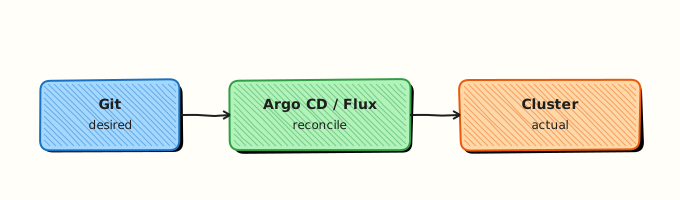
Repo-server reads repository Secrets from the argocd namespace before cloning. Applications reference repos by URL — Argo CD matches URL to registered credentials.
Theory
What it is
Repository credentials are Kubernetes Secrets labelled for Argo CD:
metadata:
  labels:
    argocd.argoproj.io/secret-type: repository
stringData:
  type: git
  url: https://github.com/org/repo.git
  password: <token>
  username: <username-or-token-name>
Supported type values include git, helm, and oci (Helm/OCI charts). SSH Git repos use sshPrivateKey instead of username/password.
Argo CD also supports credential templates (argocd.argoproj.io/secret-type: repo-creds) matching URL prefixes — useful for organisation-wide GitHub access.
Registration methods:
| Method | Use |
|---|---|
| Declarative Secret YAML | GitOps-friendly, review in PR |
argocd repo add CLI | Labs and break-glass |
| UI Settings → Repositories | Interactive admin |
Why it matters
Private repo sync fails with authentication required until credentials exist. Over-privileged PATs (Personal Access Tokens) in shared secrets violate least privilege — scope tokens to read-only repo content. Rotating credentials without downtime requires updating Secrets and letting repo-server reconnect. Platform teams centralise repo-creds templates per GitHub organisation.
Helm/OCI: modern teams store charts in OCI registries (oci://registry.example.com/charts/myapp). Argo CD Application spec.source uses chart + repoURL OCI form; repository secrets carry registry username/password.
How it works
- Admin applies repository Secret with label
argocd.argoproj.io/secret-type: repository. - Argo CD credential helper indexes secrets by repo URL.
- Application sync triggers repo-server clone; matching secret supplies auth.
- Connection status appears in UI/CLI (
argocd repo list) as Successful or Failed. - For public repos, no secret — repo-server clones anonymously over HTTPS.
Public vs private flow:
| Repo type | Secret required | Example URL |
|---|---|---|
| Public Git HTTPS | No | https://github.com/argoproj/argocd-example-apps.git |
| Private Git HTTPS | Yes (PAT) | https://github.com/myorg/private.git |
| Private Git SSH | Yes (sshPrivateKey) | git@github.com:myorg/private.git |
| OCI Helm | Yes (registry creds) | oci://ghcr.io/myorg/charts |
Key concepts and comparisons
| Secret key | Purpose |
|---|---|
url | Exact repo URL (must match Application repoURL) |
username / password | HTTPS basic or token auth |
sshPrivateKey | PEM key for SSH repos |
type | git, helm, or oci |
enableOCI | true for OCI Helm registries |
| Approach | Trade-off |
|---|---|
| Per-repo Secret | Fine-grained rotation |
| repo-creds template | Less Secret sprawl; broader blast radius if leaked |
| External Secrets Operator | Enterprise rotation from vault |
Common pitfalls
- URL mismatch —
https://github.com/org/repovshttps://github.com/org/repo.gitmust match exactly. - Committing real PATs to Git — use placeholders in docs; inject via CI/sealed secrets.
- Read-write tokens when read-only suffices — CI compromise exfiltrates write access.
- SSH known_hosts issues for self-hosted Git — configure
spec.sourceor ConfigMap per docs. - Storing Helm repo credentials in Application spec — belongs in repository Secret only.
Hands-on Lab
Objective
Create a repository Secret template with placeholders for private Git, register connection to the public argocd-example-apps repo via declarative Application, and prove successful repo access through sync into rebash-argocd-m05.
Prerequisites
- Argo CD control plane healthy (Modules 3–4)
- CLI logged in:
argocd login localhost:8080 --username admin --password ... --insecure - Port-forward if using localhost UI/API
Lab environment
Real-world scenario
Platform engineering must document how application teams register private GitHub repos without sharing tokens in chat. You ship a redacted Secret template for the runbook and demonstrate public repo connectivity — the same Application pattern teams reuse with real credentials injected from a vault at deploy time.
Step-by-step tasks
Task 1 – Private repository Secret template (placeholders only)
Create repository-private-template.yaml:
apiVersion: v1
kind: Secret
metadata:
  name: repo-private-github-template
  namespace: argocd
  labels:
    argocd.argoproj.io/secret-type: repository
  annotations:
    rebash.academy/warning: "Template only — replace placeholders before apply; never commit real tokens"
type: Opaque
stringData:
  type: git
  url: https://github.com/EXAMPLE-ORG/EXAMPLE-PRIVATE-REPO.git
  username: <GITHUB_USERNAME>
  password: <GITHUB_PAT_READ_ONLY>
Validate YAML without applying placeholders to cluster:
cd ~/rebash-argocd/module-05
kubectl apply --dry-run=client -f repository-private-template.yaml | tee repo-template-dryrun-m05.txt
grep -q 'repository-private-github-template' repo-template-dryrun-m05.txt
grep -q 'argocd.argoproj.io/secret-type' repository-private-template.yaml
echo "repository template validated (not applied)" | tee repo-template-summary-m05.txt
Expected output
Dry-run succeeds; summary confirms template was not applied with real credentials.
Task 2 – Public repo Application (no secret required)
Create namespace.yaml:
apiVersion: v1
kind: Namespace
metadata:
  name: rebash-argocd-m05
  labels:
    rebash.academy/module: "05"
Create application-public-repo.yaml:
apiVersion: argoproj.io/v1alpha1
kind: Application
metadata:
  name: rebash-public-repo-demo
  namespace: argocd
spec:
  project: default
  source:
    repoURL: https://github.com/argoproj/argocd-example-apps.git
    targetRevision: HEAD
    path: guestbook
  destination:
    server: https://kubernetes.default.svc
    namespace: rebash-argocd-m05
  syncPolicy:
    automated:
      prune: true
      selfHeal: true
    syncOptions:
      - CreateNamespace=true
Apply:
cd ~/rebash-argocd/module-05
kubectl apply -f namespace.yaml
kubectl apply -f application-public-repo.yaml | tee application-apply-m05.txt
kubectl get application rebash-public-repo-demo -n argocd | tee application-get-m05.txt
Expected output
Application created; controller begins sync without repository Secret.
Task 3 – Prove repository connection and sync
cd ~/rebash-argocd/module-05
kubectl wait --for=jsonpath='{.status.sync.status}'=Synced \
  application/rebash-public-repo-demo -n argocd --timeout=300s | tee wait-synced-m05.txt
argocd repo list | tee repo-list-m05.txt
argocd app get rebash-public-repo-demo | tee app-get-m05.txt
grep -q 'argoproj/argocd-example-apps' repo-list-m05.txt || \
  grep -q 'Successful' app-get-m05.txt
kubectl get deploy,svc -n rebash-argocd-m05 | tee workloads-m05.txt
echo "public repo connected via sync" | tee repo-connected-m05.txt
Expected output
Application Synced; argocd repo list shows public repo with Successful connection (implicit credential-free); workloads exist in rebash-argocd-m05.
Task 4 – Helm/OCI repository reference manifest
Create repository-oci-template.yaml — documentation artefact for Helm OCI (do not apply without real registry):
apiVersion: v1
kind: Secret
metadata:
  name: repo-oci-helm-template
  namespace: argocd
  labels:
    argocd.argoproj.io/secret-type: repository
  annotations:
    rebash.academy/warning: "Template only — replace registry placeholders"
type: Opaque
stringData:
  type: helm
  url: oci://ghcr.io/EXAMPLE-ORG/helm-charts
  enableOCI: "true"
  username: <REGISTRY_USERNAME>
  password: <REGISTRY_READ_TOKEN>
Validate offline:
cd ~/rebash-argocd/module-05
kubectl apply --dry-run=client -f repository-oci-template.yaml | tee oci-template-dryrun-m05.txt
grep -q 'enableOCI' repository-oci-template.yaml
echo "OCI template validated" | tee oci-template-summary-m05.txt
Expected output
Client dry-run passes; file documents OCI Helm credential shape.
CLI equivalents (reference):
# Public Git (often auto-discovered on first sync)
# argocd repo add https://github.com/argoproj/argocd-example-apps.git

# Private Git HTTPS (lab — use real values only in shell, not Git)
# argocd repo add https://github.com/ORG/PRIVATE.git --username USER --password TOKEN

# OCI Helm
# argocd repo add oci://ghcr.io/org/charts --enable-oci --username USER --password TOKEN
Validation steps
- Private repo template uses placeholders, not real secrets
- Public Application syncs without authentication errors
-
argocd repo listor app get shows successful connection - Guestbook workloads run in
rebash-argocd-m05 - OCI template documents
enableOCI: "true"
Common errors and fixes
| Error | Cause | Fix |
|---|---|---|
| authentication required | Missing or wrong Secret | Match URL exactly; verify PAT scope |
| repository not found | Typo in URL or repo renamed | Compare Application repoURL and Secret url field |
| x509 certificate signed by unknown authority | Self-hosted Git TLS | Add cert to repo-server trust bundle per docs |
| OCI login failed | enableOCI false or wrong type | Set type: helm, enableOCI: "true" |
| Secret applied but not used | Wrong namespace or label | Secret must be in argocd with repository label |
Challenge exercise
Create repository-ssh-template.yaml with sshPrivateKey: | placeholder block and document when SSH is preferred over HTTPS (for example GitHub deploy keys on self-hosted runners). Do not apply unless you have a real key in a secure local path outside Git.
Learning outcomes
- Authored repository Secrets with correct labels and keys
- Connected public HTTPS repo through declarative Application sync
- Documented private Git and OCI Helm templates for platform runbooks
- Contrasted CLI
repo addwith declarative GitOps registration
Cleanup
kubectl delete application rebash-public-repo-demo -n argocd --ignore-not-found
kubectl delete namespace rebash-argocd-m05 --ignore-not-found
# Do not leave real credential secrets in argocd namespace
kubectl delete secret repo-private-github-template -n argocd --ignore-not-found 2>/dev/null || true
rm -rf ~/rebash-argocd/module-05
Validation
- No real tokens committed or applied from templates
- You can explain URL exact-match requirement
- Public repo sync evidence captured
- You can describe token rotation procedure
Code Walkthrough
Production repository credential habits:
- Read-only tokens — scope PATs to minimum repo list.
- Externalise secrets — Sealed Secrets or ESO from vault; never plain Git.
- Template + inject — keep YAML structure in Git, values from CI/CD secrets.
- Verify connection —
argocd repo listafter every rotation. - Audit — log who created repository Secrets in
argocdnamespace.
Security Considerations
- Never commit PATs, SSH private keys, or registry passwords to documentation repos.
- Rotate credentials when team members leave or tokens leak.
- Prefer GitHub Apps or deploy keys per repo over org-wide admin PATs.
- Restrict RBAC who can read Secrets in
argocdnamespace — they contain repo credentials. - Use separate credentials per environment if repos differ; avoid one global org token.
Common Mistakes
Applying template Secrets with literal placeholder strings
<GITHUB_PAT_READ_ONLY> is not valid auth. Fix: inject real values via vault at deploy time; keep templates dry-run only in labs.
Same PAT shared across all repos in chat
Leaked token exposes entire org. Fix: repo-creds with read-only scope or per-repo deploy keys.
Mismatch between Application repoURL and Secret url
Silent clone failures. Fix: copy URL character-for-character including .git suffix.
Best Practices
- Use credential templates for org-level GitHub with narrow URL pattern.
- Test repository connection with a throwaway Application before production cutover.
- Pin
targetRevisionon Applications after repo connectivity proven. - Document rotation runbook: update Secret → verify repo list → trigger sync.
- For OCI, mirror image pull secrets policy — read-only registry accounts.
Troubleshooting
| Symptom | Likely cause | Fix |
|---|---|---|
| 401 on clone | Expired PAT | Rotate Secret; check token expiry |
| 403 on org repo | SSO authorisation not enabled for token | Authorise token for org in IdP |
| SSH handshake fail | Wrong key or known_hosts | Verify key pair; configure SSH known hosts CM |
| Repo listed Failed | Network egress blocked | Allow repo-server to reach Git host |
| Helm OCI 404 | Chart path wrong | Use chart: field in Application spec with OCI repoURL |
Summary
Repository Secrets bridge Argo CD to private Git, Helm, and OCI sources. Public repos sync without credentials; production uses labelled Secrets, least-privilege tokens, and declarative Applications. You validated templates offline and proved public repo connectivity through a successful guestbook sync.
Continue the track via the Argo CD roadmap for upcoming modules (sync phases, RBAC, multi-cluster).
Interview Questions
1. How does Argo CD discover credentials for a private Git repository?
Reveal answer
Kubernetes Secrets in the argocd namespace labelled argocd.argoproj.io/secret-type: repository (or repo-creds templates). The stringData.url must match the Application spec.source.repoURL. Repo-server uses these credentials when cloning during manifest generation.
2. What is the difference between repository and repo-creds secret types?
Reveal answer
repository secrets bind to a specific URL. repo-creds templates match URL prefixes (for example all https://github.com/myorg/*) so one credential covers many repos. Templates reduce sprawl but increase blast radius if compromised.
3. When is no repository Secret required?
Reveal answer
Public repositories accessible anonymously over HTTPS — for example https://github.com/argoproj/argocd-example-apps.git. Repo-server clones without auth. Private repos always need HTTPS or SSH credentials.
4. How do you register an OCI Helm repository?
Reveal answer
Create a repository Secret with type: helm, enableOCI: "true", and url: oci://registry/host/path. Supply registry username/password or token. Application spec uses repoURL as OCI base and chart for chart name. CLI: argocd repo add oci://... --enable-oci.
5. Why must repo URL in Secret match Application repoURL exactly?
Reveal answer
Argo CD indexes credentials by URL string matching. Variations (http vs https, trailing .git, SSH vs HTTPS) are different keys — clone fails with auth errors even if credentials are valid for a logically same repo.
6. How should teams handle credential rotation without downtime?
Reveal answer
Update Secret data (or ExternalSecret refresh), wait for Argo CD to reload credentials, verify with argocd repo list Successful status, then trigger sync on affected Applications. Use overlapping valid tokens where provider allows dual-active before revoking old token.
7. What permissions should a GitHub PAT used by Argo CD have?
Reveal answer
Read-only access to repository contents (and metadata) for deploy repos — not admin, not write, unless a CI bot also uses the same token (avoid sharing). Prefer fine-scoped PAT or GitHub App with repository selection. Never use personal admin tokens for production Argo CD.
8. Declarative Secret vs argocd repo add — production preference?
Reveal answer
Declarative Secrets (or sealed/external variants) in GitOps config repo — reviewable, auditable, reproducible. CLI repo add suits labs and emergency debugging but leaves no Git trail unless wrapped in automation.
Related Tutorials
- Course overview
- Argo CD Applications and Projects
- ConfigMaps and Secrets
- Installing Helm and Repositories
- GitOps Fundamentals