Introduction to GitOps and Argo CD
Overview
GitOps keeps the desired state of your systems in Git and uses a controller to reconcile live clusters toward that state. Argo CD is a CNCF (Cloud Native Computing Foundation) graduated GitOps continuous delivery tool for Kubernetes — it watches Git (or Helm/OCI sources), compares manifests to the cluster, and syncs when they differ.
Push-based pipelines run kubectl apply or helm upgrade from CI using long-lived credentials. Pull-based GitOps inverts that model: the cluster-side agent fetches desired state and applies it. That improves auditability (every change is a commit), rollback (revert and sync), and security (no cluster-admin kubeconfig in every pipeline).
This is Tutorial 1 in Module 1: GitOps Foundations of the REBASH Academy Argo CD for Kubernetes Engineers series — written for Cloud, DevOps, Platform, and SRE engineers who need to explain and implement GitOps before installing Argo CD.
By the end, you will articulate GitOps principles, contrast push and pull models, and prepare declarative manifests that pass kubectl apply --dry-run=client — the same artefacts Argo CD will reconcile in later modules.
Prerequisites
- Introduction to Kubernetes and Orchestration — Pods, Deployments, Namespaces,
kubectl apply - GitOps Fundamentals — declarative config, apps vs clusters layout
- A workstation with
kubectl(cluster optional for this module; dry-run works offline) - Basic Git workflow (branch, commit, pull request)
Learning Objectives
By the end of this tutorial, you will be able to:
- State the four GitOps principles (declarative, versioned, automated, reconciled)
- Contrast push-based CI deploy with pull-based GitOps reconciliation
- Explain desired state and drift in Argo CD terms
- Layout a minimal GitOps-ready manifest set with Kustomize
- Validate manifests locally with
kubectl apply --dry-run=client - Capture machine-readable GitOps principles in YAML for team onboarding
Architecture
GitOps separates what should run (Git) from what is running (the cluster). A controller such as Argo CD continuously compares the two and syncs when they diverge.
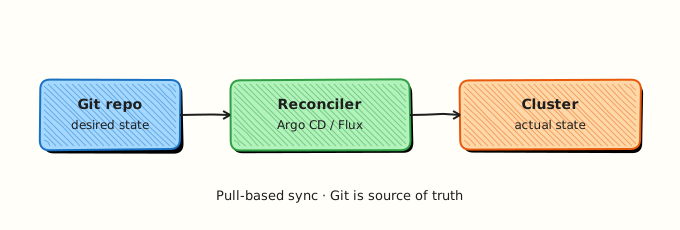
In later modules you install Argo CD as the reconciler. This module focuses on the Git side: correct, reviewable desired state that a controller can trust.
Theory
What it is
GitOps is an operational model where Git repositories hold the authoritative description of infrastructure and application state. Changes flow through pull requests; automation applies approved commits to environments. Desired state is the YAML, Helm chart, or Kustomize overlay in Git. Live state is what the Kubernetes API server reports. Drift occurs when someone changes the cluster manually or when Git moves ahead of the cluster.
Argo CD implements GitOps for Kubernetes. It is not a CI system — it does not build container images. It deploys what Git (or OCI) already declares. Teams pair Argo CD with CI (GitHub Actions, GitLab CI, Jenkins) that builds images and opens pull requests updating image tags in the config repo.
Why it matters
Push deploys from CI require distributing kubeconfig or cloud credentials to every pipeline. Credentials leak, pipelines become single points of failure, and nobody can answer “what should production look like right now?” without inspecting the cluster. GitOps centralises truth in Git: auditors read commit history; on-call engineers revert a bad merge instead of guessing which kubectl patch happened at 2 a.m.
Platform teams adopt Argo CD to enforce promotion gates (dev → staging → prod), standardise Application objects per service, and integrate with SSO and policy (AppProjects, OPA). For Indian IT teams moving from ticket-driven releases to automated delivery, GitOps gives a clear story for managers: every production change has a PR, reviewer, and rollback commit.
How it works
- Developers merge application code; CI builds and pushes a container image to a registry.
- CI (or a bot) opens a PR updating
image.tagor digest in the GitOps repo. - After merge, Argo CD detects the new commit (poll interval or webhook).
- Argo CD renders manifests (plain YAML, Kustomize, Helm, or Jsonnet) and diffs against the cluster.
- Sync applies create/update/delete operations according to policy (manual, automatic, prune, self-heal).
- Health and sync status on the Application custom resource (CR) report whether the rollout succeeded.
Pull-based flow keeps deploy credentials inside the cluster boundary. Push-based flow runs apply from outside:
| Model | Who applies | Credential location | Rollback story |
|---|---|---|---|
| Push CI | Pipeline agent | CI secrets / kubeconfig | Re-run old pipeline or manual apply |
| Pull GitOps | In-cluster controller | Cluster-scoped repo credentials | Git revert + sync |
Key concepts and comparisons
| GitOps principle | Practical meaning |
|---|---|
| Declarative | Describe end state (Deployment with N replicas), not shell steps |
| Versioned | Git commit SHA is the deployment revision |
| Automated | Controller syncs without human kubectl for routine changes |
| Reconciled | Loop runs continuously; drift is detected and optionally corrected |
| Term | Definition |
|---|---|
| Desired state | Manifests in Git at targetRevision |
| Live state | Resources currently in the cluster |
| Sync | Apply Git state to cluster |
| Self-heal | Revert manual cluster edits back to Git |
| Prune | Delete cluster resources removed from Git |
Argo CD vs generic “GitOps”:
| Concern | Argo CD role |
|---|---|
| Multi-cluster | One control plane can manage many clusters |
| UI / CLI | Visual diff, sync, rollback |
| Helm / Kustomize | Native source types |
| Access control | AppProject RBAC, SSO via Dex |
Common pitfalls
- Treating GitOps as “Git + kubectl in CI” — that is still push-based unless a controller reconciles.
- Storing plaintext Secrets in Git — use Sealed Secrets, SOPS, or External Secrets Operator; Argo CD syncs references, not cleartext production passwords.
- Monolithic repos without path-scoped Applications — one bad sync can touch unrelated namespaces.
- Skipping dry-run and schema validation in PR checks — broken YAML reaches the controller and blocks sync for everyone.
- Confusing synced with healthy — Kubernetes objects can be applied yet Pods crash; always check Application health and workload readiness.
Hands-on Lab
Objective
Build a Kustomize manifest bundle under ~/rebash-argocd/module-01, apply it to a kind cluster with kubectl apply, prove workloads with kubectl get, and optionally register an Argo CD Application when Module 3 is complete.
Prerequisites
- kind installed (
brew install kindor kind docs) kubectlv1.27+- Cluster created:
kind create cluster --name rebash-argocd(if not already running)
Lab environment
Workspace: ~/rebash-argocd/module-01 on your workstation.
kind create cluster --name rebash-argocd 2>/dev/null || true
mkdir -p ~/rebash-argocd/module-01/base && cd ~/rebash-argocd/module-01
export KUBECONFIG="$(kind get kubeconfig-path --name rebash-argocd 2>/dev/null || kind get kubeconfig --name rebash-argocd)"
Runtime: kind cluster with live kubectl apply — client dry-run alone is not sufficient for this lab.
Real-world scenario
Your platform team onboards a new microservice squad. Before granting Argo CD sync access, you must deliver manifests that actually run on a lab cluster — namespace, Deployment, and Service — with evidence from kubectl get.
Step-by-step tasks
Task 1 – Base application manifests
Create base/deployment.yaml:
apiVersion: apps/v1
kind: Deployment
metadata:
  name: rebash-gitops-demo
  labels:
    app.kubernetes.io/name: rebash-gitops-demo
    app.kubernetes.io/part-of: rebash-argocd-lab
spec:
  replicas: 1
  selector:
    matchLabels:
      app.kubernetes.io/name: rebash-gitops-demo
  template:
    metadata:
      labels:
        app.kubernetes.io/name: rebash-gitops-demo
    spec:
      containers:
        - name: web
          image: nginxinc/nginx-unprivileged:1.27-alpine
          ports:
            - containerPort: 8080
          resources:
            requests:
              cpu: 50m
              memory: 64Mi
            limits:
              cpu: 200m
              memory: 128Mi
Create base/service.yaml:
apiVersion: v1
kind: Service
metadata:
  name: rebash-gitops-demo
  labels:
    app.kubernetes.io/name: rebash-gitops-demo
spec:
  type: ClusterIP
  ports:
    - port: 8080
      targetPort: 8080
  selector:
    app.kubernetes.io/name: rebash-gitops-demo
Create base/kustomization.yaml:
apiVersion: kustomize.config.k8s.io/v1beta1
kind: Kustomization
namespace: rebash-argocd-m01
resources:
  - deployment.yaml
  - service.yaml
commonLabels:
  app.kubernetes.io/managed-by: rebash-lab
Task 3 – Namespace and Kustomize build
Create namespace.yaml:
apiVersion: v1
kind: Namespace
metadata:
  name: rebash-argocd-m01
  labels:
    rebash.academy/course: argocd
    rebash.academy/module: "01"
Build and inspect rendered manifests:
cd ~/rebash-argocd/module-01
kubectl kustomize base | tee build-m01.yaml
grep -q 'kind: Deployment' build-m01.yaml
grep -q 'namespace: rebash-argocd-m01' build-m01.yaml
grep -q 'nginxinc/nginx-unprivileged:1.27-alpine' build-m01.yaml
echo "kustomize build: OK" | tee kustomize-validate.txt
Expected output
kustomize-validate.txt shows kustomize build: OK; build-m01.yaml contains Deployment, Service, and pinned image tag.
Task 3 – Apply to kind and prove workload state
Apply namespace and application bundle:
cd ~/rebash-argocd/module-01
kubectl apply -f namespace.yaml | tee apply-ns-m01.txt
kubectl apply -k base | tee apply-app-m01.txt
kubectl wait --for=condition=Available deployment/rebash-gitops-demo -n rebash-argocd-m01 --timeout=180s | tee wait-deploy-m01.txt
kubectl get deploy,svc,pods -n rebash-argocd-m01 | tee cluster-state-m01.txt
grep -q 'rebash-gitops-demo' cluster-state-m01.txt
grep -q '1/1' cluster-state-m01.txt || kubectl get pods -n rebash-argocd-m01 --no-headers | grep -q Running
echo "live apply OK" | tee apply-summary-m01.txt
Expected output
Deployment Available; pod Running; Service exists in rebash-argocd-m01.
Task 4 – Simulate drift and re-apply (GitOps reconcile preview)
Introduce drift, then re-apply from Git manifests:
cd ~/rebash-argocd/module-01
kubectl scale deployment rebash-gitops-demo -n rebash-argocd-m01 --replicas=2 | tee drift-scale-m01.txt
kubectl get deployment rebash-gitops-demo -n rebash-argocd-m01 -o jsonpath='{.spec.replicas}{"\n"}' | tee drift-replicas-m01.txt
grep -q '^2$' drift-replicas-m01.txt
kubectl apply -k base | tee reconcile-m01.txt
kubectl get deployment rebash-gitops-demo -n rebash-argocd-m01 -o jsonpath='{.spec.replicas}{"\n"}' | tee after-reconcile-m01.txt
grep -q '^1$' after-reconcile-m01.txt
echo "drift corrected" | tee drift-fix-m01.txt
Expected output
Manual scale to 2 replicas; re-apply from Kustomize restores replicas: 1 — the same behaviour Argo CD self-heal provides when enabled.
Validation steps
- Kustomize build renders Deployment and Service into
rebash-argocd-m01 - Image tag is pinned (
1.27-alpine), notlatest -
kubectl applycreated namespace and workloads on kind - Deployment reaches Available; pod is Running
- Drift (manual scale) corrected by re-applying manifests
Common errors and fixes
| Error | Cause | Fix |
|---|---|---|
kustomize build not found | Old kubectl without kustomize | Upgrade kubectl or install kustomize CLI; use kubectl kustomize |
| Dry-run fails on Deployment | Invalid API version or indentation | Run kubectl apply --dry-run=client -k base -v=8 and fix YAML |
| Namespace not in rendered output | Kustomize namespace: field adds it at apply time | Expected — dry-run with -k base still targets rebash-argocd-m01 |
python3 yaml module missing | PyYAML not installed | pip install pyyaml or validate manifests with kubectl apply --dry-run=client |
Challenge exercise
Add overlays/dev/kustomization.yaml that sets replicas: 2 via a strategic merge patch, build with kubectl kustomize overlays/dev, and assert replicas: 2 appears in the output. This mirrors how platform teams keep one base and environment-specific overlays — the pattern Argo CD will sync in Module 4.
Learning outcomes
- Documented GitOps principles in reviewable, machine-readable YAML
- Built a Kustomize base suitable for a GitOps repository
- Proved desired state validates with client dry-run before any controller install
- Distinguished chart/manifest source (Git) from future reconciler (Argo CD)
Cleanup
kubectl delete namespace rebash-argocd-m01 --ignore-not-found
# Optional: kind delete cluster --name rebash-argocd
rm -rf ~/rebash-argocd/module-01
Validation
- Lab completed under
~/rebash-argocd/module-01/ - You can explain declarative, versioned, automated, and reconciled in your own words
- You used
kubectl kustomizeand dry-run instead of ad hoc apply - You can describe one production failure mode (for example drift with self-heal disabled)
Code Walkthrough
Production GitOps for introductory workflows always combines:
- Inspect before sync — render Kustomize/Helm in CI; dry-run in PR checks.
- Pin versions — image tags, chart versions, and Argo CD
targetRevision(branch/tag/SHA). - Capture evidence — store build artefacts and dry-run logs in the PR.
- Scope Applications — one Application per service or path, not an entire monorepo blindly.
- Least privilege — Git read-only for deploy repos; no cluster-admin in application CI.
Security Considerations
- Never commit kubeconfig, cloud keys, or registry passwords into the GitOps repo.
- Separate application source repos from deployment repos when regulations require it.
- Enforce branch protection and required reviewers on production paths.
- Scan manifests in CI for privileged containers,
hostPath, and overly broad RBAC. - Treat dry-run success as schema validation only — it does not prove runtime security.
Common Mistakes
Calling CI kubectl apply 'GitOps' without a reconciler
GitOps requires continuous reconciliation. A pipeline that applies once and stops is push-based. Fix: introduce Argo CD or Flux and move apply responsibility to the controller.
Using floating :latest image tags in desired state
Git cannot reproduce rollbacks if tags move. Fix: pin semver or digest in manifests; let CI open PRs to bump tags.
One repo path for every environment without overlays
Teams overwrite each other's values. Fix: use Kustomize overlays or Helm values per environment with separate Application objects.
Best Practices
- Validate manifests in CI with
kubectl apply --dry-run=serverwhen a cluster API is available. - Keep bases small and composable; avoid copy-paste YAML across services.
- Document sync policy (manual vs automated) per environment in the Application CR.
- Use meaningful Git commit messages — they become deployment audit entries.
- Link runbooks to Application names so on-call knows which Argo CD object to inspect.
Troubleshooting
| Symptom | Likely cause | Fix |
|---|---|---|
| Controller never sees changes | Wrong repo URL or branch | Verify targetRevision and path in Application (Module 4) |
| Dry-run passes but sync fails | Server-side admission policy | Check Pod Security, resource quotas, and validating webhooks |
| Drift persists after Git fix | Self-heal off and no manual sync | Enable self-heal or run argocd app sync |
| PR merged but prod unchanged | Auto-sync disabled for prod | Expected for gated prod — run approved sync |
| Kustomize path wrong in Argo CD | Relative path from repo root | Set spec.source.path to directory containing kustomization.yaml |
Summary
GitOps stores desired state in Git and uses a pull-based controller to reconcile Kubernetes. Argo CD is the reconciler you install and operate in this course. You prepared declarative manifests and principles evidence without a cluster install — the same discipline production teams use before granting sync access.
Continue to Argo CD Architecture and Components to map API server, repo server, application controller, and supporting services.
Interview Questions
1. What are the four core GitOps principles?
Reveal answer
Declarative (describe target state), versioned (Git history is the audit log), automated (controllers apply approved changes), and reconciled (continuous loop detects and fixes drift). Together they replace ad hoc kubectl with reviewable, repeatable delivery.
2. How does pull-based GitOps differ from a typical CI pipeline that runs kubectl apply?
Reveal answer
Push CI holds cluster credentials in the pipeline and applies from outside the cluster. Pull GitOps stores credentials in the cluster (or uses short-lived tokens) and an in-cluster agent fetches Git and applies. Pull reduces credential sprawl and makes Git the single source of truth; push is simpler for small teams but harder to audit at scale.
3. What is drift in Argo CD, and how might self-heal respond to it?
Reveal answer
Drift is when live cluster resources differ from Git — for example someone kubectl edits a Deployment replica count. With self-heal enabled, Argo CD re-applies Git state and reverts the manual change on the next reconciliation. Without self-heal, drift appears in the UI diff until an operator syncs.
4. Why should Secrets not be stored in plaintext in a GitOps repository?
Reveal answer
Anyone with repo read access obtains production credentials; forks and logs multiply exposure. Use Sealed Secrets, Mozilla SOPS, or External Secrets Operator so Git holds encrypted or referenced secrets only. Argo CD syncs the wrapper resource; decryption happens in-cluster with constrained keys.
5. What is the difference between Application sync status and health status?
Reveal answer
Sync status reflects whether cluster resources match Git (Synced, OutOfSync). Health reflects runtime readiness (Healthy, Progressing, Degraded) based on resource hooks and built-in health checks. A synced Application can still be Degraded if Pods crash — operators must watch both.
6. When would you choose manual sync over automated sync for production?
Reveal answer
Regulated or high-risk environments often require human approval after CI and peer review — manual sync ensures nothing applies until an operator clicks sync or runs CLI. Automated sync suits lower environments for speed. Many teams automate staging and gate production with manual sync plus change windows.
7. How does Argo CD relate to CI — does it replace Jenkins or GitHub Actions?
Reveal answer
No. CI builds, tests, and publishes artefacts (container images, packages). Argo CD deploys what Git declares — typically after CI opens a PR updating image tags. CI answers "is the code good?"; GitOps answers "does the cluster match approved config?"
Related Tutorials
- Course overview
- Argo CD Architecture and Components — next in series
- GitOps Fundamentals
- GitOps and CI/CD with Kubernetes