Synchronisation, Sync Options, and Hooks
Overview
Argo CD synchronisation is the step where desired state in Git is applied to the cluster. You choose whether sync runs on a schedule (automated) or only when an operator approves it (manual), whether drift is corrected automatically (selfHeal), and whether resources removed from Git are deleted in the cluster (prune). Sync options fine-tune apply behaviour; sync waves order resources; hooks run Jobs or other resources at defined points in the sync lifecycle.
Platform teams tune these knobs per environment: production often keeps manual sync or disables prune until change windows; dev clusters enable automated sync with selfHeal for fast feedback. Misconfigured prune has deleted production Services; misunderstood hooks have blocked syncs for hours.
This is Tutorial 6 in Module 6 · Synchronisation of the REBASH Academy Argo CD for Kubernetes GitOps series — written for Cloud, DevOps, Platform, and SRE engineers.
Prerequisites
- Applications and Projects
- GitOps fundamentals
- A local Kubernetes cluster (kind, minikube, or k3d) with Argo CD installed, or offline YAML validation only
kubectlconfigured to the cluster
Learning Objectives
By the end of this tutorial, you will be able to:
- Contrast manual sync with automated sync and explain when each is appropriate
- Configure
selfHealandprunesafely for different environments - Apply common
syncOptions(CreateNamespace,ServerSideApply, and related flags) - Order resources with sync-wave annotations
- Define PreSync, PostSync, and SyncFail hooks on Kubernetes resources
- Inspect Application sync status and hook execution from the CLI
Architecture
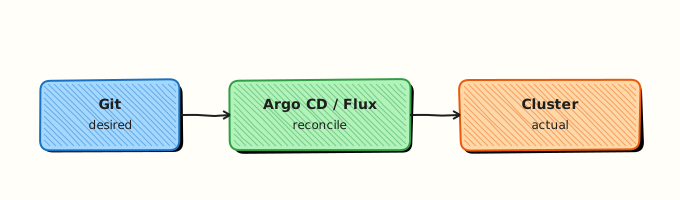
Sync policy, sync options, waves, and hooks sit between Git desired state and the Kubernetes API apply path.
Theory
What it is
Synchronisation in Argo CD compares live cluster resources with manifests rendered from the Application source, then applies differences. A manual sync waits for a human or API call (argocd app sync). Automated sync (syncPolicy.automated) triggers when Git changes or drift is detected (depending on settings).
| Control | Field | Effect |
|---|---|---|
| Automated sync | syncPolicy.automated | Sync without manual approval |
| Self-heal | syncPolicy.automated.selfHeal | Revert manual cluster edits to match Git |
| Prune | syncPolicy.automated.prune or manual sync with prune | Delete cluster objects absent from desired state |
| Sync options | syncPolicy.syncOptions | Modify apply/prune behaviour |
| Sync waves | argocd.argoproj.io/sync-wave annotation | Apply order (lower numbers first) |
| Hooks | argocd.argoproj.io/hook annotation | Run resources at PreSync / Sync / PostSync / SyncFail |
Why it matters
GitOps only delivers value when sync behaviour matches operational risk. Automated sync with selfHeal keeps dev sandboxes faithful to Git. Production teams often disable auto-sync for critical apps so every change is reviewed in the Argo CD UI or via CI-gated sync API calls. Prune prevents orphan resources but can remove shared cluster objects if your Application path is too broad. Hooks let you run database migrations or smoke tests at the right moment — but a failing PreSync hook blocks the entire sync.
How it works
- Argo CD renders manifests from Git (plain YAML, Helm, Kustomize, and so on).
- It diff’s rendered manifests against live resources in the destination namespace (and cluster-scoped objects if permitted).
- On sync, it applies out-of-sync resources — respecting sync waves (ascending) and hook phases.
- Hook resources run in order: PreSync → normal resources → PostSync; SyncFail runs if sync fails.
- Health assessment runs after apply; the Application
status.syncandstatus.healthfields update.
Hook phases (common):
| Phase | Typical use |
|---|---|
| PreSync | DB migration Job, cache flush |
| Sync | Rare; runs with main resources |
| PostSync | Smoke test, notification Job |
| SyncFail | Alerting or cleanup Job on failure |
Sync options (selected):
| Option | Purpose |
|---|---|
CreateNamespace=true | Create destination namespace if missing |
PruneLast=true | Prune after successful apply |
ApplyOutOfSyncOnly=true | Skip unchanged resources |
ServerSideApply=true | Use server-side apply (SSA) |
RespectIgnoreDifferences=true | Honour ignoreDifferences during sync |
Key concepts and comparisons
| Scenario | Recommended starting policy |
|---|---|
| Personal dev cluster | Automated + selfHeal + prune |
| Shared staging | Automated sync; prune with narrow path |
| Production (regulated) | Manual sync; prune only after review |
| Platform bootstrap (App of Apps) | Automated with CreateNamespace=true |
Sync waves example: wave -1 for Namespace, 0 for ConfigMap, 1 for Deployment, 2 for Ingress — ensures dependencies exist before dependents roll out.
Common pitfalls
- Prune deletes unexpected resources when the Application
pathincludes cluster-scoped or shared objects. Fix: Narrow path; usePrunePropagationPolicy=foreground; test in staging with prune off first. - selfHeal fights incident hotfixes — manual
kubectl scalereverts on next sync. Fix: Disable selfHeal for that app or patch Git first. - Hooks without TTL leave completed Jobs that block re-sync. Fix: Set
hook-delete-policy: HookSucceeded(annotationargocd.argoproj.io/hook-delete-policy). - Automated sync + monorepo syncs every commit touching the path. Fix: Use ApplicationSets or separate Applications per folder.
- Ignoring hook failure — PreSync failure leaves app OutOfSync and Degraded. Fix: Check hook Job logs; set reasonable
backoffLimit.
Hands-on Lab
Objective
Create two declarative Applications — one with prune: false and one with prune: true — remove a manifest from Git, observe prune behaviour, then add a PreSync hook Job and prove sync status from the CLI.
Prerequisites
- Argo CD installed (namespace
argocdis the default) kubectl,argocdCLI optional- Git directory or inline manifests under
~/rebash-argocd/module-06
Lab environment
Workspace: ~/rebash-argocd/module-06 on your workstation.
mkdir -p ~/rebash-argocd/module-06/manifests ~/rebash-argocd/module-06/apps && cd ~/rebash-argocd/module-06
Runtime: local Kubernetes with Argo CD; namespace prefix rebash-argocd-m06.
Real-world scenario
A platform team enables automated sync for a microservice in staging with selfHeal but keeps prune disabled until they trust the manifest folder boundary. After validation, they enable prune and add a PreSync migration Job so schema changes run before the Deployment updates.
Step-by-step tasks
Task 1 – Base manifests and namespace
Create manifests/namespace.yaml:
Create manifests/configmap-app.yaml:
apiVersion: v1
kind: ConfigMap
metadata:
  name: rebash-sync-demo
  namespace: rebash-argocd-m06
  annotations:
    argocd.argoproj.io/sync-wave: "0"
data:
  message: "sync-options lab v1"
Create manifests/deployment-demo.yaml:
apiVersion: apps/v1
kind: Deployment
metadata:
  name: rebash-sync-demo
  namespace: rebash-argocd-m06
  annotations:
    argocd.argoproj.io/sync-wave: "1"
spec:
  replicas: 1
  selector:
    matchLabels:
      app: rebash-sync-demo
  template:
    metadata:
      labels:
        app: rebash-sync-demo
    spec:
      containers:
        - name: web
          image: nginxinc/nginx-unprivileged:1.27-alpine
          ports:
            - containerPort: 8080
Apply base manifests once so the namespace exists for offline testing:
cd ~/rebash-argocd/module-06
kubectl apply -f manifests/namespace.yaml
kubectl apply --dry-run=client -f manifests/configmap-app.yaml -f manifests/deployment-demo.yaml | tee dryrun-base-m06.txt
grep -q 'configmap/rebash-sync-demo' dryrun-base-m06.txt
Expected output
Client dry-run succeeds; ConfigMap and Deployment validate.
Task 2 – Application with automated sync and prune disabled
Create apps/application-no-prune.yaml:
apiVersion: argoproj.io/v1alpha1
kind: Application
metadata:
  name: rebash-sync-no-prune
  namespace: argocd
spec:
  project: default
  source:
    repoURL: https://github.com/argoproj/argocd-example-apps.git
    targetRevision: HEAD
    path: guestbook
  destination:
    server: https://kubernetes.default.svc
    namespace: rebash-argocd-m06
  syncPolicy:
    automated:
      prune: false
      selfHeal: true
    syncOptions:
      - CreateNamespace=true
      - ApplyOutOfSyncOnly=true
For a local Git path (preferred when you control the repo), create apps/application-local-no-prune.yaml:
apiVersion: argoproj.io/v1alpha1
kind: Application
metadata:
  name: rebash-sync-local-no-prune
  namespace: argocd
spec:
  project: default
  source:
    repoURL: file:///tmp/rebash-argocd/module-06/manifests
    path: .
    targetRevision: HEAD
  destination:
    server: https://kubernetes.default.svc
    namespace: rebash-argocd-m06
  syncPolicy:
    automated:
      prune: false
      selfHeal: true
    syncOptions:
      - CreateNamespace=true
Create apps/application-local-prune.yaml:
apiVersion: argoproj.io/v1alpha1
kind: Application
metadata:
  name: rebash-sync-local-prune
  namespace: argocd
spec:
  project: default
  source:
    repoURL: file:///tmp/rebash-argocd/module-06/manifests
    path: .
    targetRevision: HEAD
  destination:
    server: https://kubernetes.default.svc
    namespace: rebash-argocd-m06
  syncPolicy:
    automated:
      prune: true
      selfHeal: true
    syncOptions:
      - CreateNamespace=true
      - PruneLast=true
Validate Application YAML:
cd ~/rebash-argocd/module-06
kubectl apply --dry-run=client -f apps/application-local-no-prune.yaml 2>&1 | tee app-no-prune-dryrun-m06.txt
kubectl apply --dry-run=client -f apps/application-local-prune.yaml 2>&1 | tee app-prune-dryrun-m06.txt
grep -q 'application.argoproj.io/rebash-sync-local-no-prune' app-no-prune-dryrun-m06.txt || grep -q 'configured' app-no-prune-dryrun-m06.txt
Expected output
Both Application manifests pass client-side validation.
Task 3 – PreSync hook Job
Create manifests/hook-presync-job.yaml:
apiVersion: batch/v1
kind: Job
metadata:
  name: rebash-presync-check
  namespace: rebash-argocd-m06
  annotations:
    argocd.argoproj.io/hook: PreSync
    argocd.argoproj.io/hook-delete-policy: HookSucceeded
    argocd.argoproj.io/sync-wave: "-1"
spec:
  ttlSecondsAfterFinished: 120
  template:
    spec:
      restartPolicy: Never
      containers:
        - name: check
          image: busybox:1.36
          command:
            - sh
            - -c
            - echo "PreSync hook OK" && sleep 2
  backoffLimit: 1
Validate hook manifest:
cd ~/rebash-argocd/module-06
kubectl apply --dry-run=client -f manifests/hook-presync-job.yaml | tee hook-dryrun-m06.txt
grep -q 'job.batch/rebash-presync-check' hook-dryrun-m06.txt
grep -q 'PreSync' manifests/hook-presync-job.yaml && echo "hook annotation present"
Expected output
Job validates; annotation PreSync is present in the file.
Task 4 – Apply Applications and prove sync status
Adjust the repoURL in local Application manifests if your path differs from file:///tmp/rebash-argocd/module-06/manifests. Register a local repo in Argo CD if required:
Apply Applications and prove sync status (Argo CD required):
cd ~/rebash-argocd/module-06
cp -a ~/rebash-argocd/module-06 /tmp/rebash-argocd/ 2>/dev/null || true
kubectl apply -f apps/application-local-no-prune.yaml
kubectl apply -f apps/application-local-prune.yaml
kubectl wait --for=jsonpath='{.status.sync.status}'=Synced \
  application/rebash-sync-local-no-prune -n argocd --timeout=300s | tee sync-wait-no-prune-m06.txt
kubectl get application rebash-sync-local-no-prune -n argocd \
  -o jsonpath='{.status.sync.status}{"\n"}{.status.health.status}{"\n"}' | tee sync-status-no-prune-m06.txt
kubectl get application rebash-sync-local-prune -n argocd \
  -o jsonpath='{.status.sync.status}{"\n"}{.status.health.status}{"\n"}' | tee sync-status-prune-m06.txt
grep -q 'Synced' sync-status-no-prune-m06.txt
kubectl get jobs -n rebash-argocd-m06 | tee jobs-m06.txt
echo "sync apply OK" | tee sync-apply-ok-m06.txt
Demonstrate prune difference offline by removing manifests/deployment-demo.yaml from the tracked set and comparing spec:
cd ~/rebash-argocd/module-06
grep 'prune:' apps/application-local-no-prune.yaml | tee prune-false-m06.txt
grep 'prune:' apps/application-local-prune.yaml | tee prune-true-m06.txt
grep -q 'prune: false' prune-false-m06.txt
grep -q 'prune: true' prune-true-m06.txt
Expected output
With Argo CD running, Applications report Synced and Healthy when manifests are valid; prune settings differ between the two Application specs; PreSync Job appears in jobs-m06.txt after sync when hooks are included in source.
Validation steps
- Base manifests validate with
kubectl apply --dry-run=client - Two Applications differ only in
prune(and related syncOptions) - PreSync hook Job carries
argocd.argoproj.io/hook: PreSync - Sync status captured from Application CR when cluster is available
- Namespace
rebash-argocd-m06used consistently
Common errors and fixes
| Error | Cause | Fix |
|---|---|---|
| Application Pending | Unknown repo or path | Register repo; fix repoURL and path |
| Sync stuck on hook | PreSync Job failing | kubectl logs job/rebash-presync-check -n rebash-argocd-m06 |
| Prune did not delete resource | prune: false on Application | Enable prune: true or manual sync with Prune checked |
| selfHeal reverted hotfix | Automated selfHeal enabled | Patch Git or temporarily disable selfHeal |
| Invalid file repo URL | Wrong absolute path | Use file:///full/path/to/manifests and allow file repos in Argo CD config |
Challenge exercise
Add a PostSync hook Job that writes a timestamp to a ConfigMap (working artefact), annotate it with argocd.argoproj.io/hook: PostSync, sync the Application, and capture the Job pod log as evidence.
Learning outcomes
- Declared automated sync with contrasting prune settings
- Applied syncOptions suitable for namespace creation and controlled pruning
- Authored a PreSync hook Job with delete policy
- Inspected Application sync and health status from Kubernetes API
Cleanup
kubectl delete application rebash-sync-local-no-prune rebash-sync-local-prune -n argocd --ignore-not-found
kubectl delete -f ~/rebash-argocd/module-06/manifests/ --ignore-not-found
kubectl delete namespace rebash-argocd-m06 --ignore-not-found
Validation
- Lab commands run under
~/rebash-argocd/module-06/ - You can explain manual vs automated sync and prune/selfHeal trade-offs
- You used
kubectland Application CR status for evidence - You can describe one production failure mode (prune or hook blocking sync)
Code Walkthrough
Production practice for Argo CD synchronisation always combines:
- Inspect Application diff in UI or
argocd app diffbefore enabling prune in production - Prefer declarative Application YAML in Git over click-ops sync settings
- Capture sync history and hook Job logs for change records
- Test hook Jobs independently with
kubectl applybefore embedding in Git - Least privilege — restrict who can sync with prune to platform admins
Security Considerations
- Restrict
sync+prunepermissions; prune is equivalent to delete for managed resources - Do not run hook Jobs with cluster-admin ServiceAccounts
- Audit automated sync changes; selfHeal can overwrite break-glass kubectl edits
- Validate Git repo access — compromised repo plus auto-sync equals arbitrary apply
- Use Projects to limit resource kinds and destinations per team
Common Mistakes
Enabling prune on a broad Application path
A path at repo root can delete cluster-scoped resources when manifests disappear from Git. Fix: Scope path narrowly; test with prune: false first.
PreSync hook with image pull secrets missing
Hook Jobs fail and block every sync. Fix: Reuse the same ServiceAccount and imagePullSecrets as the main Deployment.
Assuming sync success means the app works
Synced only means manifests applied; health checks and metrics still matter. Fix: Configure resource customisations and monitoring alerts.
Best Practices
- Start with manual sync in production; enable automation after trust is established
- Use sync waves for CRDs, namespaces, operators, then workloads
- Set
hook-delete-policyso successful hooks do not clutter etcd - Document prune boundaries in the Application README or Project description
- Pair Git branch protection with Argo CD sync windows for change control
Troubleshooting
| Symptom | Likely cause | Fix |
|---|---|---|
| OutOfSync loop | Fields ignored or mutating webhook drift | Add ignoreDifferences; check SSA conflicts |
| Sync failed — hook error | PreSync Job exit non-zero | Inspect Job logs; fix command or RBAC |
| Resource not pruned | prune: false or resource has prune: false annotation | Enable prune; remove argocd.argoproj.io/sync-options: Prune=false |
| Slow sync | Many resources, no ApplyOutOfSyncOnly | Enable ApplyOutOfSyncOnly=true |
| Drift not corrected | selfHeal disabled | Set syncPolicy.automated.selfHeal: true |
Summary
Synchronisation policy defines how aggressively Argo CD applies Git to the cluster. Automated sync, selfHeal, and prune accelerate dev loops but need guardrails in production. Sync options, waves, and hooks order work and run migrations safely. Next, deploy Helm charts as first-class Argo CD sources.
Interview Questions
1. What is the difference between manual sync and automated sync in Argo CD?
Reveal answer
Manual sync applies changes only when an operator or API call triggers sync — suitable when production changes need approval. Automated sync (syncPolicy.automated) applies when Argo CD detects Git changes or drift (with selfHeal), reducing toil in lower environments. Production often uses manual sync or sync windows; dev uses automated sync for fast feedback.
2. What does prune: true do, and what is the main risk?
Reveal answer
Prune deletes cluster resources that are no longer present in the rendered desired state for that Application. The main risk is deleting shared or cluster-scoped objects when the Application path is too wide or when someone removes a manifest accidentally. Teams test prune in staging and narrow Application paths before enabling prune in production.
3. How does selfHeal interact with emergency kubectl changes?
Reveal answer
With selfHeal enabled, Argo CD detects drift from Git and reverts manual edits on the next sync cycle. That protects Git as source of truth but can undo legitimate incident scaling or hotfixes. Fix forward by patching Git, temporarily disabling selfHeal, or using ignoreDifferences for specific fields during the incident.
4. Explain sync waves and give an example ordering problem they solve.
Reveal answer
Sync waves (argocd.argoproj.io/sync-wave annotation, lower numbers first) control apply order. Example: apply Namespace and ConfigMap at wave -1 and 0, Deployment at wave 1, and Ingress at wave 2 so the backend exists before the Ingress references it. Without waves, Argo CD may apply resources in arbitrary order.
5. When would you use a PreSync hook versus a PostSync hook?
Reveal answer
PreSync runs before main resources — typical for database migrations or validation Jobs that must pass before a new Deployment rolls out. PostSync runs after main resources — common for smoke tests, cache warming, or notifications. PreSync failures block the sync; PostSync failures mark the operation failed but main resources may already be live.
6. What are two useful syncOptions and when would you enable them?
Reveal answer
CreateNamespace=true creates the destination namespace if missing — standard for team self-service Applications. ServerSideApply=true uses Kubernetes server-side apply to reduce field manager conflicts on large resources or controllers. PruneLast=true defers pruning until after successful apply, reducing brief outages during complex updates.
7. (Senior) How would you design sync policy differently for staging and production?
Reveal answer
Staging: automated sync, selfHeal, prune enabled on a narrow path, hooks for migrations — fast feedback. Production: manual sync or automated with sync windows; prune enabled only after path review; mandatory PR on Git; optional require sync approval in Project; PostSync smoke tests wired to alerting. Both use the same manifest structure; policy differs via Application overlay or ApplicationSet template parameters.
Related Tutorials
- Course overview
- Previous: Applications and Projects
- Next: Helm with Argo CD
- GitOps and CI/CD with Kubernetes