Argo CD Applications and Projects
Overview
An Application custom resource (CR) tells Argo CD which Git (or Helm/OCI) source to deploy and which cluster namespace receives the workloads. An AppProject groups Applications with RBAC, allowed repos, and destination restrictions — platform teams use projects to isolate teams and environments.
Sync status (Synced, OutOfSync) compares Git to cluster objects. Health status (Healthy, Progressing, Degraded) reflects runtime readiness. This module declares manifests declaratively (application.yaml, appproject.yaml), syncs the upstream guestbook example, and verifies with kubectl and argocd app get.
This is Tutorial 4 in Module 4: Applications of the REBASH Academy Argo CD for Kubernetes Engineers series.
Prerequisites
- Installing Argo CD — running control plane in
argocdnamespace - Deployments — Managing Replicated Pods
argocdCLI logged in (port-forward or ingress)- Example apps repository: argocd-example-apps
Learning Objectives
By the end of this tutorial, you will be able to:
- Author an Application CR with source, destination, and syncPolicy
- Create an AppProject restricting repos and namespaces
- Explain sync vs health status on an Application
- Sync an app via declarative apply and CLI equivalents
- Verify workloads in namespace
rebash-argocd-m04
Architecture
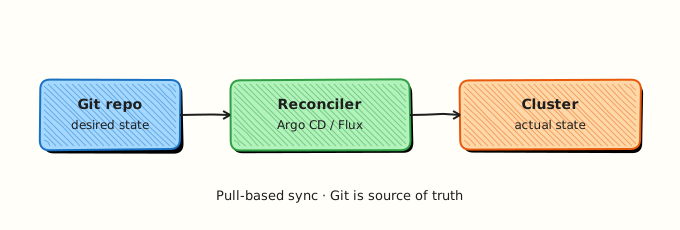
Applications live in the argocd namespace (control plane). They deploy resources to destination namespaces on registered clusters — here, in-cluster rebash-argocd-m04.
Theory
What it is
Application (argoproj.io/v1alpha1):
| Field | Purpose |
|---|---|
spec.project | AppProject name (RBAC boundary) |
spec.source.repoURL | Git, Helm, or OCI repository URL |
spec.source.path | Directory or chart path within repo |
spec.source.targetRevision | Branch, tag, or commit SHA |
spec.destination.server | Kubernetes API URL (in-cluster default) |
spec.destination.namespace | Target namespace for rendered manifests |
spec.syncPolicy | Automated sync, prune, selfHeal, syncOptions |
AppProject defines:
- Allowed source repos and destination clusters/namespaces
- Resource whitelist/blacklist (for example deny
ClusterRole) - Roles for Argo CD RBAC
Status fields operators watch:
| Status | Values | Meaning |
|---|---|---|
status.sync.status | Synced, OutOfSync | Git matches cluster |
status.health.status | Healthy, Progressing, Degraded, Missing | Workload readiness |
status.operationState.phase | Running, Succeeded, Failed | Last sync operation |
Why it matters
Declarative Applications are GitOps artefacts — store them in a config repo (“app of apps”) so cluster bootstrap is reproducible. AppProjects prevent a team from pointing Applications at arbitrary repos or production namespaces. Interviewers and auditors expect you to read Application conditions during incidents.
How it works
- Platform engineer commits
application.yamlto Git (or kubectl applies once for bootstrap). - Application controller detects the CR, clones
spec.sourcevia repo-server. - Manifests render and diff against destination namespace.
- Sync creates/updates Deployment, Service, etc.
- Health assessment marks Application Healthy when Pods pass checks.
- UI/CLI show live status; automated sync repeats on Git changes.
Declarative vs imperative:
| Approach | Example |
|---|---|
| Declarative (preferred) | kubectl apply -f application.yaml |
| CLI equivalent | argocd app create guestbook --repo ... --path guestbook ... |
Store YAML in Git; use CLI for debugging and one-off sync.
Key concepts and comparisons
| syncPolicy option | Effect |
|---|---|
automated.prune | Delete cluster objects removed from Git |
automated.selfHeal | Revert manual kubectl edits |
syncOptions: CreateNamespace=true | Create destination namespace if missing |
| AppProject control | Example |
|---|---|
sourceRepos | Only https://github.com/my-org/* |
destinations | Namespace rebash-* on in-cluster server |
clusterResourceWhitelist | Deny cluster-scoped resources for app teams |
Common pitfalls
- Application in wrong namespace — Application CR must live in
argocd(or configured install namespace). - Path relative to repo root wrong — guestbook lives at
guestbook/not/guestbook. - Auto-sync with prune deleting shared resources — scope paths narrowly.
- Ignoring Degraded health while Synced — crash-looping Pods still show Synced.
- Forgetting
CreateNamespace=truewhen namespace empty — sync fails until namespace exists.
Hands-on Lab
Objective
Create appproject.yaml and application.yaml, apply them declaratively, sync the guestbook example into rebash-argocd-m04, and prove sync/health with kubectl get application and argocd app get.
Prerequisites
- Argo CD installed (Module 3) with CLI login
- Port-forward:
kubectl port-forward svc/argocd-server -n argocd 8080:443 - Public internet to clone
argocd-example-apps(repo-server fetches Git)
Lab environment
Real-world scenario
A product squad needs guestbook deployed from the organisation’s allowed GitHub repos into namespace rebash-argocd-m04. Platform policy requires an AppProject limiting sources and destinations before the squad’s Application can sync.
Step-by-step tasks
Task 1 – AppProject with guardrails
Create appproject.yaml:
apiVersion: argoproj.io/v1alpha1
kind: AppProject
metadata:
  name: rebash-lab
  namespace: argocd
spec:
  description: REBASH Module 04 lab project
  sourceRepos:
    - https://github.com/argoproj/argocd-example-apps.git
    - https://github.com/argoproj/argocd-example-apps
  destinations:
    - namespace: rebash-argocd-m04
      server: https://kubernetes.default.svc
  clusterResourceWhitelist:
    - group: ""
      kind: Namespace
  namespaceResourceWhitelist:
    - group: apps
      kind: Deployment
    - group: ""
      kind: Service
    - group: ""
      kind: ConfigMap
  orphanedResources:
    warn: true
Apply and verify:
cd ~/rebash-argocd/module-04
kubectl apply -f appproject.yaml | tee appproject-apply-m04.txt
kubectl get appproject rebash-lab -n argocd | tee appproject-get-m04.txt
Expected output
AppProject rebash-lab exists in namespace argocd.
Task 2 – Application CR (declarative)
Create application.yaml:
apiVersion: argoproj.io/v1alpha1
kind: Application
metadata:
  name: rebash-guestbook
  namespace: argocd
  finalizers:
    - resources-finalizer.argocd.argoproj.io
spec:
  project: rebash-lab
  source:
    repoURL: https://github.com/argoproj/argocd-example-apps.git
    targetRevision: HEAD
    path: guestbook
  destination:
    server: https://kubernetes.default.svc
    namespace: rebash-argocd-m04
  syncPolicy:
    automated:
      prune: true
      selfHeal: true
    syncOptions:
      - CreateNamespace=true
Apply:
cd ~/rebash-argocd/module-04
kubectl apply -f application.yaml | tee application-apply-m04.txt
kubectl get application rebash-guestbook -n argocd | tee application-get-m04.txt
Expected output
Application rebash-guestbook appears; sync may show OutOfSync briefly then progress.
Task 3 – Wait for sync and health
cd ~/rebash-argocd/module-04
kubectl wait --for=jsonpath='{.status.sync.status}'=Synced \
  application/rebash-guestbook -n argocd --timeout=300s | tee wait-synced-m04.txt
kubectl get application rebash-guestbook -n argocd \
  -o jsonpath='Sync={.status.sync.status} Health={.status.health.status}{"\n"}' \
  | tee sync-health-m04.txt
kubectl get deploy,svc -n rebash-argocd-m04 | tee workloads-m04.txt
grep -q 'Synced' sync-health-m04.txt
Expected output
Sync status Synced; health Healthy or Progressing then Healthy; Deployment and Service listed in rebash-argocd-m04.
Task 4 – CLI verification (equivalent operations)
cd ~/rebash-argocd/module-04
argocd app get rebash-guestbook | tee argocd-app-get-m04.txt
argocd app sync rebash-guestbook --prune | tee argocd-app-sync-m04.txt || true
grep -E 'Sync Status|Health Status' argocd-app-get-m04.txt | tee argocd-status-lines-m04.txt
CLI create equivalent (reference — do not run if Application already exists):
# argocd app create rebash-guestbook \
#   --project rebash-lab \
#   --repo https://github.com/argoproj/argocd-example-apps.git \
#   --path guestbook \
#   --dest-server https://kubernetes.default.svc \
#   --dest-namespace rebash-argocd-m04 \
#   --sync-policy automated --auto-prune --self-heal
Expected output
argocd app get shows Sync Status Synced and Health Status Healthy; resources listed under GROUP/KIND.
Validation steps
- AppProject
rebash-labrestricts repo and namespace - Application CR applied declaratively (not only CLI)
- Guestbook Deployment running in
rebash-argocd-m04 - Sync and health status captured in evidence files
- You can explain prune and selfHeal behaviour
Common errors and fixes
| Error | Cause | Fix |
|---|---|---|
permission denied for repo | AppProject sourceRepos mismatch | Add exact repo URL to sourceRepos |
| Application Pending | Project does not allow destination | Add namespace/server to AppProject destinations |
| OutOfSync persist | Helm/Kustomize render error | argocd app logs rebash-guestbook and repo-server logs |
| Degraded health | Image pull or probe failure | kubectl describe pod -n rebash-argocd-m04 |
| Namespace not created | Missing CreateNamespace syncOption | Add under spec.syncPolicy.syncOptions |
Challenge exercise
Add a second Application manifest guestbook-dev.yaml that pins targetRevision to a specific commit SHA from argocd-example-apps (use git ls-remote to fetch SHA) — practise immutable deploys for audit trails.
Learning outcomes
- Declared AppProject guardrails before Application sync
- Applied Application YAML matching production GitOps workflow
- Interpreted sync vs health status with kubectl and CLI
- Deployed public guestbook example into isolated namespace
Cleanup
kubectl delete application rebash-guestbook -n argocd --wait=false
kubectl delete appproject rebash-lab -n argocd --ignore-not-found
kubectl delete namespace rebash-argocd-m04 --ignore-not-found
If finalizer blocks delete, remove finalizer per Argo CD docs or use argocd app delete rebash-guestbook --cascade.
Validation
- Lab evidence files under
~/rebash-argocd/module-04/ - You can sketch Application spec fields from memory
- You understand AppProject vs Kubernetes RBAC
- You can describe a production failure when prune deletes unexpected resources
Code Walkthrough
Production Application management:
- Git-first — Application manifests live in config repo; PR review before apply.
- Project boundaries — every team Application references a restrictive AppProject.
- Pin revisions — use tags or SHAs for production, not floating HEAD.
- Evidence — export
kubectl get application -o yamlconditions to incident tickets. - Least sync privilege — disable auto-prune in prod until paths are validated.
Security Considerations
- AppProject must whitelist only trusted
sourceRepos— prevents deploying from arbitrary Git URLs. - Restrict who can create Applications in
argocdnamespace. - Avoid cluster-admin AppProjects for untrusted teams; limit cluster-scoped resources.
- Finalizers prevent accidental orphan deletes — understand cascade behaviour before cleanup.
- Review automated prune impact on shared namespaces.
Common Mistakes
Storing Application only via CLI without Git
CLI creates drift from GitOps principles. Fix: commit application.yaml to config repo; treat CLI as break-glass.
Using default project in production
default project is permissive. Fix: create team-specific AppProjects with explicit allow lists.
Assuming Synced means users can reach the app
Sync only guarantees objects match Git — not ingress, DNS, or metrics. Fix: validate health and user-facing checks.
Best Practices
- One Application per microservice path/environment combination.
- Use
targetRevisionpins for production; CI bots open PRs to bump SHAs. - Enable
orphanedResourceswarnings to detect stray objects. - Document sync windows for production manual approval.
- Mirror Application YAML in Git with the same name as
metadata.name.
Troubleshooting
| Symptom | Likely cause | Fix |
|---|---|---|
| ComparisonError | Invalid path or branch | Verify repo structure and targetRevision |
| SyncFailed | RBAC on destination | Check controller SA permissions |
| Progressing forever | Pods not ready | Inspect events in destination namespace |
| Project denied | AppProject mismatch | Align repo URL and destination with project rules |
| Duplicate resource | Name collision | Change Application name or destination namespace |
Summary
Applications connect Git sources to cluster destinations; AppProjects enforce boundaries. Sync status tracks Git fidelity; health tracks runtime readiness. You deployed guestbook declaratively — the pattern platform teams use at scale.
Next: Argo CD Repositories and Credentials.
Interview Questions
1. What is the difference between an Application and an AppProject?
Reveal answer
An Application defines one deployable unit: source repo/path/revision and destination cluster/namespace. An AppProject is a policy wrapper — allowed repos, destinations, resource types, and Argo CD RBAC roles. Every Application references a project; platform teams issue projects, product teams create Applications within those bounds.
2. Explain sync status OutOfSync with health Healthy.
Reveal answer
Possible during short windows, but typically OutOfSync means Git differs from cluster — sync has not run or selfHeal is off. If both appear together briefly, a sync may be in progress. Sustained OutOfSync with Healthy can occur if diff ignores (ignoreDifferences) hide changes — investigate diff in UI. Usually you sync until Synced; health confirms Pods are running.
3. What do automated prune and selfHeal do?
Reveal answer
Prune deletes cluster resources that no longer exist in Git — keeps cluster faithful to repo. SelfHeal re-applies Git when someone manually changes cluster objects. Both increase fidelity but raise risk if Git or path is wrong — test in lower environments first.
4. Why must Application CRs usually live in the argocd namespace?
Reveal answer
Argo CD watches Application resources in its configured install namespace (default argocd). That centralises control plane objects. Workloads still deploy to spec.destination.namespace. Some multi-tenant patterns use ApplicationSet generators, but standard install expects Applications alongside the controller.
5. How do you bootstrap an app-of-apps pattern?
Reveal answer
A root Application points at a Git directory containing other Application manifests. Sync the root once; child Applications appear and sync recursively. Store the root Application in Git or apply once securely; pin revisions and use AppProjects to limit blast radius.
6. What does CreateNamespace=true syncOption do?
Reveal answer
Allows sync to create spec.destination.namespace if missing. Without it, sync fails when namespace absent. Platform teams sometimes pre-create namespaces with quotas instead — then omit the option and manage namespace lifecycle separately.
7. CLI vs declarative Application — which should production use?
Reveal answer
Declarative YAML in Git with PR review. CLI (argocd app create) is for labs, emergencies, and debugging. Production GitOps requires Application manifests versioned alongside other config so rollback and audit match organisational process.
8. How would you detect orphaned resources?
Reveal answer
Enable orphanedResources.warn on AppProject — Argo CD flags cluster objects in the destination namespace not owned by the current Application manifest set. Helps find manual kubectl creates or resources left after path changes.
Related Tutorials
- Course overview
- Installing Argo CD
- Argo CD Repositories and Credentials — next
- GitOps and CI/CD with Kubernetes