Argo CD Notifications
Overview
When sync fails at 2 a.m., engineers need context in the channel they already monitor — not only the Argo CD UI. Argo CD Notifications watches Application conditions and fires triggers that render templates and deliver to Slack, Microsoft Teams, email, or generic webhooks. Configuration lives in ConfigMaps (argocd-notifications-cm) and Secrets for webhook URLs and tokens.
This is Tutorial 1 in Module 12 · Notifications of the REBASH Academy Argo CD for Cloud & DevOps Engineers series — written for Platform, DevOps, and SRE engineers building operational visibility around GitOps.
Prerequisites
- Argo CD Security, RBAC, and SSO
- Basic understanding of Application health and sync status
- Optional: Slack or Teams workspace admin rights for live delivery tests
Learning Objectives
By the end of this tutorial, you will be able to:
- Define notification triggers tied to Application conditions
- Author message templates with Argo CD template functions
- Configure Slack, Teams, or webhook services in notifications ConfigMap
- Store webhook URLs in Secrets without committing credentials to Git
- Configure notification triggers and prove sync-failure detection on a kind cluster
Architecture
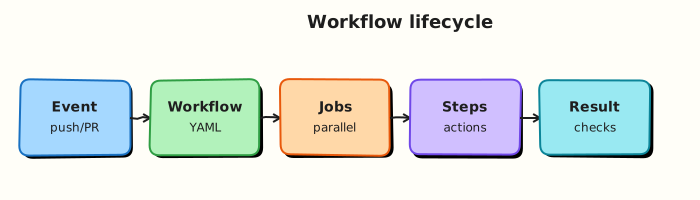
The notifications controller subscribes to Application events, evaluates triggers, renders templates, and calls configured services.
Theory
What it is
Triggers match Application state — for example on-sync-failed, on-health-degraded, or custom expressions on .status.operationState and .status.health. Templates format the payload (title, body, Slack blocks). Services define delivery endpoints (Slack webhook URL, Teams incoming webhook, generic HTTP). Subscriptions on Applications (annotations) or defaults link apps to triggers and destinations.
Why it matters
GitOps shifts deploy responsibility to merge events; without notifications, failures surface only when someone opens the UI. Integrating with Slack or Teams gives on-call engineers application name, revision, cluster, and deep links — reducing mean time to detect sync regressions.
How it works
- Application status changes (sync failed, health degraded, deployed).
- Notifications controller evaluates subscribed triggers.
- Matching trigger selects a template and service.
- Controller POSTs rendered payload to webhook/API.
- Secrets supply
$slack-tokenor webhook URL references.
Key concepts and comparisons
| Component | Purpose |
|---|---|
trigger | When to notify (condition expression) |
template | What message to send |
service | Where to send (Slack, email, webhook) |
subscription | Which app uses which trigger + destination |
| Channel | Config key | Secret needs |
|---|---|---|
| Slack | service.slack | Webhook URL or bot token in Secret |
| Teams | service.webhook.teams | Incoming webhook URL |
| Generic | service.webhook | URL + optional headers |
Common pitfalls
- Storing webhook URLs in ConfigMap
stringDatacommitted to Git. - Subscribing every app to
on-deployedin busy clusters — alert fatigue. - Missing
$escape in templates when GitOps repos also use templating tools. - Not testing triggers with a deliberate failed sync in a lab app first.
Hands-on Lab
Objective
Apply notification triggers and templates on a kind cluster, subscribe an Application to sync-failure alerts, force a failed sync, prove the notifications controller evaluates the trigger, then fix the manifest and restore Healthy status.
Prerequisites
- kind cluster with Argo CD installed (Installing Argo CD)
- Notifications controller running:
kubectl get deploy -n argocd argocd-notifications-controller kubectlandargocdCLI logged in
Lab environment
Runtime: kind cluster with Argo CD — offline YAML parsing alone is not sufficient for this lab.
kind create cluster --name rebash-argocd 2>/dev/null || true
export KUBECONFIG="$(kind get kubeconfig --name rebash-argocd)"
mkdir -p ~/rebash-argocd/module-12/{notifications,apps} && cd ~/rebash-argocd/module-12
kubectl get pods -n argocd -l app.kubernetes.io/name=argocd-notifications-controller | tee notif-pods-m12.txt
Real-world scenario
On-call needs Slack alerts when production Applications sync fails. Platform engineering configures triggers and templates, stores webhook credentials in a Secret (not Git), subscribes a lab Application, deliberately breaks the manifest path to force sync failure, confirms the notifications controller fires the trigger, then fixes the path and proves recovery.
Step-by-step tasks
Task 1 – Apply notifications ConfigMap
Create notifications/argocd-notifications-cm.yaml:
apiVersion: v1
kind: ConfigMap
metadata:
  name: argocd-notifications-cm
  namespace: argocd
  labels:
    app.kubernetes.io/part-of: argocd
data:
  trigger.on-sync-failed: |
    - when: app.status.operationState.phase in ['Error', 'Failed']
      send: [sync-failed-slack]
  trigger.on-health-degraded: |
    - when: app.status.health.status == 'Degraded'
      send: [health-degraded-slack]
  template.sync-failed-slack: |
    message: |
      Sync failed for {{.app.metadata.name}} in {{.app.spec.destination.namespace}}.
      Revision: {{.app.status.sync.revision | default "unknown"}}
    slack:
      attachments: |
        [{
          "title": "{{.app.metadata.name}} sync failed",
          "color": "#E01E5A",
          "fields": [
            {"title": "Project", "value": "{{.app.spec.project}}", "short": true},
            {"title": "Namespace", "value": "{{.app.spec.destination.namespace}}", "short": true}
          ]
        }]
  template.health-degraded-slack: |
    message: |
      Health degraded: {{.app.metadata.name}}
    slack:
      attachments: |
        [{"title": "{{.app.metadata.name}} health degraded", "color": "#ECB22E"}]
  service.slack: |
    token: $slack-token
  subscriptions: |
    - recipients:
        - slack:platform-alerts
      triggers:
        - on-sync-failed
        - on-health-degraded
Apply and verify the controller reloads config:
cd ~/rebash-argocd/module-12
kubectl apply -f notifications/argocd-notifications-cm.yaml | tee notif-cm-apply-m12.txt
kubectl get configmap argocd-notifications-cm -n argocd \
  -o jsonpath='{.data.service\.slack}{"\n"}' | tee notif-service-m12.txt
grep -q 'slack-token' notif-service-m12.txt
Expected output
ConfigMap applied; service references $slack-token placeholder.
Task 2 – Apply Secret placeholder and subscribe Application
Create notifications/argocd-notifications-secret-lab.yaml:
apiVersion: v1
kind: Secret
metadata:
  name: argocd-notifications-secret
  namespace: argocd
  labels:
    app.kubernetes.io/part-of: argocd
  annotations:
    rebash.academy/warning: "Lab placeholder only — replace with real webhook from vault in production"
type: Opaque
stringData:
  slack-token: "lab-placeholder-not-a-real-webhook"
Create apps/demo-notify.yaml:
apiVersion: argoproj.io/v1alpha1
kind: Application
metadata:
  name: demo-notify
  namespace: argocd
  annotations:
    notifications.argoproj.io/subscribe.on-sync-failed.slack: platform-alerts
    notifications.argoproj.io/subscribe.on-health-degraded.slack: platform-alerts
spec:
  project: default
  source:
    repoURL: https://github.com/argoproj/argocd-example-apps.git
    targetRevision: HEAD
    path: guestbook
  destination:
    server: https://kubernetes.default.svc
    namespace: rebash-argocd-m12
  syncPolicy:
    automated:
      prune: true
      selfHeal: true
    syncOptions:
      - CreateNamespace=true
Apply Secret and Application, wait for initial sync:
cd ~/rebash-argocd/module-12
kubectl apply -f notifications/argocd-notifications-secret-lab.yaml | tee notif-secret-apply-m12.txt
kubectl apply -f apps/demo-notify.yaml | tee app-apply-m12.txt
kubectl wait --for=jsonpath='{.status.sync.status}'=Synced \
  application/demo-notify -n argocd --timeout=300s | tee wait-initial-sync-m12.txt
kubectl get deploy -n rebash-argocd-m12 | tee workloads-initial-m12.txt
Expected output
Application Synced; guestbook workloads exist in rebash-argocd-m12.
Task 3 – Force sync failure and prove trigger evaluation
Create apps/demo-notify-broken.yaml:
apiVersion: argoproj.io/v1alpha1
kind: Application
metadata:
  name: demo-notify
  namespace: argocd
  annotations:
    notifications.argoproj.io/subscribe.on-sync-failed.slack: platform-alerts
    notifications.argoproj.io/subscribe.on-health-degraded.slack: platform-alerts
spec:
  project: default
  source:
    repoURL: https://github.com/argoproj/argocd-example-apps.git
    targetRevision: HEAD
    path: guestbook/this-path-does-not-exist
  destination:
    server: https://kubernetes.default.svc
    namespace: rebash-argocd-m12
  syncPolicy:
    automated:
      prune: true
      selfHeal: true
    syncOptions:
      - CreateNamespace=true
Apply broken manifest and capture failure state:
cd ~/rebash-argocd/module-12
kubectl apply -f apps/demo-notify-broken.yaml | tee broken-app-apply-m12.txt
sleep 15
kubectl get application demo-notify -n argocd \
  -o jsonpath='Sync={.status.sync.status} Phase={.status.operationState.phase}{"\n"}' \
  | tee sync-failed-state-m12.txt
kubectl logs -n argocd -l app.kubernetes.io/name=argocd-notifications-controller --tail=80 \
  | tee notif-controller-logs-m12.txt
grep -Ei 'demo-notify|sync-failed|trigger|notify' notif-controller-logs-m12.txt || \
  grep -Ei 'Failed|Error' sync-failed-state-m12.txt
Expected output
Application sync fails (Failed/Error phase or OutOfSync with operation error); notifications controller logs mention demo-notify or trigger evaluation.
Task 4 – Fix manifest and prove recovery
Restore the working Application manifest:
cd ~/rebash-argocd/module-12
kubectl apply -f apps/demo-notify.yaml | tee fixed-app-apply-m12.txt
kubectl wait --for=jsonpath='{.status.sync.status}'=Synced \
  application/demo-notify -n argocd --timeout=300s | tee wait-recovered-sync-m12.txt
kubectl get application demo-notify -n argocd \
  -o jsonpath='Sync={.status.sync.status} Health={.status.health.status}{"\n"}' \
  | tee recovered-health-m12.txt
grep -q 'Synced' recovered-health-m12.txt
Expected output
Application returns to Synced and Healthy after path fix.
Validation steps
- Notifications ConfigMap applied with triggers, templates, and
$slack-tokenreference - Application subscribed via annotations syncs guestbook successfully
- Broken path produces sync failure visible in Application status
- Notifications controller logs show trigger activity for
demo-notify - Fixed manifest restores Synced and Healthy state
Common errors and fixes
| Error | Cause | Fix |
|---|---|---|
| No messages delivered | Secret key name mismatch | Ensure Secret key matches $slack-token reference |
| Template render error | Invalid Go template syntax | Test with argocd-notifications template notify CLI |
| Alert spam | Too many default subscriptions | Scope subscriptions per app or use project defaults |
| 401 from Slack | Revoked webhook | Rotate token in Secret; restart notifications controller |
| Controller silent | Notifications controller not running | Check argocd-notifications-controller pods |
Challenge exercise
Add a generic webhook service entry and an on-deployed trigger that fires only when app.spec.destination.namespace contains prod. Apply the updated ConfigMap and confirm the new trigger key appears in kubectl get cm argocd-notifications-cm -n argocd -o yaml.
Learning outcomes
- Applied notification triggers and templates on a live Argo CD instance
- Subscribed an Application and forced a real sync failure
- Inspected notifications controller logs for trigger evaluation evidence
- Restored Healthy sync after fixing the manifest path
Cleanup
kubectl delete application demo-notify -n argocd --ignore-not-found
kubectl delete secret argocd-notifications-secret -n argocd --ignore-not-found
kubectl delete namespace rebash-argocd-m12 --ignore-not-found
# Restore original argocd-notifications-cm from backup in production
rm -rf ~/rebash-argocd/module-12
Validation
- Lab evidence captured under
~/rebash-argocd/module-12/ - You can explain trigger vs template vs service
- Sync failure and recovery proven on a live Application
- You know where to store webhook URLs (Secret, not Git)
Code Walkthrough
- Triggers use
whenexpressions over Application status fields;sendlists template names. - Templates support
message, channel-specific blocks (slack,email), and Go template functions. - Services reference
$variablekeys resolved fromargocd-notifications-secret. - Subscriptions via annotations override or extend global defaults in ConfigMap.
Security Considerations
- Never commit Slack/Teams webhook URLs or bot tokens to Git.
- Restrict who can edit
argocd-notifications-cmand notification Secrets. - Sanitise template output — avoid leaking internal URLs or credentials in alert bodies.
- Use dedicated alert channels per environment; do not mix prod and dev firehose.
- Rotate webhook tokens on the same schedule as other integration secrets.
Common Mistakes
Putting webhook URLs in the ConfigMap
ConfigMaps are often world-readable in GitOps repos. Use Secrets and $key references.
Subscribing all apps to every trigger
Leads to noise and ignored alerts. Prefer explicit annotations or project-level defaults.
Testing only happy-path sync
Validate failure templates with a deliberate bad manifest in a lab Application.
Best Practices
- Start with sync-failed and health-degraded; add deployed notifications later.
- Include deep links to Argo CD UI and Git commit SHA in templates.
- Document on-call runbook links in Slack attachment fields.
- Version-control trigger/template YAML in a platform repo; inject secrets at deploy.
- Review alert volume monthly; tune triggers to reduce duplicates.
Troubleshooting
| Symptom | Likely cause | Fix |
|---|---|---|
| Silent failures | Notifications controller not running | Check argocd-notifications-controller pods |
template not found | Name mismatch in trigger send | Align trigger send list with template key |
| Slack 404 | Wrong webhook URL | Verify Secret value and workspace app config |
| Duplicate messages | Overlapping subscriptions | Remove redundant default + per-app subs |
Summary
Argo CD Notifications connects Application lifecycle events to Slack, Teams, and webhooks through triggers, templates, and services. Keep credentials in Secrets, prove triggers with deliberate sync failures in a lab Application, and subscribe applications deliberately to avoid alert fatigue.
Interview Questions
1. What are the three main building blocks of Argo CD Notifications?
Reveal answer
Triggers (when to fire), templates (message content), and services (delivery channel such as Slack or webhook). Subscriptions link applications to triggers and recipient channels via annotations or ConfigMap defaults.
2. Where should a Slack webhook URL be stored?
Reveal answer
In the argocd-notifications-secret Secret (or external secret operator target), referenced from the ConfigMap as $slack-token or similar — never committed in plain text to Git.
3. How do you subscribe a single Application to sync-failure alerts?
Reveal answer
Add annotations such as notifications.argoproj.io/subscribe.on-sync-failed.slack: channel-name on the Application metadata, ensuring the trigger and template exist in argocd-notifications-cm.
4. What Application conditions are commonly alerted in production?
Reveal answer
Sync failed/error phases, health Degraded/Missing, and optionally successful prod deploys. Many teams skip success alerts in non-prod to reduce noise.
5. How would you test a new template without breaking production apps?
Reveal answer
Use a lab Application with a deliberate bad manifest to force sync failure, or the notifications CLI template notify with fixture data; route to a test Slack channel first.