Argo CD Architecture and Components
Overview
Argo CD runs as a set of controllers and services on Kubernetes. Understanding each component helps you troubleshoot sync failures, size clusters, and design high availability (HA). The API server exposes the UI, REST/gRPC API, and CLI backend. The repository server clones Git and renders Helm/Kustomize. The application controller compares desired state to live resources and performs sync operations.
Supporting services include Redis (cache and coordination), Dex (SSO connector, optional), and the notifications controller (Slack, email, webhooks). This module maps those pieces before you install Argo CD in Module 3.
This is Tutorial 2 in Module 2: Architecture of the REBASH Academy Argo CD for Kubernetes Engineers series — written for engineers who will operate the control plane in production.
Prerequisites
- Introduction to GitOps and Argo CD
- Kubernetes Architecture and Components — control plane vs worker, etcd, API server
kubectlconfigured (optional cluster withargocdnamespace for live pod evidence)
Learning Objectives
By the end of this tutorial, you will be able to:
- Name each core Argo CD component and its responsibility
- Trace a sync request from UI/CLI through repo server to application controller
- Explain why Redis and repo-server scaling matter under load
- Describe where Dex and notifications fit in non-HA vs HA layouts
- Document component facts in YAML and validate against a live install when available
Architecture
Argo CD is a Kubernetes-native application: each component is a Deployment or StatefulSet in the argocd namespace. The application controller watches Application CRs cluster-wide; repo server is stateless and horizontally scalable.
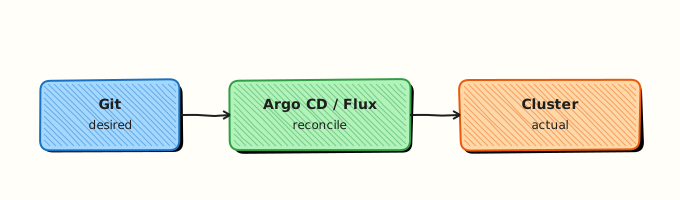
The diagram shows Git as source of truth and a controller reconciling the cluster — Argo CD’s application controller fulfils that reconciler role, backed by repo server and API server.
Theory
What it is
Argo CD’s control plane consists of specialised pods:
| Component | Kind (typical) | Role |
|---|---|---|
| argocd-server | Deployment | API, UI, auth session, CLI proxy |
| argocd-repo-server | Deployment | Git/OCI fetch, manifest generation |
| argocd-application-controller | StatefulSet | Reconciliation loop, sync execution |
| argocd-redis | Deployment | Cache rendered manifests, lock coordination |
| argocd-dex-server | Deployment | OIDC/LDAP/SAML SSO bridge (optional) |
| argocd-notifications-controller | Deployment | Event-driven alerts (optional) |
| argocd-applicationset-controller | Deployment | Generates Applications from templates (optional) |
Custom resources include Application, AppProject, ApplicationSet, and Repository (legacy; secrets with labels are preferred).
Why it matters
Sync stuck at “Comparing revisions”? Often repo-server cannot clone a private Git repo. UI login loops? Check argocd-server and Dex. Slow diff on monorepos? Scale repo-server replicas and ensure Redis is healthy. Production on-call needs a component map — not guesswork restarting random pods.
Sizing: application-controller CPU grows with Application count and cluster size; repo-server memory grows with large Helm charts. HA manifests (install.yaml vs ha/install.yaml) run multiple replicas with anti-affinity — covered in Module 3.
How it works
- User or CI creates/updates an Application CR (declarative) or uses
argocd app create(imperative wrapper). - Application controller enqueues the Application, requests a manifest from repo server at the specified
repoURL,path, andtargetRevision. - Repo server clones/fetches, runs Kustomize/Helm/Jsonnet/plugins, returns normalized manifests (and caches via Redis).
- Controller diffs manifests against live cluster state (with optional ignore differences).
- On sync, controller applies resources via Kubernetes API; updates status fields (
sync.status,health.status). - argocd-server serves UI/CLI queries from Application status in etcd via API machinery — it does not apply manifests itself.
- Notifications controller watches Application events and sends configured triggers.
- Dex delegates authentication to corporate IdP when SSO is configured; otherwise local admin/user accounts apply.
Request path summary:
UI/CLI → argocd-server → Application CR (etcd)
                              ↓
              argocd-application-controller
                     ↓              ↑
              argocd-repo-server ← argocd-redis
                     ↓
                   Git / OCI
Key concepts and comparisons
| Component | Failure symptom | First check |
|---|---|---|
| repo-server | rpc error / manifest generation failed | Repo credentials, network, Helm template error |
| application-controller | OutOfSync never resolves | Controller logs, RBAC for destination cluster |
| redis | Timeouts, repeated clones | Redis pod, memory limits |
| argocd-server | 502 UI, CLI login fail | Ingress/TLS, server pod logs |
| dex | SSO redirect errors | Dex config, connector secrets |
Non-HA vs HA (official manifests):
| Install manifest | Controller | Repo server | Redis |
|---|---|---|---|
install.yaml | Single replica | Single replica | Single pod |
ha/install.yaml | Sharded controllers | Multiple replicas | Redis HA (Sentinel/Redis) |
Pin a release tag in production instead of tracking stable branch manifests blindly.
Common pitfalls
- Restarting only argocd-server when sync fails — apply path lives in application-controller and repo-server.
- Sharing one repo-server cache Redis across untrusted teams without network policy — treat Redis as sensitive cache.
- Enabling Dex without understanding redirect URIs — breaks UI login for all SSO users.
- Ignoring applicationset-controller when using ApplicationSet — generators silently stop if that pod is down.
- Running application-controller with insufficient RBAC on managed clusters — sync partial failures look like mysterious OutOfSync.
Hands-on Lab
Objective
Install or verify Argo CD on a kind cluster, collect live pod evidence from the argocd namespace, apply a reference Application manifest, and prove sync status with kubectl get applications.
Prerequisites
- Completed Module 1 (kind cluster) or Module 3 install lab
- kind cluster with Argo CD installed in namespace
argocd kubectlandargocdCLI (optional but recommended)
Lab environment
mkdir -p ~/rebash-argocd/module-02 && cd ~/rebash-argocd/module-02
export KUBECONFIG="$(kind get kubeconfig-path --name rebash-argocd 2>/dev/null || kind get kubeconfig --name rebash-argocd)"
Runtime: kind cluster with Argo CD control plane — offline YAML-only validation is not sufficient.
Real-world scenario
You join a platform team mid-incident: the UI loads but Applications stay Progressing. The runbook asks for pod inventory and Application CR status before restarting anything. You collect evidence from a live argocd namespace and apply a minimal Application to prove the sync path works.
Step-by-step tasks
Task 1 – Verify Argo CD control plane pods
If Argo CD is not installed yet, run the Module 3 install script or:
kubectl create namespace argocd --dry-run=client -o yaml | kubectl apply -f -
kubectl apply -n argocd --server-side --force-conflicts \
  -f https://raw.githubusercontent.com/argoproj/argo-cd/stable/manifests/install.yaml
kubectl wait --for=condition=Available deployment/argocd-server -n argocd --timeout=300s
Collect pod evidence:
cd ~/rebash-argocd/module-02
kubectl get pods -n argocd -o wide | tee pod-evidence-m02.txt
kubectl get pods -n argocd --no-headers | awk '{print $1}' | tee pod-names-m02.txt
grep -q 'argocd-server' pod-names-m02.txt
grep -q 'argocd-repo-server' pod-names-m02.txt
grep -q 'argocd-application-controller' pod-names-m02.txt
echo "control plane pods OK" | tee pods-ok-m02.txt
Expected output
pod-evidence-m02.txt lists Running pods for server, repo-server, and application-controller.
Task 2 – Map services and CRDs
cd ~/rebash-argocd/module-02
kubectl get svc -n argocd | tee svc-evidence-m02.txt
kubectl get crd applications.argoproj.io applicationsets.argoproj.io | tee crd-evidence-m02.txt
grep -q argocd-server svc-evidence-m02.txt
grep -q applications.argoproj.io crd-evidence-m02.txt
echo "services and CRDs OK" | tee svc-crd-ok-m02.txt
Expected output
argocd-server Service exists; Application CRD registered.
Create application-ref.yaml:
apiVersion: argoproj.io/v1alpha1
kind: Application
metadata:
  name: architecture-lab-ref
  namespace: argocd
spec:
  project: default
  source:
    repoURL: https://github.com/argoproj/argocd-example-apps.git
    targetRevision: HEAD
    path: guestbook
  destination:
    server: https://kubernetes.default.svc
    namespace: rebash-argocd-m02
  syncPolicy:
    automated:
      prune: false
      selfHeal: true
    syncOptions:
      - CreateNamespace=true
Apply and wait for sync:
cd ~/rebash-argocd/module-02
kubectl apply -f application-ref.yaml | tee app-apply-m02.txt
kubectl wait --for=jsonpath='{.status.sync.status}'=Synced \
  application/architecture-lab-ref -n argocd --timeout=300s | tee app-sync-wait-m02.txt
kubectl get application architecture-lab-ref -n argocd \
  -o jsonpath='Sync={.status.sync.status} Health={.status.health.status}{"\n"}' | tee app-status-m02.txt
grep -q 'Synced' app-status-m02.txt
kubectl get deploy,svc -n rebash-argocd-m02 | tee app-workloads-m02.txt
echo "Application sync OK" | tee app-sync-ok-m02.txt
Expected output
Application reports Synced; guestbook workloads appear in rebash-argocd-m02.
Validation steps
- Argo CD pods Running in namespace
argocd - Application and ApplicationSet CRDs exist
- Reference Application applied and reaches Synced status
- Guestbook workloads visible in destination namespace
- You can explain why argocd-server does not apply manifests
Common errors and fixes
| Error | Cause | Fix |
|---|---|---|
| No argocd namespace | Argo CD not installed yet | Complete Module 3 install; offline validation still passes |
| repo-server CrashLoopBackOff | Bad plugin or OOM | Check kubectl logs -n argocd deploy/argocd-repo-server |
| Application CR dry-run fails CRD unknown | Argo CD CRDs not installed | Expected before Module 3 — use YAML lint and continue |
| Dex pod missing | Non-SSO install may still include dex | Not all distros enable SSO; document actual pod list |
| Redis connection errors in logs | Redis pod down or network policy | Restart redis; verify Service argocd-redis |
Challenge exercise
Extend collect-evidence.sh to append kubectl get svc -n argocd and flag if argocd-server Service has no endpoints — a quick health probe you could reuse after upgrades.
Learning outcomes
- Mapped each Argo CD component to operational symptoms
- Maintained machine-readable architecture documentation
- Collected pod evidence safely without restarting control plane pods
- Linked Application CR fields to repo-server and controller responsibilities
Cleanup
kubectl delete application architecture-lab-ref -n argocd --ignore-not-found
kubectl delete namespace rebash-argocd-m02 --ignore-not-found
rm -f ~/rebash-argocd/module-02/*-m02.txt
Validation
- Lab artefacts exist under
~/rebash-argocd/module-02/ - You can draw the sync path from Git to cluster without notes
- You know which pod logs to check for manifest generation failures
- You can name one HA consideration for repo-server
Code Walkthrough
Operating Argo CD architecture in production:
- Inspect status —
kubectl get pods -n argocdbefore any restart. - Change via Git — upgrade Argo CD with pinned manifest tags, not hand-edited Deployments.
- Evidence — save pod lists and Application conditions after upgrades.
- Scale repo-server — first lever for slow Helm/Kustomize repos.
- Least privilege — application-controller RBAC only on managed destinations.
Security Considerations
- argocd-server exposes the UI — protect with SSO (Dex), network policy, and ingress TLS.
- repo-server holds credentials to clone private repos — restrict who can exec into pods.
- Redis cache may contain rendered manifests with sensitive values — encrypt etcd and restrict namespace access.
- Disable admin password in production after SSO and rotate bootstrap secrets.
- Separate management cluster from workload clusters for multi-cluster — limit blast radius.
Common Mistakes
Restarting argocd-server to fix sync errors
Server serves UI/API; sync executes in application-controller and repo-server. Fix: inspect controller and repo-server logs first.
Single replica repo-server on large monorepos
Manifest generation becomes a bottleneck. Fix: scale repo-server Deployment or shard repos across instances.
Skipping Redis health checks
Degraded Redis forces expensive re-clones. Fix: monitor Redis memory and connectivity from repo-server logs.
Best Practices
- Pin Argo CD manifest version to a release tag; test upgrades in non-production first.
- Use HA manifests for production control planes.
- Monitor Application count per controller shard in HA mode.
- Document which IdP connector Dex uses and own redirect URI configuration.
- Keep architecture diagram and facts YAML in the platform runbook repo.
Troubleshooting
| Symptom | Likely cause | Fix |
|---|---|---|
| UI up, all apps Unknown | application-controller not running | Check controller StatefulSet pods and logs |
ComparisonError in Application | repo-server cannot generate manifests | Validate repo URL, credentials, Helm/Kustomize path |
| Slow diff | Large repo, cold cache | Scale repo-server; verify Redis |
| SSO login fails | Dex misconfiguration | Review argocd-cm and Dex config maps |
| Notifications silent | notifications-controller or trigger CM | Check argocd-notifications-cm and controller logs |
Summary
Argo CD splits concerns: repo server renders Git, application controller syncs clusters, API server presents status, Redis caches, Dex handles SSO, and notifications alert operators. Module 3 installs these components on kind or minikube with verification scripts.
Next: Installing Argo CD.
Interview Questions
1. Which component generates Kubernetes manifests from a Helm chart in Git?
Reveal answer
The argocd-repo-server. It clones the repository (or pulls OCI artefacts), runs Helm/Kustomize/Jsonnet as configured in the Application spec, and returns normalized manifests to the application controller. The API server does not render charts.
2. Why is argocd-application-controller typically a StatefulSet?
Reveal answer
HA installations shard work across controller replicas with stable network identity and coordinated leadership/sharding. StatefulSet provides predictable pod names and stable storage hooks for sharding configuration. Single-replica non-HA installs still use StatefulSet in upstream manifests for consistency.
3. What role does Redis play in Argo CD?
Reveal answer
Redis caches rendered manifest data and supports coordination so repo-server does not re-clone and re-render on every minor reconciliation. Redis failure degrades performance and can cause timeouts — it is not the source of truth (Git and etcd are).
4. How does Dex fit into authentication?
Reveal answer
Dex is an OIDC bridge. Argo CD delegates login to Dex, which federates corporate IdP (LDAP, SAML, GitHub, etc.). Users receive Argo CD RBAC roles mapped from IdP groups. Local admin account exists for bootstrap but should be disabled or rotated after SSO in production.
5. Where would you look if Applications stay OutOfSync with rpc error?
Reveal answer
Start with argocd-repo-server logs — RPC errors often mean manifest generation failed (bad Helm values, missing path, auth to private repo). Then verify Repository secrets and network egress from repo-server pods.
6. Does argocd-server need cluster-admin to function?
Reveal answer
argocd-server needs permissions to read Application status and serve API/UI — not full cluster-admin for workload apply. The application-controller service account requires broader RBAC on destination clusters to create/update/delete synced resources. Scope RBAC per AppProject and destination.
7. What is the difference between install.yaml and ha/install.yaml?
Reveal answer
Standard install runs single replicas suited to labs. HA manifest runs multiple replicas of server, repo-server, and sharded application controllers with Redis HA for production resilience. Always pin a specific release tag rather than floating stable in production.
Related Tutorials
- Course overview
- Introduction to GitOps and Argo CD
- Installing Argo CD — next
- Kubernetes Architecture