Helm with Argo CD
Overview
Argo CD can treat a Helm chart as an Application source: it renders templates with merged values and applies the result — no separate helm install from laptops. You configure source.helm.valueFiles, inline parameters, optional releaseName, and chart version in the Application spec. Charts can live in Git beside plain YAML or be pulled from an OCI registry (oci://).
This pattern is how platform teams ship one chart to many environments: chart in Git, values-dev.yaml / values-prod.yaml overlays, Argo CD Application per environment. CI builds images and bumps tags in values files; Argo CD reconciles the release.
This is Tutorial 7 in Module 7 · Helm Sources of the REBASH Academy Argo CD for Kubernetes GitOps series — written for Cloud, DevOps, Platform, and SRE engineers.
Prerequisites
- Synchronisation, sync options, and hooks
- Helm values and overrides
helmCLI v3.8+ andkubectl- Optional: local Kubernetes cluster with Argo CD
Learning Objectives
By the end of this tutorial, you will be able to:
- Configure an Application with
source.helmfields - Reference multiple
valueFilesfor environment overlays - Override chart values with Application parameters
- Explain OCI chart sources and when to use them
- Validate renders offline with
helm templatebefore sync - Compare Argo CD Helm behaviour with standalone
helm upgrade
Architecture
Argo CD renders Helm charts from Git or OCI, merges values, and applies manifests like any other Application source.
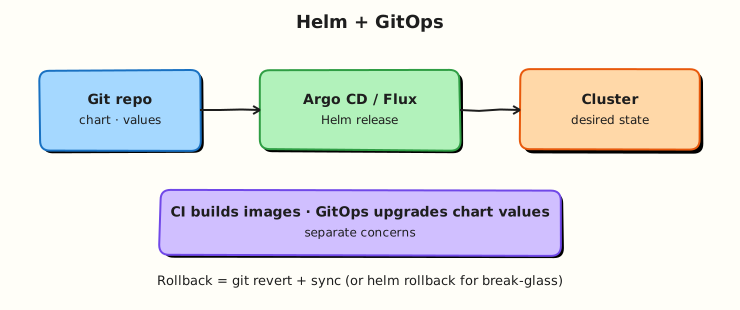
Theory
What it is
When spec.source.path points at a chart directory (contains Chart.yaml), Argo CD uses its Helm integration to template the chart. Key fields under spec.source.helm:
| Field | Purpose |
|---|---|
valueFiles | List of values files relative to the chart directory |
parameters | Inline overrides (name, value or forceString) |
releaseName | Helm release name (defaults to Application name) |
version | Chart version when source is a Helm repo or OCI |
values | Inline YAML string (use sparingly — prefer files in Git) |
skipCrds | Skip CRD install from chart crds/ |
passCredentials | Pass repo credentials to Helm when fetching dependencies |
OCI sources use repoURL: oci://registry.example.com/charts/my-chart with chart and targetRevision (version tag).
Why it matters
Helm is the packaging standard for Kubernetes applications. Argo CD Helm support lets you keep GitOps benefits (audit, rollback, drift detection) without giving every developer cluster-admin for helm upgrade. Platform engineers publish one chart; product teams own values overlays in Git.
How it works
- Application points at chart path in Git (or OCI URL).
- Argo CD loads default
values.yamlfrom the chart. - It merges
valueFilesin order, thenparameters, then inlinevalues. - Templates render to Kubernetes manifests; Argo CD tracks them as managed resources.
- Upgrades happen on Git commit — same as plain YAML sources.
Argo CD does not store Helm release secrets in the same way as Tiller-era Helm; it manages rendered resources directly. Use helm template locally to preview what Argo CD will apply.
Key concepts and comparisons
| Approach | Pros | Cons |
|---|---|---|
| Chart in Git + valueFiles | Full PR review, easy diff | Large repos; chart versioning discipline needed |
| OCI chart + values in Git | Clear artefact boundary | Registry auth and promotion pipeline required |
Inline parameters only | Quick experiments | Hard to audit; prefer files for prod |
helm upgrade from CI | Familiar | Push credentials; weaker drift story |
valueFiles paths resolve relative to the chart directory, not the repo root. If your chart is at charts/app/ and values at envs/prod/values.yaml, you often need ../../envs/prod/values.yaml from the chart path — verify with helm template.
Common pitfalls
- Wrong valueFiles path — silent use of chart defaults only. Fix: Run
helm templatewith the same-fpaths Argo uses. - Dual writers — CI runs
helm upgradewhile Argo CD syncs the same release name. Fix: Choose GitOps-only or disable Argo for that release. - Unpinned chart version on Helm/OCI repos —
targetRevision: "*"pulls latest. Fix: Pin semver tags in production Applications. - Secrets in values files — committed passwords in Git. Fix: External Secrets, Sealed Secrets, or SOPS; keep values non-secret.
- CRD race — chart installs CRDs and CRs in one sync. Fix: Separate CRD Application or sync waves; consider
skipCrdsand manage CRDs explicitly.
Hands-on Lab
Objective
Build a minimal Helm chart locally, add environment value overlays, render with helm template, and create an Argo CD Application referencing source.helm.valueFiles.
Prerequisites
- Helm 3.8+ and Python 3 for YAML validation
kubectlfor dry-run- Workspace under
~/rebash-argocd/module-07
Lab environment
mkdir -p ~/rebash-argocd/module-07/charts/rebash-guestbook/templates \
  ~/rebash-argocd/module-07/envs \
  ~/rebash-argocd/module-07/apps && cd ~/rebash-argocd/module-07
Namespace: rebash-argocd-m07.
Real-world scenario
A platform team standardises on an internal guestbook chart fork. Developers test value changes with helm template in CI; Argo CD Applications for dev and staging reference the same chart with different valueFiles — no forked templates per environment.
Step-by-step tasks
Task 1 – Minimal Helm chart
Create charts/rebash-guestbook/Chart.yaml:
apiVersion: v2
name: rebash-guestbook
description: Minimal guestbook chart for Argo CD Helm lab
type: application
version: 0.1.0
appVersion: "1.0"
Create charts/rebash-guestbook/values.yaml:
replicaCount: 1
image:
  repository: nginxinc/nginx-unprivileged
  tag: "1.27-alpine"
service:
  port: 8080
guestbook:
  title: "REBASH Guestbook"
  environment: dev
Create charts/rebash-guestbook/templates/deployment.yaml:
apiVersion: apps/v1
kind: Deployment
metadata:
  name: {{ .Release.Name }}-guestbook
  labels:
    app.kubernetes.io/name: {{ .Chart.Name }}
spec:
  replicas: {{ .Values.replicaCount }}
  selector:
    matchLabels:
      app: {{ .Release.Name }}
  template:
    metadata:
      labels:
        app: {{ .Release.Name }}
    spec:
      containers:
        - name: web
          image: "{{ .Values.image.repository }}:{{ .Values.image.tag }}"
          env:
            - name: GUESTBOOK_TITLE
              value: {{ .Values.guestbook.title | quote }}
            - name: APP_ENV
              value: {{ .Values.guestbook.environment | quote }}
          ports:
            - containerPort: {{ .Values.service.port }}
Create charts/rebash-guestbook/templates/service.yaml:
apiVersion: v1
kind: Service
metadata:
  name: {{ .Release.Name }}-guestbook
spec:
  ports:
    - port: {{ .Values.service.port }}
      targetPort: {{ .Values.service.port }}
  selector:
    app: {{ .Release.Name }}
Lint the chart:
cd ~/rebash-argocd/module-07
helm lint charts/rebash-guestbook | tee lint-m07.txt
grep -q 'Lint OK' lint-m07.txt || grep -q '0 chart(s) failed' lint-m07.txt
Expected output
helm lint reports no errors.
Task 2 – Environment value overlays
Create envs/values-dev.yaml:
Create envs/values-staging.yaml:
replicaCount: 2
guestbook:
  environment: staging
  title: "REBASH Guestbook — Staging"
Render offline with merged values:
cd ~/rebash-argocd/module-07
helm template guestbook-dev charts/rebash-guestbook \
  -f envs/values-dev.yaml \
  --namespace rebash-argocd-m07 | tee render-dev-m07.yaml
helm template guestbook-staging charts/rebash-guestbook \
  -f envs/values-dev.yaml -f envs/values-staging.yaml \
  --namespace rebash-argocd-m07 | tee render-staging-m07.yaml
grep 'replicas:' render-dev-m07.yaml | head -1 | tee replicas-dev-m07.txt
grep 'replicas:' render-staging-m07.yaml | head -1 | tee replicas-staging-m07.txt
grep -q 'replicas: 1' replicas-dev-m07.txt
grep -q 'replicas: 2' replicas-staging-m07.txt
Expected output
Dev render shows one replica; staging shows two after overlay merge.
Task 3 – Argo CD Application with valueFiles
Create apps/application-helm-dev.yaml:
apiVersion: argoproj.io/v1alpha1
kind: Application
metadata:
  name: rebash-guestbook-dev
  namespace: argocd
spec:
  project: default
  source:
    repoURL: https://github.com/example/rebash-gitops.git
    targetRevision: main
    path: charts/rebash-guestbook
    helm:
      releaseName: rebash-guestbook-dev
      valueFiles:
        - ../../envs/values-dev.yaml
      parameters:
        - name: guestbook.environment
          value: dev
  destination:
    server: https://kubernetes.default.svc
    namespace: rebash-argocd-m07
  syncPolicy:
    syncOptions:
      - CreateNamespace=true
Create apps/application-helm-local.yaml for a file-based repo (adjust path to your home directory):
apiVersion: argoproj.io/v1alpha1
kind: Application
metadata:
  name: rebash-guestbook-local
  namespace: argocd
spec:
  project: default
  source:
    repoURL: file:///tmp/rebash-argocd/module-07
    path: charts/rebash-guestbook
    targetRevision: HEAD
    helm:
      releaseName: rebash-guestbook-local
      valueFiles:
        - ../../envs/values-staging.yaml
  destination:
    server: https://kubernetes.default.svc
    namespace: rebash-argocd-m07
  syncPolicy:
    automated:
      prune: false
      selfHeal: true
    syncOptions:
      - CreateNamespace=true
Validate Application and rendered kinds:
cd ~/rebash-argocd/module-07
kubectl apply --dry-run=client -f apps/application-helm-local.yaml 2>&1 | tee app-helm-dryrun-m07.txt
python3 -c "import yaml,sys; yaml.safe_load_all(open('render-staging-m07.yaml')); print('YAML OK')" | tee yaml-check-m07.txt
grep -E '^kind:' render-staging-m07.yaml | sort | uniq -c | tee kinds-m07.txt
grep -q 'Deployment' kinds-m07.txt
Expected output
Application passes client dry-run; rendered YAML parses; Deployment and Service kinds present.
Task 4 – Apply Helm Application and prove sync
cd ~/rebash-argocd/module-07
cp -a ~/rebash-argocd/module-07 /tmp/rebash-argocd/ 2>/dev/null || true
kubectl apply -f apps/application-helm-local.yaml | tee app-helm-apply-m07.txt
kubectl wait --for=jsonpath='{.status.sync.status}'=Synced \
  application/rebash-guestbook-helm-staging -n argocd --timeout=300s | tee app-sync-m07.txt
kubectl get application rebash-guestbook-helm-staging -n argocd \
  -o jsonpath='{.status.sync.status}{"\n"}{.status.health.status}{"\n"}' | tee app-status-m07.txt
kubectl get deploy,svc -n rebash-argocd-m07 | tee cluster-resources-m07.txt
grep -q 'Synced' app-status-m07.txt
echo "helm sync OK" | tee helm-sync-ok-m07.txt
Create apps/application-helm-oci-stub.yaml as OCI reference (document only — do not apply without registry):
apiVersion: argoproj.io/v1alpha1
kind: Application
metadata:
  name: rebash-guestbook-oci-stub
  namespace: argocd
spec:
  project: default
  source:
    repoURL: oci://ghcr.io/example/charts/rebash-guestbook
    chart: rebash-guestbook
    targetRevision: 0.1.0
    helm:
      valueFiles:
        - values.yaml
      parameters:
        - name: replicaCount
          value: "2"
  destination:
    server: https://kubernetes.default.svc
    namespace: rebash-argocd-m07
Compare source types:
cd ~/rebash-argocd/module-07
grep 'repoURL:' apps/application-helm-local.yaml apps/application-helm-oci-stub.yaml | tee source-compare-m07.txt
grep -q 'file://' source-compare-m07.txt
grep -q 'oci://' source-compare-m07.txt
Expected output
Git-based Helm Application syncs; Deployment and Service run in rebash-argocd-m07; OCI stub documents alternate source pattern.
Validation steps
- Chart lints cleanly under
charts/rebash-guestbook/ - Dev and staging overlays produce different replica counts offline
- Application references
helm.valueFileswith correct relative path -
helm templateoutput validates as YAML - OCI Application stub uses
oci://repoURL form
Common errors and fixes
| Error | Cause | Fix |
|---|---|---|
| Values not applied | valueFiles path relative to chart wrong | Use ../../envs/... from chart dir; test with helm template |
| Unknown chart type | Missing Chart.yaml | Ensure path points at chart root |
| OCI auth failure | Registry credentials not in repo secret | Add repository credentials Secret; enable OCI in argocd-cm |
| Parameter type surprise | Numeric param rendered wrong | Use forceString: true for string fields |
| Duplicate release | Same releaseName on two Apps | Unique releaseName or Application name per env |
Challenge exercise
Add a third values file envs/values-prod.yaml with replicaCount: 3 and an inline parameters entry overriding image.tag. Render offline and capture the single replicas: and image line as evidence.
Learning outcomes
- Authored a minimal Helm chart suitable for Argo CD
- Merged environment valueFiles and verified with
helm template - Declared Application
source.helmwith releaseName and parameters - Contrasted Git path sources with OCI chart sources
Cleanup
kubectl delete application rebash-guestbook-local -n argocd --ignore-not-found
kubectl delete namespace rebash-argocd-m07 --ignore-not-found
Validation
- Lab completed under
~/rebash-argocd/module-07/ - You can explain valueFiles path resolution relative to the chart
- You validated renders before any cluster sync
- You can describe dual-writer risk with standalone Helm
Code Walkthrough
Production practice for Helm with Argo CD always combines:
- Pin chart version (
targetRevision) for OCI and Helm repo sources - Keep secrets out of values committed to Git
- Run
helm templatein CI with the same valueFiles as the Application - One writer — Argo CD or pipeline Helm, not both on the same release
- Separate CRD and app Applications when charts bundle both
Security Considerations
- Store OCI and Git credentials in Argo CD repository Secrets — not in Application YAML
- Avoid inline
helm.valuesfor secrets; use External Secrets Operator - Restrict who can change
parameterson production Applications - Scan chart dependencies in CI before Argo CD sync
- Use private OCI registries with read-only tokens for the Argo CD repo-server
Common Mistakes
valueFiles path relative to repo root
Argo resolves valueFiles from the chart directory. Fix: Mirror paths in helm template -f tests.
Helm upgrade and Argo CD on the same release
Two controllers fight over resources. Fix: GitOps-only deploys; remove CI helm upgrade.
Floating chart version in production
targetRevision: HEAD on OCI pulls latest on every refresh. Fix: Pin semver tags.
Best Practices
- Colocate chart and env values in one GitOps repo with clear folder layout
- CI job:
helm lint && helm templateon every PR touching charts - Use
releaseNameexplicitly when chart name differs from Application name - Document valueFiles order — later files override earlier keys
- Promote by merging values file changes, not retagging charts unnecessarily
Troubleshooting
| Symptom | Likely cause | Fix |
|---|---|---|
| Wrong replica count | valueFiles not loaded | Fix relative path; check Application spec in UI |
| Chart not found | path not chart root | Point path at directory containing Chart.yaml |
| OCI 401 | Missing registry credential | Configure repo secret with enableOCI: true |
| CRD not established | CR applied before CRD | Sync waves; separate CRD Application |
| Diff noise on labels | Helm adds labels Argo tracks | Use ignoreDifferences for known fields |
Summary
Argo CD natively renders Helm charts from Git or OCI with merged valueFiles and parameters — the standard GitOps pattern for packaged apps. Offline helm template validates what sync will apply. Next, learn Kustomize overlays as an Application source.
Interview Questions
1. How does Argo CD deploy a Helm chart differently from helm install?
Reveal answer
Argo CD renders the chart to manifests and manages resulting Kubernetes resources as part of GitOps reconciliation — tracking drift, sync status, and health. It does not rely on Helm release secrets in the cluster the same way standalone Helm does. Upgrades trigger when Git (or OCI version) changes and the Application syncs, not from a laptop helm upgrade.
2. Where are valueFiles paths resolved from?
Reveal answer
Relative to the chart directory (spec.source.path), not the repository root. If the chart is at charts/app/ and values at envs/prod.yaml, the Application often needs ../../envs/prod.yaml. Always verify with helm template using the same paths.
3. What is the purpose of helm.parameters on an Application?
Reveal answer
Inline overrides equivalent to helm --set — useful for small toggles or ApplicationSet-generated values. They merge after valueFiles. Prefer valueFiles in Git for auditability; use parameters for generated or per-cluster tweaks from ApplicationSets.
4. How do you source a Helm chart from OCI?
Reveal answer
Set repoURL to oci://registry/host/path/chart-name, specify chart and targetRevision (version tag), configure repository credentials with OCI enabled, and list helm.valueFiles if the chart expects them. Argo CD pulls the chart artefact from the registry on refresh.
5. Why should CI and Argo CD not both run Helm against the same release?
Reveal answer
Dual writers cause drift, conflicting field managers, and unpredictable rollback. GitOps standard: CI builds images and updates values in Git; Argo CD is the only deploy controller. If legacy CI uses Helm, migrate to GitOps or exclude that release from Argo management.
6. (Senior) How would you structure repos for multi-env Helm GitOps?
Reveal answer
Monorepo: charts/app/, envs/dev|staging|prod/values.yaml, Applications or ApplicationSet per env referencing same chart path with different valueFiles. Alternative: chart in artefact repo (OCI semver tags), values-only repo per env. CI runs helm template -f envs/prod on PRs; production sync is manual or windowed; image tags updated by CI PR to values files.
Related Tutorials
- Course overview
- Previous: Synchronisation and hooks
- Next: Kustomize with Argo CD
- Helm GitOps integration