CI/CD Integration with Argo CD
Overview
GitOps separates build from deploy. Continuous Integration (CI) runs tests, builds container images, pushes to a registry, then updates a config repository (image tag, Helm values, Kustomize image transformer) via commit or pull request. Argo CD pulls those changes — it does not replace CI. This tutorial covers promotion flow, GitHub Actions and GitLab CI stubs, and an offline-validated workflow that bumps a tag file while Argo CD watches the path.
This is Tutorial 1 in Module 14 · CI/CD Integration of the REBASH Academy Argo CD for Cloud & DevOps Engineers series — written for DevOps and Platform engineers wiring pipelines to GitOps controllers.
Prerequisites
Learning Objectives
By the end of this tutorial, you will be able to:
- Diagram CI → config repo → Argo CD → cluster flow
- Author a GitHub Actions workflow that promotes an image tag via Git commit
- Sketch equivalent GitLab CI job stages for config updates
- Define an Argo CD Application pointing at the config path
- Validate workflow and Application YAML offline
Architecture
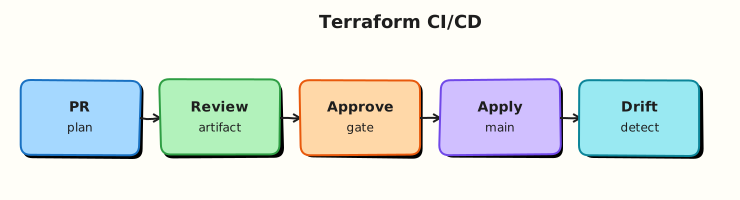
CI owns artefact quality; Git owns desired cluster state; Argo CD reconciles the cluster to Git.
Theory
What it is
Push boundaries: CI never needs cluster-admin kubeconfig in the ideal model. It pushes images and edits Git. Argo CD (in-cluster) syncs. Promotion moves a tested tag from dev to staging to prod values files or overlays — often via PR approval.
Image updaters (Argo CD Image Updater, CI scripts, Renovate) write tag bumps to Git. Application source.path points at environment overlay; targetRevision tracks main or release branches.
Why it matters
Removing direct kubectl apply from CI reduces credential sprawl and audit gaps. Every production deploy links to a Git SHA reviewers can diff. Rollback becomes revert + sync.
How it works
- Developer merges app code → CI builds
myapp:1.2.3, pushes to registry. - CI job clones config repo, updates
image.tagornewTag, commits, opens PR. - Merge to
main→ Argo CD detects change (poll/webhook). - Application syncs overlay → Deployment rolls out new image.
- Notifications alert on sync/health (see Module 12).
Key concepts and comparisons
| Anti-pattern | GitOps pattern |
|---|---|
| CI kubectl apply to prod | CI commit to config repo |
| Same repo for app + prod secrets | Split app repo and config repo |
Floating :latest tag | Immutable tag or digest in Git |
| Platform | Typical promotion step |
|---|---|
| GitHub Actions | actions/checkout config repo + commit tag file |
| GitLab CI | git push with deploy token to config project |
Common pitfalls
- CI and Argo CD both modifying the same field — fight over replicas or tags.
- Granting CI push access to config repo without branch protection.
- Forgetting MkDocs/Jekyll eat Actions expressions in workflow files when docs live in the same repo — wrap those fences in raw Jinja blocks in tutorials.
- Skipping dry-run validation on config manifests before merge.
Hands-on Lab
Objective
Create .github/workflows/gitops-promote.yml (with GitHub expression escaping for docs), an Argo CD Application for the config path, and offline validation of both.
Prerequisites
- Python 3 with PyYAML
- Optional:
actionlintfor workflow syntax - Workspace at
~/rebash-argocd/module-14
Lab environment
Workspace: ~/rebash-argocd/module-14
mkdir -p ~/rebash-argocd/module-14/{.github/workflows,config/clusters/dev,argocd,validation}
cd ~/rebash-argocd/module-14
Real-world scenario
Your team builds demo-api in an app repo. A separate platform-gitops repo holds config/clusters/dev/image-tag.txt. CI on successful build commits the new tag; Argo CD Application watches that path and syncs a Deployment manifest that reads the tag. You scaffold the workflow (validation-only mode) and Application stub.
Step-by-step tasks
Task 1 – Create config tag file and deployment stub
Create config/clusters/dev/image-tag.txt:
Create config/clusters/dev/kustomization.yaml:
apiVersion: kustomize.config.k8s.io/v1beta1
kind: Kustomization
resources:
  - deployment.yaml
configMapGenerator:
  - name: demo-api-tag
    files:
      - image-tag.txt
generatorOptions:
  disableNameSuffixHash: true
Create config/clusters/dev/deployment.yaml:
apiVersion: apps/v1
kind: Deployment
metadata:
  name: demo-api
  labels:
    app: demo-api
spec:
  replicas: 1
  selector:
    matchLabels:
      app: demo-api
  template:
    metadata:
      labels:
        app: demo-api
    spec:
      containers:
        - name: api
          image: ghcr.io/example/demo-api:1.0.0
          ports:
            - containerPort: 8080
cd ~/rebash-argocd/module-14
grep -q '1.0.0' config/clusters/dev/image-tag.txt
python3 -c "import yaml; yaml.safe_load(open('config/clusters/dev/kustomization.yaml'))"
echo 'config-layout: OK' | tee validation/config-layout.txt
Expected output
Config directory structure validates.
Task 2 – Create GitHub Actions promotion workflow
Create .github/workflows/gitops-promote.yml:
name: GitOps Promote Tag

on:
  workflow_dispatch:
    inputs:
      image_tag:
        description: Immutable image tag to promote to dev
        required: true
        type: string
  push:
    branches:
      - main
    paths:
      - 'app/**'

permissions:
  contents: write

jobs:
  promote-dev:
    runs-on: ubuntu-latest
    steps:
      - name: Checkout config layout (same repo lab)
        uses: actions/checkout@v4

      - name: Validate tag format
        run: |
          TAG="${{ github.event.inputs.image_tag || '1.0.1' }}"
          test -n "${TAG}"
          echo "${TAG}" | grep -Eq '^[0-9]+\.[0-9]+\.[0-9]+$'
          echo "TAG=${TAG}" >> "${GITHUB_ENV}"

      - name: Write promoted tag file
        run: |
          echo "${TAG}" > config/clusters/dev/image-tag.txt
          grep -q "${TAG}" config/clusters/dev/image-tag.txt

      - name: Offline validation (no git push in lab)
        run: |
          python3 -c "import yaml; yaml.safe_load(open('config/clusters/dev/kustomization.yaml'))"
          echo "promoted-tag=${TAG}" | tee validation/promote-output.txt

      - name: Commit tag bump (enable in real repo)
        if: false
        run: |
          git config user.email "ci@example.com"
          git config user.name "GitOps Promote"
          git add config/clusters/dev/image-tag.txt
          git commit -m "promote(dev): demo-api ${TAG}"
          git push
Validate workflow file exists and key steps present:
cd ~/rebash-argocd/module-14
grep -q 'workflow_dispatch' .github/workflows/gitops-promote.yml
grep -q 'image_tag' .github/workflows/gitops-promote.yml
grep -q 'config/clusters/dev/image-tag.txt' .github/workflows/gitops-promote.yml
echo 'workflow: OK' | tee validation/workflow-check.txt
Expected output
Workflow contains dispatch input and tag file path.
Task 3 – Create Argo CD Application
Create argocd/application-dev.yaml:
apiVersion: argoproj.io/v1alpha1
kind: Application
metadata:
  name: demo-api-dev
  namespace: argocd
  labels:
    app.kubernetes.io/part-of: rebash-gitops-lab
spec:
  project: default
  source:
    repoURL: https://github.com/example/platform-gitops.git
    targetRevision: main
    path: config/clusters/dev
  destination:
    server: https://kubernetes.default.svc
    namespace: demo-api-dev
  syncPolicy:
    automated:
      prune: true
      selfHeal: true
    syncOptions:
      - CreateNamespace=true
Offline validate:
cd ~/rebash-argocd/module-14
python3 -c "import yaml; yaml.safe_load(open('argocd/application-dev.yaml'))" \
  && echo 'application: OK' | tee validation/application.txt
kubectl apply --dry-run=client -f argocd/application-dev.yaml 2>&1 | tee validation/app-dryrun.txt || true
grep -q 'config/clusters/dev' argocd/application-dev.yaml
Expected output
Application YAML parses; path matches config layout.
Task 4 – Apply Application and prove sync (kind + Argo CD required)
Copy config to /tmp for local file repo if needed, apply Application, and verify sync:
cd ~/rebash-argocd/module-14
cp -a ~/rebash-argocd/module-14/config /tmp/rebash-argocd-module-14/ 2>/dev/null || true
# Update argocd/application-dev.yaml repoURL to your Git remote or use file:// after copying to /tmp
kubectl apply -f argocd/application-dev.yaml | tee app-apply-m14.txt
kubectl wait --for=jsonpath='{.status.sync.status}'=Synced \
  application/demo-api-dev -n argocd --timeout=300s | tee app-sync-m14.txt
kubectl get application demo-api-dev -n argocd \
  -o jsonpath='{.status.sync.status}{"\n"}{.spec.source.path}{"\n"}' | tee app-status-m14.txt
kubectl get deploy,cm -n demo-api-dev | tee workloads-m14.txt
grep -q 'Synced' app-status-m14.txt
grep -q 'config/clusters/dev' argocd/application-dev.yaml
echo "gitops apply OK" | tee gitops-apply-ok-m14.txt
Expected output
Application syncs; Deployment and ConfigMap exist in demo-api-dev.
Validation steps
- Workflow file uses raw Jinja wrapping in the docs repo copy (expressions safe for MkDocs)
- Tag promotion writes
image-tag.txtwith grep assertion - Application
source.pathmatches config directory - Application applied and reaches Synced status on kind
Common errors and fixes
| Error | Cause | Fix |
|---|---|---|
| MkDocs build breaks on workflow | Unescaped Actions expressions | Wrap workflow fences in raw Jinja blocks in the tutorial; learner repos keep normal YAML |
| Argo CD OutOfSync loop | CI and HPA both change replicas | Use ignoreDifferences or stop CI touching replicas |
| Push rejected | Branch protection | Use bot PR with approval; do not disable protection |
| Wrong image deployed | Tag file not wired to manifest | Use Kustomize images field or Helm values from tag file |
Challenge exercise
Extend the workflow with a job that runs kubectl kustomize config/clusters/dev when kubectl is available, saving output to validation/rendered.yaml. Skip gracefully when offline.
Learning outcomes
- Modelled CI → Git tag bump → Argo CD sync separation
- Authored GitHub Actions workflow with manual dispatch and validation gate
- Linked Application manifest to config repo path
- Documented GitLab equivalent promote job
Cleanup
Validation
- You can draw CI vs GitOps responsibilities on one diagram
- Workflow and Application YAML exist and validate offline
- You know why CI should not hold production kubeconfig in GitOps model
- Promotion uses immutable tags, not
:latest
Code Walkthrough
- Workflow dispatch — supplies
image_tag; validation regex enforces semver for lab. - Tag file — simple promotion artefact; real repos often patch Helm
values.yamlor Kustomizeimages. - Application — watches
config/clusters/dev; auto-sync applies on merge. if: falsecommit step — lab safety; enable only with real credentials and branch rules.
Security Considerations
- CI push token scoped to config repo only; not cluster-admin.
- Sign commits or require PR reviews for prod promotion paths.
- Store registry and Git credentials in GitHub/GitLab secrets — never in workflow YAML.
- Separate app repo runners from config repo with least privilege.
- Audit promotion commits; correlate with build pipeline IDs.
Common Mistakes
CI kubectl applying after Argo CD enabled
Creates drift and bypasses Git audit. CI should stop at Git promotion.
One repo secret for all environments
Use environment-scoped tokens and paths (config/clusters/prod vs dev).
Copying workflow YAML into MkDocs without raw escaping
Actions expressions break static site generators — wrap fences in raw Jinja blocks in academy docs.
Best Practices
- Two-repo (app + config) or monorepo with clear directory boundaries.
- PR + required reviewers for prod tag bumps.
- Pin Actions by SHA or version tag; pin base images.
- Emit promotion metadata (build URL, digest) into Git commit message.
- Trigger Argo CD refresh via webhook on merge for faster sync.
Troubleshooting
| Symptom | Likely cause | Fix |
|---|---|---|
| CI cannot push config | Token scope | Use fine-grained PAT with contents write on config repo |
| Argo CD did not sync | Path not in Application | Fix source.path; check branch targetRevision |
| Wrong tag synced | Promoted to wrong overlay | Separate workflows per environment input |
| Workflow syntax error in docs site | MkDocs ate expressions | Use a raw Jinja block around the workflow fence in the published tutorial |
| Image pull backoff | Tag not in registry | Verify CI pushed image before config bump |
Summary
CI/CD integration with Argo CD means CI builds and promotes configuration in Git; Argo CD syncs. Use branch protection, immutable tags, offline YAML validation, and Applications scoped to environment paths — not cluster credentials in pipelines.
Interview Questions
1. In GitOps, what is CI responsible for versus Argo CD?
Reveal answer
CI runs tests, builds container images, scans artefacts, and updates the config repository (image tags, Helm values). Argo CD reconciles cluster state to that Git config. CI should not need production cluster credentials in the ideal pull-based model.
2. Why use a separate config repository?
Reveal answer
Separates application source from deployment intent, allows different access controls (developers merge app code; platform approves prod config), and gives Argo CD a single repo to watch per environment layout without rebuilding apps on manifest edits.
3. How would you promote an image from dev to prod safely?
Reveal answer
After dev validation, open a PR updating prod overlay values/tag with CI provenance (digest, test run URL). Require reviewers; merge triggers Argo CD prod Application sync; optionally gate with sync windows and manual approval for prod project.
4. What problem does ignoreDifferences solve in CI-integrated apps?
Reveal answer
Fields mutated by controllers (HPA replica counts, mutating webhooks) cause endless OutOfSync. Ignoring those JSON paths lets Argo CD report Synced while still applying image tag changes from Git.
5. How do GitHub Actions and GitLab CI differ for GitOps promotion?
Reveal answer
Mechanism is the same — checkout config, patch tag, commit/PR. Syntax differs (workflow YAML vs .gitlab-ci.yml), secrets integration (GitHub Secrets vs CI variables), and token types (PAT vs deploy token/project access token).