Testing, Reports, and Quality Gates
Overview
A green ball that hides failing tests is worse than a red ball. Jenkins should publish JUnit results, optional HTML reports, run parallel test stages where it helps, notify humans on failure, and enforce quality gates so deploy stages do not run on broken builds.
This is Tutorial 12 in Module 12: Testing and Quality Gates of the REBASH Academy Jenkins for Cloud & DevOps Engineers series — written for Cloud, DevOps, Platform, and Site Reliability Engineering (SRE) engineers.
Prerequisites
- Pipeline Fundamentals (Declarative)
- Securing Jenkins — avoid leaking tokens in notify steps
- JUnit plugin (usually present with suggested plugins); HTML Publisher optional for HTML reports
Learning Objectives
By the end of this tutorial, you will be able to:
- Publish JUnit XML and read test trends in Jenkins
- Outline HTML Publisher usage for non-JUnit reports
- Structure parallel test stages in Declarative Pipeline
- Add failure notifications without secret leakage
- Gate a deploy stage on test success
Architecture
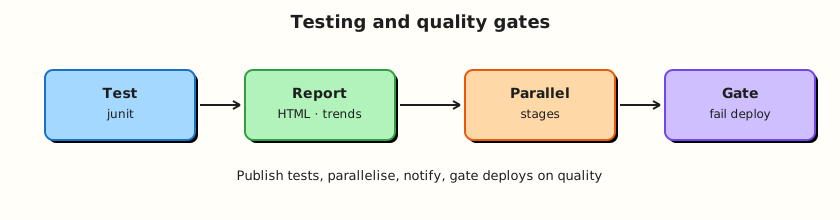
Test stages produce reports; publishers visualise trends; gates block deploy when quality fails.
Theory
What it is
JUnit publisher ingests XML test reports (**/target/surefire-reports/*.xml, pytest --junitxml, etc.) and shows pass/fail trends, flakes, and age of failures.
HTML Publisher archives HTML directories (coverage, Mutmut, custom reports) as browsable job artefacts.
Parallel stages run independent work concurrently (parallel in Declarative) to cut wall-clock time — with care for shared workspaces and agent capacity.
Notifications (email, Slack, Teams) alert on failure/recovery. Prefer credential-backed webhooks; never hard-code tokens.
Quality gates are Pipeline structure and thresholds: fail the build on test failures, require coverage minimums (tool-specific), and use when { … } / sequential stages so Deploy cannot run after a red Test.
Why it matters
Without published tests, Stage View only shows that sh './test.sh' exited zero — or worse, that someone used || true. Trends catch regressions across commits. Gates encode “no deploy on red” better than tribal knowledge.
How it works
Typical pattern:
stage('Test') {
  steps {
    sh 'pytest --junitxml=reports/junit.xml'
  }
  post {
    always {
      junit 'reports/junit.xml'
    }
  }
}
stage('Deploy') {
  when { branch 'main' }
  steps {
    echo 'Deploy only if previous stages succeeded'
  }
}
Parallel example:
stage('Tests') {
  parallel {
    stage('Unit') { steps { sh 'make unit' } }
    stage('Lint') { steps { sh 'make lint' } }
  }
}
If any parallel branch fails, the stage fails (default). Use failFast true to abort siblings early.
Key concepts and comparisons
| Signal | Meaning |
|---|---|
| Failed build | Gate should block deploy |
| Unstable | Often test failures with certain configs — treat as non-deployable unless policy says otherwise |
Skipped deploy when | Explicit branch/env gates |
| Report type | Tooling |
|---|---|
| JUnit XML | junit step |
| HTML site | HTML Publisher |
| Artefacts | archiveArtifacts |
Common pitfalls
- Generating JUnit XML but forgetting
junitinpost { always }. sh 'tests || true'— green lies.- Parallel stages writing the same workspace path.
- Slack token in Jenkinsfile.
- Deploy stage without
whenon every branch including PRs.
Hands-on Lab
Objective
Create a tiny project that emits JUnit XML, publish it from Pipeline, run a parallel lint/unit split, fail a gate intentionally once, and document a notification stub.
Prerequisites
- Jenkins with JUnit plugin
- Python 3 on the agent or use
agent { docker { image 'python:3.12-alpine' } }if Docker Pipeline available
Lab environment
Workspace: ~/rebash-jenkins/module-12
Real-world scenario
Your service must not deploy when unit tests fail. Managers want Jenkins test trends, not screenshots of terminal output.
Step-by-step tasks
Task 1 – Sample tests that emit JUnit XML
Run:
cd ~/rebash-jenkins/module-12
set -euo pipefail

rm -rf quality-demo
mkdir -p quality-demo/tests quality-demo/reports
cd quality-demo
Create tests/test_math.py:
Create generate_junit.py:
"""Minimal JUnit XML writer for labs without pytest installed on the agent."""
from pathlib import Path
xml = """<?xml version="1.0" encoding="UTF-8"?>
<testsuite name="quality-demo" tests="2" failures="0" errors="0" skipped="0">
  <testcase classname="tests.test_math" name="test_add" time="0.001"/>
  <testcase classname="tests.test_math" name="test_mul" time="0.001"/>
</testsuite>
"""
Path('reports').mkdir(exist_ok=True)
Path('reports/junit.xml').write_text(xml, encoding='utf-8')
print('wrote reports/junit.xml')
Verify:
# Prefer pytest if available; always have generator fallback
(python3 -m pytest tests --junitxml=reports/junit.xml -q && echo pytest_ok || python3 generate_junit.py) | tee ../test-local.txt
test -f reports/junit.xml
grep -q 'testcase' reports/junit.xml
cd ..
Expected output
reports/junit.xml contains testcase elements.
Task 2 – Pipeline with junit publish, parallel, and deploy gate
Run:
Create Jenkinsfile:
pipeline {
  agent any
  options { timestamps() }
  stages {
    stage('Tests') {
      parallel {
        stage('Unit') {
          steps {
            sh '''
              mkdir -p reports
              if python3 -m pytest tests --junitxml=reports/junit.xml -q; then
                echo pytest_ok
              else
                python3 generate_junit.py
              fi
              test -f reports/junit.xml
            '''
          }
        }
        stage('Lint placeholder') {
          steps {
            sh 'echo lint_ok | tee reports/lint.txt'
          }
        }
      }
      post {
        always {
          junit allowEmptyResults: false, testResults: 'reports/junit.xml'
          archiveArtifacts artifacts: 'reports/**', fingerprint: true
        }
      }
    }
    stage('Quality gate') {
      steps {
        echo 'Tests stage succeeded — gate open'
      }
    }
    stage('Deploy placeholder') {
      when {
        allOf {
          branch 'main'
          expression { currentBuild.currentResult == 'SUCCESS' }
        }
      }
      steps {
        echo 'Deploy gated — only on main after green tests'
      }
    }
  }
  post {
    failure {
      echo 'NOTIFY_STUB: build failed — wire Slack/email via credentials, do not put tokens here'
    }
    success {
      echo 'NOTIFY_STUB: build success (optional)'
    }
  }
}
Verify:
Create/run job rebash-demo/quality-demo (SCM or paste). Open the build → Test Result.
Expected output
Tests published; parallel branches visible.
Task 3 – Failure gate drill
Run:
Create generate_junit_fail.py:
from pathlib import Path
xml = """<?xml version="1.0" encoding="UTF-8"?>
<testsuite name="quality-demo" tests="2" failures="1" errors="0" skipped="0">
  <testcase classname="tests.test_math" name="test_add" time="0.001"/>
  <testcase classname="tests.test_math" name="test_mul" time="0.001">
    <failure message="assertion failed">expected 7</failure>
  </testcase>
</testsuite>
"""
Path('reports').mkdir(exist_ok=True)
Path('reports/junit.xml').write_text(xml, encoding='utf-8')
Create failure-drill.sh:
#!/usr/bin/env bash
set -euo pipefail
python3 generate_junit_fail.py
grep -q '<failure' reports/junit.xml
echo failure_xml_ok
Verify:
Create Jenkinsfile.fail:
pipeline {
  agent any
  options { timestamps() }
  stages {
    stage('Tests') {
      steps {
        sh 'python3 generate_junit_fail.py'
        junit allowEmptyResults: false, testResults: 'reports/junit.xml'
      }
    }
  }
}
Verify:
Expected output
Failing XML generator runs locally; swap Jenkinsfile.fail into the job to observe non-green test publishing.
Task 4 – HTML report stub and notification Pipeline fragment
Run:
Create quality-demo/reports/html/index.html:
Create publish-html-snippet.groovy:
publishHTML(target: [
  reportName: 'Coverage stub',
  reportDir: 'reports/html',
  reportFiles: 'index.html',
  keepAll: true
])
Create notify-stub.Jenkinsfile:
post {
  failure {
    echo 'NOTIFY_STUB: build failed — wire Slack/email via credentials, do not put tokens here'
  }
  success {
    echo 'NOTIFY_STUB: build success (optional)'
  }
}
Validate and archive:
grep -q publishHTML publish-html-snippet.groovy
grep -q NOTIFY_STUB notify-stub.Jenkinsfile

tar -czf module-12-evidence.tgz quality-demo/Jenkinsfile quality-demo/reports/junit.xml quality-demo/tests publish-html-snippet.groovy notify-stub.Jenkinsfile failure-drill.sh Jenkinsfile.fail *.txt
ls -l module-12-evidence.tgz | tee evidence.txt
Expected output
Evidence archive created.
Validation steps
- JUnit XML published on a Jenkins build
- Parallel Unit/Lint structure present
- Deploy stage gated (branch/
when) -
publish-html-snippet.groovyandnotify-stub.Jenkinsfiledocument safe patterns
Common errors and fixes
| Error | Cause | Fix |
|---|---|---|
Empty test results | Wrong glob / cwd | Fix testResults path |
| Deploy ran on failure | No sequencing / || true | Remove masking; rely on stage failure |
| Parallel workspace clash | Shared files | Separate dirs or stash/unstash |
| pytest missing | Agent image | Generator fallback or Docker agent |
Challenge exercise
Add publishHTML (if plugin installed) for reports/html. Fail the build when failures > 0 using junit’s defaults and a follow-up sh 'test ! -s fail.marker' pattern of your choice. Prove the gate with ./failure-drill.sh | tee gate-evidence.txt.
Learning outcomes
- Emitted and published JUnit results
- Used parallel test stages
- Gated deploy behind success
- Planned safe notifications
Cleanup
Validation
- Lab completed under
~/rebash-jenkins/module-12/ - You can find Test Result on a build page
- You can explain unstable versus failed for deploys
- You know why
|| truedestroys gates
Code Walkthrough
- Always publish in
post { always }— failed runs still need reports. - Parallel independent work — not tightly coupled writers.
- Deploy after tests in the graph — structure is the gate.
- Notify with credentials — no tokens in Git.
- Trends over screenshots — keep XML publishing on.
Security Considerations
- Test reports can contain sensitive data — restrict job read access.
- Notification webhooks are secrets.
- PR jobs should not notify production incident channels noisily without filters.
- Do not archive
.envfiles as “reports.” - Quality gates are not a substitute for security scanners — add those as separate stages when required.
Common Mistakes
Swallowing test failures with || true
Deploy proceeds on lies. Fix: let the stage fail; publish XML in always.
JUnit path wrong → empty results allowed
allowEmptyResults: true hides missing suites. Fix: require results for mandatory suites.
Deploy stage without when
Feature branches ship. Fix: branch/environment conditions + approvals later.
Webhook URL in Jenkinsfile
Instant leak. Fix: credentials binding.
Best Practices
- One mandatory unit suite per service Pipeline.
- Publish trends continuously.
- failFast for expensive parallel matrices when appropriate.
- Keep report paths stable for dashboards.
- Separate fast unit vs slow integration stages.
Troubleshooting
| Symptom | Likely cause | Fix |
|---|---|---|
| 0 tests recorded | XML not produced | Fix generator/pytest path |
| Double-counted tests | Overlapping globs | Narrow testResults |
| Parallel flake | Shared pollution | Isolate workspaces |
| HTML 404 | Wrong reportDir | Match publisher paths |
Summary
Publish tests, parallelise safely, notify without leaking secrets, and make deploy conditional on green quality signals. Next: Kubernetes Agents and Deploys.
Interview Questions
1. What does the junit Pipeline step do?
Reveal answer
It ingests JUnit-format XML reports into Jenkins so each build shows test counts, failures, and historical trends — not just a shell exit code.
2. Why publish test results in post { always }?
Reveal answer
So failed runs still upload XML. If publishing only happens on success, you lose the failure details that matter most.
3. What is a quality gate in a Jenkins Pipeline?
Reveal answer
A structural or threshold check that prevents later stages (especially deploy) from running when tests/analysis fail — for example stage ordering, when conditions, and failing the build on test failures.
4. When is Declarative parallel appropriate?
Reveal answer
When stages are independent and you want lower wall-clock time (unit vs lint). Avoid parallel writers colliding on the same workspace files without isolation.
5. What is the risk of allowEmptyResults: true?
Reveal answer
The build can stay green even when the suite never produced XML — a broken test command looks successful.
6. How should Slack/Teams notifications authenticate?
Reveal answer
Store webhook URLs or tokens in the credentials store and inject them at runtime. Do not commit them to the Jenkinsfile.
7. Difference between failed and unstable builds for deploy policy?
Reveal answer
Both should usually block production deploy. Unstable often means tests failed while the build recorded results; treat as non-releasable unless a written policy says otherwise.
8. How do HTML reports differ from JUnit publishing?
Reveal answer
JUnit is structured test data with trends. HTML Publisher archives human-readable sites (coverage, custom reports) as browsable artefacts without the same test-case analytics.