Troubleshooting and Upgrades
Overview
When CI is red, guesswork wastes hours. This tutorial builds a repeatable path through failed builds, agent issues, Pipeline Replay, console logs, plugin problems, and performance symptoms — then plans Jenkins LTS upgrades with safe restart and rollback using backups from Module 15.
This is Tutorial 16 in Module 16: Troubleshooting and Upgrades of the REBASH Academy Jenkins for Cloud & DevOps Engineers series — written for Cloud, DevOps, Platform, and Site Reliability Engineering (SRE) engineers. Keep the LTS upgrade guides open when you change production.
Prerequisites
- JCasC, Scaling, and Operations — backups before upgrades
- A lab controller with at least one Pipeline job
- Comfort reading Stage View and console output
Learning Objectives
By the end of this tutorial, you will be able to:
- Triage a failed build using Stage View → console → agent context
- Use Pipeline Replay safely on a lab job
- Recognise common plugin and performance failure patterns
- Draft an LTS upgrade checklist with staging and rollback
- Choose safe restart versus emergency restart
Architecture
Incidents flow from symptom → build evidence → agent/controller health → fix or rollback; upgrades follow backup → stage → production → verify.
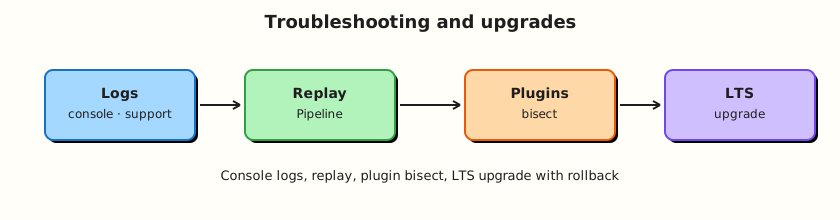
Theory
What it is
Build triage: identify which stage failed, read the first ERROR in console, check whether the agent was offline or mislabelled, then fix Jenkinsfile, credentials, or infra.
Pipeline Replay: re-run a build with an edited in-memory script (permissions required). Excellent for labs; dangerous on production without change control — prefer Git commits.
Plugin issues: boot failures, classloading errors, UI blanks after updates. Mitigation: staging controller, plugin pins, disable plugin via rescue patterns.
Performance: long queue times, GC pressure on controller, disk full from artefacts, slow Git checkouts. Fix capacity and retention, not “bigger JVM forever.”
LTS upgrades: read the upgrade guide for your jump, upgrade plugins as required, backup, upgrade staging, then production, then verify Pipelines.
Why it matters
Unstructured troubleshooting leads to safeRestart superstition and Friday plugin updates. A written path reduces mean time to recovery (MTTR) and prevents compounding outages during upgrades.
How it works
Failed build path:
- Open red build → Stage View.
- Console Output → first fatal error (not only the last line).
- Confirm agent/label (
NODE_NAME, node page). - Reproduce with Replay on lab or fix in Git.
- Capture evidence for the incident channel.
Upgrade path:
- Inventory core + plugins (
list-plugins). - Backup/restore proof current.
- Read LTS upgrade guide.
- Upgrade staging; run canary Pipelines.
- Production change window; safe restart; verify; rollback via volume restore if needed.
Key concepts and comparisons
| Tool | Use |
|---|---|
| Console Output | Ground truth |
| Replay | Temporary script edit |
| System log | Controller/plugin errors |
| Node log | Agent connectivity |
support bundle (if available) | Deeper vendor/community debug |
| Restart | When |
|---|---|
| Safe restart | Drain builds; plugin needs restart |
| Container recreate | Labs after Compose change |
| Restore volume | Bad upgrade / corruption |
Common pitfalls
- Reading only the last console line.
- Replaying production without committing the fix.
- Upgrading production before staging.
- Ignoring disk-full warnings until writes fail.
- Rolling forward blindly when rollback is faster.
Hands-on Lab
Objective
Run a deliberate failing Pipeline, triage it with shell checks, practise Replay on lab, and complete an LTS upgrade plan as validated YAML (no requirement to upgrade production).
Prerequisites
- Lab Jenkins with a Pipeline job you can break
- Backup runbook from Module 15 (
backup-restore.sh)
Lab environment
Workspace: ~/rebash-jenkins/module-16
Real-world scenario
Pager: “CI red across payments.” You need a triage checklist and an upgrade calendar before the next LTS jump.
Step-by-step tasks
Task 1 – Deliberate failure and triage script
Run:
Create broken.Jenkinsfile:
pipeline {
  agent any
  stages {
    stage('Boom') {
      steps {
        sh 'echo about_to_fail'
        sh 'false'
      }
    }
  }
  post {
    failure {
      echo 'expected failure for Module 16 triage'
    }
  }
}
Create triage-checks.sh:
#!/usr/bin/env bash
set -euo pipefail
LOG="${1:-console.log}"
grep -q about_to_fail "$LOG"
grep -qE 'ERROR|Finished: FAILURE' "$LOG"
grep -q 'expected failure for Module 16 triage' "$LOG"
echo triage_checks_ok
Verify:
Create expected-failure-markers.txt:
Verify:
Create/run a lab job with broken.Jenkinsfile, paste Console Output to console.log, then run ./triage-checks.sh console.log | tee triage-result.txt.
Expected output
Triage script identifies sh 'false' as the cause.
Task 2 – Pipeline Replay drill (lab only)
- Open the failed build → Replay.
- Change
sh 'false'tosh 'true'. - Run Replay → confirm success.
- Note that the job definition may still be broken until you save/commit the fix.
Run:
Create fixed.Jenkinsfile:
pipeline {
  agent any
  stages {
    stage('Boom') {
      steps {
        sh 'echo about_to_fail'
        sh 'true'
      }
    }
  }
}
Verify:
diff -u broken.Jenkinsfile fixed.Jenkinsfile | tee replay-fix.diff
grep -q "sh 'true'" fixed.Jenkinsfile
printf 'replay_lesson=commit_fix_to_git_not_replay_only\n' | tee replay-lesson.txt
Expected output
Diff shows the one-line fix; Replay lesson captured in replay-lesson.txt.
Task 3 – Agent and performance symptom sheet
Run:
Create symptoms.yaml:
symptoms:
  - symptom: queued_forever
    likely_cause: no_matching_agent_or_executors_zero
    first_check: nodes_and_labels
  - symptom: agent_offline
    likely_cause: network_or_secret
    first_check: node_log_and_relaunch
  - symptom: checkout_fail
    likely_cause: credentials_or_url
    first_check: credential_id_and_git_ls_remote
  - symptom: slow_controller_ui
    likely_cause: disk_cpu_plugins
    first_check: df_and_disable_heavy_plugins_on_staging
  - symptom: boot_loop_after_plugin_update
    likely_cause: bad_plugin
    first_check: disable_plugin_restore_backup
  - symptom: oomkilled_container
    likely_cause: heap_meta_space
    first_check: compose_mem_limits_and_heap_flags
Validate and archive:
python3 -c "
import yaml
with open('symptoms.yaml') as f:
    d = yaml.safe_load(f)
assert len(d['symptoms']) >= 5
print('symptoms.yaml OK')
" | tee symptoms-validate.txt
Expected output
Symptom YAML validates.
Task 4 – LTS upgrade plan YAML
Run:
Create lts-upgrade-plan.yaml:
current:
  core_version: fill_from_ui
  image_tag: lts-jdk17
  backup_last_tested: fill_from_module_15
target:
  lts_version: fill_from_jenkins_io
  upgrade_guide_read: false
  plugins_requiring_updates: []
stages:
  - backup_volume_and_list_plugins
  - upgrade_staging_controller
  - canary_pipelines: []
  - production_window: fill
  - verification: fill
  - rollback: restore_volume_or_previous_image_tag
safe_restart:
  drain_or_prepare_shutdown: fill
Validate and archive:
python3 -c "
import yaml
with open('lts-upgrade-plan.yaml') as f:
    d = yaml.safe_load(f)
assert 'rollback' in d['stages'][-1]
print('lts-upgrade-plan.yaml OK')
" | tee lts-plan-validate.txt

tar -czf module-16-evidence.tgz broken.Jenkinsfile fixed.Jenkinsfile triage-checks.sh symptoms.yaml lts-upgrade-plan.yaml replay-fix.diff replay-lesson.txt *.txt
ls -l module-16-evidence.tgz | tee evidence.txt
Expected output
Upgrade plan YAML validates; evidence archived.
Validation steps
- Failed build triaged with
triage-checks.sh - Replay practised on lab; fix captured in
fixed.Jenkinsfile -
symptoms.yamlvalidates -
lts-upgrade-plan.yamlfilled for your versions
Common errors and fixes
| Error | Cause | Fix |
|---|---|---|
| Replay button missing | Permissions / Pipeline type | Need Replay permission; Pipeline job |
| Still red after Replay | Different root cause | Re-read first ERROR |
| Upgrade boot fail | Plugin incompatibility | Restore backup; stage plugins |
| Disk full mid-upgrade | History/artefacts | Free space before upgrade |
Challenge exercise
Capture java -jar jenkins-cli.jar … list-plugins output into plugins-before.txt (with token in env only) as the baseline artefact you would attach to an upgrade ticket.
Learning outcomes
- Used a structured triage path
- Separated Replay experiments from durable Git fixes
- Planned LTS upgrades with rollback
Cleanup
Validation
- Lab completed under
~/rebash-jenkins/module-16/ - You can narrate Stage View → console → agent
- You know when to restore versus roll forward
- You will not upgrade production without staging
Code Walkthrough
- First error wins — read from the top of the failure.
- Confirm the agent — many “Pipeline bugs” are infra.
- Replay to learn; Git to fix — durable changes in SCM.
- Backup before upgrade — Module 15 is not optional.
- Stage then produce — LTS guides are mandatory reading.
Security Considerations
- Replay can run modified scripts — restrict permissions.
- Support bundles and console logs may contain secrets — redact.
- Upgrade windows need authenticated operators only.
- Do not disable security to “fix” upgrades.
- Rollback images/volumes carefully to avoid reintroducing known CVEs without a plan.
Common Mistakes
Upgrading production on Friday without staging
Weekend outage. Fix: staging canaries; Monday-friendly windows.
Fixing only via Replay
Next build is red again. Fix: commit Jenkinsfile/config.
Ignoring disk warnings
Upgrades fail writing plugins. Fix: free space; retention policies.
Blaming Pipeline for offline agents
Wrong layer. Fix: node connectivity first.
Best Practices
- Keep a living triage checklist in the platform repo.
- Pin images/tags for controllers.
- Maintain a canary job suite for post-upgrade verify.
- Record plugin inventory before/after.
- Prefer safe restart; communicate drain.
Troubleshooting
| Symptom | Likely cause | Fix |
|---|---|---|
channel / remoting errors | Agent network | Fix WebSocket/JNLP path |
RejectedAccessException | Script security | Approve carefully on staging only |
| UI theme broken | Plugin/CSS conflict | Disable recent UI plugins |
| Builds stuck “after restart” | Queue/executor confusion | Check nodes; clear stale in-progress |
Summary
Troubleshoot with evidence: stages, console, agents. Upgrade LTS with backups, staging, and an explicit rollback. You have completed the core Jenkins tutorial track — return to the course overview for capstone and interview practice.
Interview Questions
1. What is your first move when a Pipeline turns red?
Reveal answer
Open the failing build’s Stage View to find the red stage, then read Console Output from the first ERROR, and confirm which agent/label ran the build before changing code.
2. What is Pipeline Replay and when is it inappropriate?
Reveal answer
Replay re-runs a build with an edited script in Jenkins. It is useful for labs and quick experiments. It is inappropriate as the only production fix because the durable definition in Git/UI may remain broken.
3. How do you approach a Jenkins controller that will not boot after a plugin update?
Reveal answer
Restore from backup or disable the offending plugin using known rescue procedures on a staging copy first; avoid random plugin deletion on the only production volume without a restore path.
4. Name two performance symptoms that point to agent capacity issues.
Reveal answer
Long queue wait times and many pending builds waiting for labels while existing agents are busy or offline.
5. What should you read before an LTS upgrade?
Reveal answer
The official LTS upgrade guide for the versions you are jumping, plus plugin compatibility notes — after taking a tested backup.
6. Safe restart versus killing the container — which do you prefer?
Reveal answer
Prefer safe restart / prepare-for-shutdown so builds can drain and configuration writes finish. Hard kills are emergency measures that risk corruption.
7. How do backups participate in upgrade rollback?
Reveal answer
If the upgraded controller misbehaves, you restore the pre-upgrade JENKINS_HOME volume/snapshot and/or previous image tag to return to a known good state.
8. Why might checkout fail only on one agent label?
Reveal answer
That agent pool may lack Git, network egress to the SCM host, or the correct credentials mounted — issues that would not appear on other labels.