Jenkinsfile in SCM
Overview
A Pipeline that lives only in the Jenkins UI cannot be reviewed in a pull request. Pipeline from Source Control Management (SCM) loads a Jenkinsfile from Git so every change is a commit. You will structure that file with parameters and environment, check it into a local Git repo, point a Pipeline job at it, and leave the layout Multibranch-ready.
This is Tutorial 5 in Module 5: Jenkinsfile in SCM of the REBASH Academy Jenkins for Cloud & DevOps Engineers series — written for Cloud, DevOps, Platform, and Site Reliability Engineering (SRE) engineers.
Prerequisites
- Pipeline Fundamentals (Declarative)
- Running Jenkins LTS with Git and Pipeline plugins
- Git installed on your workstation (
git --version) - Module 4
Jenkinsfileideas (you will replace UI script with SCM)
Learning Objectives
By the end of this tutorial, you will be able to:
- Place a
Jenkinsfileat the repository root (or a documented path) - Configure a Pipeline job with Definition: Pipeline script from SCM
- Use
parametersandenvironmentwithout embedding secrets - Explain Multibranch readiness (same file, many branches)
- Review Pipeline changes like application code
Architecture
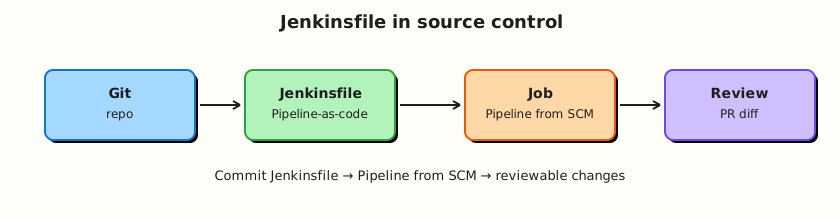
Git holds the Jenkinsfile; the job checks out SCM and executes the Declarative definition.
Theory
What it is
A Jenkinsfile is the text file that defines a Pipeline. Pipeline script from SCM tells Jenkins: clone this repository (branch/tag), then load Jenkinsfile (or Jenkinsfile.groovy, or a custom script path).
Common Declarative additions in SCM:
| Directive | Purpose |
|---|---|
parameters { } | String/boolean/choice inputs for manual or API builds |
environment { } | Environment variables for stages |
options { } | timestamps, durability, concurrent build policy |
triggers { } | cron / upstream (often replaced by webhooks in Multibranch) |
Checkout is usually implicit when using Multibranch or checkout scm in Scripted; with a single-branch SCM Pipeline job, Jenkins checks out the configured branch before running the loaded script (exact behaviour depends on job type — Multibranch always binds scm).
Why it matters
SCM is how you get code review, blame, revert, and Multibranch. Platform standards (“every service ships a Jenkinsfile”) only work when the file is in the repo. Parameters make rebuilds explicit (DEPLOY_ENV=staging). Environment blocks keep non-secret config visible; secrets still belong in the credentials store.
How it works
- Commit
Jenkinsfileto Git (root is conventional). - Create/configure a Pipeline job → Pipeline script from SCM → Git → repo URL + credentials if needed.
- Set branch specifier (
*/mainor*/master). - Script path:
Jenkinsfileunless you use a subdirectory monorepo layout. - Build → Jenkins checks out → runs Declarative Pipeline.
- Change the file in a branch → review → merge → next build picks it up.
Multibranch readiness: one Jenkinsfile at a stable path; avoid hard-coding a single branch name inside deploy logic without parameters/when; do not require UI-only steps that Multibranch cannot recreate.
Best practices: keep stages readable; fail fast; no secrets in plain environment; prefer lightweight checkout options when repos are huge; document required Jenkins plugins in the README.
Key concepts and comparisons
| Definition mode | Pros | Cons |
|---|---|---|
| Pipeline script (UI) | Fast demo | Not reviewable; drifts from Git |
| Pipeline script from SCM | Reviewable; single branch | Still one job per branch unless Multibranch |
| Multibranch Pipeline | Branch/PR discovery | Needs SCM permissions + indexing |
| Parameter type | Example use |
|---|---|
string | version override |
booleanParam | skip integration tests |
choice | deploy environment |
Common pitfalls
- Leaving the real Pipeline in the UI while an unused
Jenkinsfilesits in Git. - Putting passwords in
environment { SECRET = '...' }. - Custom script path in monorepos without documenting it for Multibranch.
- Checking in
Jenkinsfileonly ondevelopwhile the job tracksmain. - Assuming Multibranch works without webhook/indexing (Module 7).
Hands-on Lab
Objective
Create a local Git repository with a parameterised Declarative Jenkinsfile, configure Jenkins Pipeline script from SCM against that repo (file:// or hosted), and prove a build uses the committed file.
Prerequisites
- Jenkins controller from Module 2
- Git on the workstation
- For
file://remotes: Jenkins must be able to read the path (same machine / mounted path). If not, use a private GitHub/GitLab repo instead.
Lab environment
Workspace: ~/rebash-jenkins/module-05
mkdir -p ~/rebash-jenkins/module-05 && cd ~/rebash-jenkins/module-05
set -euo pipefail
git --version | tee git-version.txt
Expected output
Git version line printed.
Real-world scenario
Your service repo must own its CI definition. Reviewers rejected a UI-only Pipeline. You will put a Jenkinsfile in Git with a TARGET parameter and wire Jenkins to that repository.
Step-by-step tasks
Task 1 – Create a Git repo with Jenkinsfile
Commit and record:
cd ~/rebash-jenkins/module-05
set -euo pipefail

rm -rf scm-app
mkdir -p scm-app && cd scm-app
git init -b main
Create README.md:
Create Jenkinsfile:
pipeline {
  agent any
  options {
    timestamps()
  }
  parameters {
    string(name: 'TARGET', defaultValue: 'local', description: 'Build target label')
  }
  environment {
    APP_NAME = 'scm-app'
  }
  stages {
    stage('Checkout info') {
      steps {
        echo "Building ${env.APP_NAME} for TARGET=${params.TARGET}"
        sh 'git rev-parse --short HEAD | tee commit.txt || echo "no-git-in-agent" | tee commit.txt'
        sh 'ls -la'
      }
    }
    stage('Test') {
      steps {
        sh 'test -f Jenkinsfile'
        sh 'test -f README.md'
      }
    }
  }
  post {
    always {
      echo "SCM Pipeline finished: ${currentBuild.currentResult}"
    }
  }
}
Commit and record:
git add README.md Jenkinsfile
git -c user.email='rebash-lab@example.com' -c user.name='REBASH Lab' commit -m 'Add Declarative Jenkinsfile for Module 5'
git log -1 --oneline | tee ../commit.txt
pwd | tee ../repo-path.txt
Expected output
Commit hash in commit.txt; absolute repo path in repo-path.txt.
Task 2 – Configure Pipeline from SCM in Jenkins
- Folder rebash-demo → New Item →
scm-pipeline→ Pipeline. - Pipeline → Definition: Pipeline script from SCM.
- SCM: Git.
- Repository URL:
- Same host:
file:///home/<you>/rebash-jenkins/module-05/scm-app
(use the path fromrepo-path.txt; three slashes afterfile:is common for absolute paths) - Or push to GitHub/GitLab and paste the HTTPS/SSH URL + credentials.
- Branch:
*/main - Script path:
Jenkinsfile - Save.
Run:
Create scm-job-config.yaml:
job: rebash-demo/scm-pipeline
definition: pipeline_script_from_scm
repo_path: fill_from_repo-path.txt
repo_url: file://fill_from_repo-path.txt
branch: '*/main'
script_path: Jenkinsfile
fallback: push scm-app to remote Git if file:// fails in Dockerised Jenkins
Validate and archive:
python3 -c "
import yaml
from pathlib import Path
p = Path('repo-path.txt').read_text().strip()
d = yaml.safe_load(open('scm-job-config.yaml'))
d['repo_path'] = p
d['repo_url'] = f'file://{p}'
yaml.safe_dump(d, open('scm-job-config.yaml', 'w'), sort_keys=False)
assert d['script_path'] == 'Jenkinsfile'
print('scm-job-config.yaml OK')
" | tee scm-config-validate.txt
Expected output
Config file with your path validates; job configured.
Task 3 – Build with parameters and verify SCM load
- Build with Parameters → leave
TARGET=localor setTARGET=lab→ Build. - Confirm console shows checkout / workspace listing and
TARGET=.... - Change
README.md, commit, build again — prove a new commit is visible ifgit rev-parseworks on the agent.
Commit and record:
cd ~/rebash-jenkins/module-05/scm-app
set -euo pipefail

echo "touched $(date -u +%Y-%m-%dT%H:%M:%SZ)" >> README.md
git add README.md
git -c user.email='rebash-lab@example.com' -c user.name='REBASH Lab' commit -m 'Touch README for rebuild'
git log -1 --oneline | tee ../second-commit.txt
git rev-parse --short HEAD | tee ../head-after-touch.txt
Create ../expected-console-markers.txt:
Verify:
Expected output
Second commit recorded; paste Console Output to console.log after build and grep for markers.
Task 4 – Multibranch readiness checklist
Run:
Create multibranch-readiness.yaml:
jenkinsfile_at_repo_root: true
declarative_structure: true
no_ui_only_secrets: true
parameters_use_params: true
webhooks_branch_indexing: module_07
pr_discovery_credentials: module_7
hardcoded_prod_credential_ids: forbidden
Validate and archive:
python3 -c "
import yaml
with open('multibranch-readiness.yaml') as f:
    d = yaml.safe_load(f)
assert d['jenkinsfile_at_repo_root']
assert not d['hardcoded_prod_credential_ids']
print('multibranch-readiness.yaml OK')
" | tee mb-ready-validate.txt

tar -czf module-05-evidence.tgz scm-app/Jenkinsfile scm-app/README.md scm-job-config.yaml multibranch-readiness.yaml *.txt
ls -l module-05-evidence.tgz | tee evidence.txt
Expected output
Archive listed.
Validation steps
- Git repo contains committed
Jenkinsfile - Job uses Pipeline script from SCM, not a pasted UI script as source of truth
- Parameterised build ran (or failure diagnosed from checkout errors)
- Multibranch readiness YAML validates
Common errors and fixes
| Error | Cause | Fix |
|---|---|---|
file:// not found inside container | Jenkins in Docker cannot see host path | Mount the repo into the controller container, or use a remote Git URL |
| Authentication failed | Private remote without credentials | Add Username/Password or SSH key in Credentials |
| Wrong default branch | Repo uses master | Fix branch specifier |
| Old Pipeline still runs | Job still on UI script | Switch Definition to SCM and save |
Challenge exercise
Add a booleanParam(name: 'RUN_SLOW_TESTS', defaultValue: false) and a stage with when { expression { return params.RUN_SLOW_TESTS } } that echoes slow tests. Commit, build twice (false/true), and capture skip behaviour with grep -E 'skipped|slow tests' console.log | tee slow-test-evidence.txt.
Learning outcomes
- Moved Pipeline definition into Git
- Wired Jenkins to SCM
- Used parameters and environment safely
- Documented Multibranch readiness
Cleanup
Keep scm-app and the SCM job for Module 7 experiments. Do not commit real credentials into the repo.
Validation
- Lab completed under
~/rebash-jenkins/module-05/ - You can explain UI script versus SCM definition
- You can list two Multibranch readiness rules
- You know why secrets do not belong in
environment
Code Walkthrough
- Commit the Jenkinsfile first — then point Jenkins at it.
- Parameters for humans and APIs — defaults must be safe.
- Environment for non-secrets — credentials bindings for secrets later.
- Stable script path — root
Jenkinsfileunless monorepo docs say otherwise. - Review Pipeline diffs — treat them like production code.
Security Considerations
- Never store API tokens in
environmentor the Git history. - Restrict who can change Jenkinsfiles on production branches.
- Prefer least-privilege SCM credentials (read-only clone for CI).
- Audit parameter abuse (
TARGET=prod) withwhenand separate deploy jobs later. - Remember build logs inherit job read permissions.
Common Mistakes
Git has a Jenkinsfile but the job still uses Pipeline script
Builds ignore Git. Fix: Definition → Pipeline script from SCM.
Secrets in environment blocks
They appear in logs and config snapshots. Fix: credentials store + withCredentials / credential-binding steps later.
Monorepo script path undocumented
Multibranch cannot guess services/foo/Jenkinsfile. Fix: document Script Path and align Multibranch configuration.
Deploying from every branch without gates
SCM makes it easy to run anything. Fix: when on branch + approvals for production.
Best Practices
- One
Jenkinsfileat the repo root for simple services. - Lightweight, readable stages; push shared logic to libraries (Module 9).
- Safe parameter defaults.
- README documents required plugins and agent labels.
- Protect
mainwith reviews before Pipeline changes merge.
Troubleshooting
| Symptom | Likely cause | Fix |
|---|---|---|
Jenkinsfile not found | Wrong script path / branch | Verify path and branch specifier |
| Checkout timeout | Network / DNS from controller | Fix proxy; use reachable Git host |
| Parameter missing in UI | Need Build with Parameters after first load | Run once or enable parameters from SCM |
| Old commit built | Caching / wrong branch | Check checkout section in console |
| file:// works on host Jenkins only | Docker isolation | Remote Git or bind-mount |
Summary
SCM is the source of truth for Pipelines. Parameters and environment make builds explicit; Multibranch readiness starts with a stable root Jenkinsfile. Next: Agents, Nodes, and Executors.
Interview Questions
1. Why store a Jenkinsfile in SCM instead of the job UI?
Reveal answer
So Pipeline changes are versioned, reviewed, revertible, and reusable across branches. UI-only scripts drift and disappear if the job is deleted or the controller is lost.
2. What does “Pipeline script from SCM” configure?
Reveal answer
The job clones a repository (and branch), then loads the Pipeline from a script path such as Jenkinsfile instead of using a script pasted into the job config.
3. How do parameters differ from environment?
Reveal answer
Parameters are inputs to a specific build (often shown in Build with Parameters). Environment sets variables for the Pipeline run. Neither should hold long-lived secrets in plain text.
4. What makes a repository Multibranch-ready?
Reveal answer
A stable Jenkinsfile path, Declarative structure that does not rely on UI-only config, and branch-aware deploy gates. Indexing/webhooks come next; the file layout must already be sound.
5. Why can file:// repositories fail when Jenkins runs in Docker?
Reveal answer
The path is on the host filesystem; the controller container cannot read it unless that path is mounted into the container. Use a Git remote Jenkins can clone, or mount the repo.
6. Where should production deploy credentials live?
Reveal answer
In the Jenkins credentials store (preferably folder-scoped), injected at runtime — not in the Jenkinsfile or Git history.
7. What is a safe default for a deploy-related parameter?
Reveal answer
A non-production value such as local or staging, with production requiring an explicit choice plus when/approval controls.
8. How should Pipeline changes be reviewed?
Reveal answer
Through the same pull-request process as application code: diff the Jenkinsfile, check agent labels, credentials usage, and deploy gates before merge to the protected branch.
Related Tutorials
- Pipeline Fundamentals (Declarative)
- Agents, Nodes, and Executors
- Multibranch Pipelines and Pull Requests