Kubernetes Agents and Deploys
Overview
Static agents do not scale with bursty CI. The Kubernetes plugin launches ephemeral agents as Pods using pod templates — containers with the exact JDK, Docker-less build tools, or kubectl you need — then deletes them after the build. This tutorial covers agent templates, deploying with kubectl / Helm from Pipeline, rollbacks, and least-privilege cluster credentials.
This is Tutorial 13 in Module 13: Kubernetes Agents of the REBASH Academy Jenkins for Cloud & DevOps Engineers series — written for Cloud, DevOps, Platform, and Site Reliability Engineering (SRE) engineers.
Prerequisites
- Testing, Reports, and Quality Gates
- Kubernetes fundamentals — Pods, Deployments, RBAC
- Optional lab: kind/minikube/k3d cluster + Jenkins Kubernetes plugin
- Helm basics helpful for deploy stages
Learning Objectives
By the end of this tutorial, you will be able to:
- Explain ephemeral Kubernetes agents versus static agents
- Sketch a pod template with a builder container and optional sidecar
- Outline
kubectl/helmdeploy stages with gated credentials - Describe rollback approaches after a bad release
- Apply least-privilege ServiceAccount design for CI
Architecture
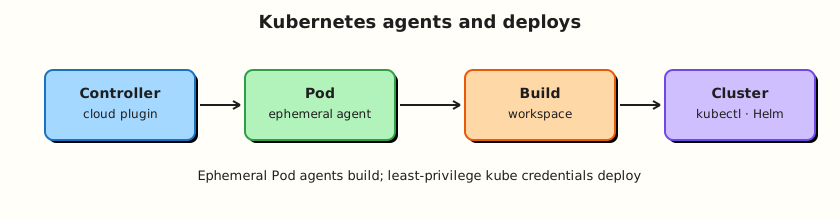
Jenkins requests a Pod agent; the plugin schedules it; the Pipeline runs in containers; deploy stages talk to the API server with scoped credentials.
Theory
What it is
The Kubernetes cloud in Jenkins connects to a cluster API. A pod template defines labels, containers (jnlp agent + maven/node builders), volumes, and ServiceAccount. Pipeline:
agent {
  kubernetes {
    yaml '''
apiVersion: v1
kind: Pod
spec:
  containers:
  - name: maven
    image: maven:3.9.9-eclipse-temurin-21
    command: ["sleep"]
    args: ["99d"]
'''
    defaultContainer 'maven'
  }
}
Ephemeral means the Pod exists for the build (plus retention settings), reducing snowflake agents.
Deploys: later stages use kubectl apply / helm upgrade --install with kubeconfig or cloud auth. Prefer short-lived tokens / OIDC over long-lived kubeconfig files in credentials when your platform supports it.
Rollbacks: kubectl rollout undo, helm rollback, or re-apply last known good Git SHA (GitOps). Pipeline should store revision metadata as an artefact.
Why it matters
Kubernetes agents give elasticity and clean workspaces. They also multiply RBAC mistakes: a CI ServiceAccount with cluster-admin turns every Jenkinsfile into a cluster break-glass. Split build agents (no deploy rights) from deploy jobs (narrow namespace rights) when possible.
How it works
- Install Kubernetes plugin; configure cloud (API URL, credentials, namespace).
- Define pod templates (UI or as code YAML in Pipeline/
podTemplate). - Jobs request
agent { label 'k8s-maven' }or inlinekubernetes { yaml … }. - Plugin creates Pod; JNLP/WebSocket connects to controller.
- Steps run in
container('maven') { }when using multiple containers. - Deploy stages authenticate to cluster; apply manifests; verify rollout; rollback on failure.
Key concepts and comparisons
| Pattern | Use |
|---|---|
| Inline YAML agent | App-defined toolchain |
| Named cloud template | Platform-standard images |
| Kaniko/BuildKit in-cluster | Image builds without host docker.sock |
| Separate deploy Pipeline | Stronger credential isolation |
| Privilege | Prefer |
|---|---|
cluster-admin for CI | Never |
| Namespace-scoped edit for deploy SA | Yes, per env |
| Get/list only for read jobs | Yes |
Common pitfalls
- Controller cannot reach cluster API / agents cannot reach Jenkins URL.
- Missing
jnlpcontainer conventions for the plugin version. - Using docker.sock mounts inside K8s agents casually.
- Helm upgrades without
--atomic/ readiness checks. - Storing prod kubeconfig in Multibranch folders that build fork PRs.
Hands-on Lab
Objective
Write a pod template YAML and a Declarative Pipeline that would run on Kubernetes agents; practice a local kubectl/helm dry-run deploy against a lab cluster or complete a no-cluster paper + YAML validation path.
Prerequisites
kubectllocally recommended- Optional kind cluster:
kind create cluster --name rebash-jenkins
Lab environment
Workspace: ~/rebash-jenkins/module-13
mkdir -p ~/rebash-jenkins/module-13 && cd ~/rebash-jenkins/module-13
set -euo pipefail
kubectl version --client | tee kubectl-client.txt || echo 'kubectl missing — YAML-only path' | tee kubectl-client.txt
Real-world scenario
Platform wants CI agents on Kubernetes next quarter. You must propose a pod template, a least-privilege ServiceAccount manifest, and a Pipeline that builds in maven and deploys only from main with a rollback note.
Step-by-step tasks
Task 1 – Pod template and RBAC manifests
Run:
Create k8s/ci-pod-template.yaml:
apiVersion: v1
kind: Pod
metadata:
  labels:
    rebash/ci: "true"
spec:
  serviceAccountName: jenkins-agent
  containers:
  - name: jnlp
    image: jenkins/inbound-agent:latest-jdk17
  - name: maven
    image: maven:3.9.9-eclipse-temurin-21
    command: ["sleep"]
    args: ["99d"]
    resources:
      requests:
        cpu: "200m"
        memory: "512Mi"
Create k8s/jenkins-agent-rbac.yaml:
apiVersion: v1
kind: ServiceAccount
metadata:
  name: jenkins-agent
  namespace: jenkins
---
# Intentionally narrow example — agents that only BUILD may need no deploy verbs.
# Deploy jobs should use a different SA in a deploy namespace.
apiVersion: rbac.authorization.k8s.io/v1
kind: Role
metadata:
  name: jenkins-agent-read
  namespace: jenkins
rules:
- apiGroups: [""]
  resources: ["pods", "pods/log"]
  verbs: ["get", "list", "watch"]
---
apiVersion: rbac.authorization.k8s.io/v1
kind: RoleBinding
metadata:
  name: jenkins-agent-read
  namespace: jenkins
roleRef:
  apiGroup: rbac.authorization.k8s.io
  kind: Role
  name: jenkins-agent-read
subjects:
- kind: ServiceAccount
  name: jenkins-agent
  namespace: jenkins
Create k8s/jenkins-deploy-rbac.yaml:
apiVersion: v1
kind: ServiceAccount
metadata:
  name: jenkins-deploy
  namespace: demo
---
apiVersion: rbac.authorization.k8s.io/v1
kind: Role
metadata:
  name: jenkins-deploy
  namespace: demo
rules:
- apiGroups: ["apps"]
  resources: ["deployments"]
  verbs: ["get", "list", "watch", "patch", "update"]
- apiGroups: [""]
  resources: ["services"]
  verbs: ["get", "list", "patch", "update", "create"]
Run:
kubectl apply --dry-run=client -f k8s/ci-pod-template.yaml | tee dry-run-pod.txt
kubectl apply --dry-run=client -f k8s/jenkins-agent-rbac.yaml | tee dry-run-agent-rbac.txt || true
Expected output
Client dry-run validates YAML structure (namespace may warn if missing).
Task 2 – Pipeline sketch for K8s agent + gated deploy
Run:
Create Jenkinsfile:
pipeline {
  agent {
    kubernetes {
      yamlFile 'k8s/ci-pod-template.yaml'
      defaultContainer 'maven'
    }
  }
  options { timestamps() }
  stages {
    stage('Build') {
      steps {
        sh 'mvn -version'
        sh 'echo build_ok | tee build.txt'
      }
    }
    stage('Deploy demo') {
      when { branch 'main' }
      steps {
        container('maven') {
          sh '''
            echo "Use a deploy container with kubectl/helm in real systems"
            echo "helm upgrade --install demo ./chart -n demo --atomic --wait || true"
          '''
        }
      }
    }
  }
  post {
    failure {
      echo 'Rollback plan: helm rollback demo  OR  kubectl rollout undo deploy/demo -n demo'
    }
  }
}
Verify:
# If plugin YAML expects only custom containers, adjust jnlp per your plugin docs
grep -q 'kubernetes' Jenkinsfile
grep -q 'Rollback' Jenkinsfile
Expected output
Jenkinsfile references kubernetes agent and rollback note.
Task 3 – Local deploy dry-run (optional cluster)
Run:
Create k8s/demo-deploy.yaml:
apiVersion: apps/v1
kind: Deployment
metadata:
  name: demo
  namespace: demo
spec:
  replicas: 1
  selector:
    matchLabels: { app: demo }
  template:
    metadata:
      labels: { app: demo }
    spec:
      containers:
      - name: demo
        image: nginx:1.27-alpine
        ports: [{ containerPort: 80 }]
Create deploy-rollback.sh:
#!/usr/bin/env bash
set -euo pipefail
NS=demo
kubectl create ns "$NS" --dry-run=client -o yaml | kubectl apply -f -
kubectl apply -f k8s/demo-deploy.yaml
kubectl -n "$NS" rollout status deploy/demo
kubectl -n "$NS" rollout undo deploy/demo
kubectl -n "$NS" rollout history deploy/demo
Verify:
chmod +x deploy-rollback.sh

if kubectl cluster-info >/dev/null 2>&1; then
  kubectl create ns demo --dry-run=client -o yaml | kubectl apply -f - | tee ns.txt
  kubectl apply --dry-run=server -f k8s/demo-deploy.yaml | tee deploy-dry-run.txt || \
    kubectl apply --dry-run=client -f k8s/demo-deploy.yaml | tee deploy-dry-run.txt
else
  echo 'No cluster — client dry-run only' | tee deploy-dry-run.txt
  kubectl apply --dry-run=client -f k8s/demo-deploy.yaml | tee -a deploy-dry-run.txt || true
fi
grep -q rollout deploy-rollback.sh
Expected output
Dry-run output or explicit no-cluster note; rollback commands in script.
Task 4 – Least privilege and Jenkins cloud checklist
Run:
Create k8s-cloud-checklist.yaml:
jenkins_url_reachable_from_pods: required
cloud_credentials_least_privilege: required
agent_sa_not_equal_deploy_sa: true
pod_security_no_privileged_unless_dind: true
resource_requests_set: true
prod_kubeconfig_not_in_pr_multibranch_folder: true
image_builds_prefer_kaniko_buildkit: true
Validate and archive:
python3 -c "
import yaml
with open('k8s-cloud-checklist.yaml') as f:
    d = yaml.safe_load(f)
assert d['agent_sa_not_equal_deploy_sa']
print('k8s-cloud-checklist.yaml OK')
" | tee k8s-cloud-validate.txt

tar -czf module-13-evidence.tgz k8s Jenkinsfile deploy-rollback.sh k8s-cloud-checklist.yaml *.txt
ls -l module-13-evidence.tgz | tee evidence.txt
Expected output
Evidence archive created.
Validation steps
- Pod template YAML exists and dry-runs
- Separate agent vs deploy RBAC sketches exist
- Pipeline includes kubernetes agent + rollback note
-
k8s-cloud-checklist.yamlvalidates
Common errors and fixes
| Error | Cause | Fix |
|---|---|---|
| Agent pending forever | Bad template / quotas | Describe Pod events |
| Cannot connect to Jenkins | Wrong Jenkins URL from Pods | Use internal URL; fix DNS |
| Deploy forbidden | RBAC | Grant namespace Role only |
| YAML rejected by plugin | Schema/jnlp mismatch | Match plugin docs for agent container |
Challenge exercise
Add a helm chart skeleton under chart/ with Chart.yaml and a Deployment template, and extend deploy with helm template chart/ | tee helm-template.txt.
Learning outcomes
- Designed an ephemeral agent pod template
- Separated build and deploy privileges
- Practised deploy dry-run and rollback planning
Cleanup
# kind delete cluster --name rebash-jenkins  # if you created one
ls ~/rebash-jenkins/module-13
Validation
- Lab completed under
~/rebash-jenkins/module-13/ - You can explain ephemeral agents
- You can argue against
cluster-adminfor CI - You can name two rollback commands
Code Walkthrough
- Templates as code — YAML in Git with the app or platform repo.
- Split SAs — build ≠ deploy.
- Gate deploys —
when { branch 'main' }+ quality gates. - Record revisions — enable rollback.
- Avoid docker.sock in Pods — prefer in-cluster builders.
Security Considerations
- Cluster credentials in Jenkins are high value — folder scope + SSO.
- Ephemeral agents still need network policy egress controls.
- Privileged DinD in Kubernetes is a last resort.
- Limit who can edit pod templates that mount secrets.
- Audit deploy RoleBindings regularly.
Common Mistakes
CI ServiceAccount with cluster-admin
Any Jenkinsfile becomes cluster root. Fix: namespace Roles; separate deploy identity.
Same Multibranch folder for fork PRs and prod kubeconfig
Untrusted code deploys. Fix: split folders/controllers.
No rollout verification
Apply returns before pods are ready. Fix: rollout status / Helm --wait --atomic.
Privileged builders by default
Escape risk. Fix: rootless/Kaniko patterns; justify privileges.
Best Practices
- Standard platform pod templates for language ecosystems.
- Resource requests/limits on agent containers.
- GitOps for production where possible; Jenkins applies to non-prod or via controlled jobs.
- Store deploy diffs as build artefacts.
- Chaos-test agent scaling and Jenkins URL reachability.
Troubleshooting
| Symptom | Likely cause | Fix |
|---|---|---|
Pending agent | Image pull / resources | Events; fix imagePullSecrets |
| Step not found in container | Wrong container() | Set defaultContainer |
| Helm OOM | Small agent memory | Raise limits |
| Rollback unknown revision | No history | rollout history / Helm revisions |
Summary
Kubernetes agents give clean, elastic CI. Pair them with narrow RBAC, gated deploys, and practiced rollbacks — not cluster-admin kubeconfigs in every folder. Next: Terraform Pipelines in Jenkins.
Interview Questions
1. What is an ephemeral Kubernetes agent in Jenkins?
Reveal answer
A Pod created for a build (from a pod template), connected as a Jenkins agent, then removed afterward — instead of a long-lived static VM agent.
2. Why include resource requests on agent containers?
Reveal answer
So the scheduler can place Pods reliably and noisy builds do not starve the node without visibility. Limits reduce noisy-neighbour risk.
3. Why separate build and deploy ServiceAccounts?
Reveal answer
Most CI jobs only need to compile/test. Deploy rights to production namespaces should be rare and gated — not available to every PR build agent.
4. How do you roll back a bad Deployment applied by Jenkins?
Reveal answer
kubectl rollout undo for Deployments, helm rollback for Helm releases, or re-deploy the last known good Git commit/artefact. Pipelines should record revision metadata.
5. What Jenkins URL problem appears with agents in another cluster network?
Reveal answer
Agent Pods must reach the controller’s JNLP/WebSocket/HTTP endpoint. Private controllers need internal DNS, ingress, or a tunnel — http://127.0.0.1:8080 on your laptop is unreachable from the cluster.
6. Why avoid mounting docker.sock into CI Pods?
Reveal answer
It grants control of the node’s Docker daemon and weakens container isolation. Prefer Kaniko/BuildKit or image-building services.
7. What is a pod template?
Reveal answer
A reusable Pod specification (labels, containers, volumes, SA) Jenkins uses when provisioning a Kubernetes agent for labelled jobs or inline YAML agents.
8. How should production kubeconfig be stored?
Reveal answer
As a tightly scoped Jenkins credential (preferably short-lived/OIDC), limited to deploy jobs/folders — never in Git and never on untrusted PR Multibranch projects.