JCasC, Scaling, and Operations
Overview
Click-ops controllers cannot be rebuilt after disk loss. Jenkins Configuration as Code (JCasC) stores system config as YAML you can review in Git. Operations also means backup/restore of JENKINS_HOME, architecting for scale (controller vs agent capacity), metrics and logging hooks, and multi-team folders with clear ownership.
This is Tutorial 15 in Module 15: JCasC, Scaling, and Operations of the REBASH Academy Jenkins for Cloud & DevOps Engineers series — written for Cloud, DevOps, Platform, and Site Reliability Engineering (SRE) engineers. Plugin docs: Configuration as Code.
Prerequisites
- Managing Jenkins — Plugins, Tools, and CLI
- Securing Jenkins
- Admin access on a lab controller
- Configuration as Code plugin available (install on lab if missing)
Learning Objectives
By the end of this tutorial, you will be able to:
- Author a minimal JCasC YAML snippet and explain how it is applied
- Design a
JENKINS_HOMEbackup and restore drill - Outline controller versus agent scaling levers
- List practical metrics and log signals for a Jenkins platform
- Propose a multi-team folder governance model
Architecture
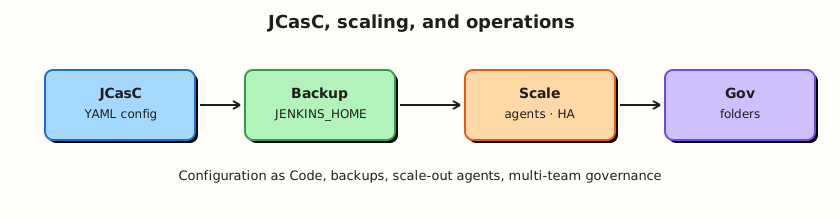
Git-held JCasC configures the controller; backups protect JENKINS_HOME; agents scale horizontally; folders isolate teams.
Theory
What it is
JCasC loads YAML (files, URL, or ConfigMap) at start or via reload to configure security realms, clouds, tool installers, global libraries, and more. Not every plugin is fully covered — treat JCasC as the preferred path, with documented exceptions.
Backup means copying JENKINS_HOME (or volume snapshots) consistently — jobs, plugins, credentials ciphertext, build history. Restore is how you prove the backup.
Scaling: add agents for build concurrency; keep the controller lean (CPU/RAM/disk for orchestration, not compiles). Horizontal agent autoscaling (Kubernetes cloud) beats vertical controller growth.
Metrics/logging: expose Jenkins metrics (Prometheus plugin or equivalent), ship controller logs, alert on queue time, executor starvation, disk, and 5xx on the UI.
Multi-team folders: one folder (or folder tree) per team/product with folder credentials, libraries, and role bindings.
Why it matters
Without JCasC and backups, a failed upgrade is a career-limiting incident. Without agent scale, queues explode. Without folder governance, every squad shares one flat credential blast radius.
How it works
- Install Configuration as Code plugin.
- Store YAML in Git; mount or fetch into the controller (
CASC_JENKINS_CONFIG). - Boot/reload applies config; review “Configuration as Code” UI for unresolved items.
- Nightly snapshot the Jenkins volume; quarterly restore to a scratch controller.
- Scale agents via Kubernetes cloud or VM pools; watch queue metrics.
- Onboard teams into folders with CODEOWNERS-equivalent platform process.
Key concepts and comparisons
| Concern | Prefer |
|---|---|
| System config | JCasC in Git |
| Job definitions | Jenkinsfiles / Job DSL / Multibranch (not giant JCasC job trees) |
| Secrets in YAML | Credentials plugin + secret sources; avoid plaintext in Git |
| Scale builds | More agents |
| Scale UI/API | HA patterns / adequate controller sizing (advanced) |
Common pitfalls
- Putting secrets in committed JCasC.
- Believing JCasC replaces Jenkinsfiles.
- Backups without restore tests.
- Autoscaling agents without Jenkins URL reachability.
- One global folder for all teams “for simplicity.”
Hands-on Lab
Objective
Write a minimal JCasC snippet, a backup/restore shell script for your Compose volume, and folder governance YAML. Validate YAML locally; apply on lab only if the plugin is installed.
Prerequisites
- Module 2 Compose stack (named volume
jenkins_home) - Optional: Configuration as Code plugin on lab Jenkins
Lab environment
Workspace: ~/rebash-jenkins/module-15
Real-world scenario
Leadership asked: “If the Jenkins disk dies tonight, how long to rebuild?” You must show JCasC for baseline config plus a practised volume restore drill.
Step-by-step tasks
Task 1 – Minimal JCasC YAML
Run:
Create jcasc/jenkins.yaml:
jenkins:
  systemMessage: "REBASH Academy lab controller — Module 15 JCasC"
  numExecutors: 0
  mode: NORMAL
  securityRealm:
    local:
      allowsSignup: false
      users:
        - id: "admin"
          # password from secret / first-boot — do not commit real passwords
          password: "${JENKINS_ADMIN_PASSWORD:-changeme}"
unclassified:
  location:
    url: "http://127.0.0.1:8080/"
Create jcasc/apply-casc.sh:
#!/usr/bin/env bash
set -euo pipefail
: "${CASC_JENKINS_CONFIG:=$(pwd)/jcasc/jenkins.yaml}"
echo "Set CASC_JENKINS_CONFIG=$CASC_JENKINS_CONFIG on the controller container"
grep -q 'numExecutors: 0' jcasc/jenkins.yaml
grep -q systemMessage jcasc/jenkins.yaml
echo jcasc_bundle_ok
Verify:
Expected output
YAML emphasises zero built-in executors and a system message.
Task 2 – Backup and restore script (Compose volume)
Run:
Create backup-restore.sh:
#!/usr/bin/env bash
set -euo pipefail
echo "Identify volume: docker volume ls | grep jenkins"
echo "Backup example:"
echo '  VOL=..._jenkins_home'
echo '  docker run --rm -v "$VOL":/jenkins -v "$PWD/backups":/backup alpine \'
echo '    tar -czf /backup/jenkins-home-$(date +%Y%m%d).tgz -C /jenkins .'
echo "Restore: extract tarball into volume on disposable controller, then docker compose up -d"
Verify:
chmod +x backup-restore.sh
./backup-restore.sh | tee backup-restore-head.txt

mkdir -p backups
ls backups | tee backups-dir.txt || true
Expected output
Backup script documents commands; practise when safe on lab.
Task 3 – Scaling and metrics checklist
Run:
Create scale-metrics.yaml:
scaling:
  controller: cpu_ram_disk_for_ui_queue_plugins
  agents: labelled_capacity_k8s_or_vms
  jobs: disableConcurrentBuilds_where_state_required
  builtin_executors: 0
signals:
  - queue_waiting_time
  - agent_offline_count
  - controller_disk_percent
  - http_5xx_login_latency
  - build_success_rate_mttr
logging:
  ship_jenkins_log_to_central
  alert_on_oomkilled_controller
Validate and archive:
python3 -c "
import yaml
with open('scale-metrics.yaml') as f:
    d = yaml.safe_load(f)
assert d['scaling']['builtin_executors'] == 0
print('scale-metrics.yaml OK')
" | tee scale-metrics-validate.txt
Expected output
Metrics YAML validates.
Task 4 – Multi-team folder governance
Run:
Create folder-governance.yaml:
folders:
  - name: rebash-demo
    owners: platform-lab
    credentials: dummy_only
    libraries: rebash-ci
  - name: team-platform
    owners: platform
    credentials: ci_limited_deploy
    libraries: rebash-ci
  - name: team-payments
    owners: payments_and_platform
    credentials: app_ci
    libraries: folder_lib_optional
rules:
  no_prod_secrets_at_root: true
  folder_admins_cannot_administer_controller: true
  new_team_requires_folder_and_rbac_ticket: true
Validate and archive:
python3 -c "
import yaml
with open('folder-governance.yaml') as f:
    d = yaml.safe_load(f)
assert d['rules']['no_prod_secrets_at_root']
print('folder-governance.yaml OK')
" | tee folder-governance-validate.txt

tar -czf module-15-evidence.tgz jcasc backup-restore.sh scale-metrics.yaml folder-governance.yaml backups-dir.txt *.txt
ls -l module-15-evidence.tgz | tee evidence.txt
Expected output
Governance YAML and evidence archive.
Validation steps
- JCasC sample sets
numExecutors: 0and system message -
backup-restore.shdocuments volume backup commands -
scale-metrics.yamlvalidates -
folder-governance.yamlvalidates
Common errors and fixes
| Error | Cause | Fix |
|---|---|---|
| JCasC attribute unknown | Plugin schema gap | Check plugin JCasC docs; export live config |
| Password in Git | Hard-coded secret | Use env/secret source |
| Restore boots empty | Wrong volume | Verify volume name/mount |
| Config not applied | Wrong CASC_JENKINS_CONFIG | Fix path; view CasC log |
Challenge exercise
Export live configuration from a lab controller (CasC UI download) into jcasc/exported.yaml, redact secrets, and diff against your minimal jenkins.yaml to see what else you should codify next.
Learning outcomes
- Authored starter JCasC
- Defined backup/restore for Compose volumes
- Linked scaling to agents not controller compiles
- Drafted multi-team folder rules
Cleanup
# Keep backups/ out of public git if it contains real home tarballs
ls ~/rebash-jenkins/module-15
Validation
- Lab completed under
~/rebash-jenkins/module-15/ - You can explain JCasC versus Jenkinsfile responsibilities
- You can describe a restore drill
- You can name three Jenkins platform metrics
Code Walkthrough
- Codify controller defaults — JCasC in Git.
- Back up the volume — prove restore.
- Scale agents — protect the controller.
- Measure queues and disk — operate with signals.
- Folder tenancy — credentials and RBAC follow ownership.
Security Considerations
- JCasC with plaintext passwords is a secret leak — use secret sources.
- Backups contain credential ciphertext — encrypt and ACL them.
- Who can edit CasC in Git can reshape security realms — protect the repo.
- Metrics endpoints may need auth.
- Folder admins still need boundaries against controller Administer.
Common Mistakes
No restore test
Backups that never restore are theatre. Fix: quarterly scratch restore.
Secrets committed in jcasc/
Tokens in Git history. Fix: ${ENV} / vault integrations; scan PRs.
Scaling the controller to run builds
Controllers become fragile and unsafe. Fix: zero built-in executors; add agents.
One shared folder for all squads
Credential blast radius. Fix: folder-per-team governance.
Best Practices
- Pipeline-as-code for jobs; JCasC for system config.
- Pin plugin versions in images or installation lists.
- Document CasC coverage gaps.
- Alert on disk and queue latency.
- Onboard teams with a folder checklist.
Troubleshooting
| Symptom | Likely cause | Fix |
|---|---|---|
| CasC reload errors | Invalid YAML/schema | Read Configuration as Code log |
| After restore, old URL | Location URL stale | Update unclassified.location.url |
| Agents cannot connect post-migrate | URL/firewall | Fix Jenkins URL and ingress |
| Huge backups | Build history retention | Trim retention policies |
Summary
Operate Jenkins as a platform product: JCasC for rebuildable config, tested JENKINS_HOME backups, agent-side scale, observable queues, and folder tenancy. Next: Troubleshooting and Upgrades.
Interview Questions
1. What is Jenkins Configuration as Code (JCasC)?
Reveal answer
A plugin and practice that configures the Jenkins controller from YAML (often in Git) so system settings are reviewable and rebuildable instead of click-ops only.
2. Should job Pipeline definitions live in JCasC?
Reveal answer
Prefer Jenkinsfiles in application repos (and Multibranch/Job DSL where needed). Use JCasC for controller system configuration — security, clouds, tools, global libraries.
3. What must a Jenkins backup include?
Reveal answer
The JENKINS_HOME contents (or volume snapshot): jobs, plugins, users, credentials ciphertext, and build history as required by retention policy — plus a tested restore procedure.
4. How do you scale Jenkins for more concurrent builds?
Reveal answer
Add agent capacity (static or Kubernetes ephemeral agents) and keep the controller focused on orchestration. Raising built-in executors is the wrong default.
5. Name two metrics that indicate agent shortage.
Reveal answer
Rising queue wait time and a large number of builds stuck pending matching labels while agents are saturated or offline.
6. Why encrypt Jenkins backups?
Reveal answer
Backups contain sensitive configuration and encrypted credentials material; loss of backup media can be as bad as loss of the live controller.
7. What is multi-team folder governance?
Reveal answer
Giving each team a folder (or tree) with scoped credentials, permissions, and libraries so they cannot administer the whole controller or see each other’s secrets.
8. How does numExecutors: 0 in JCasC help security?
Reveal answer
It enforces that the built-in node does not run builds, pushing work to agents and reducing controller compromise via untrusted Pipeline steps.