Shared Libraries
Overview
Copy-pasting the same stage('Checkout') into fifty Jenkinsfiles guarantees drift. A Shared Library centralises reusable Pipeline code in Git: vars/ for global steps teams call like buildService(), src/ for Groovy classes, optional resources/. You will configure a library, pin a version with @, and respect trust boundaries — libraries can run outside the Groovy sandbox.
This is Tutorial 9 in Module 9: Shared Libraries of the REBASH Academy Jenkins for Cloud & DevOps Engineers series — written for Cloud, DevOps, Platform, and Site Reliability Engineering (SRE) engineers. Guide: Extending with Shared Libraries.
Prerequisites
- Docker with Jenkins Pipeline or solid Declarative skills from Modules 4–5
- Git repository hosting for the library (or local Git Jenkins can clone)
- Admin (or folder admin) rights to configure libraries
Learning Objectives
By the end of this tutorial, you will be able to:
- Explain global versus folder shared libraries
- Structure
vars/andsrc/correctly - Call a library step from a Declarative Jenkinsfile with
@Library - Pin library versions and describe trust/sandbox implications
- Design a small reusable step for your teams
Architecture
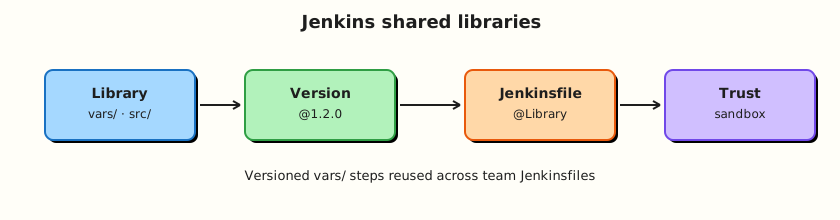
Application Jenkinsfiles load versioned library code from a separate Git repo configured on the controller or folder.
Theory
What it is
A Shared Library is a Git repository (usually) with:
(root)
├── vars/
│   └── sayHello.groovy      # call as sayHello()
├── src/
│   └── org/rebash/Util.groovy
└── resources/
    └── ...
Global libraries are configured under Manage Jenkins → System (Pipeline Shared Groovy Libraries). Folder libraries live on a folder and apply to jobs beneath it — better for multi-tenant controllers.
Retrieve with:
or implicit load when “Load implicitly” is enabled (use sparingly — makes dependencies invisible).
Why it matters
Platform teams ship golden paths: lint, build, container publish, notify. Application teams call one step instead of reinventing SCM checkout flags. Version pins (@1.2.0 or @main) let you roll forward safely. Because trusted libraries may bypass sandbox restrictions, who can merge to the library repo is a security control.
How it works
- Create library Git repo with
vars/sayHello.groovy:
- Register library name
rebash-ci→ Modern SCM → Git → default versionmain. - In an app
Jenkinsfile:
@Library('rebash-ci@main') _
pipeline {
  agent any
  stages {
    stage('Greet') {
      steps {
        script {
          sayHello('rebash')
        }
      }
    }
  }
}
Declarative often needs script { } to call custom steps cleanly.
src/ holds classes under package paths for more structured code. Prefer thin vars/ wrappers over huge Scripted blobs.
Trust: marking a library trusted allows more Jenkins API access. Only trust repos your platform team controls with reviewed merges.
Key concepts and comparisons
| Scope | Best for |
|---|---|
| Global library | Company-wide steps |
| Folder library | Business unit isolation |
| Pin | Trade-off |
|---|---|
@1.4.0 tag | Reproducible |
@main | Floating; faster iteration; breakage risk |
| Commit SHA | Strongest pin |
Common pitfalls
- Putting Jenkinsfiles inside the library repo as the only “docs” without
vars/. - Implicit global libraries nobody knows about.
- Untrusted contributors merging to a trusted library.
- Giant Scripted libraries unreadable to app teams.
- No SemVer tags — every app floats on
main.
Hands-on Lab
Objective
Create a Shared Library Git repository with a vars/ step, document controller configuration, and call it from a demo Pipeline job.
Prerequisites
- Jenkins admin for global library or folder configure permission
- Git remote or
file://visible to Jenkins (same caveats as Module 5)
Lab environment
Workspace: ~/rebash-jenkins/module-09
Real-world scenario
Three squads duplicate Slack notify and git metadata stages. Platform will publish rebash-ci Shared Library v0.1.0 with sayHello and ciMeta steps as the pattern for later real steps.
Step-by-step tasks
Task 1 – Create the library repository layout
Commit and record:
cd ~/rebash-jenkins/module-09
set -euo pipefail

rm -rf rebash-ci-lib
mkdir -p rebash-ci-lib/vars rebash-ci-lib/src/org/rebash
cd rebash-ci-lib
git init -b main
Create vars/sayHello.groovy:
def call(String name = 'world') {
  echo "Hello, ${name} — from rebash-ci Shared Library"
}
Create vars/ciMeta.groovy:
def call() {
  echo "JOB_NAME=${env.JOB_NAME}"
  echo "BUILD_NUMBER=${env.BUILD_NUMBER}"
  echo "BRANCH_NAME=${env.BRANCH_NAME}"
}
Create src/org/rebash/Strings.groovy:
package org.rebash

class Strings implements Serializable {
  static String shout(String s) {
    return s?.toUpperCase()
  }
}
Create README.md:
# rebash-ci Shared Library

## Usage

@Library('rebash-ci@main') _

steps:
- sayHello('name')
- ciMeta()
Commit and record:
git add vars src README.md
git -c user.email='rebash-lab@example.com' -c user.name='REBASH Lab' commit -m 'Initial rebash-ci library with sayHello and ciMeta'
git tag -a v0.1.0 -m 'v0.1.0'
git log -1 --oneline | tee ../lib-commit.txt
pwd | tee ../lib-path.txt
Expected output
Tag v0.1.0 created; path recorded.
Task 2 – Configure the library in Jenkins
- Prefer folder library on
rebash-demo: Folder → Configure → Pipeline Shared Libraries
(or Manage Jenkins → System → Global Pipeline Libraries). - Name:
rebash-ci - Default version:
v0.1.0(ormain) - Modern SCM → Git → repository URL (remote or
file://…) - Uncheck “Allow default version to be overridden” only if you want hard pins — for labs, allow override.
- Do not mark Trusted unless you understand sandbox implications; for
echo-only steps, untrusted is enough.
Run:
Create library-config.yaml:
name: rebash-ci
scope: folder_rebash_demo_or_global
default_version: v0.1.0
repo: fill_from_lib-path.txt
trusted: false
implicit_load: false
Validate and archive:
python3 -c "
import yaml
from pathlib import Path
p = Path('lib-path.txt').read_text().strip()
d = yaml.safe_load(open('library-config.yaml'))
d['repo'] = p
yaml.safe_dump(d, open('library-config.yaml', 'w'), sort_keys=False)
assert d['name'] == 'rebash-ci'
assert d['default_version'] == 'v0.1.0'
print('library-config.yaml OK')
" | tee library-config-validate.txt
Expected output
Config YAML validates; library saved in UI.
Task 3 – Consumer Jenkinsfile
Run:
Create consumer-app/Jenkinsfile:
@Library('rebash-ci@v0.1.0') _
pipeline {
  agent any
  options { timestamps() }
  stages {
    stage('Library steps') {
      steps {
        script {
          sayHello('module-09')
          ciMeta()
        }
      }
    }
  }
}
Create consumer-job.yaml:
job: rebash-demo/lib-consumer
definition: pipeline_script_or_scm_consumer_app
library_pin: rebash-ci@v0.1.0
expected_console: Hello from rebash-ci Shared Library
Verify:
Create/run lib-consumer and confirm console output.
Expected output
Build success; library echo lines visible.
Task 4 – Versioning and trust memo
Run:
Create trust-policy.yaml:
pin: tag_v0.1.0_for_reproducibility
platform: cut_tags_after_review
trusted_library: merge_rights_equal_script_approval_power
folder_libraries: reduce_blast_radius_vs_global_implicit
rollback: retag_or_point_jobs_at_previous_tag
Validate and archive:
python3 -c "
import yaml
with open('trust-policy.yaml') as f:
    d = yaml.safe_load(f)
assert 'v0.1.0' in d['pin']
print('trust-policy.yaml OK')
" | tee trust-policy-validate.txt

tar -czf module-09-evidence.tgz rebash-ci-lib/vars rebash-ci-lib/README.md consumer-app/Jenkinsfile library-config.yaml consumer-job.yaml trust-policy.yaml *.txt
ls -l module-09-evidence.tgz | tee evidence.txt
Expected output
Archive present.
Validation steps
- Library repo has
vars/sayHello.groovyand tagv0.1.0 - Jenkins library named
rebash-ciconfigured - Consumer Pipeline calls library steps successfully
- Trust policy YAML validates
Common errors and fixes
| Error | Cause | Fix |
|---|---|---|
| Library not found | Name/URL mismatch | Match library name exactly |
sayHello undefined | Missing _ / wrong version | Check @Library('rebash-ci@v0.1.0') _ |
| Sandbox RejectedAccess | Untrusted + restricted API | Avoid privileged APIs; or review trust carefully |
| file:// clone fail | Docker Jenkins isolation | Use hosted Git |
Challenge exercise
Add vars/requireLabel.groovy that errors if env.NODE_LABELS / label checks fail your policy string (simple echo + error if a parameter REQUIRED_LABEL is set and not contained in env.NODE_NAME). Pin @v0.1.1 after tagging.
Learning outcomes
- Built a minimal Shared Library layout
- Registered and consumed a version-pinned library
- Documented trust boundaries for library merges
Cleanup
Keep rebash-ci library config for later modules. Remove experimental consumer jobs if cluttered.
Validation
- Lab completed under
~/rebash-jenkins/module-09/ - You can explain
vars/versussrc/ - You can justify version pins over floating
main - You can describe why library merge rights are sensitive
Code Walkthrough
- Thin vars steps — app Jenkinsfiles stay Declarative.
- Pin versions — tags/SHAs in production.
- Folder scope when multi-tenant — limit blast radius.
- No implicit globals by default — make
@Libraryvisible. - Review library PRs like production code — they run everywhere.
Security Considerations
- Trusted libraries can weaken Groovy sandbox protections.
- Library credentials for clone should be read-only.
- Do not put secrets inside library
resources/committed to Git. - Separate privileged deploy helpers from PR-safe helpers.
- Audit who can configure global libraries on the controller.
Common Mistakes
Implicit trusted global library on main
Every job loads changing code silently. Fix: explicit @Library + tags; avoid implicit in production.
Application teams with merge rights to trusted libs
Equivalent to broad script approval. Fix: platform-owned repo, CODEOWNERS, reviews.
Copy-paste Scripted novels in vars/
Unmaintainable. Fix: small steps; shared conventions; document parameters.
No tags — everyone on @main
One bad commit breaks the company. Fix: SemVer tags and staged rollout.
Best Practices
- SemVer tags and changelog for the library.
- Examples in library README.
- Folder libraries per business unit when needed.
- Deprecate steps with clear echo warnings before removal.
- Test library changes on a canary folder/job first.
Troubleshooting
| Symptom | Likely cause | Fix |
|---|---|---|
| Old step behaviour | Cached version / wrong pin | Check replay resolves expected ref |
error fetching library | Git auth | Fix credentials |
| Step works in script{} only | Declarative limits | Wrap custom calls in script |
| ClassNotFound in src/ | Package path mismatch | Match src/org/... to package |
Summary
Shared Libraries turn repeated Pipeline glue into versioned platform products. Use vars/ for callable steps, pin releases, and treat library trust as a security boundary. Next: Managing Jenkins — Plugins, Tools, and CLI.
Interview Questions
1. What belongs in vars/ versus src/?
Reveal answer
vars/ defines global call steps (filename = step name). src/ holds Groovy classes under Java-like package paths for structured code. Most app-facing APIs should be thin vars/ wrappers.
2. What does @Library('name@version') _ do?
Reveal answer
It loads the named Shared Library at a Git ref (branch, tag, or commit) into the Pipeline. The underscore imports the global vars for use as steps.
3. Why pin library versions in production?
Reveal answer
Floating @main means a library merge can break every consumer simultaneously. Tags/SHAs make rollbacks and gradual rollouts possible.
4. What is the risk of a Trusted shared library?
Reveal answer
Trusted libraries can run with elevated Groovy permissions (less sandbox). A malicious or sloppy merge can become remote code execution across jobs. Merge rights must be tightly controlled.
5. Global versus folder library — when choose folder?
Reveal answer
When different teams need different libraries or you want to limit who can use/admin a library to a folder subtree on a multi-tenant controller.
6. Why avoid “Load implicitly” for global libraries?
Reveal answer
Implicit load hides dependencies — Jenkinsfiles no longer show @Library, making reviews and debugging harder, and surprise upgrades more likely.
7. How do you roll back a bad library release?
Reveal answer
Point consumers at the previous tag/SHA (or fix-forward with a new tag). Avoid rewriting published tags that many pipelines already pinned.
8. Should deploy credentials live inside the Shared Library repository?
Reveal answer
No. Libraries should reference Jenkins credentials by ID at runtime. Secrets in Git are a leak and rotation nightmare.