Docker with Jenkins Pipeline
Overview
Static agent images drift. Docker Pipeline lets a Jenkinsfile choose a container toolchain per stage: agent { docker { image '…' } }, agent { dockerfile true }, and image build/push patterns with registry credentials. You must also understand Docker-in-Docker (DinD) versus a sibling Docker socket — both work; both have sharp edges.
This is Tutorial 8 in Module 8: Docker with Pipeline of the REBASH Academy Jenkins for Cloud & DevOps Engineers series — written for Cloud, DevOps, Platform, and Site Reliability Engineering (SRE) engineers. Official guide: Using Docker with Pipeline.
Prerequisites
- Multibranch Pipelines and Pull Requests
- Docker basics — images, Dockerfile, registries
- Docker Pipeline plugin on Jenkins
- An agent that can run Docker (labelled
docker/rebash-agent) — not the locked-down built-in node without a socket
Learning Objectives
By the end of this tutorial, you will be able to:
- Run stages inside
agent { docker { … } }images - Use
agent { dockerfile true }for repo-defined toolchains - Explain DinD versus mounting
docker.sock(sibling daemon) - Sketch a safe image build and registry push flow with credentials
- Apply
reuseNodeand cache mounts when workspaces must align
Architecture
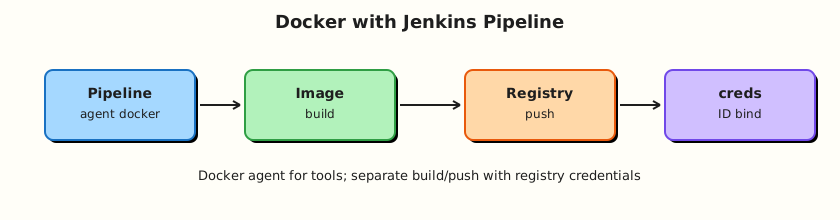
Jenkins agents invoke the Docker CLI/daemon to run language toolchains or build images for a registry.
Theory
What it is
With the Docker Pipeline plugin, Declarative Pipeline accepts:
agent {
  docker {
    image 'maven:3.9.9-eclipse-temurin-21'
    args '-v $HOME/.m2:/root/.m2'
    reuseNode true
  }
}
Or build the agent from the repo:
Scripted helpers such as docker.build('my-image:tag') and docker.withRegistry(...) support build/push flows (also usable from careful Scripted blocks / shared libraries).
Why it matters
Containers make CI reproducible: the same Maven/Node image on every agent. Registries become the hand-off to Kubernetes. Without a clear daemon model, labs fail with Cannot connect to the Docker daemon, or worse — PR builds inherit a writable host socket and escape the container.
How it works
agent { docker }: Jenkins starts a container from image, mounts a workspace, and runs steps inside it. The agent machine still needs a working Docker daemon/CLI.
reuseNode true: keep the same node/workspace instead of allocating a fresh workspace for the containerised stage.
dockerfile true: docker build the adjacent Dockerfile, then run steps in that image — great for custom OS packages.
Build and push pattern (conceptual):
- Build app tests in a language image.
docker buildthe app image.- Authenticate to a registry (credentials ID).
docker pushimmutable tags (git-sha), optionallylatestfor non-prod.
DinD versus sibling socket
| Approach | How | Upside | Risk |
|---|---|---|---|
| Sibling socket | Mount /var/run/docker.sock into the agent/container | Fast; images land on host daemon | Container can control host Docker — root-equivalent |
| DinD | Privileged docker:dind sidecar | Isolated daemon | Privileged containers; TLS/setup complexity; storage drivers |
For untrusted PR builds, prefer remote builders, Kaniko/BuildKit in Kubernetes, or tightly locked agents — not a world-writable host socket.
Registry credentials: store Username/Password (or token) in Jenkins Credentials; reference by ID in docker.withRegistry('https://registry.example.com', 'creds-id') or equivalent Declarative credential bindings. Never commit registry passwords.
Key concepts and comparisons
| Directive | Use |
|---|---|
agent { docker { image } } | Off-the-shelf toolchain |
agent { dockerfile true } | Custom repo Dockerfile agent |
agent none + per-stage docker | Multiple languages in one Pipeline |
args '-v …' | Caches (~/.m2, yarn cache) |
| Tagging | Advice |
|---|---|
| Git SHA | Immutable prod-friendly |
BUILD_ID | OK for labs |
latest | Convenience only; not a sole prod pin |
Common pitfalls
- Docker Pipeline plugin missing → invalid agent type.
- Agent without Docker CLI/daemon.
- Using
latesttags for reproducibility theatre. - Mounting
docker.sockinto Multibranch jobs that build fork PRs. - Forgetting registry credentials scopes (push denied).
Hands-on Lab
Objective
Create a small app repo with Dockerfile + Declarative Pipeline that runs tests in a container image and builds an application image. Document your daemon model (socket vs DinD). Push only if you have a registry; otherwise load/tag locally.
Prerequisites
- Docker Engine on the Jenkins agent host
- Docker Pipeline plugin
- Optional: registry credentials in Jenkins
Lab environment
Workspace: ~/rebash-jenkins/module-08
mkdir -p ~/rebash-jenkins/module-08 && cd ~/rebash-jenkins/module-08
set -euo pipefail
docker version | tee docker-version.txt
Expected output
Client/server sections (agent host must see a daemon).
Real-world scenario
Your Node service must build in CI with the same image developers use locally. Security asked you to write down whether agents use DinD or the host socket before any fork PR builds are enabled.
Step-by-step tasks
Task 1 – Sample app, Dockerfile, and daemon decision record
Run:
cd ~/rebash-jenkins/module-08
set -euo pipefail

rm -rf docker-pipe-demo
mkdir -p docker-pipe-demo && cd docker-pipe-demo
Create app.js:
Create package.json:
{
  "name": "docker-pipe-demo",
  "version": "0.1.0",
  "private": true,
  "scripts": {
    "test": "node -e \"require('fs').writeFileSync('test-ok.txt','ok'); console.log('test ok')\""
  }
}
Create Dockerfile:
FROM node:20-alpine
WORKDIR /app
COPY package.json ./
COPY app.js ./
CMD ["node", "app.js"]
Create Dockerfile.ci:
Create daemon-model.yaml:
lab_choice: fill_socket_or_dind
options:
  sibling_socket:
    description: Agent has Docker CLI; mount /var/run/docker.sock
    risk: container control of host Docker
  dind_sidecar:
    description: docker:dind privileged service with DOCKER_HOST
    risk: privileged container; more moving parts
untrusted_pr_policy: no_host_socket_for_fork_prs
Validate and archive:
python3 -c "
import yaml
with open('daemon-model.yaml') as f:
    d = yaml.safe_load(f)
assert 'sibling_socket' in d['options']
print('daemon-model.yaml OK')
" | tee daemon-model-validate.txt

cd ..
test -f docker-pipe-demo/Dockerfile
Expected output
App files and validated daemon-model.yaml exist.
Task 2 – Declarative Pipeline with docker agent + image build
Run:
Create Jenkinsfile:
pipeline {
  agent none
  options { timestamps() }
  environment {
    IMAGE_NAME = 'rebash/docker-pipe-demo'
  }
  stages {
    stage('Test in Node container') {
      agent {
        docker {
          image 'node:20-alpine'
          reuseNode true
        }
      }
      steps {
        sh 'node --version'
        sh 'npm test'
        sh 'test -f test-ok.txt'
      }
    }
    stage('Build image') {
      agent { label 'rebash-agent || docker || any' }
      steps {
        sh 'docker version'
        sh 'docker build -t ${IMAGE_NAME}:${BUILD_NUMBER} .'
        sh 'docker image ls ${IMAGE_NAME}:${BUILD_NUMBER}'
      }
    }
  }
  post {
    always {
      echo "Docker Pipeline demo: ${currentBuild.currentResult}"
    }
  }
}
Verify:
# Note: label expression may need editing to match your Module 6 labels
grep -q 'docker {' Jenkinsfile
grep -q 'docker build' Jenkinsfile
Expected output
Jenkinsfile contains docker agent and build stage.
Wire this repo into Jenkins (Pipeline from SCM or Multibranch). Ensure the Build image stage runs on an agent that can talk to Docker. Adjust the label to rebash-agent if that is your Module 6 label.
Task 3 – Optional dockerfile agent smoke
Run:
Create Jenkinsfile.dockerfile-agent:
pipeline {
  agent {
    dockerfile {
      filename 'Dockerfile.ci'
      reuseNode true
    }
  }
  stages {
    stage('Tool check') {
      steps {
        sh 'node --version'
        sh 'git --version'
      }
    }
  }
}
Verify:
Create job rebash-demo/dockerfile-agent-demo using this script (SCM or paste) and run once.
Expected output
Stage prints node and git versions from the built CI image.
Task 4 – Registry credentials pattern (Pipeline stub)
Run:
Create registry-push.Jenkinsfile:
// Credential ID registry-ci — do not commit passwords
stage('Push image') {
  steps {
    script {
      docker.withRegistry('https://ghcr.io', 'registry-ci') {
        def img = docker.build("ghcr.io/org/demo:${env.BUILD_NUMBER}")
        img.push()
      }
    }
  }
}
Validate and archive:
grep -q registry-ci registry-push.Jenkinsfile
grep -q 'docker.withRegistry' registry-push.Jenkinsfile

# Local docker build proof even without Jenkins
cd docker-pipe-demo
docker build -t rebash/docker-pipe-demo:local .
docker image ls rebash/docker-pipe-demo:local | tee ../image-ls.txt
cd ..

tar -czf module-08-evidence.tgz docker-pipe-demo/Jenkinsfile docker-pipe-demo/Dockerfile daemon-model.yaml registry-push.Jenkinsfile image-ls.txt
ls -l module-08-evidence.tgz | tee evidence.txt
Expected output
Local image listed; evidence archive created.
Validation steps
-
daemon-model.yamlrecords socket vs DinD choice - Pipeline defines a
docker { image }test stage and adocker buildstage - Local or Jenkins build produced image
rebash/docker-pipe-demo:* -
registry-push.Jenkinsfiledescribes credential ID usage without storing secrets
Common errors and fixes
| Error | Cause | Fix |
|---|---|---|
docker: not found | Agent lacks CLI | Install Docker on agent or use different label |
| Cannot connect to daemon | No socket/DinD | Fix mount or DinD DOCKER_HOST |
Invalid agent type docker | Plugin missing | Install Docker Pipeline |
| Workspace empty in container | reuseNode / allocation | Set reuseNode true when needed |
| Push denied | Auth/tag | Fix credential ID and repository name |
Challenge exercise
Extend the Pipeline with a third stage that tags the image as ${IMAGE_NAME}:git-${GIT_COMMIT} when GIT_COMMIT / env.GIT_COMMIT is available (Multibranch), otherwise ${IMAGE_NAME}:lab. Do not push unless credentials exist.
Learning outcomes
- Ran CI steps inside an official language image
- Built an application image from a Dockerfile
- Documented Docker daemon security trade-offs
- Described registry auth via Jenkins credentials
Cleanup
docker rmi rebash/docker-pipe-demo:local 2>/dev/null || true
# Remove BUILD_NUMBER tags created in Jenkins as needed
ls ~/rebash-jenkins/module-08
Validation
- Lab completed under
~/rebash-jenkins/module-08/ - You can explain
dockeragent versusdockerfileagent - You can contrast DinD and sibling socket risks
- You know where registry credentials should live
Code Walkthrough
- Test in a language image — reproducible toolchains.
- Build on a Docker-capable labelled agent — not the controller.
- Write down the daemon model — socket vs DinD is a security decision.
- Credential IDs for registries — never passwords in Jenkinsfiles.
- Immutable tags — SHA/
BUILD_NUMBERover floatinglatestalone.
Security Considerations
- Host Docker socket access is root-equivalent on the agent host.
- DinD usually needs privileged mode — limit to trusted builds.
- Untrusted PRs must not inherit privileged Docker.
- Registry tokens in credentials store; short-lived tokens when possible.
- Scan images before production deploy (policy / Module 12 themes).
Common Mistakes
Mounting docker.sock for fork PR Multibranch jobs
Malicious Pipelines can build escape paths. Fix: separate agent pools; avoid socket mounts for untrusted code.
Building images on the built-in node
Controllers with Docker become high-value targets. Fix: labelled Docker agents only.
Registry password in Jenkinsfile
Leaks via Git and console. Fix: Credentials + withRegistry / bindings.
Only tagging latest
Cannot roll back safely. Fix: push immutable tags; move latest only as a pointer if needed.
Best Practices
- Pin image digests or stable tags for CI toolchains.
- Cache mounts for Maven/npm where safe.
agent none+ per-stage containers for polyglot repos.- Document Docker label restrictions (Manage Jenkins / folder Docker label).
- Prefer BuildKit/Kaniko in Kubernetes when socket mounts are unacceptable (Module 13 bridge).
Troubleshooting
| Symptom | Likely cause | Fix |
|---|---|---|
| Permission denied on socket | Group/user mismatch | Add jenkins user to docker group (understand risk) |
| DinD TLS errors | Cert env mismatch | Align DOCKER_TLS_CERTDIR / client certs with jenkins.io Docker install docs |
| Slow builds | No dependency cache | Mount cache volumes carefully |
reuseNode surprises | Stage landed elsewhere | Set reuseNode; pin labels |
| Image missing in later stage | Different agents | Push to registry or reuse same node |
Summary
Docker Pipeline gives reproducible toolchains and a path to ship images. Choose socket versus DinD deliberately, keep builds off the controller, and authenticate to registries with credentials IDs. Next: Shared Libraries.
Interview Questions
1. What does agent { docker { image 'maven:…' } } do?
Reveal answer
It runs the Pipeline stage(s) inside a container from that image on a Docker-capable agent, mounting a workspace so steps see your source with the image’s toolchain.
2. When do you use agent { dockerfile true }?
Reveal answer
When the repository’s Dockerfile defines a custom CI environment (extra packages, corporate base images) that you want built and used as the agent for those steps.
3. What is the main security risk of mounting /var/run/docker.sock?
Reveal answer
Processes in the container can control the host Docker daemon — effectively root on the host. Untrusted Pipelines can abuse that power.
4. How does DinD differ from the sibling socket model?
Reveal answer
DinD runs a separate Docker daemon (often privileged) for builds. The sibling model uses the host daemon via the mounted socket. DinD isolates the daemon more; socket is simpler but couples to the host.
5. How should registry authentication be handled in Jenkins?
Reveal answer
Store registry username/token in the credentials store and reference the credential ID from Pipeline (docker.withRegistry or bindings). Do not commit passwords.
6. Why pin CI tool images instead of node:latest?
Reveal answer
latest moves under you and breaks builds non-deterministically. Pinning versions or digests keeps CI reproducible and debuggable.
7. What does reuseNode true change?
Reveal answer
The containerised stage reuses the same agent node and workspace instead of allocating a new workspace on potentially another node, keeping files in sync across stages.
8. Why build images on labelled agents rather than the controller?
Reveal answer
Image builds are heavy and, with socket/DinD access, privileged. Keeping them on agents protects the controller’s JENKINS_HOME and credentials plane.