Managing Jenkins — Plugins, Tools, and CLI
Overview
Pipelines fail for boring operational reasons: a plugin update breaks SCM, a JDK tool points at the wrong path, nobody knows how to safeRestart. This tutorial covers the Manage Jenkins surface — Plugin Manager, global tools, Jenkins CLI, configuration reload, and safe restart — so you can operate a controller without guessing.
This is Tutorial 10 in Module 10: Managing Jenkins of the REBASH Academy Jenkins for Cloud & DevOps Engineers series — written for Cloud, DevOps, Platform, and Site Reliability Engineering (SRE) engineers. Handbook: Managing Jenkins.
Prerequisites
- Running Jenkins LTS with admin access
- Familiarity with the dashboard from Modules 2–3
- Optional:
javaon your workstation for the CLI JAR workflow
Learning Objectives
By the end of this tutorial, you will be able to:
- Navigate Manage Jenkins and Plugin Manager safely
- Install or update a plugin and verify it loaded
- Configure a global tool installation and reference it thoughtfully
- Run a Jenkins CLI command against your controller
- Choose reload versus safe restart versus hard restart
Architecture
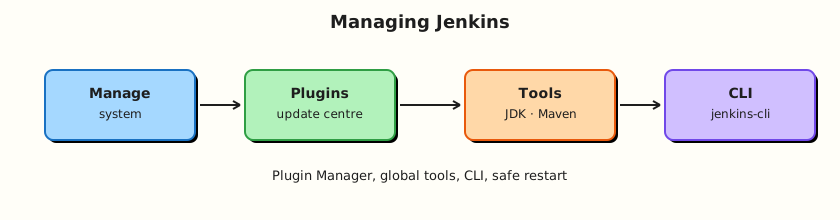
Operators change controller configuration through Manage Jenkins; plugins and tools alter what Pipelines can do; CLI automates admin tasks.
Theory
What it is
Manage Jenkins is the admin console: system config, plugins, nodes, security, tools, and more.
Plugin Manager installs/updates/removes plugins that extend Jenkins (Git, Pipeline, credentials, Branch Source…). Plugins have dependencies; updates can require a restart.
Global tools (Manage Jenkins → Tools) define JDK, Maven, Gradle, Git installations — auto-installer or fixed paths — referenced from Freestyle or tools { jdk '…' } in Pipeline. Container agents often ignore these and bake tools into images instead.
Jenkins CLI is a client (jenkins-cli.jar or ssh CLI) for scripting admin operations: list plugins, groovy console alternatives, build triggers, etc. Authenticate with an API token.
Reload configuration from disk re-reads some config without full restart. Safe restart waits for running builds to finish (when supported) then restarts. Avoid killing the JVM mid-write to JENKINS_HOME.
Why it matters
Uncontrolled plugin sprawl is how controllers die on Monday. Tool misconfiguration wastes hours of “command not found.” CLI enables inventory and automation before full Jenkins Configuration as Code (JCasC) in Module 15. Knowing safe restart etiquette keeps pipelines from being severed mid-deploy.
How it works
- Admin opens Plugin Manager → Available / Updates / Installed.
- Install plugins → possibly Restart when Jenkins requests it.
- Configure Tools → add JDK with name
jdk17. - Download CLI from
https://<jenkins>/jnlpJars/jenkins-cli.jar. java -jar jenkins-cli.jar -s https://<jenkins>/ -auth user:token help- After carefully edited
config.xmlon disk (advanced), reload — prefer UI/JCasC over hand edits.
Key concepts and comparisons
| Action | When |
|---|---|
| Reload | Limited config-from-disk cases |
| Safe restart | Plugin needs restart; drain builds |
| Immediate restart / container recreate | Labs; accept aborted builds |
| Tool strategy | Fit |
|---|---|
| Global tool installer | Static VM agents |
| Image-baked tools | Docker/K8s agents (preferred modern) |
Common pitfalls
- Updating all plugins on production Friday evening.
- Installing unused plugins “just in case.”
- Hand-editing
JENKINS_HOMEwithout backup. - Storing API tokens in shell history.
- Assuming
tools {}works identically on every ephemeral pod.
Hands-on Lab
Objective
Inventory plugins via UI and CLI, install or verify a harmless plugin state, define a global tool entry (or document why images replace it), and practice a safe restart on a lab controller.
Prerequisites
- Lab Jenkins only — do not safe-restart shared production
- Admin user + API token (User → Security → API Token)
Lab environment
Workspace: ~/rebash-jenkins/module-10
mkdir -p ~/rebash-jenkins/module-10 && cd ~/rebash-jenkins/module-10
set -euo pipefail
curl -sS -o /dev/null -w "%{http_code}\n" http://127.0.0.1:8080/login | tee controller.txt
Real-world scenario
Before a platform review you must show a plugin inventory, prove CLI access works with a token, and document the restart procedure used after plugin updates.
Step-by-step tasks
Task 1 – Plugin inventory from the UI
- Manage Jenkins → Plugins → Installed.
- Note Pipeline, Git, Folders, Docker Pipeline (if installed) versions.
- Check Updates tab — do not apply production updates blindly; labs may update one plugin.
Run:
Create plugins.txt:
# Pin core plugins for lab inventory — fill versions from UI or CLI list-plugins
workflow-aggregator
git
cloudbees-folder
docker-workflow
branch-api
Verify:
# If token exported, capture plugin list head
if [[ -n "${JENKINS_USER:-}" && -n "${JENKINS_TOKEN:-}" ]]; then
java -jar jenkins-cli.jar -s "$JENKINS_URL" -auth "$JENKINS_USER:$JENKINS_TOKEN" list-plugins \
| tee plugins-inventory.txt
head -n 5 plugins-inventory.txt | tee plugins-inventory-head.txt
else
echo "Set JENKINS_USER and JENKINS_TOKEN to capture list-plugins" | tee plugins-inventory.txt
fi
grep -q workflow-aggregator plugins.txt
Expected output
plugins.txt pin list present; full inventory when token set.
Task 2 – Jenkins CLI hello
Verify:
cd ~/rebash-jenkins/module-10
set -euo pipefail
JENKINS_URL="${JENKINS_URL:-http://127.0.0.1:8080/}"
curl -sS -O "${JENKINS_URL%/}/jnlpJars/jenkins-cli.jar"
test -f jenkins-cli.jar
# Document CLI help output (no secrets)
java -jar jenkins-cli.jar -s "$JENKINS_URL" help 2>&1 | head -n 15 | tee cli-help-head.txt || \
echo "Run with -auth after exporting JENKINS_USER and JENKINS_TOKEN" | tee cli-help-head.txt
Create cli-commands.sh:
#!/usr/bin/env bash
set -euo pipefail
: "${JENKINS_URL:=http://127.0.0.1:8080/}"
: "${JENKINS_USER:?export admin username}"
: "${JENKINS_TOKEN:?export API token — never commit}"
java -jar jenkins-cli.jar -s "$JENKINS_URL" -auth "$JENKINS_USER:$JENKINS_TOKEN" help | head
java -jar jenkins-cli.jar -s "$JENKINS_URL" -auth "$JENKINS_USER:$JENKINS_TOKEN" list-plugins | head -n 20
Verify:
chmod +x cli-commands.sh

if [[ -n "${JENKINS_USER:-}" && -n "${JENKINS_TOKEN:-}" ]]; then
  java -jar jenkins-cli.jar -s "$JENKINS_URL" -auth "$JENKINS_USER:$JENKINS_TOKEN" list-plugins \
    | head -n 20 | tee plugins-cli-head.txt
else
  echo "Set JENKINS_USER and JENKINS_TOKEN to run list-plugins" | tee plugins-cli-head.txt
fi
Expected output
jenkins-cli.jar downloaded; CLI help/plugins when token set.
Task 3 – Global tools note
Manage Jenkins → Tools → review JDK installations. Add a JDK entry named jdk17 or document that lab agents use container images instead.
Run:
Create tools.yaml:
static_agents:
  use_tools_block: true
  example:
    jdk: jdk17
container_agents:
  prefer_image_baked_toolchain: true
  module_reference: module_8
lab_observations:
  jdk_entries: fill from UI
  maven_entries: fill from UI
Create Jenkinsfile.tools:
pipeline {
  agent any
  tools { jdk 'jdk17' }
  stages {
    stage('Javac') {
      steps { sh 'javac -version || echo jdk17_not_on_agent' }
    }
  }
}
Validate and archive:
python3 -c "
import yaml
with open('tools.yaml') as f:
    d = yaml.safe_load(f)
assert d['static_agents']['use_tools_block']
print('tools.yaml OK')
" | tee tools-validate.txt
grep -q "tools { jdk" Jenkinsfile.tools
Expected output
Strategy YAML and tools Pipeline stub on disk.
Task 4 – Safe restart drill (lab only)
Run:
Create restart-checks.sh:
#!/usr/bin/env bash
set -euo pipefail
URL="${JENKINS_URL:-http://127.0.0.1:8080/login}"
echo "checking $URL"
for i in $(seq 1 12); do
  code=$(curl -sS -o /dev/null -w '%{http_code}' "$URL" || echo 000)
  echo "attempt $i http=$code"
  case "$code" in 200|403) echo restart_ok; exit 0 ;; esac
  sleep 5
done
echo restart_timeout; exit 1
Validate and archive:
chmod +x restart-checks.sh

curl -sS -o /dev/null -w "%{http_code}\n" http://127.0.0.1:8080/login | tee after-restart.txt || true

tar -czf module-10-evidence.tgz plugins.txt tools.yaml Jenkinsfile.tools cli-commands.sh restart-checks.sh jenkins-cli.jar plugins-cli-head.txt *.txt 2>/dev/null || \
tar -czf module-10-evidence.tgz plugins.txt tools.yaml Jenkinsfile.tools cli-commands.sh restart-checks.sh *.txt
ls -l module-10-evidence.tgz | tee evidence.txt
Expected output
Restart script and archive created. Do not put API tokens in the tarball.
Validation steps
- Plugin inventory captured in
plugins.txtorplugins-inventory.txt - CLI JAR downloaded;
list-pluginsor documented token prerequisite -
tools.yamlandJenkinsfile.toolswritten -
restart-checks.shready (executed on lab if safe)
Common errors and fixes
| Error | Cause | Fix |
|---|---|---|
CLI Authentication failed | Bad token | Regenerate API token |
| Plugin install stuck | Dependency/restart needed | Read Plugin Manager banner; safe restart |
javac not found with tools{} | Wrong agent | Install JDK on agent or use container |
| CLI SSL errors | HTTPS MITM/proxy | Fix certs or use internal trust store |
Challenge exercise
Use CLI list-jobs (or get-job) to export one job’s config XML to exported-job.xml locally. Redact secrets before sharing. Record the command in cli-export-command.txt:
java -jar jenkins-cli.jar -s "$JENKINS_URL" -auth "$JENKINS_USER:$JENKINS_TOKEN" get-job rebash-demo/hello-pipeline > exported-job.xml
grep -q '<flow-definition' exported-job.xml && echo export_ok | tee cli-export-command.txt
Learning outcomes
- Inventoried plugins
- Exercised Jenkins CLI auth pattern
- Separated VM tool installers from container toolchains
- Practised safe restart etiquette on a lab controller
Cleanup
# Unset tokens from shell
unset JENKINS_TOKEN JENKINS_USER
# Keep jenkins-cli.jar out of public git if your policy requires
ls ~/rebash-jenkins/module-10
Validation
- Lab completed under
~/rebash-jenkins/module-10/ - You can find Plugin Manager and Tools without hunting
- You can explain safe restart versus killing the container
- You know not to update all plugins without a window
Code Walkthrough
- Inventory before change — plugins and versions.
- One change at a time — update plugins in a test controller first.
- CLI with tokens — never password in scripts committed to Git.
- Tools match agent reality — images often win.
- Drain then restart — respect running deploys.
Security Considerations
- API tokens are passwords — store in a secret manager; rotate on leak.
- Plugin Manager requires Administer — keep it locked down.
- Some plugins are unmaintained — prefer widely used, recent releases.
- CLI over HTTPS only on real networks.
- Reload/restart are privileged operations — audit who can invoke them.
Common Mistakes
Update all plugins on production without staging
Dependency chains break Pipelines. Fix: staging controller; read changelogs; backup JENKINS_HOME.
API token in git or screenshot repos
Full admin API access leaks. Fix: rotate immediately; use local env vars.
Hard kill during plugin upgrade
Corrupt JENKINS_HOME risk. Fix: safe restart; restore from backup if needed.
Global tool JDK nobody uses
False confidence. Fix: verify on the agent that runs the job.
Best Practices
- Maintain a plugin allow-list.
- Stage upgrades; take volume snapshots.
- Prefer JCasC (Module 15) over click-ops drift.
- Document CLI examples in the platform
cli-commands.shpattern. - Monitor disk for plugin/.cache growth.
Troubleshooting
| Symptom | Likely cause | Fix |
|---|---|---|
| Jenkins boot loop after plugin | Bad plugin | Disable plugin via JENKINS_HOME recovery patterns |
| CLI connection refused | Wrong URL/port | Match Compose publish ports |
| Tool installer download fails | Egress filter | Pre-install on image; allowlist URLs |
| Changes missing after restart | Wrong volume | Verify Compose volume still mounted |
Summary
Manage Jenkins is where plugins, tools, and restarts become deliberate operations. Inventory with UI and CLI, stage plugin changes, and prefer safe restarts on lab controllers before you touch production. Next: Securing Jenkins.
Interview Questions
1. What is the Plugin Manager used for?
Reveal answer
Installing, updating, removing, and reviewing Jenkins plugins that extend core functionality such as Git, Pipeline, and credentials providers.
2. Why stage plugin updates on a non-production controller?
Reveal answer
Plugin dependencies and behavioural changes can break Pipelines and auth. A staging controller surfaces failures before production downtime.
3. What is a Jenkins API token used for?
Reveal answer
Scripted authentication to the REST API and CLI without embedding the user password. Tokens should be rotated and stored like secrets.
4. When do you choose safe restart over killing the Java process?
Reveal answer
When you want in-progress builds to finish or quiesce cleanly and avoid corrupting configuration writes. Hard kills are last resort.
5. How do global tool installations interact with Docker agents?
Reveal answer
Often poorly — ephemeral containers may not use controller auto-installed tools. Prefer baking toolchains into images or using agent { docker { image } }.
6. What does “reload configuration from disk” mean?
Reveal answer
Jenkins re-reads certain configuration files from JENKINS_HOME without a full process restart. It is not a substitute for all changes and is easy to get wrong if you hand-edit XML.
7. Name two risks of uncontrolled plugin sprawl.
Reveal answer
Larger attack surface / unmaintained plugins, and upgrade fragility from complex dependency graphs that break on update.
8. How would you list installed plugins from a script?
Reveal answer
Use the Jenkins CLI list-plugins (or the REST API) authenticated with a user API token, directed at the controller URL.