Agents, Nodes, and Executors
Overview
If build steps run on the built-in node, a Pipeline can reach the controller’s filesystem and credentials store. Agents (nodes) isolate execution: labels select where work runs, executors control concurrency, and workspaces hold checkouts. This tutorial covers static agents, connectivity basics, and global tool installations — and hardens your lab against controller builds.
This is Tutorial 6 in Module 6: Agents, Nodes, and Executors of the REBASH Academy Jenkins for Cloud & DevOps Engineers series — written for Cloud, DevOps, Platform, and Site Reliability Engineering (SRE) engineers.
Prerequisites
- Jenkinsfile in SCM
- Running Jenkins LTS (Module 2)
- Ability to run a second container or VM for an agent (Docker recommended)
- Understanding of
agentin Declarative Pipeline
Learning Objectives
By the end of this tutorial, you will be able to:
- Explain why production builds must not use the built-in node
- Describe labels, executors, and workspaces
- Attach a simple inbound or SSH-style agent pattern for labs
- Target Pipelines with
agent { label '…' } - Locate global tool installations and connect them to agents carefully
Architecture
The controller schedules; labelled agents execute; workspaces live on agents.
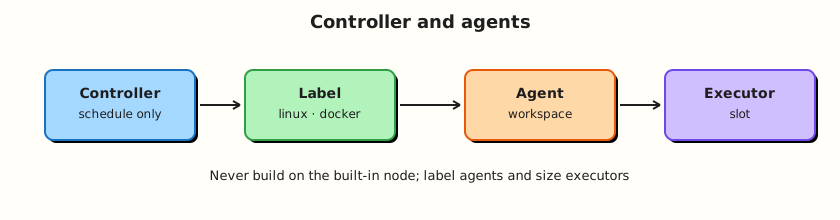
Theory
What it is
| Term | Meaning |
|---|---|
| Built-in node | The controller’s own node (historically “master”) |
| Agent / node | Separate machine/container that runs builds |
| Executor | Concurrent build slot on a node |
| Label | Tag used in agent { label 'linux && docker' } |
| Workspace | Directory for a job’s checkout on a node |
| Tool installation | Controller-defined JDK/Maven/Gradle/… auto-installed or pointed at paths |
Static agents stay online (SSH, inbound/WebSocket agents). Cloud/ephemeral agents (Docker, Kubernetes — later modules) appear for a build and vanish.
Why it matters
Controller compromise via a malicious Jenkinsfile is a classic failure mode. Even trusted builds can fill the controller disk with workspaces. Executors on the built-in node also compete with Jenkins itself for CPU.
Labels encode topology (linux, gpu, windows). Wrong labels cause endless queue times. Tool installations centralise JDK versions but still need agents that can run those tools.
How it works
- Operator registers an agent (Manage Nodes → New node) with remote root directory and labels.
- Agent connects (inbound agent JAR/WebSocket, SSH launcher, or cloud plugin).
- Pipeline
agent { label 'linux' }requests a matching executor. - Jenkins allocates a workspace under the agent’s remote root.
- Steps run; logs stream to the controller; workspace may be wiped based on policy.
Connectivity basics: agents need network reachability to the controller (or the controller to the agent for SSH). Port 50000 (or WebSocket via HTTP) must be planned. Firewalls and reverse proxies need explicit configuration.
Built-in node policy: set built-in executors to 0 in production. Labs may temporarily keep one executor for convenience — document the exception and prefer a labelled Docker agent.
Tools: Manage Jenkins → Tools defines JDK/Maven installations. Pipelines use tools { jdk '…' } or assume tools preinstalled on the agent image (often cleaner for containers).
Key concepts and comparisons
| Pattern | Pros | Cons |
|---|---|---|
| Static SSH agent | Simple VMs | Patching, snowflake hosts |
| Inbound agent | Agent dials controller | Needs controller endpoint exposure design |
Docker agent (agent { docker }) | Fresh toolchain | DinD/socket trade-offs (Module 8) |
| Kubernetes pod agent | Elastic | Cluster + plugin complexity (Module 13) |
| Executor count | Effect |
|---|---|
| 0 on built-in | Controller never runs builds (goal) |
| High on one agent | Parallelism + noisy neighbour risk |
Common pitfalls
- Leaving built-in executors at 2 “just for now” on production.
- Labels that are too cute (
bob-laptop) instead of capability-based (linux,docker). - Agents with full sudo and cloud admin roles.
- Assuming tool installer runs on every ephemeral agent the same way.
- Filling disks with uncleared workspaces.
Hands-on Lab
Objective
Document a zero-executor built-in policy, run a labelled agent via Docker, and execute a Pipeline that requires that label.
Prerequisites
- Docker on the host
- Jenkins controller Compose stack from Module 2
- Admin access to Manage Nodes
Lab environment
Workspace: ~/rebash-jenkins/module-06
Reuse Module 2 Compose network when possible. Default controller URL http://127.0.0.1:8080/.
mkdir -p ~/rebash-jenkins/module-06 && cd ~/rebash-jenkins/module-06
set -euo pipefail
docker --version | tee docker-version.txt
Real-world scenario
Security review failed your lab controller because Pipelines still schedule on the built-in node. You must attach a labelled agent and change jobs to agent { label 'rebash-agent' } before the next demo.
Step-by-step tasks
Task 1 – Record built-in node policy
In Jenkins: Manage Jenkins → Nodes → built-in node → set Number of executors to 0 → Save.
Run:
Create builtin-policy.yaml:
production:
  builtin_node_executors: 0
lab:
  set_after_agent_online: true
  bootstrap_exception: temporary 1 executor while bootstrapping agent only
Validate and archive:
python3 -c "
import yaml
with open('builtin-policy.yaml') as f:
    d = yaml.safe_load(f)
assert d['production']['builtin_node_executors'] == 0
print('builtin-policy.yaml OK')
" | tee builtin-policy-validate.txt
date -u +%Y-%m-%dT%H:%M:%SZ | tee builtin-policy-applied.txt
Expected output
Policy YAML validates; timestamp recorded when applied in UI.
Task 2 – Prepare agent launcher script and sample agent container
Official agents vary by version. For labs, a common pattern is the inbound agent image connecting with a secret from the UI.
In Jenkins UI:
- Manage Jenkins → Nodes → New node
- Name:
docker-agent-1 - Type: Permanent Agent
- Remote root directory:
/home/jenkins/agent(match image docs) - Labels:
rebash-agent linux - Launch method: Launch agent by connecting it to the controller (inbound)
- Save → open the node → copy the launcher command / secret shown
Run:
Create agent-launcher.sh:
#!/usr/bin/env bash
# Paste JENKINS_SECRET from the UI — do not commit real values
set -euo pipefail
: "${JENKINS_URL:=http://host.docker.internal:8080/}"
: "${JENKINS_SECRET:?set from UI node page}"
: "${JENKINS_AGENT_NAME:=docker-agent-1}"
docker run -d --name jenkins-agent \
  -e "JENKINS_URL=${JENKINS_URL}" \
  -e "JENKINS_SECRET=${JENKINS_SECRET}" \
  -e "JENKINS_AGENT_NAME=${JENKINS_AGENT_NAME}" \
  jenkins/inbound-agent:latest-jdk17
Verify:
Create agent-node.yaml:
name: docker-agent-1
labels:
  - rebash-agent
  - linux
remote_root: /home/jenkins/agent
launch: inbound
Create label-pipeline.Jenkinsfile:
pipeline {
  agent { label 'rebash-agent' }
  options { timestamps() }
  stages {
    stage('Prove agent') {
      steps {
        echo "Running on labelled agent"
        sh 'hostname | tee hostname.txt'
        sh 'uname -a | tee uname.txt'
        sh 'pwd | tee workspace.txt'
      }
    }
  }
  post {
    always {
      echo "Agent pipeline: ${currentBuild.currentResult}"
    }
  }
}
Validate and archive:
test -f label-pipeline.Jenkinsfile
python3 -c "
import yaml
with open('agent-node.yaml') as f:
    d = yaml.safe_load(f)
assert 'rebash-agent' in d['labels']
print('agent-node.yaml OK')
" | tee agent-node-validate.txt
Expected output
Launcher script and Jenkinsfile created. Start the agent with the secret from your UI (do not commit secrets).
Task 3 – Run a Pipeline on the label
- Confirm Nodes shows
docker-agent-1as idle/online. - Create job
rebash-demo/label-agent-demoas Pipeline script usinglabel-pipeline.Jenkinsfile. - Build Now.
- Console should show hostname from the agent container/VM, not only the controller identity.
Run:
Create assert-agent.sh:
#!/usr/bin/env bash
set -euo pipefail
LOG="${1:-console.log}"
grep -q 'Running on labelled agent' "$LOG"
grep -q 'hostname.txt' "$LOG" || grep -qE 'hostname|HOSTNAME' "$LOG"
echo "agent run evidence OK"
Verify:
Create expected-agent-markers.txt:
Expected output
Successful build on rebash-agent after agent is online; paste console to console.log and run ./assert-agent.sh console.log.
Task 4 – Tools awareness sheet
Run:
Create tools.yaml:
location: Manage Jenkins/Tools
static_agents:
  pattern: tools block with jdk name
  example_jdk: jdk17
container_agents:
  pattern: toolchain baked into image
  module_reference: module_8_docker_pipeline
lab_jdk_entries: fill from UI if present
Validate and archive:
python3 -c "
import yaml
with open('tools.yaml') as f:
    d = yaml.safe_load(f)
assert 'static_agents' in d
print('tools.yaml OK')
" | tee tools-validate.txt

tar -czf module-06-evidence.tgz builtin-policy.yaml agent-node.yaml agent-launcher.sh label-pipeline.Jenkinsfile tools.yaml assert-agent.sh expected-agent-markers.txt *.txt
grep -R "JENKINS_SECRET=" -n agent-launcher.sh 2>/dev/null | grep -v ':#' && echo 'Remove secrets before sharing' || echo 'No secret strings found in tree scan'
ls -l module-06-evidence.tgz | tee evidence.txt
Expected output
Evidence archive; secret scan warning if you pasted secrets into files.
Validation steps
- Built-in executors set to 0 after agent works
- Node
docker-agent-1(or equivalent) online with labels - Pipeline with
agent { label 'rebash-agent' }succeeded - No agent secrets committed to a public remote
Common errors and fixes
| Error | Cause | Fix |
|---|---|---|
| Agent offline | Wrong secret / URL | Recopy launcher; check JENKINS_URL |
There are no nodes… | Label mismatch | Align labels and Pipeline label expression |
| Queued after executors=0 | Agent not connected | Bring agent online before disabling built-in |
| host.docker.internal fails | Linux Docker | Use gateway IP or Compose network alias |
Challenge exercise
Add a second label heavy on the same agent and a Pipeline stage that uses agent { label 'rebash-agent && heavy' }. Save as label-heavy.Jenkinsfile and prove both label expressions with grep label-heavy.Jenkinsfile | tee heavy-label-evidence.txt.
Learning outcomes
- Enforced controller isolation policy
- Connected a labelled lab agent
- Targeted Pipelines by label
- Distinguished image-baked tools from controller tool installers
Cleanup
# Stop agent container when finished
docker rm -f jenkins-agent 2>/dev/null || true
# Keep controller volume; keep built-in executors at 0 if agent remains available
ls ~/rebash-jenkins/module-06
Remove any files that contain agent secrets before pushing to GitHub.
Validation
- Lab completed under
~/rebash-jenkins/module-06/ - You can explain built-in vs agent risk
- You can define label, executor, and workspace
- You know where tool installations are configured
Code Walkthrough
- Disable built-in executors once an agent exists.
- Label by capability —
linux,docker, not personal names. - Prove with hostname — console evidence beats assumptions.
- Prefer immutable agent images for tools.
- Scrub secrets from launcher scripts before sharing.
Security Considerations
- Built-in builds are a credentials and filesystem risk.
- Agent secrets are bearer tokens — rotate if leaked.
- Agents with Docker socket or cloud keys expand blast radius.
- Separate untrusted PR agents from production deploy agents (Module 7+).
- Harden network paths to the remoting/WebSocket endpoint.
Common Mistakes
Production controller with built-in executors > 0
Pipelines can schedule locally. Fix: set executors to 0; require labels.
One mega-agent with every label
Isolation disappears. Fix: split pools by trust and toolchain.
Committing inbound agent secrets
Anyone with the secret can join as that node. Fix: keep secrets in the shell environment only; rotate on leak.
Relying on controller tool installers for Kubernetes agents
Ephemeral pods may not match installer assumptions. Fix: bake tools into images/pod templates.
Best Practices
- Capability labels and documented pools.
- Zero built-in executors in production.
- Workspace cleanup policies on busy agents.
- Monitor agent disk and offline nodes.
- Treat agent connect secrets like passwords.
Troubleshooting
| Symptom | Likely cause | Fix |
|---|---|---|
| Agent flaps online/offline | Network/proxy | Stable URL; WebSocket via reverse proxy docs |
| Clock skew issues | NTP drift | Sync time on agents |
| Permission denied in workspace | Filesystem ownership | Fix agent user/remote root perms |
| Label expression never matches | && vs space mistakes | Match node labels exactly |
| Build on built-in unexpectedly | agent any + executors>0 | Use labels; executors=0 |
Summary
Agents execute; the controller schedules. Labels route work; executors set concurrency; the built-in node should not build in production. Next: Multibranch Pipelines and Pull Requests.
Interview Questions
1. Why should the built-in node have zero executors in production?
Reveal answer
So untrusted or heavy build steps cannot run on the controller host that holds JENKINS_HOME, credentials, and Jenkins processes. Builds belong on agents.
2. What is a label and how is it used in Declarative Pipeline?
Reveal answer
A label is a tag on a node such as linux or docker. Pipelines select nodes with agent { label 'linux && docker' } so jobs land on capable, intended machines.
3. What is an executor?
Reveal answer
A concurrent build slot on a node. Two executors allow two builds at once on that node, sharing disk and CPU — which can create noisy-neighbour effects.
4. Where is a workspace stored?
Reveal answer
On the agent (under its remote root directory), not as the primary copy on the controller. The controller stores logs and metadata; the agent holds the checkout.
5. Compare static agents with Kubernetes agents at a high level.
Reveal answer
Static agents are long-lived VMs/containers you patch and label. Kubernetes agents are ephemeral pods created per build, improving elasticity and isolation at the cost of cluster/plugin complexity.
6. What goes wrong if every job uses agent any?
Reveal answer
Jobs may schedule on the built-in node or on unsuitable agents, breaking toolchain assumptions and weakening isolation. Capability labels make intent explicit.
7. How should toolchains be provided on container agents?
Reveal answer
Prefer images that already contain JDK/Maven/Node, or Pipeline agent { docker { … } } / Kubernetes container templates. Controller auto-installers are a weaker fit for ephemeral agents.
8. What should you do if an inbound agent secret is committed to Git?
Reveal answer
Treat it as compromised: delete or rotate the agent secret/node, purge the secret from Git history if needed, and reinstate the agent with a new secret stored only in a password manager or secret store.
Related Tutorials
- Jenkinsfile in SCM
- Multibranch Pipelines and Pull Requests
- Docker with Jenkins Pipeline
- Kubernetes Agents and Deploys