Multibranch Pipelines and Pull Requests
Overview
One Pipeline job per branch does not scale. A Multibranch Pipeline scans a Git repository, discovers branches (and often pull requests), and creates a child job for each that contains a Jenkinsfile. Branch indexing and webhooks keep that view fresh. This tutorial also covers pull-request (PR) isolation and Organisation Folder awareness for GitHub/GitLab orgs.
This is Tutorial 7 in Module 7: Multibranch and PRs of the REBASH Academy Jenkins for Cloud & DevOps Engineers series — written for Cloud, DevOps, Platform, and Site Reliability Engineering (SRE) engineers. Companion reading: Branches and Pull Requests.
Prerequisites
- Jenkinsfile in SCM — root
Jenkinsfilein a Git repo - Agents, Nodes, and Executors — prefer labelled agents for untrusted PRs
- Jenkins with Multibranch / Branch API / Git (or GitHub/GitLab Branch Source) plugins
- A Git remote Jenkins can clone (GitHub, GitLab, or Gitea). Pure
file://Multibranch is awkward — use a hosted repo for this module when possible
Learning Objectives
By the end of this tutorial, you will be able to:
- Explain Multibranch versus a single-branch SCM Pipeline job
- Configure branch discovery and indexing
- Describe how PR builds differ from branch builds and why isolation matters
- Choose webhook-driven updates over aggressive polling
- Outline when an Organisation Folder helps
Architecture
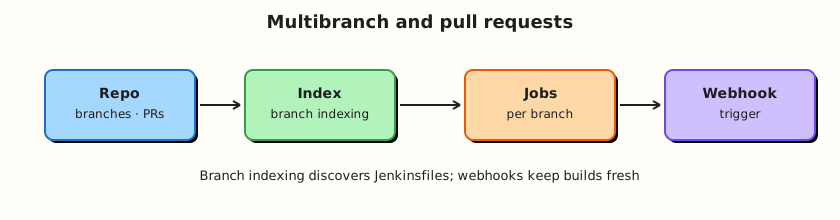
SCM events trigger indexing; Multibranch creates per-branch jobs that each run the repo Jenkinsfile.
Theory
What it is
A Multibranch Pipeline job points at one repository. On Scan / index, Jenkins lists branches (and optionally PRs/MRs) and ensures a child job exists when a Jenkinsfile is present.
| Concept | Meaning |
|---|---|
| Branch indexing / scan | Discover branches/PRs and create/remove jobs |
| Orphaned item strategy | What to do when a branch is deleted |
| Build strategies | Which discovered items should build automatically |
| Webhook | SCM notifies Jenkins of pushes/PR events |
| Organisation Folder | Scan many repos in a GitHub/GitLab org/user |
Pull request builds check out the PR merge result or head (strategy depends on Branch Source). They prove “this change builds” before merge. Treat PR code as untrusted unless authors are trusted and agents are isolated.
Why it matters
Without Multibranch, teams clone jobs by hand and forget branches. With Multibranch, every feature branch that adds a Jenkinsfile gets CI. Webhooks cut latency versus polling. Organisation Folders onboard whole orgs but amplify credential and cost blast radius — use with governance.
PR builds that share production deploy credentials are a security incident waiting to happen. Separate agents and credential scopes for untrusted PRs.
How it works
- Create Multibranch Pipeline → configure Branch Source (Git, GitHub, GitLab…).
- Set credentials with read access (and PR discovery permissions as required).
- Configure behaviours: discover branches, discover PRs originating from the repo / forks, filter by name if needed.
- Scan Repository Now (or wait for webhook).
- Open a branch job → builds use that branch’s
Jenkinsfile. - Webhook (GitHub: GitHub plugin / Branch Source; GitLab: similar) triggers scans or events so you are not stuck on cron polling.
SCM triggers: Multibranch mostly uses indexing + webhooks. Classic “Poll SCM” on a single job is the older pattern.
Organisation Folder: instead of one repo, you point at an org; each repo that matches can become a Multibranch project. Start with one Multibranch before you automate an entire org.
Key concepts and comparisons
| Job type | Scope |
|---|---|
| Pipeline from SCM | One branch (or specifier) |
| Multibranch Pipeline | Many branches/PRs in one repo |
| Organisation Folder | Many repos |
| Trust level | Agent / credentials guidance |
|---|---|
Protected main | Deploy credentials OK with gates |
| Feature branches | CI credentials; careful deploys |
| Fork PRs | Isolated agents; no prod secrets |
Common pitfalls
- Discovering fork PRs onto agents that mount the Docker socket and cloud keys.
- No orphaned item cleanup → thousands of dead branch jobs.
- Webhooks pointing at
localhostfrom GitHub.com (unreachable). - Script path wrong for monorepos so indexing finds nothing.
- Building PRs with
agent anyon the controller.
Hands-on Lab
Objective
Prepare a Multibranch-ready Git repo with two branches, document Multibranch job settings, and (when a remote is available) create a Multibranch project and capture indexing evidence. If you cannot expose webhooks, document a scan-based lab path.
Prerequisites
- Git remote Jenkins can reach (recommended)
- Admin access to create Multibranch items
- Module 5
scm-appcan be reused or recreated
Lab environment
Workspace: ~/rebash-jenkins/module-07
mkdir -p ~/rebash-jenkins/module-07 && cd ~/rebash-jenkins/module-07
set -euo pipefail
git --version | tee git-version.txt
Real-world scenario
Your team opens feature branches daily. Platform asks for Multibranch CI with PR checks before merge, and forbids fork PRs from using production cloud credentials.
Step-by-step tasks
Task 1 – Create a Multibranch-ready repository
Commit and record:
cd ~/rebash-jenkins/module-07
set -euo pipefail

rm -rf mb-demo
mkdir mb-demo && cd mb-demo
git init -b main
Create Jenkinsfile:
pipeline {
  agent any
  options { timestamps() }
  stages {
    stage('Branch info') {
      steps {
        echo "BRANCH_NAME=${env.BRANCH_NAME}"
        echo "CHANGE_ID=${env.CHANGE_ID}"
        sh 'test -f Jenkinsfile'
        sh 'uname -a || true'
      }
    }
    stage('CI checks') {
      steps {
        sh 'echo OK | tee ci-ok.txt'
        sh 'test -f ci-ok.txt'
      }
    }
  }
  post {
    always {
      echo "Multibranch demo finished: ${currentBuild.currentResult}"
    }
  }
}
Create README.md:
Commit and record:
git add Jenkinsfile README.md
git -c user.email='rebash-lab@example.com' -c user.name='REBASH Lab' commit -m 'Add Multibranch Jenkinsfile on main'

git checkout -b feature/module-07
echo "feature branch $(date -u +%Y-%m-%d)" >> README.md
git add README.md
git -c user.email='rebash-lab@example.com' -c user.name='REBASH Lab' commit -m 'Feature branch change for Multibranch discovery'

git checkout main
git branch -vv | tee ../branches.txt
pwd | tee ../repo-path.txt
Expected output
main and feature/module-07 listed.
Task 2 – Push (recommended) and write Multibranch config
Push mb-demo to GitHub/GitLab (private is fine). Then:
Run:
Create multibranch-config.yaml:
job_path: rebash-demo/mb-demo
item_type: multibranch_pipeline
branch_sources:
- git_or_github_or_gitlab
credentials: read_only_clone
behaviours:
discover_branches: true
discover_pull_requests: origin_first
build:
script_path: Jenkinsfile
orphaned_items:
discard_after_days: 30
remote:
clone_url: fill_after_push
webhook: fill_if_public_controller
lab_fallback: scan_repository_now
trust:
fork_prs: isolated_label_no_deploy_credentials
main: deploy_credentials_with_approvals_later
Validate and archive:
python3 -c "
import yaml
with open('multibranch-config.yaml') as f:
d = yaml.safe_load(f)
assert d['build']['script_path'] == 'Jenkinsfile'
print('multibranch-config.yaml OK')
" | tee mb-config-validate.txt
Create the Multibranch item in the UI using your remote. Scan Repository Now.
Expected output
Child jobs for main and feature/module-07 appear when the remote is reachable.
Task 3 – Collect indexing and build evidence
Commit and record:
cd ~/rebash-jenkins/module-07
set -euo pipefail
git -C mb-demo branch --list | tee branches-discovered.txt
git -C mb-demo show main:Jenkinsfile | grep -q 'pipeline' | tee index-main-jenkinsfile.txt
git -C mb-demo show feature/module-07:Jenkinsfile | grep -q 'pipeline' | tee index-feature-jenkinsfile.txt
Create expected-branch-markers.txt:
Expected output
Greps succeed; paste console to console.log after builds and grep for BRANCH_NAME.
Task 4 – PR isolation checklist
Run:
Create pr-isolation.yaml:
fork_pr_discovery: disabled_or_sandboxed
prod_cloud_keys_in_mb_folder: forbidden
pr_ci_agent_label: isolated_from_prod_deploy
secrets_in_jenkinsfile: forbidden
orphaned_branch_cleanup: scheduled
organisation_folder: after_single_repo_multibranch_stable
Validate and archive:
python3 -c "
import yaml
with open('pr-isolation.yaml') as f:
    d = yaml.safe_load(f)
assert not d['prod_cloud_keys_in_mb_folder']
print('pr-isolation.yaml OK')
" | tee pr-isolation-validate.txt

tar -czf module-07-evidence.tgz mb-demo/Jenkinsfile mb-demo/README.md multibranch-config.yaml pr-isolation.yaml *.txt
ls -l module-07-evidence.tgz | tee evidence.txt
Expected output
Archive created.
Validation steps
- Repo has
Jenkinsfileonmainand a feature branch - Multibranch config YAML validates (and job created if remote available)
- Branch discovery evidence in
branches-discovered.txt - PR isolation YAML validates
Common errors and fixes
| Error | Cause | Fix |
|---|---|---|
| No jobs after scan | Missing Jenkinsfile / wrong path | Fix Script Path; ensure file on branch |
| Auth errors | Credential scope | Use correct clone credential |
| Webhook 404/timeout | Jenkins not reachable from SaaS SCM | VPN, tunnel, or scan periodically in labs |
| PR builds on controller | agent any + built-in executors | Labels + executors=0 (Module 6) |
Challenge exercise
Open a pull request from feature/module-07 into main on your host. Enable PR discovery for origin PRs, scan, and record whether a PR-… job appears with grep -E 'PR-|CHANGE_ID' console.log | tee pr-job-evidence.txt.
Learning outcomes
- Built a Multibranch-ready repo with two branches
- Configured (or fully specified) Multibranch discovery
- Documented webhook versus scan trade-offs
- Applied a PR trust/isolation checklist
Cleanup
Keep the Multibranch job for later modules. Delete orphaned experimental branches you no longer need.
Validation
- Lab path completed under
~/rebash-jenkins/module-07/ - You can explain Multibranch versus single-branch SCM jobs
- You can describe one PR credential risk
- You know what an Organisation Folder is for
Code Walkthrough
- One Jenkinsfile path — discovery depends on it.
- Scan then webhook — prove with scan; add webhooks for latency.
- Orphan strategy — delete dead branch jobs.
- Trust boundaries — fork PRs never see prod secrets.
- Org folders last — automate one repo first.
Security Considerations
- Fork PRs can run malicious
Jenkinsfilecontent — isolate agents. - Branch-source credentials often have org-wide reach — least privilege.
- Webhook endpoints must authenticate (shared secrets / signatures).
- Do not grant deploy credentials at the Multibranch folder used for public forks.
- Audit who can trigger scans on large orgs (cost/load).
Common Mistakes
Enabling fork PR builds on privileged agents
Untrusted code gets your cloud keys. Fix: separate folder/agent pool; disable fork discovery until ready.
No orphaned item strategy
Deleted branches leave zombie jobs forever. Fix: discard old items after a retention window.
Webhooks to http://127.0.0.1
GitHub cannot reach your laptop. Fix: public HTTPS endpoint, tunnel, or periodic scan for labs.
Organisation Folder on day one
One misconfigured credential scans hundreds of repos. Fix: master single-repo Multibranch first.
Best Practices
- Webhooks for push/PR events; light periodic scan as backup.
- Name filters when repos are noisy.
- Document Script Path for monorepos.
- Separate Multibranch folders by trust tier.
- Keep
Jenkinsfilechanges reviewed like product code.
Troubleshooting
| Symptom | Likely cause | Fix |
|---|---|---|
| Branch missing | Not pushed / filtered | Push branch; check filters |
| PR not discovered | Behaviour disabled / permissions | Enable discover PRs; fix token scopes |
| Old Jenkinsfile used | Stale scan | Scan now; check webhook deliveries |
| Rate limited | Org folder + polling | Webhooks; reduce scan frequency |
CHANGE_* empty | Not a PR build | Confirm PR job type in Multibranch |
Summary
Multibranch turns one Jenkinsfile into CI for every branch and PR Jenkins discovers. Indexing and webhooks keep jobs current; isolation keeps untrusted PRs off privileged agents. Next: Docker with Jenkins Pipeline.
Interview Questions
1. What problem does Multibranch Pipeline solve?
Reveal answer
It automatically creates and maintains Pipeline jobs for each branch (and optionally PR) that contains a Jenkinsfile, so teams are not manually cloning jobs per branch.
2. What is branch indexing (a scan)?
Reveal answer
Jenkins queries the SCM for branches/PRs and reconciles child jobs — creating jobs for new branches with a Jenkinsfile and removing or marking orphaned ones per strategy.
3. Why are fork pull-request builds dangerous on shared agents?
Reveal answer
Anyone who can open a fork PR can run arbitrary Pipeline/shell on your agents. If those agents have cloud credentials or Docker socket access, the PR can exfiltrate secrets or abuse infrastructure.
4. Webhook versus polling — which should you prefer?
Reveal answer
Webhooks for low-latency, event-driven updates. Keep a slower periodic scan as a safety net when webhook delivery fails.
5. What is an Organisation Folder?
Reveal answer
A Jenkins item that scans a GitHub/GitLab organisation (or user) and can create Multibranch projects for many repositories. Powerful, but needs tight filters and credential governance.
6. How does a Multibranch child job choose which Jenkinsfile to run?
Reveal answer
It uses the Jenkinsfile from that branch (or PR checkout) at the configured script path — typically Jenkinsfile at the repo root.
7. What should orphaned item strategy accomplish?
Reveal answer
When branches are deleted in Git, Jenkins should eventually remove or disable the corresponding jobs so the controller does not accumulate abandoned history and clutter.
8. Which environment variables often identify PR builds?
Reveal answer
Common Multibranch variables include BRANCH_NAME, and for changes/PRs CHANGE_ID, CHANGE_TARGET, and related CHANGE_* fields (exact set depends on branch source). They help when conditions separate PR CI from mainline deploys.