Pipeline Fundamentals (Declarative)
Overview
Click-built automation does not survive team growth. Pipeline expresses CI/CD as code: stages, steps, an agent, and post actions that always run cleanup or notifications. Declarative Pipeline is the structured pipeline { } syntax most teams should start with; Scripted Pipeline remains available for advanced cases.
This tutorial teaches the core directives, contrasts Declarative versus Scripted, and points you at the official Pipeline Syntax reference. You will run a real Declarative job on your lab controller and keep the definition under ~/rebash-jenkins/module-04.
This is Tutorial 4 in Module 4: Pipeline Fundamentals of the REBASH Academy Jenkins for Cloud & DevOps Engineers series — written for Cloud, DevOps, Platform, and Site Reliability Engineering (SRE) engineers.
Prerequisites
- Using Jenkins — Jobs, Views, and Folders
- Running Jenkins LTS with the Pipeline plugins (suggested plugins from Module 2)
- Comfort editing Groovy-like Pipeline syntax in a text editor
Learning Objectives
By the end of this tutorial, you will be able to:
- Explain Pipeline, node/agent, stage, step, and post
- Author a Declarative Pipeline with
agent,stages,steps, andpost - Contrast Declarative versus Scripted and know when Scripted appears
- Use Pipeline Syntax / Snippet Generator ideas without memorising every step
- Run and debug a Pipeline job from console output
Architecture
A Declarative Pipeline selects an agent, runs ordered stages of steps, then executes post conditions.
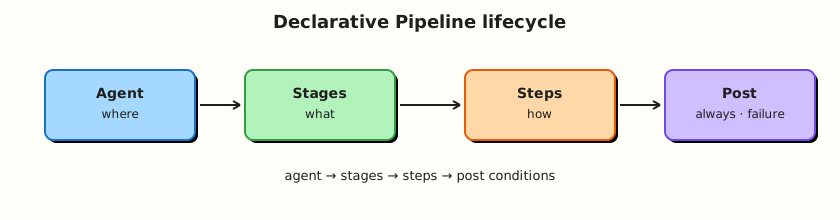
Theory
What it is
A Pipeline is a user-defined automation in Jenkins, typically checked into source control later as a Jenkinsfile. Under the hood Jenkins uses a Pipeline job type and the Pipeline plugin family.
Core ideas:
| Concept | Meaning |
|---|---|
| Agent | Where the Pipeline runs (any, label, docker, none, …) |
| Stage | Named phase shown in Stage View (Build, Test, Deploy) |
| Step | Smallest action (echo, sh, checkout, …) |
| Post | Actions after the Pipeline (or stage) based on result |
| Node | Scripted term for allocating an executor (Declarative uses agent) |
Declarative Pipeline wraps everything in pipeline { } with a fixed structure: agent, optional environment / options / parameters, required stages, optional post. Scripted Pipeline is mostly imperative Groovy in node { } blocks — powerful, easier to make unreadable, harder for newcomers.
Why it matters
Pipeline-as-code is how changes get reviewed, reused, and recovered. Declarative’s structure gives teams a shared shape: every job has visible stages and predictable post cleanup. Scripted still powers some shared libraries and edge cases; you should recognise it, not start there.
Without understanding agent, builds land on the built-in node. Without post, failures skip cleanup and notifications. Without stages, the UI becomes a single opaque console blob.
How it works
Minimal Declarative shape:
pipeline {
  agent any
  stages {
    stage('Build') {
      steps {
        echo 'compile'
      }
    }
    stage('Test') {
      steps {
        echo 'test'
      }
    }
  }
  post {
    always {
      echo "Result: ${currentBuild.currentResult}"
    }
    failure {
      echo 'Notify or collect diagnostics here'
    }
  }
}
Execution model:
- Jenkins loads the Pipeline definition (UI script or SCM — Module 5).
- The top-level
agentallocates an executor (unlessagent noneand per-stage agents). - Stages run in order (unless
parallel). - Steps inside each stage run sequentially by default.
postconditions run (always,success,failure,unstable,changed, …).
Pipeline Syntax (job → Pipeline Syntax) helps generate step snippets. Prefer reading the syntax reference over inventing directives.
Why Pipeline-as-code: the same file can run for every branch (Multibranch), appear in pull requests, and be tested on a personal controller before production.
Key concepts and comparisons
| Declarative | Scripted |
|---|---|
pipeline { } | node { } / Groovy control flow |
| Opinionated sections | Fully flexible |
| Better for most app teams | Useful inside some libraries / complex orchestration |
| Validation of required sections | Easier to write unstructured scripts |
| Directive | Role |
|---|---|
agent any | Run on any available executor (labs only — prefer labels in prod) |
agent none | No global agent; each stage declares its own |
options { timestamps() } | Common Pipeline options |
environment { … } | Env vars for the Pipeline |
parameters { … } | Manual/input parameters (deeper in Module 5) |
| Step family | Examples |
|---|---|
| Flow | echo, error, timeout |
| Shell | sh, bat, powershell |
| SCM | checkout, git (plugin-dependent) |
Common pitfalls
- Putting heavy logic in Scripted when Declarative + shared library steps would do.
- Using
agent anyin production and building on the controller. - Forgetting
post { always { } }for cleanup. - Treating Stage View colours as proof without reading console errors.
- Copy-pasting Scripted samples into a Declarative job without restructuring.
Hands-on Lab
Objective
Author a multi-stage Declarative Pipeline on disk, load it into a Pipeline job under rebash-demo, run it, and capture console evidence.
Prerequisites
- Module 2 controller running
- Folder
rebash-demofrom Module 3 (create it if missing) - Pipeline plugins installed
Lab environment
Workspace: ~/rebash-jenkins/module-04
mkdir -p ~/rebash-jenkins/module-04 && cd ~/rebash-jenkins/module-04
set -euo pipefail
curl -sS -o /dev/null -w "%{http_code}\n" http://127.0.0.1:8080/login | tee controller-login.txt
Expected output
HTTP response code from the controller.
Real-world scenario
Your squad must replace a Freestyle “build and hope” job with a Declarative Pipeline that shows Build → Test → Package stages and always prints the final result. Platform review will not accept Scripted spaghetti for this service.
Step-by-step tasks
Task 1 – Write a Declarative Jenkinsfile on disk
Run:
Create Jenkinsfile:
pipeline {
  agent any
  options {
    timestamps()
    disableConcurrentBuilds()
  }
  environment {
    APP_NAME = 'rebash-demo'
  }
  stages {
    stage('Build') {
      steps {
        echo "Building ${env.APP_NAME}"
        sh 'mkdir -p dist && echo "artifact" > dist/app.txt && ls -l dist'
      }
    }
    stage('Test') {
      steps {
        echo 'Running unit placeholder'
        sh 'test -f dist/app.txt'
        sh 'grep -q artifact dist/app.txt'
      }
    }
    stage('Package') {
      steps {
        echo 'Packaging placeholder'
        sh 'tar -czf dist/app.tgz -C dist app.txt && ls -l dist/app.tgz'
      }
    }
  }
  post {
    always {
      echo "Pipeline finished with ${currentBuild.currentResult}"
    }
    success {
      echo 'All stages green'
    }
    failure {
      echo 'Investigate console output for the red stage'
    }
  }
}
Verify:
grep -q 'pipeline {' Jenkinsfile
grep -q 'stage('\''Build'\'')' Jenkinsfile || grep -q 'stage("Build")' Jenkinsfile || grep -q "stage('Build')" Jenkinsfile
grep -q 'post {' Jenkinsfile
wc -l Jenkinsfile | tee jenkinsfile-lines.txt
Expected output
Non-zero line count; structure checks pass.
Task 2 – Create or update the Pipeline job
In Jenkins:
- Open folder rebash-demo (create if needed).
- New Item →
declarative-basics→ Pipeline (or configure an existing job). - Definition: Pipeline script.
- Paste the contents of
~/rebash-jenkins/module-04/Jenkinsfile. - Save.
Run:
Create job-config.yaml:
folder: rebash-demo
job: declarative-basics
definition: pipeline_script_ui
source_of_truth: ~/rebash-jenkins/module-04/Jenkinsfile
next_module: jenkinsfile-in-scm
Validate and archive:
python3 -c "
import yaml
with open('job-config.yaml') as f:
    d = yaml.safe_load(f)
assert d['job'] == 'declarative-basics'
print('job-config.yaml OK')
" | tee job-config-validate.txt
Expected output
Job saved; job-config.yaml validates.
Task 3 – Run the Pipeline and capture console proof
- Build Now.
- Open the build → confirm Stage View shows Build, Test, Package.
- Open Console Output.
Run:
Create expected-console-markers.txt:
Building rebash-demo
Running unit placeholder
Packaging placeholder
Pipeline finished with
All stages green
Create assert-console.sh:
#!/usr/bin/env bash
set -euo pipefail
LOG="${1:-console.log}"
test -f "$LOG" || { echo "missing $LOG — paste Console Output first"; exit 1; }
while IFS= read -r marker; do
  grep -q "$marker" "$LOG" || { echo "missing marker: $marker"; exit 1; }
done < expected-console-markers.txt
echo "console markers OK"
Verify:
chmod +x assert-console.sh

# Local syntax sanity (not a Jenkins validator, but catches truncation)
grep -c 'stage' Jenkinsfile | tee stage-count.txt
test "$(cat stage-count.txt)" -ge 3
Expected output
At least three stage occurrences; after a Jenkins run, paste Console Output to console.log and run ./assert-console.sh console.log.
Task 4 – Break-fix drill (optional but recommended)
Temporarily change the Test stage to sh 'false', Save, Build Now, observe failure post, then restore the good Jenkinsfile and rebuild.
Run:
Create Jenkinsfile.fail:
pipeline {
  agent any
  options { timestamps() }
  environment { APP_NAME = 'rebash-demo' }
  stages {
    stage('Build') {
      steps {
        sh 'mkdir -p dist && echo artifact > dist/app.txt'
      }
    }
    stage('Test') {
      steps {
        sh 'false'
      }
    }
  }
  post {
    failure {
      echo 'Investigate console output for the red stage'
    }
  }
}
Verify:
grep -q "sh 'false'" Jenkinsfile.fail
grep -q 'Investigate console' Jenkinsfile.fail
diff -q Jenkinsfile Jenkinsfile.good && echo 'good copy retained' | tee failure-drill.txt
Expected output
Failing variant and good copy on disk; swap into the job to observe FAILURE, then restore Jenkinsfile.good.
Validation steps
-
Jenkinsfilecontainsagent, three stages, andpost - Job
rebash-demo/declarative-basicsran at least once - You can point to Build / Test / Package in Stage View
- You know where Pipeline Syntax lives in the job UI
Common errors and fixes
| Error | Cause | Fix |
|---|---|---|
Expected a stage / parse errors | Scripted mixed into Declarative | Follow pipeline { stages { stage { steps }}} |
| Queued forever | No executors | Enable lab executor or add agent |
sh not found on Windows agent | Wrong agent OS | Use bat or a Linux agent |
| Stages missing in UI | Build failed at parse time | Read console from the top |
Challenge exercise
Add a parallel test block under a stage('Test') with two steps Unit and Lint (each echo is enough). Keep Declarative valid per syntax parallel. Save as Jenkinsfile.parallel and run it in a second job declarative-parallel.
Learning outcomes
- Wrote and ran a Declarative Pipeline with post conditions
- Separated Build / Test / Package stages
- Practised reading console output on failure
- Prepared the file for SCM checkout in Module 5
Cleanup
Keep declarative-basics and the Module 2 volume. Remove only experimental failing jobs you no longer need.
Validation
- Lab completed under
~/rebash-jenkins/module-04/ - You can sketch agent → stages → steps → post from memory
- You can explain Declarative versus Scripted in two sentences
- You can name one production risk of
agent any
Code Walkthrough
- Start Declarative —
pipeline { }before free-form Groovy. - Name stages for humans — Stage View is an operations tool.
- Assert in
sh—test/grep -qfail the stage loudly. - Always write
post— success paths forget cleanup;alwaysdoes not. - Move to SCM next — UI Pipeline script is a stepping stone, not the destination.
Security Considerations
agent anymay schedule on the built-in node — prefer labels before production.- Pipeline scripts can run arbitrary shell — treat untrusted PRs as hostile (Module 7).
- Do not embed credentials in
environmentas plain text; use credentials bindings later. - Console output is visible to anyone with read access to the job — avoid echoing secrets.
- Limit who can configure Pipeline jobs that deploy.
Common Mistakes
Scripted Pipeline as the default teaching path
New teams get lost in Groovy. Fix: Declarative first; Scripted when a shared library truly needs it.
One giant stage named Build
Triage becomes guesswork. Fix: split Build / Test / Package (or Deploy) stages.
No post block
Failed builds skip notifications and workspace cleanup. Fix: at least post { always { … } }.
Ignoring Pipeline Syntax reference
Invented directives waste hours. Fix: use Pipeline Syntax and the in-product Snippet Generator.
Best Practices
- Keep Pipelines Declarative and boringly structured.
- Prefer labelled agents over
anyoutside personal labs. - Fail fast with simple shell asserts.
- Use
options { timestamps() }for readable logs. - Check the same
Jenkinsfileinto Git in the next module.
Troubleshooting
| Symptom | Likely cause | Fix |
|---|---|---|
Invalid agent type | Typo / missing plugin | Check syntax; install Docker Pipeline only when using agent { docker } |
| Stage skipped unexpectedly | when conditions (later) | Read stage headers in console |
workspace issues | Concurrent builds | disableConcurrentBuilds() or unique dirs |
Groovy RejectedAccessException | Script security sandbox | Approve signatures carefully on test controllers only |
| Post not running | Parse failure before runtime | Fix syntax first |
Summary
Declarative Pipeline gives a clear agent → stages → steps → post model that teams can review and operate. Run it in the UI now; next you will move the same file into Git. Continue with Jenkinsfile in SCM.
Interview Questions
1. What is the difference between Declarative and Scripted Pipeline?
Reveal answer
Declarative uses a structured pipeline { } with required sections such as agent and stages. Scripted is primarily imperative Groovy inside node blocks. Declarative is the default for application teams; Scripted appears in advanced libraries and complex control flow.
2. What does the agent directive control?
Reveal answer
Where the Pipeline (or stage) executes — which node label, Docker image, or whether no global agent is allocated (agent none). It determines isolation and tool availability.
3. Why split work into stages instead of one sh script?
Reveal answer
Stages appear in Stage View, clarify failure location, allow per-stage agents/options, and make pipelines readable in pull requests. Operators debug by red stage, not by scrolling a monolith.
4. What is post { always { } } for?
Reveal answer
It runs regardless of success or failure — ideal for cleanup, archiving, and unconditional logging. success / failure blocks add result-specific notifications.
5. Why is agent any risky in production?
Reveal answer
It can schedule on the built-in controller node if executors exist there, coupling untrusted build steps to the control plane. Production Pipelines should target labelled agents or ephemeral cloud agents.
6. How does Pipeline-as-code help compared with Freestyle?
Reveal answer
The definition is reviewable in Git, reusable across branches, easier to recover after controller loss, and consistent with Multibranch. Freestyle hides logic in UI checkboxes.
7. Where do you look when a Declarative Pipeline fails?
Reveal answer
Open the failing build’s Stage View to see the red stage, then Console Output for the exact step error. Parse errors appear at the top before stages run.
8. When might you still use Scripted Pipeline?
Reveal answer
When implementing complex shared-library orchestration or dynamic stage generation that is awkward in pure Declarative. Even then, keep application Jenkinsfiles Declarative and hide Scripted inside trusted libraries.