Terraform Pipelines in Jenkins
Overview
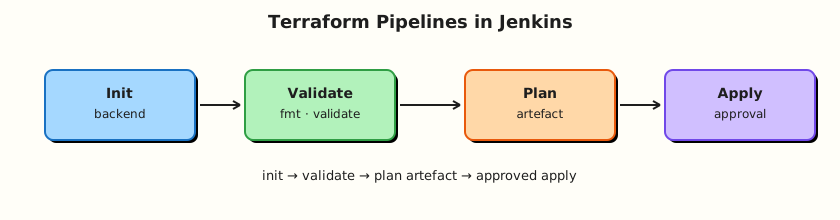
Clicking terraform apply on a laptop does not scale. Jenkins should run init → validate → plan, publish the plan artefact, require an approval (or protected branch policy) before apply, and use remote state with credentials that prefer short-lived cloud roles (OIDC-style patterns) over long-lived access keys. Labs must also practise destroy discipline so sandbox resources do not leak money.
This is Tutorial 14 in Module 14: Terraform Pipelines of the REBASH Academy Jenkins for Cloud & DevOps Engineers series — written for Cloud, DevOps, Platform, and Site Reliability Engineering (SRE) engineers.
Prerequisites
- Kubernetes Agents and Deploys or solid Pipeline + agent skills
- Terraform workflow fundamentals
- Terraform CLI on the agent image/VM for the lab (or Docker image
hashicorp/terraform) - Optional cloud account — local lab uses a
local/file backend mock or null resources
Learning Objectives
By the end of this tutorial, you will be able to:
- Structure a Jenkins Pipeline for Terraform init/validate/plan/apply
- Explain remote state awareness in CI
- Gate apply behind human approval or branch policy
- Archive plan files as build artefacts
- Document destroy rules for lab environments
Architecture
CI runs plan on every change; apply consumes the exact plan artefact after approval.
Theory
What it is
| Stage | Command intent |
|---|---|
| Init | terraform init — backends/providers |
| Validate | terraform validate |
| Plan | terraform plan -out=tfplan |
| Apply | terraform apply tfplan |
| Destroy | terraform destroy (labs / teardown jobs) |
Remote state (S3/GCS/Azure + locking) is the production default so CI agents share one state. Lab may use local state with clear warnings.
Credentials: inject cloud roles via environment / OIDC federation where possible. Static AWS_ACCESS_KEY_ID in Jenkins credentials works but needs rotation and least privilege.
Approvals: Declarative input step, or separate apply job with manual trigger, or GitOps-style promotion. Never auto-apply random PR plans to production.
Why it matters
Unreviewed apply from a feature branch can delete databases. Plan artefacts prove what was approved. State locking prevents two Jenkins jobs from corrupting state. Destroy jobs prevent abandoned lab VPCs.
How it works
- Checkout Terraform root module.
initwith backend config (often injected).validate+plan -out=tfplan.archiveArtifacts 'tfplan'(andplan.txtfromterraform show).- On
main(or afterinput):terraform apply -auto-approve tfplanusing the same plan file. - Tear down labs with a dedicated destroy Pipeline and guardrails.
Key concepts and comparisons
| Anti-pattern | Better |
|---|---|
apply without plan file | Apply saved tfplan |
| Auto-apply all branches | when { branch 'main' } + approval |
| State on agent disk only | Remote backend + lock |
| Admin cloud keys in PR CI | Narrow roles; no apply on PRs |
Common pitfalls
- Applying a stale plan after newer commits.
- Different backend config between plan and apply agents.
- Printing secret variable values in plan logs.
- No locking → concurrent applies.
- Forgetting destroy for ephemeral labs.
Hands-on Lab
Objective
Create a Docker-backed Terraform module, run init/plan/apply/destroy in a Pipeline-shaped simulation script, archive plan output, and author a Jenkinsfile with gated apply and destroy parameters.
Prerequisites
- Docker Engine running (
docker info) - Terraform CLI 1.5+ (
terraform version) - Jenkins agent or local shell for the CLI portion; Jenkins job optional after local simulation passes
Lab environment
Workspace: ~/rebash-jenkins/module-14
mkdir -p ~/rebash-jenkins/module-14 && cd ~/rebash-jenkins/module-14
set -euo pipefail
docker info | tee docker-info.txt
terraform version | tee terraform-version.txt
Real-world scenario
Platform requires every infrastructure change to show a Jenkins-stored plan before apply. Production apply is manual-approved on main only. Labs must destroy resources within 24 hours.
Step-by-step tasks
Task 1 – Docker-backed Terraform module
Run:
cd ~/rebash-jenkins/module-14
set -euo pipefail

rm -rf tf-demo
mkdir -p tf-demo && cd tf-demo
Create main.tf:
terraform {
  required_version = ">= 1.5.0"
  required_providers {
    docker = {
      source  = "kreuzwerker/docker"
      version = "~> 3.0"
    }
  }
}

provider "docker" {}

resource "docker_image" "nginx" {
  name         = "nginx:1.25-alpine"
  keep_locally = false
}

resource "docker_container" "rebash" {
  name  = "rebash-jenkins-tf-lab"
  image = docker_image.nginx.image_id

  ports {
    internal = 80
    external = 8080
  }
}

output "container_id" {
  value = docker_container.rebash.id
}

output "url" {
  value = "http://127.0.0.1:8080"
}
Create README.md:
# tf-demo

Docker-provider Terraform lab for Jenkins Pipeline patterns.
Requires Docker Engine; no cloud credentials.
Run:
docker info >/dev/null
terraform init | tee ../init.txt
terraform validate | tee ../validate.txt
terraform plan -out=tfplan -input=false | tee ../plan.txt
terraform show -no-color tfplan > ../plan-show.txt
test -f tfplan
grep -q 'docker_container.rebash' ../plan.txt
cd ..
Expected output
plan.txt shows docker_container.rebash will be created; tfplan exists.
Task 2 – Jenkinsfile with plan artefact and gated apply
Run:
Create Jenkinsfile:
pipeline {
  agent any
  options {
    timestamps()
    disableConcurrentBuilds()
  }
  parameters {
    booleanParam(name: 'APPLY', defaultValue: false, description: 'Apply saved plan (main only)')
    booleanParam(name: 'DESTROY', defaultValue: false, description: 'Destroy lab resources')
  }
  stages {
    stage('Terraform fmt/validate') {
      steps {
        dir('tf-demo') {
          sh 'terraform fmt -check || terraform fmt'
          sh 'terraform init -input=false'
          sh 'terraform validate'
        }
      }
    }
    stage('Plan') {
      steps {
        dir('tf-demo') {
          sh 'terraform plan -input=false -out=tfplan'
          sh 'terraform show -no-color tfplan | tee plan.txt'
        }
      }
      post {
        always {
          archiveArtifacts artifacts: 'tf-demo/tfplan,tf-demo/plan.txt', fingerprint: true
        }
      }
    }
    stage('Approve') {
      when {
        allOf {
          branch 'main'
          expression { return params.APPLY == true }
        }
      }
      steps {
        input message: 'Apply Terraform plan?', ok: 'Apply'
      }
    }
    stage('Apply') {
      when {
        allOf {
          branch 'main'
          expression { return params.APPLY == true }
        }
      }
      steps {
        dir('tf-demo') {
          sh 'terraform apply -input=false tfplan'
        }
      }
    }
    stage('Destroy lab') {
      when {
        expression { return params.DESTROY == true }
      }
      steps {
        dir('tf-demo') {
          sh 'terraform destroy -input=false -auto-approve'
        }
      }
    }
  }
}
Verify:
# Repo root layout note: if job SCM root is module-14, paths above work when tf-demo nested
grep -q 'terraform plan' Jenkinsfile
grep -q 'input message' Jenkinsfile
Expected output
Gated apply/destroy parameters present.
Task 3 – Pipeline simulation: apply, prove, destroy
Create pipeline-simulate.sh:
#!/usr/bin/env bash
set -euo pipefail
cd "$(dirname "$0")/tf-demo"
docker info >/dev/null
terraform init -input=false
terraform validate
terraform plan -input=false -out=tfplan
terraform apply -input=false -auto-approve tfplan
docker ps --filter name=rebash-jenkins-tf-lab --format '{{.Names}} {{.Status}}' | tee ../container-proof.txt
grep -q 'rebash-jenkins-tf-lab' ../container-proof.txt
curl -sf http://127.0.0.1:8080 >/dev/null
terraform destroy -input=false -auto-approve
echo pipeline_simulate_ok
Run and archive evidence:
cd ~/rebash-jenkins/module-14
set -euo pipefail
chmod +x pipeline-simulate.sh
./pipeline-simulate.sh | tee pipeline-simulate.txt
grep -q pipeline_simulate_ok pipeline-simulate.txt
Expected output
container-proof.txt shows the container running before destroy; pipeline-simulate.txt ends with pipeline_simulate_ok.
Task 4 – Destroy discipline script
Run:
Create destroy-checks.sh:
#!/usr/bin/env bash
set -euo pipefail
grep -q 'params.DESTROY' tf-demo/Jenkinsfile
grep -q 'terraform destroy' tf-demo/Jenkinsfile
grep -q 'docker_container' tf-demo/main.tf
echo destroy_policy_ok
Validate and archive:
chmod +x destroy-checks.sh
./destroy-checks.sh | tee destroy-checks.txt

tar -czf module-14-evidence.tgz tf-demo/main.tf tf-demo/Jenkinsfile pipeline-simulate.sh destroy-checks.sh *.txt tf-demo/tfplan 2>/dev/null || \
tar -czf module-14-evidence.tgz tf-demo/main.tf tf-demo/Jenkinsfile pipeline-simulate.sh destroy-checks.sh *.txt
ls -l module-14-evidence.tgz | tee evidence.txt
Expected output
Evidence archive created; destroy-checks.txt contains destroy_policy_ok.
Validation steps
- Docker module plans and applies locally via
pipeline-simulate.sh - Jenkinsfile archives
tfplanand gates apply -
container-proof.txtshows the lab container before destroy -
destroy-checks.shvalidates destroy gating and Docker provider usage
Common errors and fixes
| Error | Cause | Fix |
|---|---|---|
Cannot connect to the Docker daemon | Docker not running | Start Docker Desktop or sudo systemctl start docker |
| Backend changed between plan/apply | Different env | Pin backend config |
| Stale plan | New commits | Re-plan before apply |
| State locked | Parallel job | Wait/investigate lock holder |
| Port 8080 in use | Another service bound | Change external port in main.tf and re-plan |
Challenge exercise
Add a second Pipeline job tf-plan-only that sets APPLY default false and cannot run destroy. Prove branch protection intent in tf-plan-only.yaml validated with Python.
Learning outcomes
- Ran Terraform plan/apply/destroy against real Docker resources
- Gated apply with
input+ parameters in Jenkinsfile - Separated lab destroy from production practice
- Archived plan artefacts and container proof for review
Cleanup
cd ~/rebash-jenkins/module-14/tf-demo
terraform destroy -auto-approve 2>/dev/null || true
docker rm -f rebash-jenkins-tf-lab 2>/dev/null || true
ls ~/rebash-jenkins/module-14
Validation
- Lab completed under
~/rebash-jenkins/module-14/ - You can explain why apply uses a saved plan file
- You can refuse auto-apply on PR branches
- You can describe state locking’s purpose
Code Walkthrough
- Plan always, apply rarely — artefacts + approvals.
- Identical backend — plan/apply agents agree.
- PR = plan only — no prod roles.
- Archive tfplan — audit what was approved.
- Destroy labs on a timer — cost control.
Security Considerations
- Cloud credentials in Jenkins are production power — scope tightly.
- Plan logs can reveal sensitive attributes — limit job visibility.
inputapprovals need authenticated users, not anonymous.- Remote state buckets need encryption and strict IAM.
- Destroy parameters must not be available on production Multibranch PR jobs.
Common Mistakes
Auto-apply on every branch
Feature branches mutate prod. Fix: when { branch 'main' } + approvals.
Apply without -out plan file
Drift between reviewed plan and apply. Fix: apply tfplan.
Long-lived admin keys for PR CI
Leak = account takeover. Fix: OIDC/narrow roles; plan-only on PRs.
No destroy for labs
Bill shock. Fix: TTL + destroy job.
Best Practices
- One root module per Pipeline path; use workspaces carefully.
disableConcurrentBuildsfor stateful applies.- Policy as code (OPA/tfsec) before apply.
- Tag cloud resources with
managed-by=terraform+ owner. - Promote plans across environments deliberately.
Troubleshooting
| Symptom | Likely cause | Fix |
|---|---|---|
| Provider auth fail | Missing creds/OIDC | Check env/role |
| Plan empty unexpectedly | Wrong directory/workspace | Pin dir() / -chdir |
| Apply forbidden | Branch/param gates | Expected for PRs |
| Corrupt local state | Interrupted apply | Prefer remote + lock |
Summary
Jenkins makes Terraform reviewable: plan artefacts, gated apply, remote state awareness, and strict destroy rules for labs. Next: JCasC, Scaling, and Operations.
Interview Questions
1. Why archive tfplan as a build artefact?
Reveal answer
So the exact binary plan that was reviewed/approved is what apply uses, and auditors can see what change set was proposed for that build.
2. Why should pull requests not auto-apply to production?
Reveal answer
PR code and untrusted authors must not mutate production infrastructure. PRs should plan (read-only roles); apply stays on protected branches with approvals.
3. What problem does remote state locking solve?
Reveal answer
It prevents two concurrent Terraform runs from corrupting state by serialising applies against the same state.
4. What is the risk of applying without a saved plan file?
Reveal answer
The apply may compute a different change set than the one humans reviewed if the configuration or inputs drifted.
5. How do OIDC-style cloud credentials improve on static access keys?
Reveal answer
They mint short-lived roles for CI, reducing long-lived secret sprawl and enabling tighter trust policies tied to the Jenkins identity/job.
6. Where should terraform destroy live in production workflows?
Reveal answer
In tightly controlled jobs with strong approvals — not as a casual parameter on Multibranch PR pipelines. Labs may use destroy flags with clear TTL policies.
7. Why use disableConcurrentBuilds on Terraform Pipelines?
Reveal answer
Concurrent applies against one state increase lock contention and human confusion; serialising reduces race risk.
8. What should a Terraform Jenkins Pipeline do on plan failure?
Reveal answer
Fail the build, publish logs, do not run apply, and notify owners. Fix the configuration or credentials, then re-plan.