Securing Jenkins
Overview
A Jenkins controller is a privileged orchestration plane: it holds credentials, can deploy to clusters, and executes Pipeline code. Securing it means getting authentication and authorisation right, using the credentials store, keeping Cross-Site Request Forgery (CSRF) protection on, isolating builds from the controller, and practising Multibranch credential hygiene so untrusted pull requests never see production secrets.
This is Tutorial 11 in Module 11: Securing Jenkins of the REBASH Academy Jenkins for Cloud & DevOps Engineers series — written for Cloud, DevOps, Platform, DevSecOps, and Site Reliability Engineering (SRE) engineers. Handbook: Securing Jenkins.
Prerequisites
- Managing Jenkins — Plugins, Tools, and CLI
- Lab controller you administer (do not harden a shared production host without change control)
- Modules 6–7 concepts: built-in executors and PR trust tiers
Learning Objectives
By the end of this tutorial, you will be able to:
- Distinguish authentication from authorisation in Jenkins
- Outline matrix / role-based strategies at a practical level
- Store and reference credentials without embedding secrets in jobs
- Verify CSRF protection and markup formatter basics
- Apply a controller-isolation and Multibranch hygiene checklist
Architecture
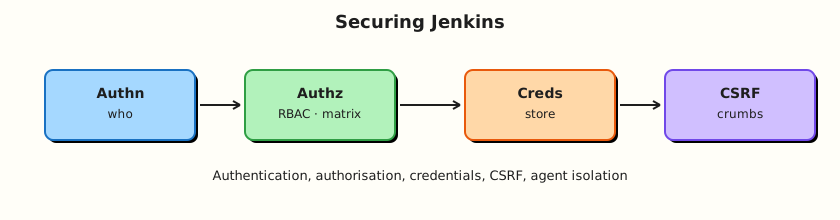
Users authenticate; authorisation gates actions; credentials inject at runtime on isolated agents.
Theory
What it is
Authentication answers who you are (Jenkins’ own user database, Lightweight Directory Access Protocol (LDAP), Security Assertion Markup Language (SAML), OpenID Connect (OIDC), GitHub App, …).
Authorisation answers what you may do. Common models:
| Strategy | Idea |
|---|---|
| Logged-in users can do anything | Lab-only anti-pattern for shared controllers |
| Matrix Authorization | Permissions grid per user/group |
| Role-based (Role Strategy plugin) | Roles mapped to users/groups; folder-aware setups common |
| Folder-scoped permissions | Teams administer inside their folder only |
Credentials store holds secrets (secret text, username/password, SSH keys, certificates) encrypted under JENKINS_HOME, referenced by ID from Pipeline (withCredentials, credential bindings, credentials() in environment where supported).
CSRF crumbs prevent forged browser requests from other sites while you are logged into Jenkins. Keep protection enabled.
Markup formatter controls whether job descriptions allow HTML — unsafe HTML enables stored XSS if untrusted users can edit descriptions.
Controller isolation means zero (or near-zero) executors on the built-in node and privileged work only on labelled agents.
Why it matters
Compromised Jenkins equals compromised delivery: cloud keys, Kubernetes configs, and production SSH. Most “Jenkins breaches” are exposed UIs, over-powered accounts, secrets in Freestyle builders, or PR builds on privileged agents — not exotic zero-days.
How it works
- Enable security realm (who logs in).
- Choose authorisation strategy; remove anonymous Overall/Administer.
- Create personal users or sync groups; avoid shared
adminfor daily work. - Put secrets in Credentials (folder scope when multi-tenant).
- Pipelines reference credential IDs; agents receive ephemeral env/files.
- Multibranch: production deploy credentials live in folders that untrusted PR jobs cannot access — or use separate controllers/folders entirely.
- Keep CSRF on; restrict who can run Groovy script console.
Key concepts and comparisons
| Bad practice | Better |
|---|---|
| Secrets in Jenkinsfile | Credentials ID |
| Anonymous read + job configure | Authenticated least privilege |
| Everyone Administer | Matrix/roles + folder admins |
| PR jobs in prod-creds folder | Separate CI folder/agent pool |
| Built-in executors > 0 | Executors = 0 |
| Credential type | Typical use |
|---|---|
| Secret text | API tokens |
| Username/password | Registries, basic Git |
| SSH private key | Git over SSH, some hosts |
| Secret file | kubeconfig (prefer short-lived OIDC patterns when possible) |
Common pitfalls
- “Security disabled” left on from a hurried lab.
- Anonymous Overall/Read on internet-facing controllers.
- Script Console open to non-admins.
- Folder credentials inherited into Multibranch PR jobs unintentionally.
- Disabling CSRF “because the CLI was annoying” without fixing auth properly.
Hands-on Lab
Objective
Produce a hardening checklist against your lab controller, create a folder-scoped credential (dummy value), reference it from a Pipeline without printing the secret, and verify CSRF and built-in executor posture with validated YAML and shell checks.
Prerequisites
- Admin on lab Jenkins
- Ability to create folders and credentials
Lab environment
Workspace: ~/rebash-jenkins/module-11
mkdir -p ~/rebash-jenkins/module-11 && cd ~/rebash-jenkins/module-11
set -euo pipefail
curl -sS -o /dev/null -w "%{http_code}\n" http://127.0.0.1:8080/login | tee controller.txt
Real-world scenario
Security review requires evidence that anonymous users cannot configure jobs, CSRF is enabled, production-like secrets are not in Git, and built-in builds are disabled.
Step-by-step tasks
Task 1 – Security posture as YAML
In UI: Manage Jenkins → Security. Record realm and authorisation strategy in the YAML keys below.
Run:
Create security-policy.yaml:
authentication:
  realm: fill_from_ui
  admin_account_count: fill_from_ui
authorisation:
  strategy: fill_from_ui
  anonymous_administer: false
  anonymous_job_build: fill_from_ui
csrf:
  prevent_csrf: true
markup:
  formatter: fill_from_ui
controller_isolation:
  builtin_executors_target: 0
  privileged_agent_labels: fill_from_ui
script_console:
  access: administer_only
Validate and archive:
python3 -c "
import yaml
with open('security-policy.yaml') as f:
    d = yaml.safe_load(f)
assert d['csrf']['prevent_csrf'] is True
assert d['authorisation']['anonymous_administer'] is False
print('security-policy.yaml OK')
" | tee security-policy-validate.txt
Expected output
YAML validates required keys; fill UI values after inspection.
Task 2 – Folder-scoped dummy credential
- Open folder
rebash-demo(create if needed) → Credentials → Add. - Kind: Secret text. ID:
rebash-demo-dummy. Secret:not-a-real-secret. - Scope: folder (not global) if offered.
Run:
Create credential-config.yaml:
id: rebash-demo-dummy
kind: secret_text
scope: folder_rebash-demo
rotation_owner: platform-lab
value_storage: jenkins_credentials_store_only
Create creds-pipeline.Jenkinsfile:
pipeline {
  agent any
  stages {
    stage('Use credential safely') {
      steps {
        withCredentials([string(credentialsId: 'rebash-demo-dummy', variable: 'DEMO_SECRET')]) {
          sh '''
            test -n "$DEMO_SECRET"
            # Prove length only — never echo the secret
            python3 - <<'PY' || awk 'BEGIN{exit 0}'
import os
s=os.environ.get("DEMO_SECRET","")
print("secret_length=", len(s))
if s == "":
    raise SystemExit(1)
PY
          '''
        }
      }
    }
  }
}
Create job rebash-demo/creds-safe-demo with this script and build it. Console must not print not-a-real-secret.
Expected output
Build success; length line only.
Task 3 – Multibranch hygiene policy
Run:
Create multibranch-hygiene.yaml:
prod_deploy_credentials_separate_from_pr_jobs: true
fork_pr_discovery: disabled_or_sandboxed_agents
jenkinsfile_prod_credential_ids: forbidden_for_pr_jobs
credential_ids_documented: true
builtin_executors: 0
lab_decision: fill_after_controller_review
Validate and archive:
python3 -c "
import yaml
with open('multibranch-hygiene.yaml') as f:
    d = yaml.safe_load(f)
assert d['prod_deploy_credentials_separate_from_pr_jobs']
print('multibranch-hygiene.yaml OK')
" | tee mb-hygiene-validate.txt
Expected output
Hygiene YAML validates.
Task 4 – Evidence pack
Run:
Create hardening-checks.sh:
#!/usr/bin/env bash
set -euo pipefail
python3 -c "
import yaml
for f in ('security-policy.yaml','multibranch-hygiene.yaml','credential-config.yaml'):
    yaml.safe_load(open(f))
print('yaml_bundle_ok')
"
grep -q 'withCredentials' creds-pipeline.Jenkinsfile
grep -q 'secret_length' creds-pipeline.Jenkinsfile
echo hardening_checks_ok
Validate and archive:
chmod +x hardening-checks.sh
./hardening-checks.sh | tee hardening-checks.txt

tar -czf module-11-evidence.tgz security-policy.yaml multibranch-hygiene.yaml credential-config.yaml creds-pipeline.Jenkinsfile hardening-checks.sh *.txt
ls -l module-11-evidence.tgz | tee evidence.txt
Expected output
Archive without real secrets.
Validation steps
- CSRF confirmed enabled
- Dummy credential used via
withCredentialswithout echoing value - Multibranch hygiene YAML validates
-
hardening-checks.shpasses locally - Built-in executor policy recorded
Common errors and fixes
| Error | Cause | Fix |
|---|---|---|
| Credentials unavailable | Wrong folder scope | Add creds where the job runs |
withCredentials missing | Plugin/step not installed | Install Credentials Binding |
| Secret appears in logs | echo $SECRET | Print length/hash only |
| Locked yourself out | Authz misconfig | Use disable-security recovery patterns offline on lab only |
Challenge exercise
Create two users (or simulate with RBAC): dev-user with Job/Build in rebash-demo only, and ensure they cannot access Manage Jenkins. Capture the matrix or role strategy as rbac-matrix.yaml with required permission keys validated by Python.
Learning outcomes
- Mapped authn vs authz on a real controller
- Practised safe credential binding
- Documented Multibranch secret boundaries
- Reinforced controller isolation
Cleanup
Validation
- Lab completed under
~/rebash-jenkins/module-11/ - You can explain CSRF’s purpose
- You can place secrets in the store, not Git
- You can describe one PR credential failure mode
Code Walkthrough
- Authenticate people, authorise actions — separately.
- Credentials by ID — never literals in Jenkinsfiles.
- Folder scope for multi-team — reduce blast radius.
- CSRF stays on — fix clients properly.
- PR trust tiers — separate folders/agents/creds.
Security Considerations
- Internet-facing Jenkins needs TLS, SSO, and aggressive authz — not just “installed.”
- Script Console is root-equivalent — Administer only.
- Backup encryption and access control matter;
JENKINS_HOMEcontains credential ciphertext. - Agent compromise leaks whatever credentials a job injects — minimise scopes.
- Audit plugin versions with known CVEs as part of operations.
Common Mistakes
Anonymous users can Administer
Trivial takeover. Fix: review Authorization matrix immediately.
Secrets in Multibranch folder shared with fork PRs
Untrusted code reads prod IDs. Fix: split folders/controllers; sandbox PR CI.
Disabling CSRF for convenience
Session-riding attacks. Fix: keep CSRF; use API tokens for automation.
Shared admin password on sticky notes
No accountability. Fix: SSO + personal accounts + break-glass admin.
Best Practices
- SSO for humans; API tokens for automation with rotation.
- Role Strategy or equivalent for folder tenancy.
- Regular credential rotation and ownership tags.
- Zero built-in executors in production.
- Threat-model Multibranch before enabling fork PRs.
Troubleshooting
| Symptom | Likely cause | Fix |
|---|---|---|
| 403 on every POST | CSRF/token issues | Re-login; update CLI auth |
| Creds not found | Scope/ID typo | Match folder + ID |
| Users can see all jobs | Authz too open | Tighten matrix/roles |
| Builds on controller | Executors > 0 | Set 0; force labels |
Summary
Secure Jenkins by authenticating strongly, authorising narrowly, storing secrets in the credentials system, keeping CSRF on, and isolating untrusted Pipelines from the controller and production credentials. Next: Testing, Reports, and Quality Gates.
Interview Questions
1. What is the difference between authentication and authorisation in Jenkins?
Reveal answer
Authentication establishes identity (login). Authorisation decides which Jenkins permissions that identity has (read, build, configure, administer).
2. Why use the credentials store instead of environment literals?
Reveal answer
Secrets stay encrypted in JENKINS_HOME, are access-controlled, rotatable, and injected at runtime without appearing in Git. Literals leak via repos, config history, and logs.
3. What does CSRF protection prevent?
Reveal answer
It prevents other websites from tricking a browser that is already logged into Jenkins into performing state-changing requests (forged builds, config changes) without a valid crumb/token.
4. How do matrix and role strategies differ at a high level?
Reveal answer
Matrix assigns permissions directly to users/groups in a grid. Role strategies define named roles with permission sets, then assign users/groups to roles — often easier at scale and with folders.
5. Why is Script Console dangerous?
Reveal answer
It can execute arbitrary Groovy with high privilege on the controller — effectively full compromise. Restrict to Administer and monitor usage.
6. How should production credentials be handled for Multibranch PR builds?
Reveal answer
Keep them out of folders/stores that untrusted PR jobs can access. Use separate CI credentials and agents for PRs; reserve deploy credentials for protected branches with gates.
7. What is a practical controller isolation control?
Reveal answer
Set built-in node executors to zero so Pipelines cannot run on the controller host; require labelled agents for all builds.
8. What goes wrong if job descriptions allow raw HTML from untrusted users?
Reveal answer
Stored cross-site scripting can run in admins’ browsers when they view the job, leading to session theft or unintended actions. Use safe markup formatters and limit who can edit descriptions.
Related Tutorials
- Agents, Nodes, and Executors
- Multibranch Pipelines and Pull Requests
- Testing, Reports, and Quality Gates