Containers: ECS, EKS, and ECR
Overview
A container packages your application and its dependencies into one runnable unit — “it works on my laptop” becomes “it works in production.” On AWS you store images in ECR, run them with ECS or Kubernetes (EKS), and optionally skip managing servers with Fargate.
Think of the container stack this way:
- Docker — builds the box (you may already know this from Module 7 prerequisites)
- ECR — AWS’s private warehouse for boxes (images)
- ECS — AWS-native system that schedules containers
- EKS — AWS-managed Kubernetes (popular, but costs more to learn casually)
- Fargate — run containers without patching EC2 yourself
This is Tutorial 1 in Module 7: Containers of the REBASH Academy AWS for Cloud & DevOps Engineers series. You will build and push an image to ECR and produce an ECS Fargate task definition JSON — without creating an EKS cluster (~$0.10/hour control plane plus workers).
Cost hygiene
ECR storage is cheap at lab scale. Do not create an EKS cluster for this tutorial. Delete the ECR repository in Cleanup.
Prerequisites
- Databases on AWS
- Docker installed locally (Docker Desktop or Linux engine)
- AWS CLI v2 with
ecr:*permissions - Recommended: Introduction to Containers and Docker
Learning Objectives
By the end of this tutorial, you will be able to:
- Explain ECR, ECS, EKS, and Fargate with plain analogies
- Create an ECR repository and push a Docker image
- Inspect image metadata with
aws ecr describe-images - Author a valid ECS Fargate task definition JSON
- Tell task execution role vs task role apart
- Answer fresher interview questions on ECS vs EKS
Architecture
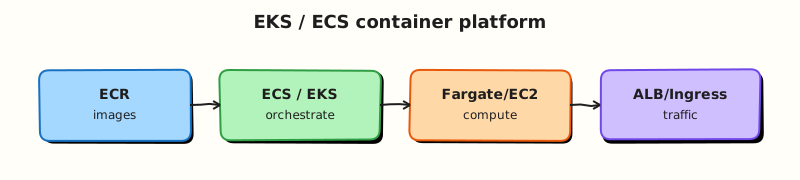
Developers build images → push to ECR → ECS or EKS pulls by tag/digest → tasks or pods run on Fargate or EC2. Load balancers register healthy targets; CloudWatch collects logs; IAM roles grant permissions.
Theory
The problem (before AWS words)
“It works on my machine” breaks in production because servers have different library versions. Shipping the whole environment inside a container fixes that — but you still need somewhere to store images and something to run them at scale.
Docker image — the shipping container
Problem: Copying code without dependencies causes “missing library” outages.
Analogy: A shipping container holds everything needed — app, runtime, config — sealed and portable.
Tiny example: Dockerfile → docker build → image myapp:v1.
Interview one-liner: “An image is immutable layers; a container is a running instance of an image.”
ECR — AWS’s private image registry
Problem: You need a secure place to store images that ECS/EKS can pull from.
Analogy: ECR (Elastic Container Registry) is your company’s private Docker Hub inside AWS.
Tiny example: 123456789.dkr.ecr.eu-west-2.amazonaws.com/myapp:v1
Interview one-liner: “ECR stores OCI/Docker images; enable scan-on-push for CVE checks.”
ECS — AWS-native orchestrator
Problem: Running one container manually does not survive crashes or traffic spikes.
Analogy: ECS (Elastic Container Service) is a foreman assigning work shifts — tasks (running containers) grouped in services with desired counts.
| Term | Plain meaning |
|---|---|
| Cluster | Logical grouping of capacity |
| Task definition | JSON recipe (CPU, memory, image, roles) |
| Service | Keeps N tasks running |
| Task | One running container group |
Interview one-liner: “ECS is AWS-native orchestration — simpler if you do not need full Kubernetes APIs.”
EKS — managed Kubernetes
Problem: Your team already uses Kubernetes tools (Helm, operators) or wants multi-cloud portability.
Analogy: EKS (Elastic Kubernetes Service) runs upstream Kubernetes — AWS manages the control plane; you manage nodes or Fargate profiles.
Interview one-liner: “EKS costs control plane hourly fee — justify it when you need K8s ecosystem, not for a hello-world.”
Fargate — no EC2 patching
Problem: You do not want to SSH into servers to patch the OS for every container.
Analogy: Fargate is serverless containers — specify CPU/memory; AWS runs the infrastructure.
Tiny example: ECS task cpu: 256, memory: 512, requiresCompatibilities: FARGATE.
Interview one-liner: “Fargate uses awsvpc — each task gets its own ENI and security groups.”
ECS vs EKS
| Question | ECS | EKS |
|---|---|---|
| API style | ECS API / CloudFormation | Kubernetes API (kubectl) |
| Learning curve | Lower for AWS-first teams | Higher (CKA-level K8s) |
| Control plane fee | No separate hourly CP charge | ~$0.10/hr per cluster |
| Best when | AWS-native microservices | Helm, operators, multi-cloud |
Task execution role vs task role
Problem: The container runtime must pull images and write logs; your app must call S3/DynamoDB — different permissions.
| Role | Who uses it | Typical permissions |
|---|---|---|
| Task execution role | ECS/Fargate agent | ECR pull, CloudWatch Logs, secrets at startup |
| Task role | Your application code | S3, DynamoDB, SQS, etc. |
Interview one-liner: “Swapping these roles causes CannotPullContainerError vs app AccessDenied — classic fresher bug.”
Common pitfalls
- Using only
:latesttag in production — pin digests or immutable tags - Launching EKS for one tiny API — control plane tax 24/7
- Wrong Fargate CPU/memory pair — task fails placement
- No image scanning — vulnerable base images reach prod
Hands-on Lab
Objective
Create an ECR repository, build and push a container image, describe images in ECR, and produce a Fargate-compatible task-definition.json — without launching an EKS cluster.
Prerequisites
| Tool | Notes |
|---|---|
| Docker | Build and push |
| AWS CLI v2 | ecr:* |
| jq | Parse JSON |
Lab environment
mkdir -p ~/rebash-aws/module-07 && cd ~/rebash-aws/module-07
export AWS_REGION="${AWS_REGION:-eu-west-2}"
export AWS_PAGER=""
ACCOUNT_ID=$(aws sts get-caller-identity --query Account --output text)
export REPO="rebash-m07-app"
echo "$REPO" | tee repo-name.txt
echo "$ACCOUNT_ID" | tee account-id.txt
aws sts get-caller-identity --output table
Real-world scenario
CI built a new status API image. Platform requires it in ECR with a documented ECS task definition before any Fargate deploy window. You push the image, verify digest metadata, and hand off JSON — the gate used before ecs run-task in production.
Step-by-step tasks
Task 1 – Create ECR repository
cd ~/rebash-aws/module-07
REPO=$(cat repo-name.txt)
aws ecr create-repository --repository-name "$REPO" \
  --image-scanning-configuration scanOnPush=true \
  --encryption-configuration encryptionType=AES256 \
  --output json | tee create-repo.json
aws ecr describe-repositories --repository-names "$REPO" \
  --query 'repositories[0].repositoryUri' --output text | tee repo-uri.txt
test -s repo-uri.txt
Expected output
repo-uri.txt contains ACCOUNT.dkr.ecr.REGION.amazonaws.com/rebash-m07-app.
Task 2 – Build Dockerfile and push image
Create Dockerfile:
FROM public.ecr.aws/docker/library/python:3.12-alpine
WORKDIR /app
RUN pip install --no-cache-dir flask==3.0.3 gunicorn==22.0.0
COPY app.py .
EXPOSE 8080
CMD ["gunicorn", "-b", "0.0.0.0:8080", "app:app"]
Create app.py:
from flask import Flask
app = Flask(__name__)

@app.get("/health")
def health():
    return {"status": "ok", "service": "rebash-m07"}
cd ~/rebash-aws/module-07
REPO_URI=$(cat repo-uri.txt)
IMAGE_TAG="${REPO_URI}:v1"
docker build -t "$IMAGE_TAG" .
aws ecr get-login-password --region "$AWS_REGION" | \
  docker login --username AWS --password-stdin "${REPO_URI%%/*}"
docker push "$IMAGE_TAG" | tee push.log
grep -q digest push.log || docker inspect --format='{{index .RepoDigests 0}}' "$IMAGE_TAG" | tee digest.txt
Expected output
Push succeeds; log or digest.txt shows @sha256:… digest.
Task 3 – Describe images in ECR
cd ~/rebash-aws/module-07
REPO=$(cat repo-name.txt)
aws ecr describe-images --repository-name "$REPO" --output json | tee describe-images.json
jq -e '.imageDetails | length >= 1' describe-images.json
jq -r '.imageDetails[0].imageTags[]?' describe-images.json | tee tags.txt
grep -q v1 tags.txt
echo "ecr push describe OK" | tee evidence.txt
Expected output
describe-images.json lists at least one image with tag v1.
Task 4 – Author ECS Fargate task definition (artefact)
Create task-definition.json:
{
  "family": "rebash-m07-status",
  "networkMode": "awsvpc",
  "requiresCompatibilities": ["FARGATE"],
  "cpu": "256",
  "memory": "512",
  "executionRoleArn": "arn:aws:iam::ACCOUNT_ID:role/ecsTaskExecutionRole",
  "taskRoleArn": "arn:aws:iam::ACCOUNT_ID:role/rebash-m07-task-role",
  "containerDefinitions": [
    {
      "name": "status-api",
      "image": "ACCOUNT_ID.dkr.ecr.REGION.amazonaws.com/rebash-m07-app:v1",
      "essential": true,
      "portMappings": [
        {"containerPort": 8080, "protocol": "tcp"}
      ],
      "logConfiguration": {
        "logDriver": "awslogs",
        "options": {
          "awslogs-group": "/ecs/rebash-m07-status",
          "awslogs-region": "REGION",
          "awslogs-stream-prefix": "status"
        }
      },
      "healthCheck": {
        "command": ["CMD-SHELL", "wget -qO- http://localhost:8080/health || exit 1"],
        "interval": 30,
        "timeout": 5,
        "retries": 3,
        "startPeriod": 10
      }
    }
  ]
}
cd ~/rebash-aws/module-07
ACCOUNT_ID=$(cat account-id.txt)
sed -e "s/ACCOUNT_ID/${ACCOUNT_ID}/g" -e "s/REGION/${AWS_REGION}/g" \
  task-definition.json > task-definition-rendered.json
python3 -m json.tool task-definition-rendered.json > /dev/null
grep -q FARGATE task-definition-rendered.json
grep -q rebash-m07-app task-definition-rendered.json
echo "task definition artefact OK" | tee task-evidence.txt
# Optional if ecsTaskExecutionRole exists in your account:
# aws ecs register-task-definition --cli-input-json file://task-definition-rendered.json
Expected output
JSON validates; rendered file contains your account ECR URI and Fargate compatibility.
Validation steps
- ECR repository exists with scan-on-push enabled
- Docker image pushed with tag
v1 -
describe-imagesshows the image -
task-definition-rendered.jsonis valid Fargate JSON - No EKS cluster was created
Common errors and fixes
| Error | Cause | Fix |
|---|---|---|
| docker login failed | Wrong Region/account | Match AWS_REGION to repo URI |
| denied: repository does not exist | Repo not created | Run create-repository first |
| CannotPullContainerError (if run) | Execution role missing ECR | Attach AmazonECSTaskExecutionRolePolicy |
| Invalid CPU/memory | Bad Fargate pair | Use supported combo (256/512, 512/1024, …) |
Challenge exercise
Create task-definition-sidecar.json adding a non-essential log-router sidecar placeholder — document where a log agent would sit in the same task.
cd ~/rebash-aws/module-07
test -f task-definition-sidecar.json
grep -qi sidecar task-definition-sidecar.json
echo "sidecar challenge OK" | tee challenge.txt
Learning outcomes
- You pushed a real image to ECR and verified metadata
- You understand execution vs task IAM roles in JSON
- You produced interview-ready ECS task definition without costly EKS
- You can articulate ECS vs EKS vs App Runner trade-offs
Cleanup
cd ~/rebash-aws/module-07
REPO=$(cat repo-name.txt)
aws ecr delete-repository --repository-name "$REPO" --force
rm -f push.log describe-images.json evidence.txt task-evidence.txt
Validation
- ECR repository deleted (no storage charge)
- You can explain Fargate awsvpc networking in plain English
- Task definition JSON validates locally
- You can justify when EKS is worth the control plane cost
Code Walkthrough
- ECR login —
get-login-passwordpipes todocker loginfor your account registry. - Immutable tags + digests — production deploys reference
@sha256:not floating tags. - Scan on push — ECR basic scanning catches CVEs early.
- Execution role — pull/logs/secrets only; app AWS calls use task role.
- Skip EKS in lab — practise Kubernetes on kind locally for CKA; use ECS/Fargate on AWS for image pipeline labs.
Security Considerations
- Private ECR repos by default; use repository policies for cross-account CI.
- Enable image scanning; block deploy on critical CVEs in pipeline.
- Task role least privilege — no
*on S3/DynamoDB. - Use Secrets Manager for secrets, not plain environment variables in task def.
- Pin base image digests in Dockerfile
FROMwhere possible.
Common Mistakes
Launching EKS for hello-world
Control plane fees run 24/7. Use ECS Fargate or App Runner until you need Kubernetes APIs.
Task and execution role confusion
ECR pull works but S3 fails — you attached permissions to the wrong role.
Public :latest in production
Tags can be overwritten — use immutability and digest deploys.
Best Practices
- One service per task definition family; version via revisions
- Centralise logs to CloudWatch with structured JSON
- Use Spot capacity providers for fault-tolerant ECS on EC2
- GitOps task definition promotions through CI/CD
- Mirror public base images to ECR to avoid rate limits
Troubleshooting
| Symptom | Likely cause | Fix |
|---|---|---|
| ImagePullBackOff (EKS) | ECR IAM or wrong URI | Node role needs ecr:GetAuthorizationToken |
| Task stuck PROVISIONING | Fargate subnet/IP exhaustion | Add subnets/IPs; check awsvpc |
| CannotPullContainerError | Execution role | Attach managed execution policy |
| App 403 on AWS API | Task role missing | Add least-privilege policy to task role |
Summary
ECR stores images; ECS and EKS orchestrate them; Fargate removes node patching. This lab proved build → push → describe → task definition — the pipeline gate before any Fargate deploy — without an expensive EKS cluster.
Next: Serverless on AWS.
Interview Questions
1. What is ECR in simple words?
Reveal answer
ECR (Elastic Container Registry) is AWS’s private Docker/OCI image registry. You push images from CI or your laptop; ECS and EKS pull them to run containers. It integrates with IAM and can scan images on push for vulnerabilities.
2. ECS vs EKS — how do you decide?
Reveal answer
Choose ECS when you want AWS-native APIs and faster time-to-value without Kubernetes operational burden. Choose EKS when you need Kubernetes compatibility (Helm, operators, multi-cloud) and have platform capacity to run clusters. Small teams often start with ECS Fargate.
3. What is Fargate?
Reveal answer
Fargate is serverless compute for containers — you specify CPU and memory; AWS manages the underlying servers. Each task/pod gets an ENI in awsvpc mode with its own security groups. You pay per task runtime, at a premium vs self-managed EC2.
4. Task execution role vs task role?
Reveal answer
Execution role — used by ECS/Fargate to pull images from ECR, write logs, and fetch secrets at startup. Task role — credentials your application code uses for AWS APIs (S3, DynamoDB). Swapping them causes pull success but app permission failures.
5. Why did this lab skip EKS?
Reveal answer
EKS charges for the managed control plane hourly plus worker compute. Learning ECR push and task definitions does not require Kubernetes — use kind/minikube locally for K8s. Production EKS is justified when K8s APIs and ecosystem are requirements.
6. App Runner vs ECS Fargate?
Reveal answer
App Runner is opinionated — connect repo or ECR, auto HTTPS, minimal VPC wiring — great for simple web services. ECS Fargate offers full VPC, load balancers, sidecars, and batch — more control, more design work.
7. What network mode for Fargate tasks?
Reveal answer
awsvpc — each task gets its own elastic network interface and IP in subnets you choose. Required for Fargate. Security groups attach to the task ENI.
8. How do you secure container images?
Reveal answer
Private ECR, scan on push, minimal base images, pin digests, block critical CVEs in CI, and least-privilege IAM for pull roles. Avoid deploying floating :latest tags in production.
Related Tutorials
- Previous: Databases on AWS
- Next: Serverless on AWS
- Introduction to Containers and Docker
- Compute: EC2, ASG, and Load Balancing