Cost Optimisation on AWS
Overview
Cost surprises are a common early mistake — leaving a server running overnight, forgetting a NAT Gateway, or launching a GPU instance by accident. This module teaches Budgets, Cost Explorer, and pricing models in plain terms.
Problem in plain English: On AWS you pay mostly for what you use. That is powerful but dangerous for students. A forgotten lab resource can become a real bill.
What FinOps means: FinOps combines finance awareness with engineering choices — right-sizing servers, setting alerts, tagging resources by team, and picking pricing models wisely.
AWS terms you will meet:
| Term | Plain English |
|---|---|
| AWS Budgets | Email alert when spend crosses a limit you set |
| Cost Explorer | Charts showing which service spent money |
| On-Demand | Pay per hour — no commitment |
| Reserved Instances / Savings Plans | Commit for 1–3 years for a discount |
| Spot Instances | Cheap spare capacity — AWS can take it back with 2 minutes notice |
This is Tutorial 1 in Module 13: Cost Optimisation of the REBASH Academy AWS for Cloud & DevOps Engineers series. You will create a USD 5 monthly budget with email notification, prove it with describe-budget, then delete it — while learning patterns interviewers ask about daily.
Cost
AWS Budgets themselves are low cost (first budgets often Free Tier eligible). The lab budget does not charge you USD 5 — it alerts when spend approaches that threshold.
Prerequisites
- AWS Fundamentals — you created a billing alarm in Module 1
- CI/CD on AWS (Module 12) — pipelines can multiply resources quickly
- Billing console access or
budgets:*andce:*read in sandbox
You do not need finance or accounting background.
Learning Objectives
By the end of this tutorial, you will be able to:
- Explain why cloud cost matters for students and junior engineers
- Configure AWS Budgets with thresholds and email subscribers
- Explain On-Demand vs Reserved vs Spot in plain English
- Query Cost Explorer by service for a simple investigation
- Name three common AWS waste items (unattached disks, idle NAT, old snapshots)
- Answer fresher interview questions on tags and bill spikes
Architecture
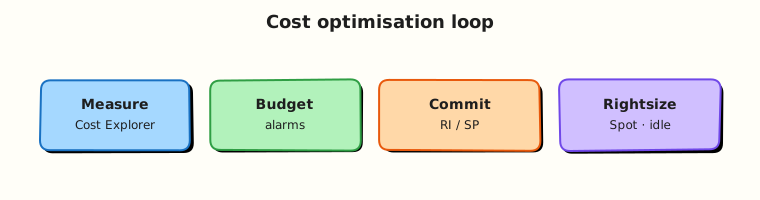
Billing data flows from usage records to Cost and Usage Reports (CUR), Cost Explorer, and Budgets. Organisations consolidate linked accounts. Tags enable allocation; SCPs and budgets enforce guardrails at the organisation level.
Theory
The problem (before jargon)
Problem: A team deploys 20 test servers and forgets them over the weekend. Monday’s manager asks why the bill doubled.
Analogy: Leaving all the lights and AC on in a rented office when nobody is inside — the building owner still sends the bill.
AWS reality: Most services bill continuously (per hour, per GB, per request). Automation (IaC, CI/CD) makes it easy to create resources fast — guardrails must be automatic too.
AWS cost optimisation in plain English
Cost optimisation means matching spend to business value: delete waste, pick the right size server, choose smart pricing, and alert before surprises.
| Tool | Plain job | Tiny example |
|---|---|---|
| AWS Budgets | “Email me at 80% of USD 5” | Student sandbox safety net |
| Cost Explorer | “Which service spent most this week?” | After alert, find NAT Gateway spike |
| Cost and Usage Report (CUR) | Detailed line-item export to S3 | Finance team spreadsheets |
| Trusted Advisor | Automated best-practice tips | “You have 3 unattached EBS volumes” |
| Compute Optimizer | “This server is too big” | Downsize t3.large → t3.small |
Interview one-liner: “I tag resources, set budgets, review Cost Explorer weekly, and delete what we do not need — cost is a design choice, not only finance’s problem.”
Pricing models — comparison for beginners
| Model | Plain meaning | Good for | Risk |
|---|---|---|---|
| On-Demand | Pay hourly, no contract | Unknown or spiky workloads | Highest unit price |
| Savings Plans | Commit to USD/hour compute spend | Steady baseline traffic | Pay even if usage drops |
| Reserved Instances | Commit to specific instance type/Region | Stable databases | Wrong size wastes money |
| Spot | Bid on spare capacity | Batch jobs, CI workers | AWS can interrupt with 2-minute notice |
Analogy for Spot: Standby airline seats sold cheap — you may be bumped if demand rises. Do not put your only production database on Spot without a plan.
Common waste patterns (memorise for interviews)
| Waste | How you notice | Fix |
|---|---|---|
| Unattached EBS disk | Trusted Advisor / console | Snapshot if needed; delete volume |
| NAT Gateway left running | Cost Explorer → VPC | Delete; use S3 gateway endpoint in labs |
| Old snapshots | Age + no tags | Lifecycle policy |
| Idle load balancer | Low request count | Remove or merge |
| Wrong Region resources | Console filter confusion | Delete in correct Region |
VPC cost link (Module 3)
Problem: Private subnets need internet access. NAT Gateway charges hourly plus per GB processed — a common student surprise bill.
Fix for S3 access from private subnets: Use a gateway VPC endpoint for S3 (free in many cases) instead of sending all traffic through NAT.
Interview one-liner: “NAT Gateway is often the hidden line item after networking labs — I use endpoints where possible and delete NAT when done.”
Common pitfalls
- Budget with no owner — alerts go to an inbox nobody reads.
- Buying 3-year Reserved Instances on day one — architecture still changing.
- Spot without interruption handling — batch job loses progress mid-run.
- No tags — cannot answer “which team spent this?”
Hands-on Lab
Objective
Create a monthly cost budget of USD 5 with email notification at 80% actual spend, prove with describe-budget, simulate subscriber file structure, and delete the budget.
Prerequisites
| Tool | Notes |
|---|---|
| AWS CLI v2 | budgets:CreateBudget, budgets:DescribeBudget |
| Account ID | From sts get-caller-identity |
| Valid email | For notification subscriber (use your own) |
Lab environment
mkdir -p ~/rebash-aws/module-13 && cd ~/rebash-aws/module-13
export AWS_REGION="${AWS_REGION:-eu-west-2}"
export AWS_PAGER=""
export BUDGET_NAME="rebash-m13-monthly-5usd"
ACCOUNT_ID=$(aws sts get-caller-identity --query Account --output text)
echo "$ACCOUNT_ID" | tee account-id.txt
export BUDGET_EMAIL="${BUDGET_EMAIL:-you@example.com}"
echo "$BUDGET_EMAIL" | tee budget-email.txt
Replace you@example.com with your real inbox before Task 2.
Real-world scenario
Finance asks platform: “Give engineers an early warning before sandbox spend crosses USD 5 this month — no surprise invoice.” You implement AWS Budgets with documented JSON artefacts the team can reuse in Terraform or CloudFormation later.
Step-by-step tasks
Task 1 – Author budget and notification JSON files
Create budget.json:
{
  "BudgetName": "rebash-m13-monthly-5usd",
  "BudgetLimit": {
    "Amount": "5",
    "Unit": "USD"
  },
  "TimeUnit": "MONTHLY",
  "BudgetType": "COST",
  "CostTypes": {
    "IncludeTax": true,
    "IncludeSubscription": true,
    "UseBlended": false
  }
}
Create notifications.json:
[
  {
    "Notification": {
      "NotificationType": "ACTUAL",
      "ComparisonOperator": "GREATER_THAN",
      "Threshold": 80,
      "ThresholdType": "PERCENTAGE"
    },
    "Subscribers": [
      {
        "SubscriptionType": "EMAIL",
        "Address": "REPLACE_WITH_YOUR_EMAIL"
      }
    ]
  }
]
Replace the email placeholder:
cd ~/rebash-aws/module-13
EMAIL=$(cat budget-email.txt)
sed "s/REPLACE_WITH_YOUR_EMAIL/${EMAIL}/" notifications.json > notifications-ready.json
grep -q "$EMAIL" notifications-ready.json
Expected output
notifications-ready.json contains your email address in the Address field.
Task 2 – Create budget and describe proof
cd ~/rebash-aws/module-13
ACCOUNT_ID=$(cat account-id.txt)
aws budgets create-budget \
  --account-id "$ACCOUNT_ID" \
  --budget file://budget.json \
  --notifications-with-subscribers file://notifications-ready.json \
  | tee create-budget.json
aws budgets describe-budget \
  --account-id "$ACCOUNT_ID" \
  --budget-name "$BUDGET_NAME" \
  --output json | tee describe-budget.json
jq -e '.Budget.BudgetLimit.Amount == "5.0" or .Budget.BudgetLimit.Amount == "5"' describe-budget.json
jq -e '.Budget.BudgetType == "COST"' describe-budget.json
echo "budget created OK" | tee evidence.txt
Expected output
describe-budget.json shows "BudgetName": "rebash-m13-monthly-5usd" and limit USD 5; evidence.txt confirms creation.
Task 3 – Cost Explorer read-only investigation
cd ~/rebash-aws/module-13
START=$(date -u -v-7d +%Y-%m-%d 2>/dev/null || date -u -d '7 days ago' +%Y-%m-%d)
END=$(date -u +%Y-%m-%d)
aws ce get-cost-and-usage \
  --time-period Start="$START",End="$END" \
  --granularity DAILY \
  --metrics UnblendedCost \
  --group-by Type=DIMENSION,Key=SERVICE \
  --output json | tee cost-by-service.json
jq '[.ResultsByTime[].Groups[] | {service: .Keys[0], amount: .Metrics.UnblendedCost.Amount}] | sort_by(.amount | tonumber) | reverse | .[0:5]' \
  cost-by-service.json | tee top-services.json
test -s top-services.json
echo "cost explorer OK" | tee ce-evidence.txt
Expected output
top-services.json lists up to five services with spend amounts (may be small in sandbox).
Task 4 – Document Spot vs On-Demand decision (artefact file)
Create spot-decision.md:
# REBASH Module 13 — Spot vs On-Demand (lab note)

| Workload | Choice | Reason |
|----------|--------|--------|
| CI batch worker (Module 12) | Spot with checkpoint | Interruptible; 60–90% savings |
| Production API ASG baseline | On-Demand + Savings Plan | Steady traffic; interruption unacceptable |
| Render farm | Spot Fleet + diversification | Multiple pools reduce interruption rate |

**Interview line:** "We use Savings Plans for baseline compute and Spot for fault-tolerant batch — never Spot for single-AZ stateful databases without HA design."
cd ~/rebash-aws/module-13
test -f spot-decision.md
wc -l spot-decision.md | tee spot-lines.txt
Expected output
spot-lines.txt shows a non-zero line count; file exists for portfolio reference.
Validation steps
- Budget created with USD 5 monthly limit
-
describe-budgetreturns matching name and type - Email subscriber present in notification JSON
- Cost Explorer query returned service breakdown
- Spot decision artefact documents trade-offs
Common errors and fixes
| Error | Cause | Fix |
|---|---|---|
DuplicateRecordException | Budget name exists | Delete old budget or pick new name |
AccessDeniedException on CE | Missing ce:GetCostAndUsage | Use billing admin role or skip CE task |
| Email not received | Threshold not crossed yet | 80% alert fires only when spend exceeds limit |
| Invalid email in subscriber | Typo in JSON | Fix notifications-ready.json and update budget |
Challenge exercise
Add a usage budget JSON file for EC2 running hours (e.g. 100 hours/month) in budget-ec2-hours.json and create it with a second notification at 100% forecasted. Delete both budgets in cleanup. Forecast notifications help catch pipeline runaway before month end.
Learning outcomes
- You implemented programmatic AWS Budgets — common in landing zone baselines
- You queried Cost Explorer by service — first step in spike triage
- You documented Spot vs On-Demand judgement for interviews
- You understand budgets alert on spend, not charge your card automatically
Cleanup
cd ~/rebash-aws/module-13
ACCOUNT_ID=$(cat account-id.txt)
aws budgets delete-budget --account-id "$ACCOUNT_ID" --budget-name "$BUDGET_NAME"
aws budgets describe-budget --account-id "$ACCOUNT_ID" --budget-name "$BUDGET_NAME" 2>&1 | tee delete-check.txt || true
grep -q 'NotFoundException\|Unable to get budget' delete-check.txt && echo "budget removed OK" | tee cleanup-log.txt
Validation
- Budget lifecycle completed (create → describe → delete)
- Can explain RI vs Savings Plan vs Spot in plain English
- Can name three common AWS waste items
- Links NAT/endpoints discussion to Module 3 networking costs
Code Walkthrough
- Account ID in budget API — budgets are always scoped to payer/linked account ID.
- ACTUAL vs FORECASTED notifications — actual fires on spend; forecast predicts month-end breach.
- Unblended vs blended costs — organisations with RIs use blended in payer view; unblended for linked account attribution.
- Cost Explorer group-by SERVICE — fastest “what spiked?” view after alert.
- JSON files in Git — same artefacts IaC modules consume (
aws_budgets_budgetin Terraform).
Security Considerations
- Restrict
budgets:ModifyBudgetto finance/platform roles — attackers could disable alerts. - CUR buckets contain detailed usage — encrypt with KMS; block public access.
- Do not publish cost reports with account IDs to public wikis.
- Use IAM deny on expensive instance types in sandbox SCPs (Module 15).
- Anomaly detection complements budgets for zero-day resource creation spikes.
Common Mistakes
Alerts without owners
Route budget SNS/email to a team alias with on-call rotation — not an individual who left the company.
RI purchase before rightsizing
Buy commitments only after workload stabilises; use Compute Optimizer first.
Ignoring Support plan limits
Full Trusted Advisor checks require Business/Enterprise Support — know what is available in your account.
Best Practices
- Mandatory cost allocation tags enforced at creation (SCP/tag policy)
- Weekly Cost Explorer review per team; monthly FinOps council
- S3 Intelligent-Tiering or lifecycle for log buckets (Module 5)
- Gateway endpoints for S3 in private VPCs (Module 3)
- Automate idle resource reports with AWS Config rules or custom Lambda
Troubleshooting
| Symptom | Likely cause | Fix |
|---|---|---|
| Bill spike after VPC lab | NAT Gateway hourly + data processing | Delete NAT; use endpoints |
| Budget never emails | Below threshold | Lower threshold for test or use forecast alert |
CE shows $0 everywhere | New account / IAM scope | Wait 24h for data; check payer vs linked account |
| Spot fleet unstable | Single pool, one AZ | Diversify instance types and AZs |
Summary
Cost control is architecture plus discipline: tags, budgets, right-sizing, and smart purchasing. You created and verified a real AWS Budget and queried Cost Explorer — skills that pair with Reliability and Disaster Recovery when balancing spend against how fast you must recover from outages.
Interview Questions
1. Why should a student set a budget before launching servers?
Reveal answer
Labs can leave billable resources running (EC2, load balancers, NAT Gateways). A budget emails you when spend crosses a threshold so a learning mistake does not become a large invoice. It also shows interviewers you think about cost from day one.
2. Reserved Instance vs Savings Plan — which is more flexible?
Reveal answer
Compute Savings Plans apply to EC2, Fargate, and Lambda regardless of instance family, size, AZ, or Region (within the plan scope). Standard RIs lock to instance family, tenancy, and Region. Savings Plans suit dynamic fleets; RIs can offer deeper discounts when attributes are stable.
3. When is Spot appropriate and how do you handle interruption?
Reveal answer
Spot fits fault-tolerant, flexible workloads: batch, CI, render farms, stateless workers with multiple instance types. Handle the two-minute interruption notice with checkpointing, graceful drain, Spot Fleet diversification, and fallback to On-Demand capacity in mixed instance groups.
4. What is the first CLI/API step after a budget alert fires?
Reveal answer
Open Cost Explorer (or ce get-cost-and-usage) grouped by service and linked account for the alert window. Identify the top contributor, then drill into resource IDs via CUR/Resource Groups Tagging API. Correlate with CloudTrail for who created resources.
5. How do VPC choices affect cost (Module 3 link)?
Reveal answer
NAT Gateways charge hourly plus per-GB processed — chatty private subnets hurt. S3/DynamoDB gateway endpoints avoid NAT for those prefixes. Cross-AZ traffic between tiers adds data transfer charges. Public subnets with IGW avoid NAT cost but expose instances — design trade-off.
6. Trusted Advisor vs Compute Optimizer?
Reveal answer
Trusted Advisor provides broad best-practice checks (security, fault tolerance, cost, limits) depending on support plan. Compute Optimizer focuses on ML-driven right-sizing for EC2, EBS, Lambda, ASG. Use both: Advisor for checklist, Optimizer for sizing evidence.
7. What tags do you require for chargeback?
Reveal answer
At minimum: Environment, Owner or Team, CostCentre or Project, and Application. Activate cost allocation tags in the billing console. Enforce with SCP/tag policies at org level (Module 15).
8. How do pipelines cause cost incidents?
Reveal answer
Runaway builds, leaked long-lived test clusters, unbounded parallel integration tests, and failed destroy steps in IaC pipelines. Mitigate with account vending for ephemeral envs, auto-expiry tags, budget alerts, and mandatory cleanup jobs in CI.
Related Tutorials
- Previous: CI/CD on AWS (Module 12)
- Next: Reliability and Disaster Recovery (Module 14)
- VPC Networking on AWS — NAT and endpoint cost
- Monitoring and Observability on AWS
- Course index: AWS for Cloud & DevOps Engineers