Reliability and Disaster Recovery on AWS
Overview
Interviews often use three words early: RTO, RPO, and Disaster Recovery (DR). This module explains them in plain English, then proves a small snapshot restore drill.
Problem in plain English: Your company’s website runs on one server in one building. The building loses power. How long until customers can use the site again? How much data from the last hour is lost forever?
Two terms to memorise:
| Term | Plain English | Example |
|---|---|---|
| RTO — Recovery Time Objective | Maximum time the business accepts being down | “We must be back online within 15 minutes” |
| RPO — Recovery Point Objective | Maximum data loss measured in time | “We can lose at most 5 minutes of transactions” |
Analogy: RTO is how long the shop stays closed after a fire. RPO is how many pages of the ledger burned — if you backup hourly, RPO is roughly one hour.
AWS terms: Reliability means your system survives failures (power cut in one Availability Zone, disk failure, human mistake). Disaster Recovery is the plan to restore service when something big goes wrong — using backups, replicas, and runbooks.
This is Tutorial 1 in Module 14: Reliability of the REBASH Academy AWS for Cloud & DevOps Engineers series. You will document RTO/RPO for a sample app, create a 1 GiB Amazon Elastic Block Store (EBS) volume, take a snapshot, prove recovery metadata, and delete everything cleanly.
Cost
A 1 GiB gp3 volume and snapshot are pennies if deleted within the session. Snapshots persist charges until deleted.
Prerequisites
- AWS Fundamentals — Regions and Availability Zones
- Storage: S3, EBS, EFS
- Cost Optimisation on AWS (Module 13) — DR choices cost money
- Optional: Lab — Secure EC2 via SSM and S3
You do not need prior on-call or SRE experience.
Learning Objectives
By the end of this tutorial, you will be able to:
- Define RTO and RPO with a simple shop-fire analogy
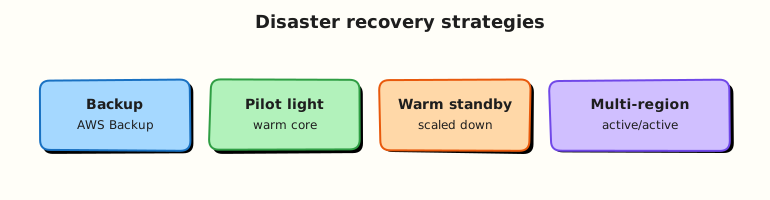
- Name four DR strategies from cheapest to most expensive
- Explain multi-AZ vs multi-Region in plain English
- Create and verify EBS snapshots as recovery points
- Contrast manual snapshots vs AWS Backup
- Answer fresher Well-Architected Reliability interview questions
Architecture
Production tiers span multiple Availability Zones within a Region. Backups (EBS snapshots, RDS snapshots, S3 versioning/replication) feed DR runbooks. Route 53 health checks and failover route traffic during Region-level events. AWS Backup centralises plans across services.
Theory
The problem (before AWS words)
Problem: One server, one disk, no backup. An intern deletes the database. The company asks “when will we be live again?” and “how much data is gone?” — nobody has numbers.
Analogy: A college project on one laptop with no Git push. Laptop stolen = project gone. RPO was “since last save”; RTO was “how long to rewrite”.
AWS approach: Design for failure. Spread across AZs. Take automatic backups. Test restores before disaster day.
RTO and RPO — depth with examples
| Tier | Workload | RTO | RPO | Plain meaning |
|---|---|---|---|---|
| Tier 1 | Payment API | 15 min | 5 min | Almost no downtime; near-live data copy |
| Tier 2 | Internal reports | 4 hours | 1 hour | Can wait hours; nightly backup OK |
| Tier 3 | Sandbox CI | 24 hours | N/A | Recreate from IaC; no precious data |
Interview one-liner: “RTO is downtime tolerance; RPO is data loss tolerance — they drive backup frequency and DR spend.”
DR strategies — comparison table
| Strategy | Plain English | Typical RTO | Cost |
|---|---|---|---|
| Backup-and-restore | Turn off until you restore from backup | Hours–days | Lowest |
| Pilot light | Tiny copy running in DR Region (e.g. database replica) | Tens of minutes–hours | Low–medium |
| Warm standby | Small full stack always running, scale up on disaster | Minutes | Medium |
| Active-active | Full stacks in two Regions serving traffic | Seconds–minutes | Highest |
Analogy for pilot light: Gas heater pilot flame — small flame always on so the main burner lights fast when needed.
Tiny AWS example: Nightly EBS snapshots = backup-and-restore. RDS cross-Region read replica = pilot light component.
Multi-AZ vs multi-Region
| Idea | Plain meaning | Protects against |
|---|---|---|
| Multi-AZ | Same Region, two buildings (AZs) | One AZ power/network failure |
| Multi-Region | Copy in Mumbai and London | Whole Region disaster |
Common fresher mistake: “My RDS is Multi-AZ so I am safe if the Region fails.” No — Multi-AZ is within one Region. Region DR needs cross-Region replicas or backups.
Interview one-liner: “Multi-AZ is for AZ failure; multi-Region is for Region failure — different problems, different designs.”
EBS snapshots — the lab primitive
An EBS snapshot is a point-in-time backup of a disk volume. AWS stores it incrementally. You can create a new volume from a snapshot to restore data.
AWS Backup automates schedules and retention across EBS, RDS, DynamoDB, and more — what you will use in production instead of manual CLI snapshots.
Common pitfalls
- Snapshots never restored in a test — corrupt backup discovered during real outage.
- S3 versioning without lifecycle — storage cost grows forever after ransomware-style overwrites.
- DNS TTL too high — failover takes hours because clients cache old IP.
- Backups in same account with no protection — attacker deletes backups too.
Hands-on Lab
Objective
Document RTO/RPO for a lab workload, create a 1 GiB gp3 EBS volume, snapshot it, prove snapshot metadata, restore proof via describe-volumes, then delete snapshot and volume.
Prerequisites
| Tool | Notes |
|---|---|
| AWS CLI v2 | ec2:CreateVolume, ec2:CreateSnapshot, ec2:Delete* |
| Default VPC or any AZ name | Volume is AZ-scoped |
| jq | Parse JSON |
Lab environment
mkdir -p ~/rebash-aws/module-14 && cd ~/rebash-aws/module-14
export AWS_REGION="${AWS_REGION:-eu-west-2}"
export AWS_PAGER=""
AZ=$(aws ec2 describe-availability-zones --query 'AvailabilityZones[0].ZoneName' --output text)
echo "$AZ" | tee az.txt
Real-world scenario
After a storage incident, SRE asks: “Prove we can snapshot a data volume and describe recovery point metadata before we enable AWS Backup org-wide.” You execute the primitive operations that Backup automates — with explicit RTO/RPO notes for the interview.
Step-by-step tasks
Task 1 – Document RTO/RPO targets
Create rto-rpo.md:
# REBASH Module 14 — sample tier classification

| Tier | Workload | RTO | RPO | DR strategy |
|------|----------|-----|-----|-------------|
| Tier 1 | Customer API (RDS + EC2) | 15 min | 5 min | Multi-AZ + cross-Region read replica (pilot light) |
| Tier 2 | Internal reporting | 4 h | 1 h | Backup-and-restore from nightly snapshots |
| Tier 3 | Sandbox CI workers | 24 h | N/A | Recreate from IaC; no durable data |

**Lab volume (this exercise):** RTO 30 min (manual restore from snapshot), RPO = time of last snapshot (minutes if automated hourly).
cd ~/rebash-aws/module-14
test -f rto-rpo.md
grep -q 'Tier 1' rto-rpo.md
echo "rto-rpo doc OK" | tee rto-evidence.txt
Expected output
rto-evidence.txt contains rto-rpo doc OK.
Task 2 – Create 1 GiB EBS volume
cd ~/rebash-aws/module-14
AZ=$(cat az.txt)
VOL_ID=$(aws ec2 create-volume --availability-zone "$AZ" --size 1 --volume-type gp3 \
  --tag-specifications 'ResourceType=volume,Tags=[{Key=Name,Value=rebash-m14-data}]' \
  --query VolumeId --output text)
echo "$VOL_ID" | tee volume-id.txt
aws ec2 wait volume-available --volume-ids "$VOL_ID"
aws ec2 describe-volumes --volume-ids "$VOL_ID" --output json | tee volume.json
jq -e '.Volumes[0].Size == 1' volume.json
jq -e '.Volumes[0].VolumeType == "gp3"' volume.json
Expected output
volume-id.txt contains vol-…; volume.json shows "State": "available", size 1, type gp3.
Task 3 – Create snapshot and describe recovery point
cd ~/rebash-aws/module-14
VOL_ID=$(cat volume-id.txt)
SNAP_ID=$(aws ec2 create-snapshot --volume-id "$VOL_ID" \
  --description "REBASH module-14 lab snapshot" \
  --tag-specifications 'ResourceType=snapshot,Tags=[{Key=Name,Value=rebash-m14-snap}]' \
  --query SnapshotId --output text)
echo "$SNAP_ID" | tee snapshot-id.txt
aws ec2 wait snapshot-completed --snapshot-ids "$SNAP_ID"
aws ec2 describe-snapshots --snapshot-ids "$SNAP_ID" --output json | tee snapshot.json
jq -e '.Snapshots[0].State == "completed"' snapshot.json
jq -e '.Snapshots[0].VolumeSize == 1' snapshot.json
echo "snapshot proof OK" | tee snap-evidence.txt
Expected output
snapshot.json shows "State": "completed" and "VolumeId" matching the lab volume.
Task 4 – Simulate restore planning (describe-only)
Prove you can identify restore target AZ and size without keeping a restored volume:
cd ~/rebash-aws/module-14
SNAP_ID=$(cat snapshot-id.txt)
aws ec2 describe-snapshots --snapshot-ids "$SNAP_ID" \
  --query 'Snapshots[0].{Snap:SnapshotId,Size:VolumeSize,StartTime:StartTime,Encrypted:Encrypted}' \
  --output json | tee restore-plan.json
# Optional: create restored volume then immediately delete (proves create-volume from snapshot)
AZ=$(cat az.txt)
RESTORE_VOL=$(aws ec2 create-volume --snapshot-id "$SNAP_ID" --availability-zone "$AZ" \
  --volume-type gp3 --tag-specifications \
  'ResourceType=volume,Tags=[{Key=Name,Value=rebash-m14-restored}]' \
  --query VolumeId --output text)
echo "$RESTORE_VOL" | tee restore-volume-id.txt
aws ec2 wait volume-available --volume-ids "$RESTORE_VOL"
aws ec2 describe-volumes --volume-ids "$RESTORE_VOL" --query 'Volumes[0].SnapshotId' --output text | tee restore-from.txt
grep -q "$SNAP_ID" restore-from.txt
echo "restore drill OK" | tee restore-evidence.txt
Expected output
restore-from.txt equals the snapshot ID; restored volume reaches available.
Validation steps
- RTO/RPO document defines three tiers
- 1 GiB gp3 volume created in an AZ
- Snapshot completed and described
- Restore-from-snapshot volume created and verified (optional but recommended)
- All volumes and snapshots deleted in cleanup
Common errors and fixes
| Error | Cause | Fix |
|---|---|---|
InvalidSnapshot.NotFound | Wrong Region or deleted snap | Export AWS_REGION; recreate snapshot |
Volume stuck creating | AZ capacity rare for 1 GiB | Retry or pick another AZ |
SnapshotCreationPerVolumeRateExceeded | Rapid snapshot retries | Wait and retry |
| Cannot delete volume | Attached to instance | Detach first (detach-volume) |
Challenge exercise
Add backup-plan-notes.yaml describing an AWS Backup plan skeleton (daily snapshot, 7-day retention, copy to second Region) without applying if Backup vault setup is out of scope — explain how it improves RPO over manual snapshots in an interview.
# Portfolio sketch — AWS Backup plan (not applied in minimal lab)
BackupPlan:
  Name: rebash-m14-daily
  Rules:
    - RuleName: daily-ebs
      TargetBackupVault: Default
      ScheduleExpression: cron(0 5 * * ? *)
      StartWindowMinutes: 60
      CompletionWindowMinutes: 120
      Lifecycle:
        DeleteAfterDays: 7
      CopyActions:
        - DestinationBackupVaultArn: arn:aws:backup:eu-west-1:ACCOUNT:backup-vault:dr-vault
          Lifecycle:
            DeleteAfterDays: 7
Learning outcomes
- You linked RTO/RPO language to concrete backup operations
- You executed EBS snapshot create/describe/restore path
- You understand snapshot AZ/Region scope for DR planning
- You can contrast manual snapshots with AWS Backup governance
Cleanup
cd ~/rebash-aws/module-14
SNAP_ID=$(cat snapshot-id.txt 2>/dev/null || true)
VOL_ID=$(cat volume-id.txt 2>/dev/null || true)
RESTORE_VOL=$(cat restore-volume-id.txt 2>/dev/null || true)
[[ -n "${RESTORE_VOL:-}" ]] && aws ec2 delete-volume --volume-id "$RESTORE_VOL" || true
[[ -n "${SNAP_ID:-}" ]] && aws ec2 delete-snapshot --snapshot-id "$SNAP_ID" || true
[[ -n "${VOL_ID:-}" ]] && aws ec2 delete-volume --volume-id "$VOL_ID" || true
aws ec2 describe-snapshots --snapshot-ids "$SNAP_ID" 2>&1 | tee delete-check.txt || echo "snapshot gone OK" | tee cleanup-log.txt
Validation
- Snapshot lifecycle completed with CLI evidence
- Can define RTO and RPO without reading notes
- Can name four DR strategies and typical RTO bands
- Can explain multi-AZ RDS vs cross-Region replica
Code Walkthrough
- AZ in
create-volume— EBS volumes are AZ-local; DR copies snapshots to other Regions. wait snapshot-completed— scripts should not restore from pending snapshots.- Tags on snapshots — cost allocation and lifecycle automation depend on them.
- Restore creates new volume — original volume may still exist; plan cutover steps.
- Delete order — detach/delete restored volume, delete snapshot, delete source volume.
Security Considerations
- Encrypt EBS volumes and snapshots with KMS; restrict
kms:Decrypton DR keys. - Use AWS Backup Vault Lock for WORM compliance where regulations require.
- Cross-account backup copies protect against credential compromise in workload account.
- IAM policies limiting
ec2:DeleteSnapshotto break-glass roles. - Test restores in isolated VPC — restored data may contain production secrets.
Common Mistakes
Backup without restore drill
A snapshot you never restored is hope, not a strategy. Schedule quarterly restore tests.
Single-AZ NAT or bastion
NAT Gateway in one AZ breaks private egress when that AZ fails — multi-AZ NAT or endpoint-first design.
Ignoring application consistency
Crash-consistent EBS snapshots need quiescing or database-aware backup for RPO guarantees.
Best Practices
- Multi-AZ for tier-1 databases and stateless fleets behind load balancers
- Infrastructure as Code for DR Region baseline (Module 11)
- Route 53 health checks with reasonable TTL for failover
- S3 versioning + replication for critical objects; MFA delete where appropriate
- Game days documented with actual RTO measured, not theoretical
Troubleshooting
| Symptom | Likely cause | Fix |
|---|---|---|
| AZ outage; single-AZ app down | No multi-AZ ASG/RDS | Fail over to standby AZ/Region per runbook |
| Restore slower than RTO | Large snapshot / cold data | Pre-warm AMIs; pilot light in DR Region |
| S3 object deleted in attack | No versioning/replication | Enable versioning; cross-Region replication |
| Backup job failed silently | AWS Backup IAM/KMS | Check Backup audit events; fix role |
Summary
Reliability is designed: spread across AZs, take backups, test restores, and know your RTO and RPO numbers honestly. You proved EBS snapshot mechanics that underpin AWS Backup and DR strategies — next, embed these patterns in Production AWS Landing Zones.
Interview Questions
1. Define RTO and RPO with an example.
Reveal answer
RTO is maximum allowable downtime (e.g. 15 minutes for a payment API). RPO is maximum allowable data loss measured in time since last recovery point (e.g. 5 minutes if continuous replication). They drive DR strategy selection and backup frequency.
2. Compare pilot light and warm standby.
Reveal answer
Pilot light keeps minimal DR resources running — often database replica and golden AMIs — scaling up on disaster. Warm standby runs a reduced full stack always on. Warm standby offers lower RTO but higher steady cost than pilot light.
3. Does Multi-AZ RDS protect against Region failure?
Reveal answer
No. Multi-AZ provides synchronous standby within one Region for AZ failure. Region-level DR requires cross-Region read replicas, backups copied to another Region, or dual active stacks with Route 53 failover.
4. EBS snapshot vs Amazon S3 for backup?
Reveal answer
EBS snapshots are block-level incremental backups of volumes — ideal for EC2/RDS underlying storage recovery. S3 is object storage for files, logs, and static assets with versioning/replication. Many systems use both: EBS/RDS for databases, S3 for objects and IaC state with versioning.
5. What is AWS Backup vs manual snapshots?
Reveal answer
AWS Backup provides centralised plans, schedules, retention, cross-Region/account copies, and compliance reporting across EBS, RDS, DynamoDB, EFS, etc. Manual snapshots work for ad-hoc ops but do not scale governance org-wide.
6. How does Well-Architected Reliability relate to DR?
Reveal answer
The Reliability pillar covers fault isolation, recovery procedures, scaling, and change management. DR strategy is part of workload resilience — documented runbooks, tested backups, and monitoring that prove health before failover.
7. Active-active challenges?
Reveal answer
Data consistency across Regions, conflict resolution, dual write complexity, higher cost, and observability across stacks. Use when business requires near-zero RTO and you can invest in data layer design (Global Tables, custom replication).
8. First steps when AZ impairment is announced?
Reveal answer
Confirm impact via Health Dashboard and alarms; verify multi-AZ failover occurred for RDS/ELB; check Auto Scaling replacing instances in impaired AZ; communicate RTO; avoid manual changes until root cause understood; invoke DR runbook only if Region-wide event.
Related Tutorials
- Previous: Cost Optimisation on AWS (Module 13)
- Next: Production AWS Landing Zones (Module 15)
- Storage: S3, EBS, EFS
- Lab: Secure EC2 via SSM and S3
- Course index: AWS for Cloud & DevOps Engineers