Infrastructure as Code on AWS
Overview
Every Cloud and DevOps team expects Infrastructure as Code (IaC) — define networks and servers in files you can review, repeat, and destroy safely.
Problem in plain English: A senior engineer clicks around the AWS website and creates a storage bucket. It works. Six months later nobody remembers the exact settings. A new hire creates a second bucket with different security. An audit fails. A disaster recovery drill cannot rebuild the environment.
What IaC means: You write a recipe file (YAML, JSON, or code) that describes what cloud resources should exist — encryption on, public access off, versioning on. You store that file in Git (like application code). A tool reads the file and creates or updates AWS resources the same way every time.
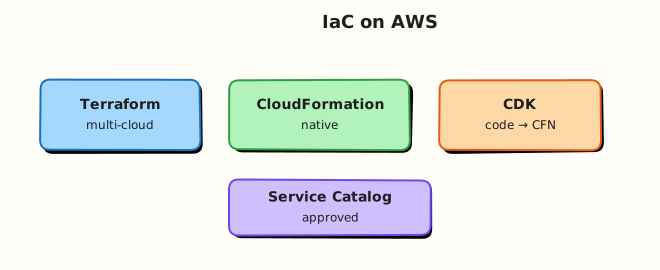
AWS term: On AWS, the native recipe engine is AWS CloudFormation. It turns templates into stacks — groups of resources AWS tracks together. Other popular tools include HashiCorp Terraform, the AWS Cloud Development Kit (CDK), and AWS Service Catalog for governed self-service.
This is Tutorial 1 in Module 11: Infrastructure as Code of the REBASH Academy AWS for Cloud & DevOps Engineers series — practical AWS for Cloud and DevOps work.
Cost
The lab S3 bucket costs pennies if deleted promptly. Empty the bucket before stack delete or CloudFormation will fail on DELETE_FAILED.
Prerequisites
- AWS Fundamentals and Global Infrastructure — account, Region, CLI,
get-caller-identity - AWS Security Services (Module 10) — encryption and least privilege (helpful, not mandatory on day one)
- Git basics — you will store templates in version control later
- AWS CLI v2 configured for a sandbox account
You do not need prior Terraform or CloudFormation experience.
Learning Objectives
By the end of this tutorial, you will be able to:
- Explain IaC to a friend using a “recipe in Git” analogy
- Name four AWS IaC tools and when teams pick each
- Write a CloudFormation template with encryption, versioning, and Block Public Access
- Create, describe, and delete a stack with CLI evidence
- Explain drift in plain English and why console hotfixes are risky
- Answer fresher interview questions on state, rollback, and stack delete failures
Architecture
IaC flows from Git through review into an apply engine (Terraform CLI, CloudFormation service, CDK synth/deploy, Service Catalog). The desired state becomes live AWS resources; drift detection and pipelines close the loop.
Theory
The problem (before any tool names)
Problem: Manual console work does not scale. Two engineers configure the same bucket differently. Nobody can reproduce production after an outage. Auditors ask “show me the approved configuration” and you have screenshots, not files.
Analogy: Building IKEA furniture from memory vs following the printed instruction sheet stored in a shared folder everyone can review.
AWS approach: Put the instruction sheet in Git. Run a tool that reads it and creates AWS resources identically in dev, test, and prod.
What Infrastructure as Code is
| Plain idea | AWS / industry term |
|---|---|
| Recipe file | Template (CloudFormation YAML/JSON) or HCL (Terraform) |
| One deployment unit | CloudFormation stack |
| “What exists now” record | Stack state (AWS-managed) or Terraform state file |
| File changed in Git | Pull request review before apply |
| Live resource differs from file | Drift |
Tiny example: A template says “S3 bucket with versioning enabled.” CloudFormation creates the bucket and remembers that versioning must stay on. If someone disables versioning in the console, the next stack update can put it back.
Interview one-liner: “IaC means infrastructure is version-controlled, reviewable, and repeatable — not tribal knowledge in one engineer’s head.”
CloudFormation, Terraform, CDK, Service Catalog
| Tool | Plain description | When teams pick it |
|---|---|---|
| CloudFormation | AWS-native YAML/JSON templates → stacks | AWS-only shops, Control Tower customisations |
| Terraform | Multi-cloud language (HCL) + providers | Mixed AWS/Azure/GCP estates |
| AWS CDK | Write infrastructure in TypeScript/Python; compiles to CloudFormation | Developer teams who want typed code |
| Service Catalog | Approved product catalogue teams can launch | Enterprise guardrails and self-service |
Analogy for CDK: CloudFormation is assembly instructions in YAML. CDK is a program that generates those instructions — useful when you reuse patterns many times.
Depth — state models:
| Concern | CloudFormation | Terraform |
|---|---|---|
| Who stores “what exists” | AWS service (the stack) | Your state file (often S3 + DynamoDB lock) |
| Rollback on failure | Automatic stack rollback (configurable) | You plan and apply reverse changes |
| Multi-cloud | AWS only | Strong multi-provider support |
Why IaC matters for your first job
- CI/CD pipelines (Module 12) deploy templates — not console clicks — to production.
- Landing zones (Module 15) ship as stacks and organisation-wide baselines.
- Interviews ask: What is drift? Why did stack delete fail? CloudFormation vs Terraform?
How the lifecycle works
- Author — write template describing resources and dependencies.
- Validate —
aws cloudformation validate-templateorterraform validate. - Preview — change set (CloudFormation) or plan (Terraform).
- Apply — create or update resources in dependency order.
- Operate — detect drift; fix template, not only console.
- Destroy — delete stack; empty S3 buckets first.
Common pitfalls
- Deleting stacks with full S3 buckets — CloudFormation cannot delete non-empty buckets. Empty with
aws s3 rm --recursivefirst. - Secrets in Git — never commit passwords; use AWS Secrets Manager or Parameter Store references.
- Console hotfixes — manual edits cause drift; the next deploy may overwrite or fail.
- Over-privileged deploy roles — CI should not have
AdministratorAccess.
Fix for console hotfixes: Change the template, run through review, apply via pipeline.
Hands-on Lab
Objective
Deploy a CloudFormation stack that creates an S3 bucket with versioning, default encryption, and Block Public Access; prove with describe-stacks and head-bucket; delete the stack after emptying the bucket.
Prerequisites
| Tool | Notes |
|---|---|
| AWS CLI v2 | cloudformation:*, s3:* on lab bucket |
| jq | Parse stack outputs |
| Sandbox account | No production data |
Lab environment
mkdir -p ~/rebash-aws/module-11 && cd ~/rebash-aws/module-11
export AWS_REGION="${AWS_REGION:-eu-west-2}"
export AWS_PAGER=""
export STACK_NAME="rebash-m11-iac-$(date +%s)"
Real-world scenario
Platform receives a ticket: “Create a compliant artefact bucket for CI logs — encrypted, versioned, no public access — and document how we tear it down.” You deliver IaC instead of a console click-path so the same template can run in CI after Module 12.
Step-by-step tasks
Task 1 – Author the CloudFormation template
Create rebash-m11-bucket.yaml:
AWSTemplateFormatVersion: "2010-09-09"
Description: REBASH Module 11 — encrypted versioned S3 bucket (lab)

Parameters:
  BucketSuffix:
    Type: String
    Default: lab
    AllowedPattern: "^[a-z0-9-]{3,12}$"
    Description: Short suffix for globally unique bucket name

Resources:
  ArtefactBucket:
    Type: AWS::S3::Bucket
    DeletionPolicy: Delete
    UpdateReplacePolicy: Delete
    Properties:
      BucketName: !Sub "rebash-m11-${BucketSuffix}-${AWS::AccountId}-${AWS::Region}"
      VersioningConfiguration:
        Status: Enabled
      BucketEncryption:
        ServerSideEncryptionConfiguration:
          - ServerSideEncryptionByDefault:
              SSEAlgorithm: AES256
      PublicAccessBlockConfiguration:
        BlockPublicAcls: true
        BlockPublicPolicy: true
        IgnorePublicAcls: true
        RestrictPublicBuckets: true
      Tags:
        - Key: Name
          Value: rebash-m11-artefacts
        - Key: rebash:module
          Value: "11"

Outputs:
  BucketName:
    Description: Name of the artefact bucket
    Value: !Ref ArtefactBucket
    Export:
      Name: !Sub "${AWS::StackName}-BucketName"
  BucketArn:
    Description: ARN of the artefact bucket
    Value: !GetAtt ArtefactBucket.Arn
Validate syntax locally:
cd ~/rebash-aws/module-11
aws cloudformation validate-template --template-body file://rebash-m11-bucket.yaml | tee validate.json
Expected output
validate.json shows "Description" and "Parameters" — no validation error.
Task 2 – Create stack and capture outputs
cd ~/rebash-aws/module-11
aws cloudformation create-stack \
  --stack-name "$STACK_NAME" \
  --template-body file://rebash-m11-bucket.yaml \
  --parameters ParameterKey=BucketSuffix,ParameterValue=lab \
  --tags Key=Name,Value=rebash-m11-stack \
  | tee create-stack.json
aws cloudformation wait stack-create-complete --stack-name "$STACK_NAME"
aws cloudformation describe-stacks --stack-name "$STACK_NAME" \
  --query 'Stacks[0].{Status:StackStatus,Outputs:Outputs}' --output json | tee stack.json
BUCKET=$(jq -r '.Outputs[] | select(.OutputKey=="BucketName") | .OutputValue' stack.json)
echo "$BUCKET" | tee bucket-name.txt
echo "$STACK_NAME" | tee stack-name.txt
test -n "$BUCKET"
Expected output
stack.json shows "StackStatus": "CREATE_COMPLETE" and a bucket name like rebash-m11-lab-123456789012-eu-west-2.
Task 3 – Prove bucket properties and upload test object
cd ~/rebash-aws/module-11
BUCKET=$(cat bucket-name.txt)
echo "rebash-m11 proof $(date -u +%Y-%m-%dT%H:%M:%SZ)" > proof.txt
aws s3 cp proof.txt "s3://${BUCKET}/proof.txt"
aws s3api head-bucket --bucket "$BUCKET"
aws s3api get-bucket-versioning --bucket "$BUCKET" | tee versioning.json
aws s3api get-bucket-encryption --bucket "$BUCKET" | tee encryption.json
aws s3api get-public-access-block --bucket "$BUCKET" | tee public-block.json
grep -q '"Status": "Enabled"' versioning.json
grep -q 'AES256' encryption.json
echo "bucket proof OK" | tee evidence.txt
Expected output
versioning.json shows "Status": "Enabled"; encryption.json lists AES256 default; evidence.txt contains bucket proof OK.
Task 4 – Introduce drift, detect, and reconcile
Simulate console drift by toggling a tag, then show stack update restores declared state:
cd ~/rebash-aws/module-11
BUCKET=$(cat bucket-name.txt)
STACK_NAME=$(cat stack-name.txt)
aws s3api put-bucket-tagging --bucket "$BUCKET" \
  --tagging 'TagSet=[{Key=drift,Value=manual-console}]'
aws s3api get-bucket-tagging --bucket "$BUCKET" | tee tags-drift.json
aws cloudformation update-stack \
  --stack-name "$STACK_NAME" \
  --template-body file://rebash-m11-bucket.yaml \
  --parameters ParameterKey=BucketSuffix,ParameterValue=lab 2>&1 | tee update-stack.json || true
aws cloudformation wait stack-update-complete --stack-name "$STACK_NAME" 2>/dev/null || \
  aws cloudformation wait stack-create-complete --stack-name "$STACK_NAME"
aws cloudformation describe-stack-resource-drifts --stack-name "$STACK_NAME" \
  --output json | tee drifts.json
echo "drift exercise done" | tee drift.txt
Expected output
tags-drift.json shows the manual tag before update; drift API may list MODIFIED properties or empty if already reconciled.
Validation steps
- Template validated with
validate-template - Stack reached
CREATE_COMPLETEwith bucket output - Versioning, encryption, and public access block confirmed via API
- Test object uploaded successfully
- You can explain why emptying the bucket matters before delete
Common errors and fixes
| Error | Cause | Fix |
|---|---|---|
AlreadyExistsException for bucket name | Name collision | Change BucketSuffix parameter |
DELETE_FAILED on stack | Bucket not empty | aws s3 rm s3://bucket --recursive then retry delete |
InsufficientCapabilities | Template creates IAM with custom names | Pass --capabilities CAPABILITY_NAMED_IAM when template includes IAM |
ValidationError on template | YAML indentation | Run validate-template and fix line cited |
Challenge exercise
Add a AWS::S3::BucketPolicy denying insecure transport in rebash-m11-bucket-policy.yaml (separate snippet file), merge into the template, update the stack, and prove aws s3api get-bucket-policy returns "aws:SecureTransport": "false" deny. Document the change in one sentence for interview storytelling.
{
  "Version": "2012-10-17",
  "Statement": [
    {
      "Sid": "DenyInsecureTransport",
      "Effect": "Deny",
      "Principal": "*",
      "Action": "s3:*",
      "Resource": [
        "arn:aws:s3:::BUCKET_NAME",
        "arn:aws:s3:::BUCKET_NAME/*"
      ],
      "Condition": {
        "Bool": {
          "aws:SecureTransport": "false"
        }
      }
    }
  ]
}
Replace BUCKET_NAME with your bucket, attach via BucketPolicy resource or aws s3api put-bucket-policy.
Learning outcomes
- You authored compliant S3 IaC with encryption and versioning
- You executed the full stack lifecycle with CLI evidence
- You touched drift — a common production IaC interview theme
- You have artefacts under
~/rebash-aws/module-11for portfolio discussion
Cleanup
cd ~/rebash-aws/module-11
BUCKET=$(cat bucket-name.txt)
STACK_NAME=$(cat stack-name.txt)
aws s3 rm "s3://${BUCKET}" --recursive
aws cloudformation delete-stack --stack-name "$STACK_NAME"
aws cloudformation wait stack-delete-complete --stack-name "$STACK_NAME"
rm -f bucket-name.txt stack-name.txt evidence.txt proof.txt
echo "cleanup complete" | tee cleanup-log.txt
Validation
- Stack created and deleted without manual console dependency
- Can explain CloudFormation vs Terraform state models in plain English
- Can name when CDK or Service Catalog fits over raw YAML
- Understands empty-bucket requirement before stack delete
Code Walkthrough
- Parameters over hard-coding —
BucketSuffixkeeps names unique without editing the template per account. DeletionPolicy: Delete— lab buckets should not retain by default; production may useRetain.- Block Public Access four flags — defence in depth for artefact buckets.
- Stack outputs + exports — downstream stacks and CI jobs consume
BucketNamewithout parsing resources. - Wait conditions —
wait stack-create-completeavoids racing describe calls in scripts.
Security Considerations
- Scope deploy roles to
cloudformation:*on stack ARN prefixes, not*. - Deny S3 public ACLs/policies at organisation level (Module 15 SCPs).
- Never store secrets in template parameters — use dynamic references to Secrets Manager.
- Enable CloudTrail for stack events; alert on
DeleteStackin production accounts. - Sign and scan templates in CI (cfn-lint, cfn-guard, Checkov).
Common Mistakes
Console hotfixes
Manual console edits cause drift and surprise replacements on the next deploy. Fix the template and pipeline, not only the symptom.
PassRole too broad
CI roles with unrestricted iam:PassRole let attackers attach admin policies to new roles. Condition on role name prefix and service.
Skipping change sets in production
Always review change sets for destructive updates — especially RDS replacements and security group renames.
Best Practices
- Store templates in Git; tag releases; require pull request review
- Use nested stacks or modules for repeated patterns (VPC, logging bucket)
- Pin provider/CDK versions; test upgrades in a sandbox OU first
- Separate state/stack per environment (
dev,staging,prod) - Document rollback: CloudFormation auto-rollback vs Terraform targeted destroy
Troubleshooting
| Symptom | Likely cause | Fix |
|---|---|---|
Stack stuck ROLLBACK_COMPLETE | Resource failed during create | describe-stack-events; fix template; delete stack and retry |
| Update replaces bucket unexpectedly | Name or replacement policy change | Use stable logical IDs; UpdateReplacePolicy |
| Terraform/CFN fight same resource | Duplicate management | Import into one tool or remove duplicate |
| CDK synth differs from deploy | Context/environment mismatch | Commit cdk.context.json or pin context keys |
Summary
Infrastructure as Code means cloud resources are defined in files, reviewed in Git, and applied repeatably. CloudFormation is AWS’s native engine; Terraform suits multi-cloud; CDK suits developer teams. You proved the full lifecycle with a real encrypted S3 stack. Next, wire similar templates into CI/CD on AWS.
Interview Questions
1. What is Infrastructure as Code in simple words?
Reveal answer
IaC means you describe servers, storage, and networks in text files stored in version control instead of clicking in a console. A tool reads those files and creates or updates cloud resources the same way every time — so teams can review, reproduce, and audit infrastructure like application code.
2. CloudFormation vs Terraform — how does state differ?
Reveal answer
CloudFormation stores stack state inside AWS — you describe stacks and AWS tracks resources. Terraform keeps a separate state file (often in S3 with DynamoDB locking) mapping your HCL addresses to real resource IDs. Terraform supports many cloud providers; CloudFormation is AWS-only with automatic rollback options on stack failure.
3. When would you choose AWS CDK over raw CloudFormation YAML?
Reveal answer
When developers need typed languages, reuse via constructs, and unit tests on infrastructure logic. CDK synthesises CloudFormation — you still operate stacks in AWS. Raw YAML suits simple stacks, third-party tools that only accept templates, or teams that forbid additional build steps.
4. What is drift and how do you handle it?
Reveal answer
Drift is when live resources differ from the declared template or state file — often because someone changed settings in the console. Detect with CloudFormation drift detection or Terraform plan. Fix by updating the template for intentional changes or applying to revert accidental console edits.
5. Why did stack delete fail on an S3 bucket?
Reveal answer
Non-empty buckets (and buckets with DeletionPolicy: Retain) block stack deletion. Empty objects with aws s3 rm --recursive, delete bucket policy/lifecycle if needed, then retry delete-stack. For retained buckets, delete the stack and clean the bucket separately.
6. What is AWS Service Catalog’s role?
Reveal answer
It publishes approved products (often CloudFormation templates) to portfolios so application teams self-provision within guardrails — tagging, allowed instance types, network placement. Platform teams govern; users launch constrained products instead of free-form templates.
7. How do you secure IaC pipelines?
Reveal answer
Least-privilege deploy roles, OIDC federation from GitHub/GitLab (no long-lived keys), signed commits, plan/change-set review gates, secret scanning, and separate accounts per environment. Never run production applies from unreviewed feature branches.
8. When is importing an existing resource necessary?
Reveal answer
When resources were created manually or by another tool and you need to bring them under IaC without recreation. CloudFormation supports resource import; Terraform uses terraform import. Imports require matching logical IDs and careful first-plan review to avoid unintended changes.
Related Tutorials
- Previous: AWS Security Services (Module 10)
- Next: CI/CD on AWS (Module 12)
- Production AWS Landing Zones (Module 15)
- Course index: AWS for Cloud & DevOps Engineers