CI/CD on AWS
Overview
CI/CD (Continuous Integration / Continuous Delivery) is one of the most common terms on DevOps job descriptions. This module explains what it means on AWS and how to prove a small pipeline step with CodeBuild.
Problem in plain English: Ten developers push code to Git every day. If someone manually copies files to a server each time, mistakes happen, releases take weekends, and nobody can prove tests ran before production.
What CI/CD means:
| Term | Plain English |
|---|---|
| CI — Continuous Integration | Every code change automatically builds and runs tests |
| CD — Continuous Delivery / Deployment | Passing builds automatically (or with approval) reach staging or production |
Analogy: A factory assembly line. Code enters at one end; automated steps compile, test, and package it; only good packages ship to customers.
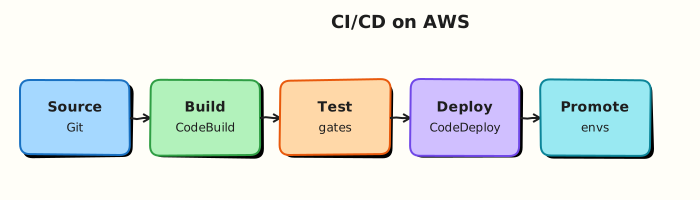
AWS terms: AWS CodeBuild runs the build steps. AWS CodePipeline connects source → build → test → deploy stages. AWS CodeDeploy rolls out to servers or containers. Many teams also use GitHub Actions with short-lived AWS login (OIDC) instead of stored passwords.
This is Tutorial 1 in Module 12: CI/CD of the REBASH Academy AWS for Cloud & DevOps Engineers series. You will create a real CodeBuild project, start a build, prove SUCCEEDED, and delete it — the same building block inside full pipelines that deploy Module 11 CloudFormation templates.
Cost
CodeBuild charges per build minute. This lab uses BUILD_GENERAL1_SMALL with a seconds-long buildspec. Delete the project when finished.
Prerequisites
- Infrastructure as Code on AWS (Module 11) — templates should flow through pipelines
- AWS Fundamentals — CLI and IAM basics
- AWS CLI v2 with
codebuild,iam, andlogspermissions
You do not need prior Jenkins, GitLab CI, or CodePipeline experience.
Learning Objectives
By the end of this tutorial, you will be able to:
- Explain CI and CD to a non-technical friend
- Describe what CodeBuild, CodePipeline, and CodeDeploy each do
- Create and run a CodeBuild project with observable build logs
- Contrast blue/green and canary deployments in plain English
- Explain why GitHub OIDC beats long-lived AWS keys in repositories
- Answer fresher interview questions on pipeline security and rollback
Architecture
Source (CodeCommit, GitHub, S3) triggers CodePipeline. Build stage invokes CodeBuild (buildspec phases). Test/deploy stages call CodeDeploy, CloudFormation, or ECS/EKS actions. CloudWatch Logs capture build output; IAM roles isolate permissions per stage.
Theory
The problem (before tool names)
Problem: Manual releases are slow, error-prone, and unauditable. “It worked on my laptop” is not evidence for production.
Analogy: Checking exam answer sheets by hand for 500 students vs running them through a scanner that flags errors automatically.
AWS approach: Automate build and deploy with services that integrate with IAM and logging.
What CI/CD is on AWS
| Service | Plain job | Tiny example |
|---|---|---|
| CodePipeline | Orchestrator — connects stages | “When Git push → run build → deploy to test” |
| CodeBuild | Runs commands in a container | npm test, docker build, terraform plan |
| CodeDeploy | Rolls out to EC2, Lambda, or ECS | Swap old servers for new ones safely |
| GitHub Actions + OIDC | External CI that logs into AWS briefly | Workflow assumes IAM role without stored keys |
Interview one-liner: “CI proves every change builds and tests; CD moves proven artefacts to environments with automation instead of manual SSH.”
The buildspec — where work happens
CodeBuild reads a buildspec YAML file with phases:
version: 0.2
phases:
  install:    # install tools
  pre_build:  # login to registry, lint
  build:      # compile, test
  post_build: # push image, deploy
Tiny example: A buildspec might run echo hello, then npm test, then upload a zip to S3. The lab uses a minimal buildspec to prove the engine works before you connect GitHub.
Deployment styles (depth for interviews)
| Pattern | Plain meaning | When teams use it |
|---|---|---|
| In-place | Update same servers | Simple; brief downtime possible |
| Blue/green | New fleet ready; switch traffic | Fast rollback — keep old fleet warm |
| Canary | Send 5% traffic to new version first | Risky releases; watch metrics |
| Rolling | Replace servers in batches | Common with Auto Scaling groups |
Analogy for blue/green: Open a new shop next door, verify it works, then redirect customers — old shop stays as backup.
GitHub Actions OIDC (no passwords in Git)
Problem: Storing AWS_ACCESS_KEY_ID in GitHub Secrets leaks easily via forks and logs.
Solution: GitHub mints a short-lived token; AWS trusts it and gives temporary credentials via sts:AssumeRoleWithWebIdentity.
Interview one-liner: “We use OIDC so CI gets temporary credentials scoped to one repo and branch — no long-lived keys in Git.”
Common pitfalls
- Over-privileged CodeBuild role — scope S3 and CloudFormation to specific ARNs.
- Secrets in buildspec plain text — use Secrets Manager or Parameter Store.
- Missing CloudWatch Logs permission — build fails with empty logs; hard to debug.
- Deploying every branch to production — use branch filters and manual approvals.
Hands-on Lab
Objective
Create an IAM role and CodeBuild project with a trivial inline buildspec, start a build, prove SUCCEEDED from CLI output, then delete the project and role.
Prerequisites
| Tool | Notes |
|---|---|
| AWS CLI v2 | iam:*, codebuild:*, logs:* (scoped) |
| jq | Parse build status |
| Sandbox account | No shared CI infrastructure |
Lab environment
mkdir -p ~/rebash-aws/module-12 && cd ~/rebash-aws/module-12
export AWS_REGION="${AWS_REGION:-eu-west-2}"
export AWS_PAGER=""
export PROJECT_NAME="rebash-m12-build"
export ROLE_NAME="rebash-m12-codebuild-role"
ACCOUNT_ID=$(aws sts get-caller-identity --query Account --output text)
echo "$ACCOUNT_ID" | tee account-id.txt
Real-world scenario
DevOps receives: “Prove our AWS account can run CodeBuild before we connect GitHub OIDC and deploy Module 11 CloudFormation stacks.” You stand up the smallest working build, capture logs, and document teardown — standard platform onboarding work.
Step-by-step tasks
Task 1 – Create CodeBuild trust and service role
Create codebuild-trust.json:
{
  "Version": "2012-10-17",
  "Statement": [
    {
      "Effect": "Allow",
      "Principal": {
        "Service": "codebuild.amazonaws.com"
      },
      "Action": "sts:AssumeRole"
    }
  ]
}
Create codebuild-policy.json:
{
  "Version": "2012-10-17",
  "Statement": [
    {
      "Effect": "Allow",
      "Action": [
        "logs:CreateLogGroup",
        "logs:CreateLogStream",
        "logs:PutLogEvents"
      ],
      "Resource": "*"
    },
    {
      "Effect": "Allow",
      "Action": [
        "codebuild:CreateReportGroup",
        "codebuild:CreateReport",
        "codebuild:UpdateReport",
        "codebuild:BatchPutTestCases",
        "codebuild:BatchPutCodeCoverages"
      ],
      "Resource": "*"
    }
  ]
}
cd ~/rebash-aws/module-12
aws iam create-role --role-name "$ROLE_NAME" \
  --assume-role-policy-document file://codebuild-trust.json \
  --tags Key=Name,Value=rebash-m12-codebuild | tee role-create.json
aws iam put-role-policy --role-name "$ROLE_NAME" \
  --policy-name rebash-m12-codebuild-inline \
  --policy-document file://codebuild-policy.json
ROLE_ARN=$(aws iam get-role --role-name "$ROLE_NAME" --query Role.Arn --output text)
echo "$ROLE_ARN" | tee role-arn.txt
test -n "$ROLE_ARN"
sleep 10
Expected output
role-arn.txt contains arn:aws:iam::…:role/rebash-m12-codebuild-role.
Task 2 – Create CodeBuild project with inline buildspec
Create buildspec-inline.txt (human-readable reference):
version: 0.2
phases:
  build:
    commands:
      - echo "REBASH Module 12 — hello build"
      - echo "BUILD_ID=$CODEBUILD_BUILD_ID"
      - echo "REGION=$AWS_DEFAULT_REGION"
      - uname -a
Create codebuild-project.json (replace ROLE_ARN_PLACEHOLDER after Task 1):
{
  "name": "rebash-m12-build",
  "source": {
    "type": "NO_SOURCE",
    "buildspec": "version: 0.2\nphases:\n  build:\n    commands:\n      - echo \"REBASH Module 12 — hello build\"\n      - echo \"BUILD_ID=$CODEBUILD_BUILD_ID\"\n      - echo \"REGION=$AWS_DEFAULT_REGION\"\n      - uname -a\n"
  },
  "artifacts": {
    "type": "NO_ARTIFACTS"
  },
  "environment": {
    "type": "LINUX_CONTAINER",
    "image": "aws/codebuild/standard:7.0",
    "computeType": "BUILD_GENERAL1_SMALL",
    "privilegedMode": false
  },
  "serviceRole": "ROLE_ARN_PLACEHOLDER",
  "tags": [
    {
      "key": "Name",
      "value": "rebash-m12"
    }
  ]
}
cd ~/rebash-aws/module-12
ROLE_ARN=$(cat role-arn.txt)
sed "s|ROLE_ARN_PLACEHOLDER|${ROLE_ARN}|" codebuild-project.json > codebuild-project-ready.json
aws codebuild create-project --cli-input-json file://codebuild-project-ready.json | tee project-create.json
aws codebuild batch-get-projects --names "$PROJECT_NAME" \
  --query 'projects[0].name' --output text | tee project-name.txt
grep -q "$PROJECT_NAME" project-name.txt
Expected output
project-create.json shows "name": "rebash-m12-build"; batch-get-projects returns the project name.
Task 3 – Start build and prove SUCCEEDED
cd ~/rebash-aws/module-12
BUILD_ID=$(aws codebuild start-build --project-name "$PROJECT_NAME" \
  --query 'build.id' --output text)
echo "$BUILD_ID" | tee build-id.txt
aws codebuild batch-get-builds --ids "$BUILD_ID" \
  --query 'builds[0].buildStatus' --output text | tee status-initial.txt
for i in $(seq 1 30); do
  STATUS=$(aws codebuild batch-get-builds --ids "$BUILD_ID" \
    --query 'builds[0].buildStatus' --output text)
  echo "attempt $i status=$STATUS"
  case "$STATUS" in
    SUCCEEDED|FAILED|FAULT|STOPPED|TIMED_OUT) break ;;
  esac
  sleep 10
done
echo "$STATUS" | tee build-status.txt
test "$STATUS" = "SUCCEEDED"
aws codebuild batch-get-builds --ids "$BUILD_ID" --output json | tee build.json
Expected output
build-status.txt contains SUCCEEDED; build.json shows phases completed and log group/stream ARNs.
Task 4 – Fetch build log snippet (optional failure drill)
Revoke logs permission temporarily to see failure mode, then restore:
cd ~/rebash-aws/module-12
aws iam delete-role-policy --role-name "$ROLE_NAME" --policy-name rebash-m12-codebuild-inline
BUILD_FAIL=$(aws codebuild start-build --project-name "$PROJECT_NAME" \
  --query 'build.id' --output text)
sleep 45
aws codebuild batch-get-builds --ids "$BUILD_FAIL" \
  --query 'builds[0].buildStatus' --output text | tee status-broken.txt
aws iam put-role-policy --role-name "$ROLE_NAME" \
  --policy-name rebash-m12-codebuild-inline \
  --policy-document file://codebuild-policy.json
BUILD_OK=$(aws codebuild start-build --project-name "$PROJECT_NAME" \
  --query 'build.id' --output text)
for i in $(seq 1 20); do
  STATUS=$(aws codebuild batch-get-builds --ids "$BUILD_OK" \
    --query 'builds[0].buildStatus' --output text)
  [[ "$STATUS" == "SUCCEEDED" || "$STATUS" == "FAILED" ]] && break
  sleep 10
done
echo "$STATUS" | tee restore-status.txt
test "$STATUS" = "SUCCEEDED"
echo "break-fix build OK" | tee breakfix.txt
Expected output
status-broken.txt may show FAILED; after policy restore, restore-status.txt is SUCCEEDED.
Validation steps
- IAM role created with CodeBuild trust
- Project exists and build reached
SUCCEEDED - Build JSON shows log streams
- Break/fix demonstrated IAM logs permission impact
- No pipeline left running after cleanup
Common errors and fixes
| Error | Cause | Fix |
|---|---|---|
InvalidInputException on buildspec | Escaping in inline string | Use buildspec-inline.txt and careful escaping, or S3 source |
AccessDenied on StartBuild | Missing codebuild:StartBuild | Grant caller codebuild:StartBuild on project ARN |
Build FAILED immediately | Role missing logs permissions | Attach codebuild-policy.json |
Cannot delete role | Project still references role | Delete CodeBuild project first |
Challenge exercise
Create github-oidc-trust.json documenting a trust policy skeleton for GitHub Actions (token.actions.githubusercontent.com) with StringLike condition on sub for your repo. Do not apply if you lack org approval — keep as portfolio artefact and explain the flow in an interview answer.
{
  "Version": "2012-10-17",
  "Statement": [
    {
      "Effect": "Allow",
      "Principal": {
        "Federated": "arn:aws:iam::ACCOUNT_ID:oidc-provider/token.actions.githubusercontent.com"
      },
      "Action": "sts:AssumeRoleWithWebIdentity",
      "Condition": {
        "StringEquals": {
          "token.actions.githubusercontent.com:aud": "sts.amazonaws.com"
        },
        "StringLike": {
          "token.actions.githubusercontent.com:sub": "repo:ORG/REPO:ref:refs/heads/main"
        }
      }
    }
  ]
}
Learning outcomes
- You created a working CodeBuild project without external Git connectivity
- You proved build status via CLI — the same check pipelines gate on
- You saw IAM break/fix impact on builds
- You have OIDC trust skeleton for GitHub → AWS stories
Cleanup
cd ~/rebash-aws/module-12
aws codebuild delete-project --name "$PROJECT_NAME"
aws iam delete-role-policy --role-name "$ROLE_NAME" --policy-name rebash-m12-codebuild-inline
aws iam delete-role --role-name "$ROLE_NAME"
echo "cleanup complete" | tee cleanup-log.txt
Validation
- Build project created and deleted cleanly
- Can explain CodePipeline vs standalone CodeBuild in plain English
- Can describe blue/green vs canary at a high level
- Understands OIDC advantage over long-lived AWS keys in CI
Code Walkthrough
- Service role per project — never share one mega-role across all builds.
- NO_SOURCE + inline buildspec — fastest lab path; production uses GitHub/CodeCommit source.
- Poll build status — mirrors pipeline stage completion checks.
- Logs permissions — first thing to verify when builds fail mysteriously.
- Delete project before role — IAM dependency order matters.
Security Considerations
- Restrict
codebuild:StartBuildto approved principals and project ARNs. - Run sensitive builds in VPC with private subnets and restricted security groups.
- Encrypt artefacts with KMS; deny unencrypted S3 uploads via bucket policy.
- Use OIDC subject conditions — never
repo:*wildcards in production trust policies. - Scan buildspec and Docker images for secrets and CVEs in CI.
Common Mistakes
Admin keys in GitHub Secrets
Long-lived AWS_ACCESS_KEY_ID in repos leak via forks and logs. Prefer OIDC with scoped roles.
Production deploy without approval
Manual approval stages and environment branch filters prevent accidental main→prod pushes.
Ignoring build caches
Stale Docker layer caches can hide dependency vulnerabilities — pin images and bust cache on security updates.
Best Practices
- Separate pipelines/roles per environment
- Store buildspec in Git when using source providers — inline only for bootstrap
- Emit SBOM and scan results as build artefacts
- Use CodeDeploy lifecycle hooks for draining connections
- Tag builds with commit SHA for traceability
Troubleshooting
| Symptom | Likely cause | Fix |
|---|---|---|
Build stuck IN_PROGRESS | VPC ENI/subnet issue | Check VPC config or use default networking |
| Empty CloudWatch logs | Role missing logs:* | Fix IAM policy on service role |
| Pipeline source fails | OAuth/token expired | Reconnect GitHub/CodeCommit credential |
| Deploy rollback loop | Health check too aggressive | Tune grace period and alarm thresholds |
Summary
CI/CD automates build, test, and deploy so teams ship smaller changes with evidence. CodeBuild runs the work; CodePipeline orchestrates stages; CodeDeploy handles rollout styles; GitHub OIDC is the modern keyless path. You proved a real build end-to-end — next, control cost before pipelines multiply resources.
Interview Questions
1. What is CI/CD in simple words?
Reveal answer
Continuous Integration means every code change automatically builds and runs tests. Continuous Delivery/Deployment means passing builds are promoted to environments through automation instead of manual copying. Together they reduce release risk and provide audit evidence.
2. What does CodeBuild execute and where is it defined?
Reveal answer
CodeBuild runs a buildspec YAML with phases (install, pre_build, build, post_build) on a managed container image. The buildspec can live in the repository, in S3, or inline for simple projects. Environment variables, secrets, and artefacts are configured on the project.
3. Blue/green vs canary on CodeDeploy?
Reveal answer
Blue/green provisions a parallel fleet (green), shifts traffic when healthy, keeps blue for fast rollback. Canary shifts a small traffic percentage first, monitoring metrics before full cutover. Blue/green is simpler; canary reduces blast radius on risky releases.
4. How does GitHub Actions OIDC replace access keys?
Reveal answer
GitHub issues a short-lived JWT for the workflow. AWS IAM trusts the GitHub OIDC provider and allows sts:AssumeRoleWithWebIdentity when aud and sub conditions match the repo and branch. The workflow receives temporary credentials — no static keys in secrets.
5. Where do pipeline artefacts live and how are they protected?
Reveal answer
CodePipeline stores artefact zips in S3 buckets (often customer-managed with KMS encryption). IAM policies scope bucket access per pipeline role. Cross-account artefacts use bucket policies and KMS grants carefully.
6. What breaks a CodeBuild project that “used to work”?
Reveal answer
Common causes: expired GitHub token, IAM policy shrink, VPC/subnet drift, Docker image pull failures, buildspec path change, or insufficient CloudWatch Logs permissions. batch-get-builds and log streams are the first triage step.
7. When would you attach CodeBuild to a VPC?
Reveal answer
When builds must reach private resources — internal npm mirrors, RDS databases, on-premises endpoints via Direct Connect. Trade-off: ENI creation time, NAT/endpoints for outbound internet, and security group design.
8. How does CI deploy Module 11 CloudFormation safely?
Reveal answer
Pipeline runs cfn-lint/validate, creates a change set, runs tests, requires approval, executes deploy with a scoped role (cloudformation:* on stack prefix, iam:PassRole conditioned), and emits stack outputs as artefacts. Rollback uses previous template version or stack auto-rollback.
Related Tutorials
- Previous: Infrastructure as Code on AWS (Module 11)
- Next: Cost Optimisation on AWS (Module 13)
- AWS Security Services (Module 10)
- Course index: AWS for Cloud & DevOps Engineers