AWS Fundamentals and Global Infrastructure
Overview
Companies used to buy physical servers and keep them in a room. That is expensive and slow. Amazon Web Services (AWS) rents you computing power, storage, and networking over the internet — open an account, run commands or use the console, and get a virtual computer or database in minutes. You pay mostly for what you use.
This tutorial builds your first mental map:
- Where your stuff runs in the world (Regions and Availability Zones)
- Who is responsible when something is insecure (shared responsibility)
- How you prove “I am logged into the right account” with the AWS Command Line Interface (CLI)
- How you stop a student lab from creating a surprise bill (Budgets / billing alarm)
This is Tutorial 1 in Module 1: AWS Fundamentals of the REBASH Academy AWS for Cloud & DevOps Engineers series — practical AWS for Cloud and DevOps work.
Cost hygiene (read this before any lab)
AWS is not a free playground by default. Prefer Free Tier-eligible actions. Create a billing alarm in this module before you launch virtual machines later. Always run Cleanup at the end of each lab.
Prerequisites
- Linux — open a terminal, edit a file, run a command
- Networking — roughly what an IP address and HTTP are
- Git — optional today; required when you learn Infrastructure as Code later
- An AWS account you control (Free Tier is fine). Sign up on the AWS website if you do not have one yet
You do not need to know IAM, VPC, Kubernetes, or Terraform yet.
Learning Objectives
By the end of this tutorial, you will be able to:
- Explain AWS to a friend in two sentences without jargon
- Explain Region vs Availability Zone with a simple building analogy
- Say what you secure vs what AWS secures (shared responsibility) with EC2 and S3 examples
- Run
aws sts get-caller-identityand read Account / Arn from the output - List Regions and Availability Zones for your account with the CLI
- Create a small monthly cost alarm and prove it exists
- Answer common “fresher” interview questions on this topic
Architecture
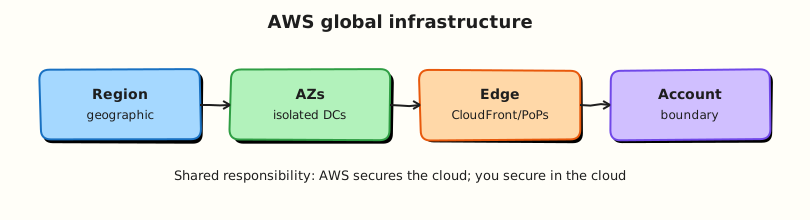
Think of AWS as a global set of data-centre campuses. You choose a Region (a geographic area, for example London or Mumbai). Inside that Region, AWS runs several isolated buildings called Availability Zones (AZs). Your resources live in a Region; for reliability you often spread them across AZs. Separate from that, edge locations help deliver websites and Domain Name System (DNS) answers closer to users — they are not where you normally put your main servers.
Theory
What AWS is (start here if you are new)
Problem companies have: buying servers takes weeks, capacity is wasted at night, and one office fire can take everything down.
What AWS sells: rental access to building blocks — virtual computers, disks, databases, networks, identity, monitoring — via a website console and Application Programming Interfaces (APIs). You create an account (a 12-digit ID). That account is your bill and your isolation boundary.
Tiny mental model:
| Idea | Plain meaning |
|---|---|
| Account | Your “customer ID” + bill + wall around your resources |
| Region | Which country/area’s data centres you use |
| Service | A product you turn on (for example EC2 = virtual computers) |
| Resource | One thing you created (one virtual machine, one bucket of files) |
| Console | The clickable AWS website |
| CLI | Commands in your terminal that do the same things as the console |
When people say “we are on AWS”, they mean their application’s servers, databases, and files live as resources inside one or more AWS accounts and Regions.
Regions and Availability Zones
Analogy: A Region is a city. An Availability Zone is a separate building in that city with its own power and networking. If one building has a power cut, the other building can keep working — if you designed your app to use both.
| Term | What it means | Example |
|---|---|---|
| Region | A geographic area with multiple AZs | eu-west-2 (London), ap-south-1 (Mumbai) |
| Availability Zone | Isolated location inside a Region | eu-west-2a, eu-west-2b |
| Edge location | Small site for caching content / DNS near users | CloudFront Points of Presence — not a place for your main EC2 app |
Why interviews ask this: “Is one server in one AZ highly available?” → No. High availability usually means at least two AZs (and a design that can fail over).
Practical tip for students: Pick one home Region for all labs (for example eu-west-2 or ap-south-1) and stick to it. Beginners often create a server in us-east-1, then open the console filtered to another Region and panic because “AWS deleted my instance”. It is still there — wrong filter.
Edge locations vs Regions (do not mix these up)
If your company wants a website to load fast worldwide, they may use Amazon CloudFront (a Content Delivery Network, CDN). CloudFront caches copies of files at edge locations near users.
That is different from running your application server. Your database and main app almost always sit in a Region, often across AZs. Saying “I deployed my database to an edge location” is a common fresher mistake — do not do that in interviews.
Shared responsibility model
Analogy: You rent a flat in a building. The landlord secures the building doors and structure. You lock your own flat, decide who gets keys, and do not leave valuables in the corridor.
AWS calls this the shared responsibility model:
- AWS secures of the cloud — buildings, hardware, hypervisor (the software that runs virtual machines), and the managed service itself.
- You secure in the cloud — who can log in, your firewall rules, your application code, encryption settings you choose, and patching the operating system when you run a virtual machine.
| Example | AWS does | You do |
|---|---|---|
| EC2 (virtual computer) | Host machines, hypervisor | Patch the guest OS, configure access, open only needed ports |
| S3 (object file storage) | Keep the service durable and available | Turn on Block Public Access, encryption, correct bucket policies |
| Lambda (run code without managing servers) | Patch the host environment | Secure your code, function permissions, and secrets |
Interview line you can use: “AWS is responsible for the security of the cloud; I am responsible for security in the cloud — for example IAM policies and not making an S3 bucket public by mistake.”
Accounts, root user, and why billing matters
When you sign up, AWS creates a root user for that account (the email you registered). Treat root like the master key to a building:
- Turn on multi-factor authentication (MFA) on root
- Never create access keys for root
- Do daily work as a normal identity (you will learn IAM users/roles in Module 2)
Free Tier means some usage is free for 12 months or forever depending on the service — it is not “everything is free”. A forgotten server or NAT Gateway can still create a bill. That is why this lab creates a budget alarm.
How you talk to AWS: console, CLI, CloudShell
Three common ways:
- Console — browser UI. Good for learning visually.
- AWS CLI — terminal commands. What DevOps interviews expect you to use.
- CloudShell — a browser terminal already logged into your account. Handy if your laptop CLI is not set up yet.
The CLI needs credentials (proof of who you are). As a student, you might use:
- IAM Identity Center (SSO) login (best when your company sets it up), or
- Access keys for a lab user (okay for a personal sandbox; rotate and delete them; never commit them to GitHub)
Every signed request uses your credentials. The command that answers “who am I right now?” is:
STS means Security Token Service. You do not need the full STS theory yet — remember this one command for every lab and every interview troubleshooting story.
How a request actually works (simple version)
- You run a CLI command or click in the console.
- Your tool sends a signed HTTPS API call to an AWS endpoint (often regional, for example EC2 in
eu-west-2). - AWS checks identity and permissions (Module 2).
- If allowed, AWS creates/changes/reads a resource and returns JSON.
You will live in that loop for your whole Cloud career: identity → permission → API → resource.
Common pitfalls
- Creating resources in the wrong Region and thinking they vanished
- Using the root user for daily labs
- Leaving EC2 / load balancers / NAT running overnight
- Pasting access keys into Slack, WhatsApp, or a public GitHub repo
- Memorising service logos without being able to explain Region vs AZ
Hands-on Lab
Objective
Prove you can authenticate, see where AWS can place your resources (Regions/AZs), and create a real cost alarm — the same hygiene a good junior engineer shows in week one.
Prerequisites
| Tool | Notes |
|---|---|
| AWS account | Free Tier fine; you must be able to open Billing settings |
| AWS CLI v2 | Install from AWS docs; check with aws --version |
| jq (optional) | Makes JSON easier to read |
If the CLI is not configured yet:
aws configure
# enter Access Key ID, Secret, default region (e.g. eu-west-2), output json
# Or use: aws sso login   # if your account uses IAM Identity Center
Lab environment
mkdir -p ~/rebash-aws/module-01 && cd ~/rebash-aws/module-01
export AWS_REGION="${AWS_REGION:-eu-west-2}"
export AWS_PAGER=""
Choose your Region
If you live in India, ap-south-1 is a common lab choice. If in the UK/EU, eu-west-2 is common. Set AWS_REGION and use the same value everywhere today.
Real-world scenario
Your mentor will not let you launch servers until you can show: (1) which account the CLI uses, (2) which Region you work in, and (3) that a budget email will fire if spend crosses a small limit. That is this lab.
Step-by-step tasks
Task 1 – Who am I, and where can I run resources?
cd ~/rebash-aws/module-01
aws sts get-caller-identity --output json | tee identity.json
test -s identity.json
grep -q Account identity.json
aws ec2 describe-regions --query 'Regions[].RegionName' --output text | tee regions.txt
aws ec2 describe-availability-zones --region "$AWS_REGION" \
  --query 'AvailabilityZones[].{Zone:ZoneName,State:State}' --output table | tee azs.txt
cat identity.json
Expected output
identity.json shows Account (12 digits), Arn, and UserId. azs.txt shows at least two zones (for example …a and …b) in available state.
What to notice (beginner): The Arn line is your full identity name in AWS. If this command fails with “Unable to locate credentials”, your CLI is not logged in yet — fix that before anything else.
Task 2 – Create a small monthly budget alarm
Create budget.json:
{
  "BudgetName": "rebash-m01-monthly",
  "BudgetLimit": {
    "Amount": "5",
    "Unit": "USD"
  },
  "TimeUnit": "MONTHLY",
  "BudgetType": "COST"
}
Create notifications-with-subscribers.json and put your email in Address:
[
  {
    "Notification": {
      "NotificationType": "ACTUAL",
      "ComparisonOperator": "GREATER_THAN",
      "Threshold": 80,
      "ThresholdType": "PERCENTAGE"
    },
    "Subscribers": [
      {
        "SubscriptionType": "EMAIL",
        "Address": "YOU@example.com"
      }
    ]
  }
]
cd ~/rebash-aws/module-01
# Edit notifications-with-subscribers.json so Address is your real email
ACCOUNT_ID=$(aws sts get-caller-identity --query Account --output text)
echo "Using account $ACCOUNT_ID"
aws budgets create-budget \
  --account-id "$ACCOUNT_ID" \
  --budget file://budget.json \
  --notifications-with-subscribers file://notifications-with-subscribers.json \
  | tee create-budget.json
Expected output
Command succeeds. Check your email for a confirmation link from AWS Budgets and confirm it.
Task 2b – Fallback if Budgets is denied
Some student accounts block Budgets. Use a CloudWatch billing alarm in us-east-1 (billing metrics are published there — yes, even if your home Region is elsewhere):
cd ~/rebash-aws/module-01
aws cloudwatch put-metric-alarm \
  --region us-east-1 \
  --alarm-name "rebash-m01-estimated-charges" \
  --alarm-description "Lab billing guardrail for students" \
  --namespace AWS/Billing \
  --metric-name EstimatedCharges \
  --dimensions Name=Currency,Value=USD \
  --statistic Maximum \
  --period 21600 \
  --evaluation-periods 1 \
  --threshold 5 \
  --comparison-operator GreaterThanThreshold \
  --treat-missing-data notBreaching
aws cloudwatch describe-alarms --region us-east-1 \
  --alarm-names rebash-m01-estimated-charges --output table | tee alarm.txt
If EstimatedCharges is missing
In the AWS console: Billing → Billing preferences → enable Receive Billing Alerts, wait a while, retry.
Task 3 – Write shared-responsibility notes in your own words
Create shared-responsibility.md (use your editor; do not skip this — interviews ask it constantly):
# Shared responsibility — my notes

AWS secures the cloud buildings and the AWS services themselves.
I secure how I use those services.

| Example | AWS | Me |
|---------|-----|-----|
| EC2 virtual machine | Hardware + hypervisor | Patch OS, SSH/SSM, security groups |
| S3 files | Durable storage service | Public access settings, encryption, policies |
| Passwords / access keys | Provides IAM tools | MFA, no keys in GitHub, least privilege |
cd ~/rebash-aws/module-01
test -f shared-responsibility.md
ACCOUNT_ID=$(aws sts get-caller-identity --query Account --output text)
aws budgets describe-budget --account-id "$ACCOUNT_ID" --budget-name rebash-m01-monthly \
  --output json 2>/dev/null | tee budget-proof.json || \
  aws cloudwatch describe-alarms --region us-east-1 \
    --alarm-names rebash-m01-estimated-charges --output json | tee budget-proof.json
test -s budget-proof.json
echo "module-01 student proof OK" | tee evidence.txt
Expected output
budget-proof.json is non-empty; evidence.txt contains module-01 student proof OK.
Validation steps
- You can explain Account / Region / AZ without looking at notes
-
identity.jsonmatches the account you expect - You listed AZs for your home Region
- A Budget or billing alarm exists
-
shared-responsibility.mdis in your words (not only copied)
Common errors and fixes
| Error you see | Plain meaning | What to do |
|---|---|---|
| Unable to locate credentials | CLI not logged in | aws configure or aws sso login |
| AccessDenied | Your user is not allowed | Use a sandbox admin for labs, or ask mentor for Budgets permission |
| Empty regions / wrong AZ list | Wrong Region variable | echo $AWS_REGION and set it |
| No billing email | Subscriber not confirmed | Confirm the email AWS sent |
Challenge exercise
Create region-choice.md with five short lines: which Region you chose and why (latency to you, data residency, or “mentor told me”).
cd ~/rebash-aws/module-01
test -s region-choice.md
wc -l region-choice.md | tee challenge.txt
Learning outcomes
- You used the same identity command professionals use in outages
- You can draw Region vs AZ on paper
- You created a real cost safety net
- You have a shared-responsibility explanation ready for interviews
Cleanup
cd ~/rebash-aws/module-01
ACCOUNT_ID=$(aws sts get-caller-identity --query Account --output text)
aws budgets delete-budget --account-id "$ACCOUNT_ID" --budget-name rebash-m01-monthly 2>/dev/null || true
aws cloudwatch delete-alarms --region us-east-1 --alarm-names rebash-m01-estimated-charges 2>/dev/null || true
rm -f identity.json regions.txt azs.txt create-budget.json alarm.txt budget-proof.json evidence.txt challenge.txt
# Keep shared-responsibility.md and region-choice.md for revision
Validation
- Lab folder
~/rebash-aws/module-01used - You can teach Region vs AZ to a classmate in two minutes
- Cost alarm created (and deleted, or kept on purpose)
- No access keys committed to Git
Code Walkthrough
get-caller-identityfirst — stops “wrong account” mistakes before they cost money.- Pin
AWS_REGION— one variable prevents console/CLI confusion. - Budget before EC2 — juniors who care about cost get hired and trusted faster.
- Write notes in your words — copying tables without understanding fails interviews.
- Cleanup is part of the lab — leaving resources running is a real junior failure mode.
Security Considerations
- Enable MFA on the root user on day one.
- Never create root access keys.
- Treat
~/.aws/credentialslike a password file. - Do not screenshot access keys into LinkedIn posts or resume PDFs.
- Prefer SSO when your training account supports it.
Common Mistakes
One AZ = highly available
One virtual machine in one building is not highly available. Say “single point of failure” and propose a second AZ.
Free Tier means I cannot get a bill
Free Tier has limits. Alarms exist because overages happen to students every month.
Edge location = Availability Zone
Different ideas. Edge helps content delivery; AZs host your regional workloads.
Best Practices
- One documented home Region for learning
- MFA on root; daily work as non-root
- Budget + tags + cleanup habit from week one
- Prefer CLI evidence files (
identity.json) when you practise explaining incidents - Read the official “Shared Responsibility Model” page once after this lab
Troubleshooting
| Symptom | Likely cause | Fix |
|---|---|---|
| CLI works, console empty | Console Region dropdown differs | Match Region to $AWS_REGION |
ExpiredToken | Temporary login expired | Login again (aws sso login) |
| Budget create denied | IAM permission missing | Use Task 2b or ask for budgets:* in sandbox |
| AZ list shorter than a blog post | Normal — Regions differ | Design for the Region you use |
Summary
AWS is rented cloud building blocks inside an account and Region. Availability Zones are separate buildings for reliability. Shared responsibility means AWS secures the platform and you secure how you use it. The CLI command aws sts get-caller-identity and a budget alarm are your first professional habits. Next you will learn who is allowed to do what — IAM.
Interview Questions
1. What is AWS, in simple words?
Reveal answer
AWS is a cloud platform from Amazon where companies rent computing, storage, networking, and other services over the internet instead of only buying physical servers. You create an account, choose a Region, and create resources that you pay for based mainly on usage.
2. What is the difference between a Region and an Availability Zone?
Reveal answer
A Region is a geographic area (for example London or Mumbai). An Availability Zone is an isolated location inside that Region — think separate data-centre buildings with independent power and networking. You choose a Region for latency and data residency; you use multiple AZs for higher availability.
3. Is one EC2 instance in one AZ “highly available”? Why or why not?
Reveal answer
No. If that AZ has a serious failure, your only instance can go down. High availability designs place capacity in at least two AZs (and often use a load balancer). Interviewers want you to separate “it is running on AWS” from “it survives an AZ failure”.
4. Explain the shared responsibility model with one example.
Reveal answer
AWS secures the cloud infrastructure; you secure what you put in it. Example: for EC2, AWS secures the physical host and hypervisor; you patch the operating system, manage login access, and configure security groups. For S3, AWS provides the durable service; you decide public access, encryption, and bucket policies.
5. Why might someone “lose” a resource in the console?
Reveal answer
The console has a Region selector. Resources created in us-east-1 do not appear when the console is set to ap-south-1. Check the Region dropdown and confirm with the CLI (AWS_REGION and describe-* commands).
6. What does aws sts get-caller-identity tell you, and when do you use it?
Reveal answer
It returns the Account ID, ARN, and UserId for the credentials currently used by the CLI. Use it at the start of every lab and during incidents to confirm you are in the correct account and identity before you change anything.
7. Why should a student create a budget alarm before launching servers?
Reveal answer
Labs can leave billable resources running (EC2, load balancers, NAT Gateways). A small budget or billing alarm emails you when spend crosses a threshold so a learning mistake does not become a large invoice. It also shows interviewers you think about cost.
8. What is an edge location, and how is it different from an AZ?
Reveal answer
Edge locations are Points of Presence used by services such as CloudFront to cache content or answer DNS close to users. They are not the same as Availability Zones and are not where you typically place your primary application servers or databases.
Related Tutorials
- Next: IAM, Identity Access, and Organizations
- Cost Optimisation on AWS
- Troubleshooting AWS
- Later practice lab: AWS IAM and VPC Reachability Triage