Databases on AWS
Overview
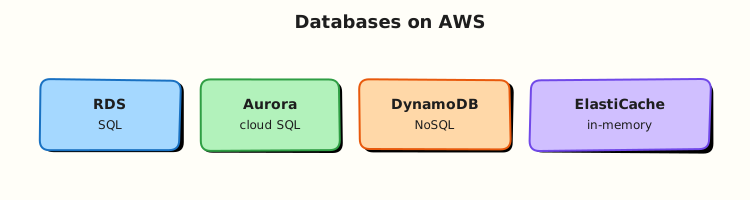
Applications need somewhere to store structured data — user accounts, orders, events, sessions. On AWS you can run traditional SQL databases, massive NoSQL tables, or fast in-memory caches.
Do not memorise database logos yet. Learn the problem each service solves:
- RDS / Aurora — managed SQL (PostgreSQL, MySQL, etc.) when you need joins and transactions
- DynamoDB — managed key-value/document store when you need huge scale and millisecond reads
- ElastiCache — Redis or Memcached in memory to speed up reads (not your primary database)
This is Tutorial 1 in Module 6: Databases of the REBASH Academy AWS for Cloud & DevOps Engineers series. Theory covers RDS and friends; the lab uses DynamoDB on-demand — not RDS — so you learn key design without hourly database charges or NAT Gateway cost.
Cost hygiene
RDS and Aurora bill hourly even when idle. This lab uses DynamoDB PAY_PER_REQUEST only. Delete the table when finished. Point-in-time recovery (PITR) adds a small storage charge — disable before delete.
Prerequisites
- Storage: S3, EBS, and EFS
- AWS CLI v2 with
dynamodb:*in a sandbox account - Basic idea of rows/columns (SQL) vs key lookup (NoSQL) — we explain the rest
Learning Objectives
By the end of this tutorial, you will be able to:
- Explain RDS vs DynamoDB vs ElastiCache with simple analogies
- Create a DynamoDB table with on-demand capacity and put/query items
- Explain why a query with the wrong partition key returns empty results
- Toggle PITR on and off safely
- Answer fresher interview questions on Multi-AZ and cache-aside pattern
Architecture
Apps connect to RDS/Aurora over SQL drivers inside a VPC. DynamoDB is API-driven (CLI/SDK) with optional streams. ElastiCache sits beside the app for sub-millisecond cached reads. Backups differ: RDS snapshots, Aurora continuous backup, DynamoDB PITR, Redis snapshots.
Theory
The problem (before AWS words)
Your shopping app stores users and orders. A spreadsheet on one server breaks when traffic grows. You need a database that backups, patches, and scales — without you becoming a full-time DBA on day one.
RDS — managed SQL in the cloud
Problem: You want PostgreSQL or MySQL but do not want to install disks, patch OS, and configure backups manually on EC2.
Analogy: RDS (Relational Database Service) is like renting a flat where the landlord handles building maintenance — AWS patches the engine and offers automated backups; you still design tables and queries.
Tiny example: db.t3.micro PostgreSQL in private subnets, port 5432, security group allows app tier only.
Interview one-liner: “RDS is managed relational SQL — Multi-AZ for failover, read replicas for read scale.”
| Term | Plain meaning |
|---|---|
| Multi-AZ | Standby copy in another AZ for failover |
| Read replica | Async copy for read traffic (and optional DR) |
| DB subnet group | Which subnets the database may use |
Aurora — AWS-built SQL engine
Problem: RDS is familiar but storage scaling and replica lag can hurt at large scale.
Analogy: Aurora is AWS’s own SQL engine compatible with PostgreSQL/MySQL — storage grows automatically like a magic expanding hard drive shared by writer and readers.
Interview one-liner: “Aurora separates compute from replicated storage across three AZs — faster failover and more read replicas than classic RDS for many workloads.”
DynamoDB — massive key-value table
Problem: Millions of sessions or IoT events per second — SQL on one big server hits limits.
Analogy: DynamoDB is a giant hash map in the cloud. You must know the partition key to fetch items quickly — like knowing which filing cabinet drawer before you search.
AWS name: Amazon DynamoDB (NoSQL).
Tiny example: Partition key tenant_id, sort key event_ts — query all events for one tenant.
Interview one-liner: “Design access patterns first, then partition key — wrong key returns empty Query, not necessarily an error.”
| Term | Plain meaning |
|---|---|
| Partition key (HASH) | Which shard stores the item |
| Sort key (RANGE) | Orders items within one partition |
| GSI | Global Secondary Index — alternate lookup pattern |
| On-demand | Pay per request — great for labs and spiky traffic |
| Scan | Read entire table — slow and expensive; avoid in prod |
ElastiCache — speed layer, not vault
Problem: Every product page hits the database for the same catalogue data.
Analogy: ElastiCache is a sticky-note pad on the desk — Redis or Memcached holds hot data in RAM so the database breathes.
Interview one-liner: “Cache-aside: app reads cache first, on miss reads DB and fills cache with TTL — do not store the only copy of money in Redis.”
When to pick which
| Workload | Prefer | Avoid |
|---|---|---|
| Orders with joins and ACID | RDS/Aurora PostgreSQL | DynamoDB relational modelling |
| Session store at huge scale | DynamoDB or Redis | Uncached RDS for every read |
| Leaderboard / real-time counts | DynamoDB | Row locks on one SQL server |
| Speed up product catalogue reads | ElastiCache + RDS | Querying RDS on every page view |
Common pitfalls
- DynamoDB hot partition — one
tenant_idgets all traffic; throttling despite “high limits” - Scan instead of Query — reads whole table; burns capacity
- RDS public accessibility — database on the internet for “easy access”
- ElastiCache as sole database — cache can evict data; DB is source of truth
Hands-on Lab
Objective
Create a DynamoDB on-demand table, put and query items, prove empty results for a wrong partition key, toggle PITR on then off, and delete the table.
Prerequisites
| Tool | Notes |
|---|---|
| AWS CLI v2 | CreateTable, PutItem, Query, UpdateContinuousBackups |
jq | Parse JSON counts |
Lab environment
mkdir -p ~/rebash-aws/module-06 && cd ~/rebash-aws/module-06
export AWS_REGION="${AWS_REGION:-eu-west-2}"
export AWS_PAGER=""
export TABLE="rebash-m06-events"
echo "$TABLE" | tee table-name.txt
aws sts get-caller-identity --output table
Real-world scenario
An event platform stores records keyed by tenant and timestamp. On-call says “customer sees no events.” You check whether data is missing or the dashboard queried the wrong tenant partition — a classic junior engineer debug path.
Step-by-step tasks
Task 1 – Create on-demand table
cd ~/rebash-aws/module-06
TABLE=$(cat table-name.txt)
aws dynamodb create-table \
  --table-name "$TABLE" \
  --attribute-definitions \
    AttributeName=tenant_id,AttributeType=S \
    AttributeName=event_ts,AttributeType=S \
  --key-schema \
    AttributeName=tenant_id,KeyType=HASH \
    AttributeName=event_ts,KeyType=RANGE \
  --billing-mode PAY_PER_REQUEST \
  --tags Key=Name,Value=rebash-m06 \
  --output json | tee create-table.json
aws dynamodb wait table-exists --table-name "$TABLE"
aws dynamodb describe-table --table-name "$TABLE" \
  --query 'Table.{Name:TableName,Billing:BillingModeSummary.BillingMode,Status:TableStatus}' \
  --output json | tee describe-table.json
grep -q PAY_PER_REQUEST describe-table.json
Expected output
describe-table.json shows "Billing": "PAY_PER_REQUEST" and "Status": "ACTIVE".
Task 2 – Put items and query by tenant
Create item1.json:
{
  "tenant_id": {"S": "tenant-acme"},
  "event_ts": {"S": "2026-08-03T10:00:00Z"},
  "event_type": {"S": "login"},
  "user_id": {"S": "user-42"}
}
Create item2.json:
{
  "tenant_id": {"S": "tenant-acme"},
  "event_ts": {"S": "2026-08-03T10:05:00Z"},
  "event_type": {"S": "purchase"},
  "user_id": {"S": "user-42"}
}
cd ~/rebash-aws/module-06
TABLE=$(cat table-name.txt)
aws dynamodb put-item --table-name "$TABLE" --item file://item1.json
aws dynamodb put-item --table-name "$TABLE" --item file://item2.json
aws dynamodb query --table-name "$TABLE" \
  --key-condition-expression "tenant_id = :t" \
  --expression-attribute-values '{":t":{"S":"tenant-acme"}}' \
  --output json | tee query-acme.json
jq -e '.Count == 2' query-acme.json
aws dynamodb get-item --table-name "$TABLE" \
  --key '{"tenant_id":{"S":"tenant-acme"},"event_ts":{"S":"2026-08-03T10:00:00Z"}}' \
  --output json | tee get-one.json
jq -e '.Item.event_type.S == "login"' get-one.json
Expected output
query-acme.json Count is 2; get-one.json shows the login event.
Task 3 – Wrong partition key returns empty (debug pattern)
cd ~/rebash-aws/module-06
TABLE=$(cat table-name.txt)
aws dynamodb query --table-name "$TABLE" \
  --key-condition-expression "tenant_id = :t" \
  --expression-attribute-values '{":t":{"S":"tenant-wrong"}}' \
  --output json | tee query-wrong.json
jq -e '.Count == 0' query-wrong.json
aws dynamodb scan --table-name "$TABLE" --select COUNT --output json | tee scan-count.json
jq -e '.Count == 2' scan-count.json
echo "dynamodb query empty vs scan OK" | tee evidence.txt
Expected output
query-wrong.json Count is 0; scan Count is 2 — data exists but wrong key returns nothing.
Task 4 – Toggle PITR and delete table
PITR = Point-in-time recovery — continuous backup so you can restore the table to a moment in the last 35 days.
cd ~/rebash-aws/module-06
TABLE=$(cat table-name.txt)
aws dynamodb update-continuous-backups --table-name "$TABLE" \
  --point-in-time-recovery-specification PointInTimeRecoveryEnabled=true \
  --output json | tee pitr-on.json
grep -qi ENABLED pitr-on.json
aws dynamodb update-continuous-backups --table-name "$TABLE" \
  --point-in-time-recovery-specification PointInTimeRecoveryEnabled=false \
  --output json | tee pitr-off.json
aws dynamodb delete-table --table-name "$TABLE" --output json | tee delete-table.json
aws dynamodb wait table-not-exists --table-name "$TABLE"
echo "table deleted" | tee cleanup-ok.txt
Expected output
PITR toggled; table deletion completes; cleanup-ok.txt printed.
Validation steps
- Table created with composite key and on-demand billing
- Query returned two items for
tenant-acme - Query for wrong tenant returned Count 0
- PITR enabled then disabled
- Table deleted — no ongoing DynamoDB charge
Common errors and fixes
| Error | Cause | Fix |
|---|---|---|
| ResourceInUseException | Table name already exists | Delete old table or pick new name |
| ValidationException on Query | Missing partition key in condition | Query must include partition key equality |
| AccessDeniedException | IAM missing dynamodb:Query | Extend sandbox policy |
| ThrottlingException | Provisioned mode under-provisioned | Lab uses on-demand |
Challenge exercise
Create gsi-design.json sketching a Global Secondary Index (GSI) for “all events by user” and a one-line note on write amplification.
{
  "IndexName": "user_id-index",
  "KeySchema": [
    {"AttributeName": "user_id", "KeyType": "HASH"},
    {"AttributeName": "event_ts", "KeyType": "RANGE"}
  ],
  "Projection": {"ProjectionType": "ALL"},
  "_note": "Each GSI duplicates writes — more indexes mean higher write cost"
}
cd ~/rebash-aws/module-06
test -f gsi-design.json
grep -q user_id gsi-design.json
echo "gsi challenge OK" | tee challenge.txt
Learning outcomes
- You created and queried DynamoDB with correct key conditions
- You proved empty Query vs Scan count — classic on-call skill
- You toggled PITR and deleted the table cleanly
- You know when RDS/Aurora would replace DynamoDB
Cleanup
cd ~/rebash-aws/module-06
TABLE=$(cat table-name.txt 2>/dev/null || echo rebash-m06-events)
aws dynamodb delete-table --table-name "$TABLE" 2>/dev/null || true
aws dynamodb wait table-not-exists --table-name "$TABLE" 2>/dev/null || true
rm -f create-table.json query-acme.json query-wrong.json evidence.txt pitr-on.json pitr-off.json
Validation
- Lab under
~/rebash-aws/module-06with query-empty evidence - You can explain RDS Multi-AZ vs read replica in plain English
- You can describe partition key design in one minute
- No DynamoDB lab tables remain
Code Walkthrough
- Composite keys —
tenant_id+event_tsenables range queries per tenant without Scan. - Query vs Scan — Query needs partition key; Scan reads everything (last resort).
- On-demand billing — zero capacity planning for labs; provisioned + auto scaling for steady prod traffic.
- Empty Query ≠ broken table — wrong key or typo returns Count 0 silently.
- PITR toggle — small extra cost when enabled; disable before delete in sandboxes.
Security Considerations
- Place RDS in private subnets; never
PubliclyAccessible=truein production. - Use Secrets Manager or IAM database authentication for credentials — not Git.
- Encrypt at rest with KMS; enforce TLS in transit.
- Restrict security groups to application tier only.
- Enable CloudTrail data events on sensitive DynamoDB tables.
Common Mistakes
Provisioning RDS for a key-design lab
RDS bills hourly and takes minutes to create. Use DynamoDB on-demand for access-pattern exercises unless the goal is engine administration.
SQL schema on DynamoDB
Many joins and normalised tables map poorly. Design queries first, then keys and GSIs.
Redis as primary database
ElastiCache is a cache — use RDS/DynamoDB as source of truth.
Best Practices
- Document access patterns before DynamoDB table design
- Use RDS Proxy for connection pooling to Aurora/RDS at scale
- Enable Performance Insights on production RDS
- Set DeletionProtection on production databases
- Use cache TTLs with jitter; monitor cache hit ratio
Troubleshooting
| Symptom | Likely cause | Fix |
|---|---|---|
| Query returns empty | Wrong partition key value | Verify put-item keys; check case sensitivity |
| ProvisionedThroughputExceeded | Hot key or low limits | Redesign key; use on-demand or raise capacity |
| RDS connection timeout | Security group or subnet | Module 3 VPC path; SG from app tier |
| High replica lag | Heavy writes | Scale writer; optimise queries |
Summary
RDS and Aurora excel at relational OLTP. DynamoDB excels at massive-scale key-value access. ElastiCache accelerates reads. The lab proved Query key correctness and safe teardown — skills that transfer directly to interviews and on-call.
Next: Containers: ECS, EKS, and ECR.
Interview Questions
1. RDS vs DynamoDB — simple difference?
Reveal answer
RDS is managed SQL — tables, joins, transactions — good when your app thinks relationally. DynamoDB is managed NoSQL — you design partition keys for specific queries at huge scale with millisecond latency. Pick based on access pattern and data model, not hype.
2. RDS Multi-AZ vs read replica?
Reveal answer
Multi-AZ keeps a synchronous standby in another AZ for automatic failover of the primary endpoint (high availability). Read replicas are asynchronous copies for read scaling and optional disaster recovery — not the same as Multi-AZ standby.
3. Why did Query return zero items but Scan shows data?
Reveal answer
Query requires the correct partition key (and optional sort key condition). Wrong tenant ID, typo, or wrong Region returns an empty set without error. Scan reads all items — proves data exists but the access pattern or key was wrong.
4. What is a DynamoDB hot partition?
Reveal answer
One partition key value receives too much traffic and saturates that shard’s throughput even if the table limit looks high. Fix with high-cardinality keys, write sharding, or on-demand capacity.
5. When would you pick DynamoDB over Aurora?
Reveal answer
When you need predictable single-digit millisecond latency at massive scale with a key-value/document model and minimal ops — sessions, IoT, carts. Choose Aurora when you need SQL joins, complex transactions, and mature SQL tooling.
6. What is cache-aside with ElastiCache?
Reveal answer
App reads cache first; on miss, reads database, stores result in cache with a TTL, returns to user. Writes update the database and invalidate or update cache. Watch cache stampede when many keys expire together.
7. DynamoDB on-demand vs provisioned?
Reveal answer
On-demand charges per request — great for unknown or spiky traffic (labs, startups). Provisioned with auto scaling is often cheaper at steady high volume but can throttle if limits are too low.
8. Why did we use DynamoDB not RDS in this lab?
Reveal answer
RDS instances bill hourly even when idle and need VPC networking. DynamoDB on-demand lets you learn partition keys and Query with pennies of cost and no NAT Gateway — the learning goal is key design, not SQL admin.
Related Tutorials
- Previous: Storage: S3, EBS, and EFS
- Next: Containers: ECS, EKS, and ECR
- Compute: EC2, ASG, and Load Balancing