IAM, Identity Access, and Organizations
Overview
After Module 1 you know where things run on Amazon Web Services (AWS). This module answers a simpler question every company cares about:
Who is allowed to do what?
IAM means Identity and Access Management. It is the AWS system for:
- Identity — proving who is calling (you, a server, a pipeline)
- Access — allowing or denying actions (start a server, read a file, delete a database)
Treat IAM like the security desk of a company office:
- Your ID card = identity (user or role)
- The door permissions on the card = policy (what you may open)
- A temporary visitor badge = assuming a role with short-lived access
- The building rules from head office that no badge can override = Organisations service control policies (you will meet these later in the page)
Bad IAM is how outages happen (AccessDenied when a deploy cannot read a secret) and how breaches happen (one leaked admin key opens everything).
This is Tutorial 1 in Module 2: Identity & Access Management of the REBASH Academy AWS for Cloud & DevOps Engineers series — practical AWS for Cloud and DevOps work.
Safety for students
Do not create access keys for the root user (the email account owner). Delete lab roles when you finish. Never paste secret keys into GitHub or chat apps.
Prerequisites
- AWS Fundamentals and Global Infrastructure — account, Region, CLI,
get-caller-identity - You can edit a small JSON file in a text editor
- A sandbox AWS account where you are allowed to create IAM roles (personal Free Tier or college/training account)
Learning Objectives
By the end of this tutorial, you will be able to:
- Explain IAM to a non-AWS friend using an office / ID-card analogy
- Tell the difference between a user, a group, a role, and a policy in plain English
- Read a simple policy and say what it allows
- Assume a role with Security Token Service (STS) and show temporary credentials
- Demonstrate
AccessDeniedon a forbidden action and success on an allowed action - Explain least privilege, MFA, and why companies prefer roles over long-lived keys
- Give a beginner-safe explanation of Organizations / SCP and IAM Identity Center
Architecture
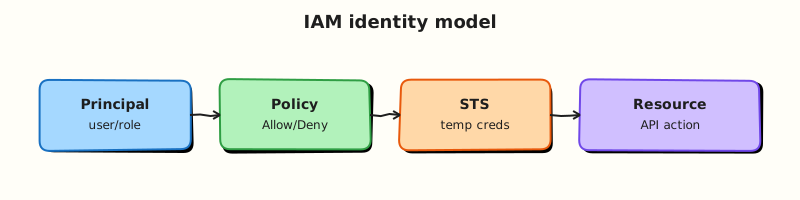
Someone (a human or a program) presents credentials. IAM checks policies and decides allow or deny. If they assume a role, STS hands out temporary keys that expire. Large companies stack accounts under Organizations and add guardrails.
Theory
The problem IAM solves (before any jargon)
Imagine three people at a startup:
- Aisha needs to see logs
- Ravi needs to deploy the website
- A script on a server needs to read files from storage
If everyone shares one password with full admin power, one laptop theft can delete the company. IAM lets you create separate identities and attach small permission lists so each person or program only gets what they need. That idea is called least privilege — give the minimum access required for the job, nothing more.
What IAM is
| Word | Plain meaning | AWS object |
|---|---|---|
| Who | A person or program | User, role, or federated identity |
| What they may do | Permission rules | Policy (JSON document) |
| Group of people | Team bundle of permissions | Group |
| Temporary job badge | Access you pick up, then drop | Role + STS |
| Extra login step | Phone/app code after password | MFA (multi-factor authentication) |
Authentication = proving who you are (login).
Authorisation = checking what you are allowed to do after login.
Users, groups, roles — the comparison students must nail
IAM user
A permanent identity inside the account (username). Can have a password for console login and/or access keys for the CLI. Fine for a personal sandbox. In real companies, daily human login usually moves to IAM Identity Center (SSO) instead of many IAM users.
IAM group
A named collection of users (for example developers). Attach policies to the group so you do not edit every person separately.
IAM role
An identity that is not a long-term person password. Something assumes the role and receives temporary keys. Used by:
- An EC2 virtual machine that must read from S3
- A Lambda function
- A CI/CD pipeline
- You, when you switch into a higher-privilege role for a short task
Analogy
| Office | AWS |
|---|---|
| Permanent employee ID | IAM user |
| Engineering department ACL | IAM group |
| “Borrow the server room badge for 1 hour” | IAM role (assume role) |
| Printed rule sheet on the badge | IAM policy |
Interview golden line: “Humans should use SSO or short sessions; applications should use roles, not access keys baked into code.”
What a policy looks like (read this slowly)
A policy is JSON. The important fields for beginners:
{
  "Version": "2012-10-17",
  "Statement": [
    {
      "Effect": "Allow",
      "Action": "ec2:DescribeRegions",
      "Resource": "*"
    }
  ]
}
| Field | Meaning |
|---|---|
Effect | Allow or Deny |
Action | API names (service:Operation) |
Resource | Which objects — * means “any” (often too wide; tighten later) |
Condition | Optional extra rules (only with MFA, only from certain IP, …) |
How AWS decides (simple rules you should memorise):
- By default you can do nothing.
- An Allow is required to do something.
- An explicit Deny always wins over Allow.
So a Deny in a guardrail can block even an admin — that is intentional for safety.
Identity policy vs resource policy (beginner view)
- Identity-based policy — attached to a user/role: “Aisha may read bucket X.”
- Resource-based policy — attached to the resource (common on S3 buckets): “This bucket allows account 1234 to read me.”
Both can apply. You do not need every edge case today; know that S3 bucket policies are resource policies you will meet soon.
STS and AssumeRole (the heart of modern AWS)
STS = Security Token Service. Its famous call is AssumeRole:
- You prove who you are.
- You ask to assume role
rebash-lab-reader. - STS returns temporary
AccessKeyId,SecretAccessKey, andSessionToken(they expire). - Your next CLI calls use those temporary keys.
- When they expire, access ends automatically.
Why companies love this: if temporary keys leak, they die soon. Permanent access keys in a GitHub repo can be mined by bots within minutes.
A role has two documents students mix up:
| Document | Question it answers |
|---|---|
| Trust policy | Who is allowed to assume this role? |
| Permissions policy | What can you do after you assumed it? |
If trust is wrong, AssumeRole fails. If permissions are wrong, AssumeRole works but later API calls return AccessDenied.
MFA, root user, and access keys
- Turn on MFA on the root user and on human logins.
- Prefer roles and SSO over creating many long-lived access keys.
- If you create student access keys for CLI labs, delete them when the course module ends.
IAM Identity Center (SSO) — what job ads mean by “SSO into AWS”
IAM Identity Center (formerly AWS SSO) is how employees click one login and land in the right AWS accounts with the right permission set. As a fresher you may only use a single sandbox account; still say in interviews: “I understand companies federate human access through Identity Center rather than sharing root or raw access keys.”
AWS Organizations and SCPs (overview, not a full course)
AWS Organizations lets a company own many accounts (prod, test, sandbox) under one bill/structure.
Service control policies (SCPs) are organisation rules such as “no account in this OU may use Region X” or “deny leaving GuardDuty off”. Important beginner truth:
SCPs do not grant permissions. They only set a ceiling. You still need an IAM Allow. Think: head office bans smoking everywhere; your team badge still needs permission to enter the lab — the ban does not open doors by itself.
Permission boundaries (awareness level)
A permission boundary is an advanced cap on how powerful a role can ever become — used when a platform team lets app teams create roles safely. Know the name for interviews; you do not need to design boundaries on day one.
Cross-account access (simple picture)
Account A (CI) assumes a role in Account B (production) instead of copying production passwords into the pipeline. Trust policy in B names A; permissions in B say what the pipeline may deploy. Module 15 goes deeper for landing zones.
Common pitfalls
- Creating root access keys “for CLI convenience”
- Attaching
AdministratorAccessto everything so the lab “just works”, then forgetting to remove it - Confusing trust policy with permissions policy
- Believing an SCP alone gives access
- Committing
~/.aws/credentialsor labassume.jsonto GitHub
Hands-on Lab
Objective
Create a least-privilege role that can only list Regions, assume it, prove a forbidden call fails, and prove the allowed call works — a story you can tell in interviews.
Prerequisites
| Tool | Notes |
|---|---|
| AWS CLI v2 | Working aws sts get-caller-identity from Module 1 |
| jq | Install if missing (brew install jq / sudo apt install jq) |
| IAM permissions | Ability to create roles and put role policies in your sandbox |
Lab environment
mkdir -p ~/rebash-aws/module-02 && cd ~/rebash-aws/module-02
export AWS_REGION="${AWS_REGION:-eu-west-2}"
export AWS_PAGER=""
aws sts get-caller-identity --output table
ACCOUNT_ID=$(aws sts get-caller-identity --query Account --output text)
echo "ACCOUNT_ID=$ACCOUNT_ID"
Real-world scenario
Your mentor refuses to give the inventory script admin rights. You must create a role that can only call ec2:DescribeRegions, prove that DescribeInstances is denied, and show temporary credentials from STS. That is exactly how production “task roles” and CI roles are shaped — just smaller.
Step-by-step tasks
Task 1 – Create trust and permissions files
Create trust-policy.json (you will replace ACCOUNT_ID in the next commands):
{
  "Version": "2012-10-17",
  "Statement": [
    {
      "Effect": "Allow",
      "Principal": {
        "AWS": "arn:aws:iam::ACCOUNT_ID:root"
      },
      "Action": "sts:AssumeRole"
    }
  ]
}
Create permissions-policy.json:
{
  "Version": "2012-10-17",
  "Statement": [
    {
      "Sid": "DescribeRegionsOnly",
      "Effect": "Allow",
      "Action": "ec2:DescribeRegions",
      "Resource": "*"
    }
  ]
}
cd ~/rebash-aws/module-02
ACCOUNT_ID=$(aws sts get-caller-identity --query Account --output text)
sed -i.bak "s/ACCOUNT_ID/${ACCOUNT_ID}/g" trust-policy.json
cat trust-policy.json
aws iam create-role \
  --role-name rebash-lab-reader \
  --assume-role-policy-document file://trust-policy.json \
  --description "Student lab: least privilege reader" \
  | tee create-role.json
aws iam put-role-policy \
  --role-name rebash-lab-reader \
  --policy-name DescribeRegionsOnly \
  --policy-document file://permissions-policy.json
aws iam get-role --role-name rebash-lab-reader --query 'Role.Arn' --output text | tee role-arn.txt
Expected output
role-arn.txt looks like arn:aws:iam::123456789012:role/rebash-lab-reader.
Beginner check: Open trust-policy.json after sed and confirm your real account ID appears — not the text ACCOUNT_ID.
Task 2 – Assume the role (get a temporary visitor badge)
cd ~/rebash-aws/module-02
ROLE_ARN=$(cat role-arn.txt)
aws sts assume-role \
  --role-arn "$ROLE_ARN" \
  --role-session-name student-m02 \
  --duration-seconds 900 \
  --output json | tee assume.json
export AWS_ACCESS_KEY_ID=$(jq -r '.Credentials.AccessKeyId' assume.json)
export AWS_SECRET_ACCESS_KEY=$(jq -r '.Credentials.SecretAccessKey' assume.json)
export AWS_SESSION_TOKEN=$(jq -r '.Credentials.SessionToken' assume.json)
aws sts get-caller-identity --output json | tee assumed-identity.json
cat assumed-identity.json
Expected output
The Arn contains assumed-role/rebash-lab-reader/student-m02. You are no longer your admin user for the next commands.
Do not commit assume.json
It contains secret temporary keys. Keep it only on your machine for this lab.
Task 3 – Break (denied) then succeed (allowed)
cd ~/rebash-aws/module-02
set +e
aws ec2 describe-instances --region "$AWS_REGION" 2>&1 | tee deny.txt
set -e
grep -Eiq 'AccessDenied|UnauthorizedOperation' deny.txt
aws ec2 describe-regions --output json | tee regions-ok.json
jq -e '.Regions | length > 0' regions-ok.json
echo "least privilege proof OK" | tee evidence.txt
echo "----- denied call -----"; cat deny.txt
echo "----- evidence -----"; cat evidence.txt
Expected output
deny.txt shows AccessDenied (or UnauthorizedOperation). regions-ok.json lists Regions. That contrast is your interview story.
Task 4 – Return to your normal identity and inspect the policy
Open a new terminal tab (or unset the three variables) so you leave the temporary badge behind:
cd ~/rebash-aws/module-02
unset AWS_ACCESS_KEY_ID AWS_SECRET_ACCESS_KEY AWS_SESSION_TOKEN
aws sts get-caller-identity --output table
aws iam get-role-policy --role-name rebash-lab-reader --policy-name DescribeRegionsOnly \
  --output json | tee role-policy.json
Expected output
Caller is your original user/SSO identity again. role-policy.json shows only ec2:DescribeRegions.
Validation steps
- You can explain trust policy vs permissions policy without notes
- AssumeRole worked and
assumed-identity.jsonshows the role - Forbidden API denied; allowed API succeeded
- Temporary environment variables are unset
- You can tell the story in under two minutes
Common errors and fixes
| Error | Plain meaning | Fix |
|---|---|---|
| AccessDenied on AssumeRole | Trust policy does not allow you | Ensure Principal account ID is correct |
| Still admin after assume | Exports missing AWS_SESSION_TOKEN | Export all three values from assume.json |
| MalformedPolicyDocument | JSON typo | jq . permissions-policy.json |
| jq not found | Tool missing | Install jq |
Challenge exercise
Create permission-boundary.json that allows only ec2:Describe* and sts:AssumeRole, and write five lines in boundary-notes.md explaining in your own words: “A boundary is a maximum cap; it does not replace least-privilege policies.”
cd ~/rebash-aws/module-02
test -f permission-boundary.json
test -f boundary-notes.md
echo "boundary study artefacts OK" | tee challenge.txt
Learning outcomes
- You built least privilege with your own hands
- You used STS the same way CI and EC2 instance profiles do
- You captured deny/allow evidence for interviews
- You know why “just give admin” is not an acceptable junior answer
Cleanup
cd ~/rebash-aws/module-02
unset AWS_ACCESS_KEY_ID AWS_SECRET_ACCESS_KEY AWS_SESSION_TOKEN
aws iam delete-role-policy --role-name rebash-lab-reader --policy-name DescribeRegionsOnly
aws iam delete-role --role-name rebash-lab-reader
rm -f create-role.json role-arn.txt assume.json assumed-identity.json deny.txt regions-ok.json evidence.txt role-policy.json challenge.txt trust-policy.json.bak
Validation
- Lab completed under
~/rebash-aws/module-02 - Can explain user vs role vs policy to a classmate
- No secrets in Git
- Ready for Module 3 (networking) with identity basics solid
Code Walkthrough
- Trust first, permissions second — two files, two questions.
- AssumeRole session name — use your name or ticket id; it shows up in logs.
- Keep the deny output —
deny.txtproves least privilege better than slides. - Unset temporary keys — otherwise every later command uses the weak role by accident.
- Cleanup roles — leftover lab roles confuse the next exercise.
Security Considerations
- MFA on human logins and root.
- Never commit access keys or
assume.json. - Prefer Identity Center for employees; roles for applications.
- In CI, prefer OpenID Connect (OIDC) role assumption over stored keys (Module 12).
- Read CloudTrail when something mysteriously works or fails — it records who called what.
Common Mistakes
Admin for convenience
Attaching AdministratorAccess makes labs easy and resumes weak. Practise least privilege now.
Mixing up trust and permissions
If AssumeRole fails, fix trust. If AssumeRole works but APIs fail, fix permissions.
Thinking SCPs grant access
SCPs only limit. IAM Allow is still required.
Best Practices
- Least privilege by default; widen with a ticket and expiry date
- Short-lived credentials (roles, SSO sessions)
- Separate prod and sandbox accounts when you can (Module 15)
- Name roles clearly (
app-prod-readonly, notrole1) - Document who can assume production roles
Troubleshooting
| Symptom | Likely cause | Fix |
|---|---|---|
| AssumeRole AccessDenied | Trust / SCP / MFA | Read trust policy; check org SCPs |
| API AccessDenied after assume | Permissions too tight (or typo) | Compare Action names to docs |
| Wrong account in identity | Profile/SSO mix-up | get-caller-identity before changes |
| Keys work on laptop, fail in CI | Missing session token or wrong role | Print identity in the pipeline log |
Summary
IAM decides who can do what on AWS. Learn users vs roles vs policies in plain language, practise AssumeRole with a tiny permission set, and always be able to show an AccessDenied next to a successful call. That combination is what interviewers look for — not memorising every service name.
Interview Questions
1. What is IAM, in simple words?
Reveal answer
IAM is AWS’s system for identities and permissions. It controls who can sign in or call APIs, and what actions they are allowed to perform on which resources. Without IAM, every caller would need unsafe shared admin access.
2. What is the difference between an IAM user and an IAM role?
Reveal answer
A user is a long-lived identity (person or permanent access keys). A role is assumed when needed and returns temporary credentials that expire. Applications, EC2, Lambda, and modern human SSO flows prefer roles. Users with long-lived keys are riskier if leaked.
3. What is the difference between a trust policy and a permissions policy on a role?
Reveal answer
The trust policy answers who is allowed to call sts:AssumeRole on that role. The permissions policy answers what API actions the assumed session may perform afterwards. Beginners often edit the wrong one when debugging.
4. What does least privilege mean, and why do interviewers care?
Reveal answer
Least privilege means granting only the permissions required for a task — nothing more. It limits damage if credentials leak and makes audits clearer. Saying “I gave AdministratorAccess so it worked” is a red flag; showing a deny/allow lab is a green flag.
5. What is MFA and why enable it on the root user?
Reveal answer
Multi-factor authentication adds a second proof (usually a one-time code from a phone app) after the password. The root user is the account master key; if only a password protects it, email compromise can take over billing and all resources. MFA greatly reduces that risk.
6. What does AccessDenied usually mean?
Reveal answer
Your identity authenticated, but authorisation failed — no matching Allow, or an explicit Deny (including from an SCP or permission boundary). First run aws sts get-caller-identity, then inspect policies. It is different from a network timeout.
7. Does a service control policy (SCP) grant permissions?
Reveal answer
No. An SCP sets the maximum permissions available in an account or organisational unit. Effective access still needs an Allow from IAM (and resource policies where relevant). SCPs are ceilings and guardrails, not grants.
8. How would you give a GitHub Actions workflow access to AWS without saving long-lived access keys?
Reveal answer
Use OpenID Connect (OIDC): create an IAM identity provider for GitHub, create a role whose trust policy allows that provider only for your repository or environment, and have the workflow assume that role to get temporary credentials. That is the modern pattern companies expect you to know by name even as a junior.
Related Tutorials
- Previous: AWS Fundamentals
- Next: VPC Networking on AWS
- AWS Security Services
- Stretch lab: AWS IAM and VPC Reachability Triage