Storage: S3, EBS, and EFS
Overview
Every application needs somewhere to keep files, disks, and backups. On AWS you usually choose between three storage shapes — and picking the wrong one wastes money or breaks your design in interviews.
Start with the storage problem each service solves:
- S3 — store files as objects (like a massive shared drive accessed over HTTP)
- EBS — attach a disk to one virtual machine (like a USB drive for EC2)
- EFS — share a folder across many Linux servers (like a network file share)
This is Tutorial 1 in Module 5: Storage of the REBASH Academy AWS for Cloud & DevOps Engineers series. You will harden an S3 bucket, prove read/write, inject a Deny policy on a folder, restore access, add a lifecycle rule, and delete every version cleanly.
Cost hygiene
S3 charges for storage and requests. EBS volumes bill even when detached. This lab uses S3 only — no EC2 or NAT Gateway required. Always run Cleanup.
Prerequisites
- Compute: EC2, ASG, and Load Balancing — you know what an EC2 instance is
- AWS CLI v2 with permission to create S3 buckets in a sandbox account
- Optional: Lab — AWS SSM and S3
Learning Objectives
By the end of this tutorial, you will be able to:
- Explain S3 vs EBS vs EFS using everyday analogies
- Enable Block Public Access (BPA), versioning, and encryption on a bucket
- Apply a bucket policy that Denies reads and prove
AccessDenied - Add a lifecycle rule and delete a versioned bucket completely
- Answer fresher interview questions on storage classes and public bucket risk
Architecture
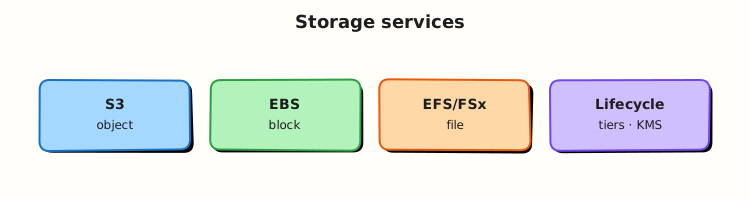
Clients and services read/write S3 objects over HTTPS. EC2 instances attach EBS volumes as block devices in one AZ. EFS mount targets in subnets expose NFS to many instances. Lifecycle rules move or expire S3 objects over time.
Theory
The problem (before AWS words)
Your app needs to store user uploads, database backups, and static website files. Buying NAS hardware does not scale globally. Attaching one disk per server does not share files across ten web servers.
What AWS sells: managed storage services with different shapes for different jobs.
S3 — the internet-scale filing cabinet
Problem: You need durable, cheap storage for millions of files accessed by many services worldwide.
Analogy: S3 is a giant filing cabinet where each drawer is a bucket and each file is an object with a key name like logs/2026/app.log. There are no real folders — only key prefixes that look like folders.
AWS name: Amazon Simple Storage Service (S3).
Tiny example: Upload hello.txt to s3://my-bucket/public/hello.txt and download it from anywhere with HTTPS.
Interview one-liner: “S3 is object storage — great for backups, static assets, and logs; not a POSIX disk you mount as / on one server.”
| Term | Plain meaning |
|---|---|
| Bucket | Container with a globally unique name |
| Object | File + metadata (key, bytes, headers) |
| Versioning | Keep old copies when you overwrite |
| BPA | Block Public Access — account/bucket guardrail against public exposure |
EBS — the EC2 hard drive
Problem: Your virtual machine needs a boot disk and maybe a data disk with low latency.
Analogy: EBS is a network USB drive locked to one instance in one Availability Zone (AZ).
AWS name: Elastic Block Store (EBS).
Tiny example: Root volume /dev/xvda on your EC2 instance is usually EBS.
Interview one-liner: “EBS is block storage for one EC2 instance in one AZ — snapshot to copy across AZs.”
EFS — shared Linux folder
Problem: Ten web servers need the same uploaded images directory without copying files constantly.
Analogy: EFS is a shared network drive (NFS) that many Linux instances mount at once, spread across AZs.
AWS name: Elastic File System (EFS).
Interview one-liner: “EFS is managed NFS for shared POSIX files; S3 is object storage; EBS is one instance’s block disk.”
When to pick which
| Need | Choose | Why |
|---|---|---|
| Website images, backups, logs | S3 | Cheap, durable, HTTP access |
| OS disk for EC2 | EBS | Block device the OS expects |
Shared /uploads across web tier | EFS | Multiple mounts, POSIX |
| Static site + CDN | S3 + CloudFront | Objects at edge |
Encryption and policies (why labs matter)
Problem: Public S3 buckets still cause real-world data leaks. Teams also need guardrails so even admins cannot read certain prefixes.
Tools you will touch today:
| Control | Plain job |
|---|---|
| SSE-S3 | S3-managed encryption keys (AES256) |
| Bucket policy | Resource-based rules (who may read this bucket) |
| Explicit Deny | Always wins over Allow — compliance guardrail |
| Lifecycle | Auto-move or expire old objects to save money |
Interview one-liner: “Block Public Access plus bucket policies — neither alone replaces the other for intentional cross-account access.”
S3 storage classes (awareness)
| Class | Plain meaning |
|---|---|
| Standard | Frequent access |
| Standard-IA | Infrequent — 30-day minimum charge |
| Glacier | Archive — cheap storage, slower retrieval |
| Intelligent-Tiering | AWS moves tiers when access pattern changes |
Common pitfalls
- Thinking S3 “folders” are real directories — they are key prefixes
- Deleting a versioned bucket without deleting all versions —
BucketNotEmptyerror - Leaving detached EBS volumes running up a bill
- Disabling BPA “just to test” and forgetting to re-enable
Hands-on Lab
Objective
Create a versioned, encrypted S3 bucket; upload and download objects; deny GetObject on a restricted/ prefix via bucket policy; restore access; add a lifecycle rule; delete all versions and the bucket.
Prerequisites
| Tool | Notes |
|---|---|
| AWS CLI v2 | s3:* in sandbox |
jq | Optional JSON checks |
| Unique bucket name | Globally unique across all AWS customers |
Lab environment
mkdir -p ~/rebash-aws/module-05 && cd ~/rebash-aws/module-05
export AWS_REGION="${AWS_REGION:-eu-west-2}"
export AWS_PAGER=""
ACCOUNT_ID=$(aws sts get-caller-identity --query Account --output text)
export BUCKET="rebash-m05-${ACCOUNT_ID}-$(date +%s)"
echo "$BUCKET" | tee bucket-name.txt
aws sts get-caller-identity --output table
Real-world scenario
Platform needs a compliance archive bucket: encryption and versioning on, public access blocked, and a policy that blocks reads of restricted/ objects. You prove the deny works, remove bad policy drift, add lifecycle for old logs, then tear down for FinOps.
Step-by-step tasks
Task 1 – Create bucket with BPA, versioning, and SSE
cd ~/rebash-aws/module-05
BUCKET=$(cat bucket-name.txt)
if [[ "$AWS_REGION" == "us-east-1" ]]; then
  aws s3api create-bucket --bucket "$BUCKET" --output json | tee create-bucket.json
else
  aws s3api create-bucket --bucket "$BUCKET" \
    --create-bucket-configuration LocationConstraint="$AWS_REGION" \
    --output json | tee create-bucket.json
fi
aws s3api put-public-access-block --bucket "$BUCKET" \
  --public-access-block-configuration \
  BlockPublicAcls=true,IgnorePublicAcls=true,BlockPublicPolicy=true,RestrictPublicBuckets=true
aws s3api put-bucket-versioning --bucket "$BUCKET" \
  --versioning-configuration Status=Enabled
aws s3api put-bucket-encryption --bucket "$BUCKET" \
  --server-side-encryption-configuration '{
    "Rules": [{"ApplyServerSideEncryptionByDefault": {"SSEAlgorithm": "AES256"}}]
  }'
aws s3api get-bucket-versioning --bucket "$BUCKET" | tee versioning.json
grep -q Enabled versioning.json
Expected output
versioning.json contains "Status": "Enabled".
Task 2 – Put, get, and overwrite (versioning proof)
Create hello.txt:
cd ~/rebash-aws/module-05
BUCKET=$(cat bucket-name.txt)
aws s3 cp hello.txt "s3://${BUCKET}/public/hello.txt"
aws s3 cp hello.txt "s3://${BUCKET}/restricted/secret.txt"
echo "rebash module-05 v2" > hello-v2.txt
aws s3 cp hello-v2.txt "s3://${BUCKET}/public/hello.txt"
aws s3 cp "s3://${BUCKET}/public/hello.txt" - | tee get-public.txt
grep -q "v2" get-public.txt
aws s3api list-object-versions --bucket "$BUCKET" --prefix public/hello.txt \
  --output json | tee versions-public.json
jq -e '.Versions | length >= 2' versions-public.json
Expected output
get-public.txt shows v2; versions-public.json lists at least two versions.
Task 3 – Deny GetObject on restricted/ prefix, break, restore
Create deny-restricted-policy.json:
{
  "Version": "2012-10-17",
  "Statement": [
    {
      "Sid": "DenyRestrictedReads",
      "Effect": "Deny",
      "Principal": "*",
      "Action": "s3:GetObject",
      "Resource": "arn:aws:s3:::BUCKET_NAME/restricted/*"
    }
  ]
}
cd ~/rebash-aws/module-05
BUCKET=$(cat bucket-name.txt)
sed "s/BUCKET_NAME/${BUCKET}/g" deny-restricted-policy.json > bucket-policy.json
aws s3api put-bucket-policy --bucket "$BUCKET" --policy file://bucket-policy.json
set +e
aws s3 cp "s3://${BUCKET}/restricted/secret.txt" - 2>&1 | tee deny-get.txt
set -e
grep -Eiq 'AccessDenied|403' deny-get.txt
aws s3 cp "s3://${BUCKET}/public/hello.txt" - | tee still-ok.txt
grep -q v2 still-ok.txt
aws s3api delete-bucket-policy --bucket "$BUCKET"
aws s3 cp "s3://${BUCKET}/restricted/secret.txt" - | tee restored.txt
grep -q "module-05" restored.txt
echo "s3 deny-restore OK" | tee evidence.txt
Expected output
deny-get.txt shows AccessDenied; public read still works; after policy removal, restored.txt returns the object body.
Task 4 – Lifecycle rule and full bucket deletion
Create lifecycle.json:
{
  "Rules": [
    {
      "ID": "ExpireOldPublicLogs",
      "Status": "Enabled",
      "Filter": { "Prefix": "public/" },
      "Transitions": [
        { "Days": 30, "StorageClass": "STANDARD_IA" }
      ],
      "NoncurrentVersionExpiration": { "NoncurrentDays": 7 }
    }
  ]
}
Create delete-versions.py:
import json
import sys

data = json.load(open("all-versions.json"))
objs = []
for v in data.get("Versions", []):
    objs.append({"Key": v["Key"], "VersionId": v["VersionId"]})
for m in data.get("DeleteMarkers", []):
    objs.append({"Key": m["Key"], "VersionId": m["VersionId"]})
print(json.dumps({"Objects": objs, "Quiet": True}))
cd ~/rebash-aws/module-05
BUCKET=$(cat bucket-name.txt)
aws s3api put-bucket-lifecycle-configuration --bucket "$BUCKET" \
  --lifecycle-configuration file://lifecycle.json
aws s3api get-bucket-lifecycle-configuration --bucket "$BUCKET" | tee lifecycle-applied.json
grep -q ExpireOldPublicLogs lifecycle-applied.json
aws s3api list-object-versions --bucket "$BUCKET" --output json > all-versions.json
python3 delete-versions.py > delete-batch.json
if jq -e '.Objects | length > 0' delete-batch.json >/dev/null 2>&1; then
  aws s3api delete-objects --bucket "$BUCKET" --delete file://delete-batch.json
fi
aws s3api delete-bucket --bucket "$BUCKET"
echo "bucket deleted" | tee cleanup-ok.txt
Expected output
Lifecycle rule present; cleanup-ok.txt confirms bucket deletion.
Validation steps
- Bucket had BPA, versioning Enabled, and SSE-S3 (AES256)
- Overwrite created two versions of
public/hello.txt - Bucket policy deny blocked
restricted/read; public read worked - After policy removal, restricted object readable again
- Lifecycle applied; all versions deleted; bucket gone
Common errors and fixes
| Error | Cause | Fix |
|---|---|---|
| BucketAlreadyExists | Name not globally unique | Append account ID + timestamp |
| IllegalLocationConstraintException | us-east-1 special case | Omit LocationConstraint for us-east-1 |
| BucketNotEmpty on delete | Versioned objects remain | Run delete-versions.py batch delete |
| AccessDenied on put-bucket-policy | Missing IAM permission | Use sandbox admin role |
Challenge exercise
Create storage-class-picker.sh that prints which S3 class you would pick for three scenarios (active website assets, monthly audit logs, seven-year legal archive) — a script interviewers accept as “you thought about cost”.
#!/bin/bash
set -euo pipefail
echo "active-website-assets -> S3 Standard"
echo "monthly-audit-logs -> S3 Standard-IA (30-day minimum applies)"
echo "seven-year-legal-archive -> S3 Glacier Flexible Retrieval or Deep Archive"
cd ~/rebash-aws/module-05
chmod +x storage-class-picker.sh
./storage-class-picker.sh | tee storage-class-output.txt
grep -qi glacier storage-class-output.txt
grep -qi intelligent storage-class-output.txt || grep -qi standard-ia storage-class-output.txt
echo "storage challenge OK" | tee challenge.txt
Learning outcomes
- You hardened S3 with BPA, versioning, and encryption
- You proved explicit Deny on a prefix via bucket policy
- You applied lifecycle rules and deleted a versioned bucket completely
- You can map S3 to backups and static assets in production designs
Cleanup
cd ~/rebash-aws/module-05
BUCKET=$(cat bucket-name.txt 2>/dev/null || echo "")
if [[ -n "$BUCKET" ]] && aws s3api head-bucket --bucket "$BUCKET" 2>/dev/null; then
  aws s3api list-object-versions --bucket "$BUCKET" --output json > all-versions.json
  python3 delete-versions.py > delete-batch.json 2>/dev/null || true
  if jq -e '.Objects | length > 0' delete-batch.json >/dev/null 2>&1; then
    aws s3api delete-objects --bucket "$BUCKET" --delete file://delete-batch.json
  fi
  aws s3api delete-bucket --bucket "$BUCKET" 2>/dev/null || true
fi
rm -f create-bucket.json versioning.json deny-get.txt evidence.txt
Validation
- Lab completed under
~/rebash-aws/module-05with deny/restore evidence - You can explain S3 vs EBS vs EFS without notes
- You can describe why explicit Deny beats Allow
- No lab buckets left in the account
Code Walkthrough
- Globally unique bucket names — embed account ID; never hard-code in Terraform without a random suffix.
- Versioning before lifecycle — noncurrent version expiration needs versioning enabled.
- Explicit Deny — test with evidence files; public prefix unaffected if policy scopes correctly.
- Delete markers and versions — always
list-object-versionsbeforedelete-bucket. us-east-1bucket create — noLocationConstraint(common fresher exam trap).
Security Considerations
- Keep Block Public Access enabled at account level.
- Use bucket policies and IAM together for cross-account access.
- Enable access logging or CloudTrail data events on sensitive buckets.
- Prefer SSE-KMS in regulated environments (Module 10 goes deeper).
- Apply least-privilege
s3:ListBucketwith prefix conditions for multi-tenant apps.
Common Mistakes
Public bucket by mistake
Legacy ACLs and disabled BPA still cause breaches. Keep BPA on; use policies only for intentional sharing.
Forgotten EBS volumes
Detached volumes still bill. Delete snapshots you no longer need.
Lifecycle without understanding minimum duration
Infrequent Access and Glacier classes charge for minimum storage duration even if you delete early.
Best Practices
- Default encrypt all buckets; prefer KMS with key policies in production
- Match storage class to access pattern; review costs monthly
- For EBS: use
gp3, right-size IOPS, snapshot with lifecycle - For EFS: use lifecycle to Infrequent Access for cold files
- Use S3 Inventory or Storage Lens for FinOps reporting
Troubleshooting
| Symptom | Likely cause | Fix |
|---|---|---|
| 403 on GetObject | Bucket policy Deny, KMS key, or wrong account | Check policy; KMS Decrypt permission |
| Slow LIST on huge prefix | Hot prefix in flat namespace | Shard keys (logs/2026/08/03/) |
| EBS attach fails | AZ mismatch | Create volume in instance AZ |
| EFS mount timeout | Security group missing TCP 2049 | Allow NFS from client to EFS SG |
Summary
S3 is the default durable object store on AWS. EBS and EFS cover block and shared file needs on EC2. Master BPA, versioning, encryption, lifecycle, and bucket policies — and prove deny/restore with CLI evidence. That is how storage shows up in interviews and incident response.
Next: Databases on AWS.
Interview Questions
1. S3 vs EBS — when do you pick each?
Reveal answer
Choose S3 for durable objects accessed over HTTP/API — backups, static assets, logs, data lakes — when many clients need read access without attaching a disk. Choose EBS when one EC2 instance needs a block device (OS or database disk) with low-latency attachment in one AZ.
2. What does S3 versioning buy you?
Reveal answer
Versioning keeps every overwrite as a distinct version ID so you can recover from accidental delete or overwrite (including delete markers). It enables lifecycle rules on old versions and replication. It is not a full backup strategy by itself — you still plan cross-Region copies for disasters.
3. Why can explicit Deny in a bucket policy block an admin Allow?
Reveal answer
AWS policy evaluation gives explicit Deny precedence over Allow. A bucket policy Deny on s3:GetObject for restricted/* applies to all principals unless another boundary applies. That is how compliance guardrails work.
4. EBS vs EFS — key trade-off?
Reveal answer
EBS is block storage for one instance (AZ-bound), ideal for boot/data volumes with controlled IOPS. EFS is multi-AZ NFS shared across many Linux instances with elastic capacity — better for shared content, different cost and latency profile. Neither replaces S3 for object storage.
5. What breaks when you delete a versioned bucket with objects inside?
Reveal answer
DeleteBucket returns BucketNotEmpty until all object versions and delete markers are removed. Automation must paginate list-object-versions and batch delete-objects, then delete the bucket.
6. What is Block Public Access (BPA)?
Reveal answer
BPA is an account- or bucket-level setting that blocks public ACLs and public bucket policies that would expose data to the internet. It is a safety rail — you still design intentional private cross-account access with IAM and policies.
7. SSE-S3 vs SSE-KMS in one sentence each?
Reveal answer
SSE-S3 uses keys managed entirely by S3 with simple setup. SSE-KMS uses AWS Key Management Service keys with separate key policies and CloudTrail audit of decrypt operations — better for regulated data, with KMS quota and latency trade-offs.
8. How do you prevent accidental public S3 exposure?
Reveal answer
Enable account and bucket Block Public Access, avoid public ACLs, use bucket policies only for intentional cross-account access, monitor with IAM Access Analyzer for S3, and require encryption plus logging on sensitive buckets.
Related Tutorials
- Previous: Compute: EC2, ASG, and Load Balancing
- Next: Databases on AWS
- Lab: AWS SSM and S3
- AWS Security Services — KMS encryption depth