VPC Networking on AWS
Overview
Your virtual computer on Amazon Web Services (AWS) needs a network the same way an office needs corridors and doors. Without a network path, the computer can be “running” but nobody can reach the website on it.
VPC means Virtual Private Cloud — your own private network slice inside an AWS Region. This tutorial explains VPC for people who have never designed a cloud network: what a subnet is, how a route table works, what an Internet Gateway does, and how a security group acts like a firewall.
This is Tutorial 1 in Module 3: Networking of the REBASH Academy AWS for Cloud & DevOps Engineers series — practical AWS for Cloud and DevOps work.
Cost
Do not create a NAT Gateway in this lab. It is a common surprise bill for students. We use a public subnet + Internet Gateway, and a free S3 gateway endpoint.
Prerequisites
- IAM — you can run the CLI as an allowed identity
- Networking fundamentals — IP address, CIDR (for example
10.0.0.0/16), TCP port (for example 80 for HTTP) - Sandbox permission for
ec2networking APIs
Learning Objectives
By the end of this tutorial, you will be able to:
- Explain VPC, subnet, route table, and Internet Gateway with an office-building analogy
- Say what makes a subnet “public”
- Contrast security group vs network ACL in plain English
- Build a small public VPC with the CLI and prove the default route
- Break and restore a route (classic interview triage skill)
- Explain why a VPC endpoint can replace NAT for S3 access
Architecture
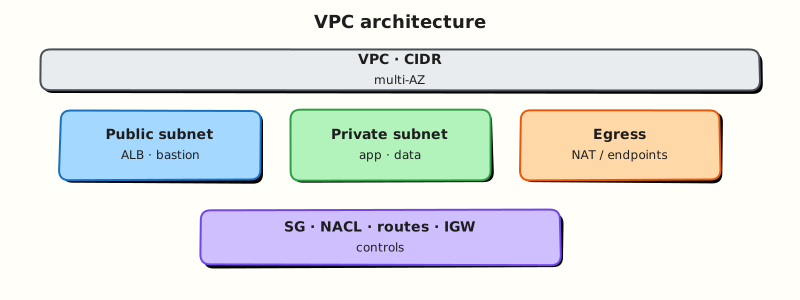
A VPC owns an IP address range (CIDR). Subnets are smaller ranges in one Availability Zone each. Route tables decide where packets go next. An Internet Gateway connects public subnets to the internet. Security groups filter traffic to network interfaces.
Theory
The problem (before AWS words)
You deploy a website on a virtual machine. Users report “site down”. The machine status says running. What failed?
Often it is not the app — it is the path:
- Wrong door rules (firewall)
- Missing road to the internet (route)
- Machine has no public address
Cloud networking is learning to read that path calmly.
VPC — your private office floor on AWS
Analogy: The AWS Region is a city. Your VPC is a private office campus you rent inside that city. Outsiders cannot walk into random rooms unless you build doors and roads.
CIDR (for example 10.42.0.0/16) is the address range for that campus — like the set of room numbers you own. Plan so two campuses you might connect later do not use the same numbers (overlapping CIDRs block peering).
Subnets — rooms in one building (AZ)
A subnet is a slice of the VPC CIDR inside one Availability Zone (one building).
Public subnet (plain meaning): machines can reach the internet (and be reached) because:
- The subnet’s route table sends
0.0.0.0/0(everything elsewhere) to an Internet Gateway (IGW) - The instance has a public IP (or Elastic IP)
The name tag “public” alone does nothing — routing makes it public.
Private subnet: no direct IGW route. Apps often sit here and go out through a NAT Gateway (costs money) or talk to AWS services through VPC endpoints (often cheaper for S3).
Interview line: “A subnet is public if its route table points 0.0.0.0/0 to an Internet Gateway and instances get public IPs — not because someone typed public in the name.”
Route tables — the campus map
A route table is a list of: destination → next hop.
| Destination | Typical target | Meaning |
|---|---|---|
| VPC CIDR (local) | local | Stay inside the VPC |
0.0.0.0/0 | igw-… | Go to the internet via IGW |
0.0.0.0/0 | nat-… | Private subnet egress via NAT (costs) |
| S3 prefix list | vpce-… | S3 via gateway endpoint |
If the default route to the IGW is missing, public websites time out even when the instance is healthy.
Internet Gateway vs NAT Gateway
| Device | Plain job | Student note |
|---|---|---|
| Internet Gateway | Door between VPC and internet for public subnets | Free attachment; normal for labs |
| NAT Gateway | Lets private subnets start outbound internet connections | Hourly + data charges — avoid in student labs |
Security groups — the door lock on the machine
A security group (SG) is a stateful firewall attached to a network interface (the virtual network card).
- You write allow rules (by default, deny what is not allowed for inbound)
- Stateful means if you allow inbound HTTP, the response is allowed back automatically
Analogy: The security group is the lock on the office door. The route table is whether a road exists to the building at all.
Network ACLs — the gate at the street
A network ACL (NACL) sits on the subnet. It is stateless — you must allow return traffic ports explicitly. Beginners rarely need custom NACLs; misconfigured NACLs cause mysterious failures. Prefer security groups as your main tool.
VPC endpoints — private roads to AWS services
If a private server must talk to S3 (file storage), you can:
- Pay for NAT and go via the internet path, or
- Create a gateway VPC endpoint for S3 — a free route that keeps S3 traffic on the AWS network
Interview line: “For S3 from private subnets I prefer a gateway endpoint over sending that traffic through a NAT Gateway.”
Peering and Transit Gateway (awareness)
- VPC peering connects two VPCs (not transitive: A–B and B–C does not mean A–C)
- Transit Gateway is a hub when you have many VPCs
Know the names; you will not build TGW in this student lab.
Common pitfalls
- Opening SSH
0.0.0.0/0on port 22 to the world - Creating NAT “because the diagram had one” and getting a bill
- Forgetting
MapPublicIpOnLaunchthen wondering why there is no public IP - Overlapping
10.0.0.0/16everywhere so accounts can never peer
Hands-on Lab
Objective
Build VPC 10.42.0.0/16 with one public subnet, IGW, route, and security group; prove routes; delete the default route (break); restore it; add an S3 gateway endpoint; clean up.
Prerequisites
| Tool | Notes |
|---|---|
| AWS CLI v2 | Working identity from Module 1 |
| jq | Recommended |
Lab environment
mkdir -p ~/rebash-aws/module-03 && cd ~/rebash-aws/module-03
export AWS_REGION="${AWS_REGION:-eu-west-2}"
export AWS_PAGER=""
aws sts get-caller-identity --output table
Real-world scenario
Platform asks for a cheap scratch network for learning — no NAT. You deliver a public subnet path, prove you can spot a missing internet route, and add an S3 endpoint so later private workloads can reach buckets without NAT.
Step-by-step tasks
Task 1 – Create VPC, subnet, IGW, routes
cd ~/rebash-aws/module-03
VPC_ID=$(aws ec2 create-vpc --cidr-block 10.42.0.0/16 --tag-specifications \
  'ResourceType=vpc,Tags=[{Key=Name,Value=rebash-m03-vpc}]' \
  --query Vpc.VpcId --output text)
echo "$VPC_ID" | tee vpc-id.txt
aws ec2 modify-vpc-attribute --vpc-id "$VPC_ID" --enable-dns-support
aws ec2 modify-vpc-attribute --vpc-id "$VPC_ID" --enable-dns-hostnames
AZ=$(aws ec2 describe-availability-zones --query 'AvailabilityZones[0].ZoneName' --output text)
echo "Using AZ $AZ"
SUBNET_ID=$(aws ec2 create-subnet --vpc-id "$VPC_ID" --cidr-block 10.42.1.0/24 \
  --availability-zone "$AZ" \
  --tag-specifications 'ResourceType=subnet,Tags=[{Key=Name,Value=rebash-m03-public}]' \
  --query Subnet.SubnetId --output text)
echo "$SUBNET_ID" | tee subnet-id.txt
aws ec2 modify-subnet-attribute --subnet-id "$SUBNET_ID" --map-public-ip-on-launch
IGW_ID=$(aws ec2 create-internet-gateway --tag-specifications \
  'ResourceType=internet-gateway,Tags=[{Key=Name,Value=rebash-m03-igw}]' \
  --query InternetGateway.InternetGatewayId --output text)
echo "$IGW_ID" | tee igw-id.txt
aws ec2 attach-internet-gateway --internet-gateway-id "$IGW_ID" --vpc-id "$VPC_ID"
RTB_ID=$(aws ec2 create-route-table --vpc-id "$VPC_ID" --tag-specifications \
  'ResourceType=route-table,Tags=[{Key=Name,Value=rebash-m03-public-rt}]' \
  --query RouteTable.RouteTableId --output text)
echo "$RTB_ID" | tee rtb-id.txt
aws ec2 create-route --route-table-id "$RTB_ID" --destination-cidr-block 0.0.0.0/0 \
  --gateway-id "$IGW_ID"
aws ec2 associate-route-table --route-table-id "$RTB_ID" --subnet-id "$SUBNET_ID" \
  | tee assoc.json
Expected output
ID files created; route to 0.0.0.0/0 via IGW succeeds.
Task 2 – Security group + evidence
cd ~/rebash-aws/module-03
VPC_ID=$(cat vpc-id.txt)
SG_ID=$(aws ec2 create-security-group --vpc-id "$VPC_ID" \
  --group-name rebash-m03-sg --description "Student module-03 SG" \
  --query GroupId --output text)
echo "$SG_ID" | tee sg-id.txt
aws ec2 describe-route-tables --route-table-ids "$(cat rtb-id.txt)" --output json | tee routes.json
aws ec2 describe-security-groups --group-ids "$SG_ID" --output json | tee sg.json
jq -e '.RouteTables[0].Routes[] | select(.GatewayId!=null)' routes.json
echo "vpc path evidence OK" | tee evidence.txt
Expected output
routes.json shows a route whose gateway is your IGW.
Task 3 – Break the internet route, then fix it
cd ~/rebash-aws/module-03
RTB_ID=$(cat rtb-id.txt)
IGW_ID=$(cat igw-id.txt)
aws ec2 delete-route --route-table-id "$RTB_ID" --destination-cidr-block 0.0.0.0/0
aws ec2 describe-route-tables --route-table-ids "$RTB_ID" \
  --query 'RouteTables[0].Routes' --output json | tee routes-broken.json
echo "Broken on purpose — no default route to IGW"
aws ec2 create-route --route-table-id "$RTB_ID" --destination-cidr-block 0.0.0.0/0 \
  --gateway-id "$IGW_ID"
aws ec2 describe-route-tables --route-table-ids "$RTB_ID" \
  --query 'RouteTables[0].Routes' --output json | tee routes-fixed.json
grep -q "$(cat igw-id.txt)" routes-fixed.json
echo "break-fix route OK" | tee breakfix.txt
Expected output
Broken file lacks IGW default route; fixed file has it again.
Task 4 – S3 gateway endpoint
cd ~/rebash-aws/module-03
VPC_ID=$(cat vpc-id.txt)
RTB_ID=$(cat rtb-id.txt)
aws ec2 create-vpc-endpoint --vpc-id "$VPC_ID" --service-name "com.amazonaws.${AWS_REGION}.s3" \
  --route-table-ids "$RTB_ID" --tag-specifications \
  'ResourceType=vpc-endpoint,Tags=[{Key=Name,Value=rebash-m03-s3}]' \
  | tee s3-endpoint.json
jq -r '.VpcEndpoint.VpcEndpointId' s3-endpoint.json | tee vpce-id.txt
test -s vpce-id.txt
Expected output
vpce-id.txt contains vpce-….
Validation steps
- Can draw VPC → subnet → route → IGW on paper
- Break/fix evidence files exist
- S3 endpoint created
- No NAT Gateway created
Common errors and fixes
| Error | Meaning | Fix |
|---|---|---|
| InvalidSubnet.Conflict | CIDR already used | Choose another block |
| DependencyViolation on delete | Resources still attached | Delete endpoint/SG/subnet before VPC |
| Endpoint error | Wrong Region in service name | Use com.amazonaws.<your-region>.s3 |
Challenge exercise
Create cleanup-vpc.sh:
#!/usr/bin/env bash
set -euo pipefail
cd ~/rebash-aws/module-03
VPCE=$(cat vpce-id.txt 2>/dev/null || true)
SG=$(cat sg-id.txt 2>/dev/null || true)
RTB=$(cat rtb-id.txt 2>/dev/null || true)
SUBNET=$(cat subnet-id.txt 2>/dev/null || true)
IGW=$(cat igw-id.txt 2>/dev/null || true)
VPC=$(cat vpc-id.txt 2>/dev/null || true)
[[ -n "${VPCE:-}" ]] && aws ec2 delete-vpc-endpoints --vpc-endpoint-ids "$VPCE" || true
sleep 5
[[ -n "${SG:-}" ]] && aws ec2 delete-security-group --group-id "$SG" || true
if [[ -n "${RTB:-}" && -n "${SUBNET:-}" ]]; then
  ASSOC=$(aws ec2 describe-route-tables --route-table-ids "$RTB" \
    --query 'RouteTables[0].Associations[?SubnetId!=`null`].RouteTableAssociationId' --output text)
  [[ -n "$ASSOC" ]] && aws ec2 disassociate-route-table --association-id "$ASSOC" || true
  aws ec2 delete-route --route-table-id "$RTB" --destination-cidr-block 0.0.0.0/0 2>/dev/null || true
  aws ec2 delete-route-table --route-table-id "$RTB" || true
fi
[[ -n "${SUBNET:-}" ]] && aws ec2 delete-subnet --subnet-id "$SUBNET" || true
if [[ -n "${IGW:-}" && -n "${VPC:-}" ]]; then
  aws ec2 detach-internet-gateway --internet-gateway-id "$IGW" --vpc-id "$VPC" || true
  aws ec2 delete-internet-gateway --internet-gateway-id "$IGW" || true
fi
[[ -n "${VPC:-}" ]] && aws ec2 delete-vpc --vpc-id "$VPC" || true
echo "cleanup done"
Learning outcomes
- You built a real VPC path without paying for NAT
- You practised the most common network outage: missing default route
- You can explain SG vs route vs endpoint in an interview
Cleanup
Validation
- VPC destroyed cleanly
- Can teach public vs private subnet to a classmate
- Ready for EC2 in Module 4
Code Walkthrough
- Tags (
Name=rebash-m03-*) make console cleanup easier. MapPublicIpOnLaunchmatters for public lab instances later.- Deleting
0.0.0.0/0is safe chaos for learning. - Gateway endpoints inject prefix routes automatically.
- Delete order: endpoint → SG → routes → subnet → IGW → VPC.
Security Considerations
- Do not leave SSH open to the world in production.
- Prefer security groups as primary control; keep NACLs simple.
- Use Flow Logs in real accounts when investigating traffic.
- Separate prod and sandbox VPCs.
Common Mistakes
NAT by default
Private subnets often need AWS APIs, not the whole internet. Prefer endpoints; add NAT only when required.
Name tag is not routing
Calling a subnet “public” without an IGW route does not make it public.
Best Practices
- At least two AZs for production apps
- Clear CIDR plan written down before peering
- Tag owner and expiry on lab networks
- Document the happy-path route in your notes
Troubleshooting
| Symptom | Likely cause | Fix |
|---|---|---|
| curl timeout to instance | SG / route / no public IP | Check SG inbound, RT 0.0.0.0/0, public IP |
| S3 fails from private subnet | No NAT/endpoint | Add gateway endpoint |
| Peering fails | Overlapping CIDR | Redesign address plan |
Summary
A VPC is your private network on AWS. Subnets, route tables, Internet Gateway, and security groups decide whether users can reach your app. Practise reading the path — that skill is core for Cloud support and DevOps roles.
Interview Questions
1. What is a VPC in simple words?
Reveal answer
A Virtual Private Cloud is your private network inside an AWS Region. You choose an IP range, create subnets, and control routing and firewalls. Resources like EC2 usually sit inside a VPC.
2. What makes a subnet public?
Reveal answer
Its route table sends internet-bound traffic (0.0.0.0/0) to an Internet Gateway, and instances receive public or Elastic IPs. The subnet name alone does not make it public.
3. Security group vs network ACL?
Reveal answer
A security group is a stateful firewall on a network interface (allow rules; return traffic handled automatically). A network ACL is a stateless firewall on a subnet (allow and deny; return ports need explicit rules). Prefer security groups for most app controls.
4. Internet Gateway vs NAT Gateway?
Reveal answer
An Internet Gateway connects public subnets to the internet. A NAT Gateway lets private subnets make outbound internet connections without accepting inbound internet connections. NAT Gateways cost money; students should avoid them unless required.
5. Why did deleting the 0.0.0.0/0 route break internet access?
Reveal answer
Without a default route to the Internet Gateway, packets from the subnet have no next hop to the internet. The instance can still be running; users simply cannot reach it (and it cannot reach the internet).
6. What is a VPC gateway endpoint for S3?
Reveal answer
It is a route-table entry that sends S3 traffic to S3 over the AWS network without needing a NAT Gateway for that traffic. It is a common cost and security improvement for private subnets.
7. Is VPC peering transitive?
Reveal answer
No. If A peers with B and B peers with C, A does not automatically reach C through B. For hub-and-spoke at scale, companies use Transit Gateway.
8. How do you triage an unreachable website on EC2?
Reveal answer
Confirm identity (get-caller-identity), instance state, public IP, security group inbound port, route to IGW/NAT, then the application. Separate IAM AccessDenied on APIs from TCP timeouts on the website port.
Related Tutorials
- Previous: IAM
- Next: Compute: EC2, ASG, and Load Balancing
- Lab: IAM and VPC Reachability Triage