Production AWS Landing Zones
Overview
With one personal AWS account, it is hard to picture how large companies run dozens or hundreds of accounts without chaos. This module introduces the landing zone — multi-account foundations explained in plain English first.
Problem in plain English: One shared AWS account for everything — production website, student experiments, finance logs, and admin keys — means one mistake or one stolen password can affect everything. Auditors cannot tell who did what. Bills cannot be split by team.
What a landing zone means: A landing zone is a ready-made foundation for enterprise AWS: multiple accounts, logging turned on, security rules enforced, and a standard way to create new accounts for new teams or projects.
Analogy: Instead of one messy shared flat where everyone has the master key, the company builds a campus — separate buildings (accounts) for security, logs, production, and sandboxes, with campus-wide rules nobody can override.
AWS terms:
| Term | Plain English |
|---|---|
| AWS Organizations | Groups many AWS accounts under one umbrella with consolidated billing |
| Organizational Unit (OU) | Folder of accounts (e.g. “Production”, “Sandbox”) |
| Service Control Policy (SCP) | Campus-wide rule that denies actions even if someone’s IAM policy allows them |
| AWS Control Tower | AWS service that sets up a landing zone with guardrails and account vending |
| Log archive account | Dedicated account where audit logs are stored safely |
This is Tutorial 1 in Module 15: Production AWS of the REBASH Academy AWS for Cloud & DevOps Engineers series. Most student sandboxes are standalone accounts — you will create portfolio artefacts (permission boundaries, tagging standards, SCP JSON, account structure doc) and probe organizations describe-organization.
Organisations access
Creating OUs and SCPs requires the management account. Sandbox learners use portfolio JSON/markdown artefacts plus describe-organization — not destructive org changes.
Prerequisites
- IAM, Identity Access, and Organizations (Module 2)
- Reliability and Disaster Recovery (Module 14)
- Infrastructure as Code on AWS (Module 11)
You do not need to have used Control Tower before.
Learning Objectives
By the end of this tutorial, you will be able to:
- Explain landing zone to a friend without saying “Control Tower” first
- Sketch a multi-account layout (security, logging, workloads, sandbox)
- Author SCP and permission boundary JSON for guardrails
- Contrast SCP vs IAM policy vs permission boundary
- Describe why a separate logging account matters
- Answer fresher interview questions on blast radius and break-glass access
Architecture
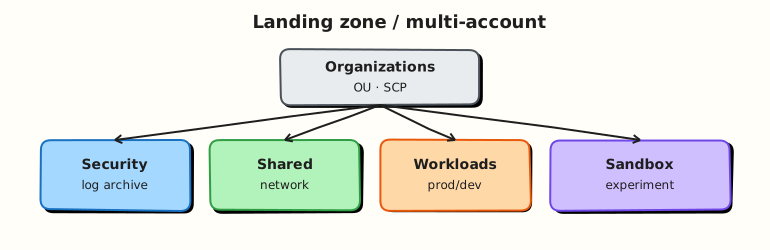
The management account hosts Organizations and SCPs. OUs segregate prod/non-prod. Workload accounts host applications. A log archive account receives CloudTrail/Config; a security account hosts GuardDuty/Security Hub admin. Shared services provide DNS, CI/CD, and networking hubs.
Theory
The problem (before org jargon)
Problem: Startup grows. Everyone uses one account. A developer deletes a production database while testing. Finance cannot attribute spend. Security cannot prove who changed a firewall rule.
Analogy: One shared college computer lab login for every student — no accountability, no separation between final-year project and first-year experiments.
AWS approach: Multi-account strategy — separate blast radius, separate bills, central audit logs.
What a landing zone contains
| Component | Plain job |
|---|---|
| Multiple accounts | Prod ≠ dev ≠ logs ≠ security tooling |
| Organisations + OUs | Folder structure for policies |
| SCPs | “Nobody in Sandbox can launch GPU instances in us-east-1” |
| Central logging | All accounts send CloudTrail to log archive |
| Identity Center (SSO) | Humans log in once; get role per account |
| Account vending | Click or API to create a new standard account |
Interview one-liner: “A landing zone is multi-account AWS with guardrails, logging, and identity baselines before app teams deploy.”
SCP vs IAM vs permission boundary
| Control | Scope | Plain example |
|---|---|---|
| IAM policy | One user/role in one account | “Ravi may start EC2 instances” |
| SCP | Whole OU or account in org | “Nobody may use Regions outside EU” |
| Permission boundary | Cap on one IAM identity | “This role can never delete org trails” |
How they combine: For an action to succeed in a member account, both SCP and IAM must allow it (SCP cannot grant — only filter/deny). Permission boundary caps what IAM can ever attach to a role.
Tiny example: IAM allows s3:*. SCP denies s3:DeleteBucket on production OU. Delete fails even though IAM said yes.
Control Tower vs custom landing zone
| Approach | Plain pros | Plain cons |
|---|---|---|
| Control Tower | Fast start; built-in guardrails | Opinionated; feature/Region limits |
| Custom (IaC / Landing Zone Accelerator) | Full flexibility | Your team maintains everything |
Depth: Control Tower uses StackSets and Account Factory behind the scenes — same IaC ideas from Module 11 at org scale.
Why a separate logging account?
Problem: If attackers compromise a workload account, they might delete CloudTrail logs in that same account.
Fix: Organisation trail delivers logs to a log archive account where workload admins cannot delete buckets.
Interview one-liner: “Logs live in an account app teams do not admin — so audit evidence survives compromise.”
Common pitfalls
- SCP without testing — can lock out all accounts; keep break-glass access in management account.
- Flat account sprawl — hundreds of accounts with no OU or tags.
- CI pipeline in management account — deploy to workload accounts only.
- Tag policies without enforcement — add SCP deny on untagged
ec2:RunInstancesfor real effect.
Hands-on Lab
Objective
Produce landing-zone portfolio artefacts (permission boundary, tagging standard, SCP deny JSON, account structure doc), attach a permission boundary to a lab IAM role, and run Organizations discovery commands — applying OU/tag policy only if you are on the org management account.
Prerequisites
| Tool | Notes |
|---|---|
| AWS CLI v2 | iam:*, organizations:Describe* |
| Sandbox account | Standalone or org member |
| Optional: management account | For OU create (skip if unavailable) |
Lab environment
mkdir -p ~/rebash-aws/module-15 && cd ~/rebash-aws/module-15
export AWS_REGION="${AWS_REGION:-eu-west-2}"
export AWS_PAGER=""
export LAB_ROLE="rebash-m15-app-role"
export BOUNDARY_NAME="rebash-m15-permission-boundary"
ACCOUNT_ID=$(aws sts get-caller-identity --query Account --output text)
echo "$ACCOUNT_ID" | tee account-id.txt
Real-world scenario
You join platform engineering: “Document our target multi-account layout and prove sandbox guardrails — permission boundary on app roles and SCP deny for unapproved Regions — before Control Tower enrollment next quarter.” Deliver artefacts hiring managers can review even without org admin access.
Step-by-step tasks
Task 1 – Document account structure
Create account-structure.md:
# REBASH target AWS organisation layout

| OU | Accounts | Purpose |
|----|----------|---------|
| Security | LogArchive, SecurityTooling | Org CloudTrail, Config, GuardDuty admin |
| Infrastructure | Network, SharedServices | Transit Gateway, DNS, central CI artifacts |
| Workloads/NonProd | Dev, Test, Staging | Integration and pre-prod |
| Workloads/Prod | Prod-A, Prod-B | Customer-facing (separate blast radius) |
| Sandbox | Personal sandboxes | Experimentation with SCP spend/Region limits |
| Suspended | Offboarded | Deny all via SCP pending closure |

**Logging flow:** All accounts → organisation trail → LogArchive S3 (SSE-KMS, bucket policy denies insecure transport).

**Human access:** IAM Identity Center permission sets — no long-lived IAM users in workload accounts.

**Pipeline access:** OIDC role per account (Module 12) with `terraform apply` scoped to stack prefixes.
cd ~/rebash-aws/module-15
test -f account-structure.md
grep -q 'LogArchive' account-structure.md
echo "account structure OK" | tee structure-evidence.txt
Expected output
structure-evidence.txt contains account structure OK.
Task 2 – Tagging standard and SCP deny artefact
Create tagging-standard.json:
{
  "RequiredTags": [
    {
      "Key": "Environment",
      "AllowedValues": ["sandbox", "dev", "test", "staging", "prod"]
    },
    {
      "Key": "Owner",
      "Description": "Team email or cost centre code"
    },
    {
      "Key": "rebash:module",
      "Description": "Course or platform component identifier"
    }
  ],
  "Enforcement": {
    "ScpCondition": "aws:RequestTag/Environment",
    "Note": "Deny ec2:RunInstances and s3:CreateBucket when Environment tag missing"
  }
}
Create scp-deny-unapproved-regions.json:
{
  "Version": "2012-10-17",
  "Statement": [
    {
      "Sid": "DenyUnapprovedRegions",
      "Effect": "Deny",
      "Action": "*",
      "Resource": "*",
      "Condition": {
        "StringNotEquals": {
          "aws:RequestedRegion": [
            "eu-west-2",
            "eu-west-1"
          ]
        },
        "ArnNotLike": {
          "aws:PrincipalARN": [
            "arn:aws:iam::*:role/OrganizationAccountAccessRole",
            "arn:aws:iam::*:role/AWSControlTowerExecution"
          ]
        }
      }
    }
  ]
}
cd ~/rebash-aws/module-15
jq empty tagging-standard.json scp-deny-unapproved-regions.json
echo "json artefacts valid" | tee json-evidence.txt
Expected output
jq empty exits 0; json-evidence.txt confirms validity.
Task 3 – Permission boundary and lab role
Create permission-boundary.json:
{
  "Version": "2012-10-17",
  "Statement": [
    {
      "Sid": "AllowCommonReadAndLabServices",
      "Effect": "Allow",
      "Action": [
        "ec2:Describe*",
        "s3:ListAllMyBuckets",
        "s3:GetBucketLocation",
        "cloudwatch:GetMetricData",
        "logs:DescribeLogGroups",
        "sts:GetCallerIdentity"
      ],
      "Resource": "*"
    },
    {
      "Sid": "DenyOrgAndIamAdmin",
      "Effect": "Deny",
      "Action": [
        "iam:CreateUser",
        "iam:CreateRole",
        "organizations:*",
        "account:*"
      ],
      "Resource": "*"
    }
  ]
}
cd ~/rebash-aws/module-15
aws iam create-policy --policy-name "$BOUNDARY_NAME" \
  --policy-document file://permission-boundary.json \
  --description "REBASH module-15 lab permission boundary" \
  | tee boundary-create.json || true
BOUNDARY_ARN=$(aws iam list-policies --scope Local --query \
  "Policies[?PolicyName=='${BOUNDARY_NAME}'].Arn | [0]" --output text)
echo "$BOUNDARY_ARN" | tee boundary-arn.txt
aws iam create-role --role-name "$LAB_ROLE" \
  --assume-role-policy-document '{"Version":"2012-10-17","Statement":[{"Effect":"Allow","Principal":{"Service":"ec2.amazonaws.com"},"Action":"sts:AssumeRole"}]}' \
  --tags Key=Name,Value=rebash-m15 \
  | tee role-create.json || true
aws iam put-role-permissions-boundary --role-name "$LAB_ROLE" \
  --permissions-boundary "$BOUNDARY_ARN"
aws iam get-role --role-name "$LAB_ROLE" \
  --query 'Role.PermissionsBoundary.PermissionsBoundaryArn' --output text | tee boundary-attached.txt
grep -q "$BOUNDARY_NAME" boundary-attached.txt
Expected output
boundary-attached.txt shows the boundary policy ARN on the lab role.
Task 4 – Organizations discovery (and optional OU)
cd ~/rebash-aws/module-15
aws organizations describe-organization --output json 2>&1 | tee org-describe.json || true
if jq -e '.Organization' org-describe.json >/dev/null 2>&1; then
  jq '{Id: .Organization.Id, MasterAccountId: .Organization.MasterAccountId, FeatureSet: .Organization.FeatureSet}' org-describe.json | tee org-summary.json
  MASTER=$(jq -r '.Organization.MasterAccountId' org-describe.json)
  ACCOUNT_ID=$(cat account-id.txt)
  if [[ "$ACCOUNT_ID" == "$MASTER" ]]; then
    OU_ID=$(aws organizations create-organizational-unit \
      --parent-id "$(aws organizations list-roots --query 'Roots[0].Id' --output text)" \
      --name rebash-m15-sandbox-ou --query 'OrganizationalUnit.Id' --output text 2>/dev/null || true)
    echo "${OU_ID:-skipped}" | tee ou-id.txt
  else
    echo "not management account — OU create skipped" | tee ou-id.txt
  fi
else
  echo "standalone account — no organization" | tee org-summary.json
fi
test -s org-describe.json || test -s org-summary.json
Expected output
Either org-summary.json with Organisation ID or a clear standalone-account message in org-summary.json.
Validation steps
-
account-structure.mddescribes multi-account layout and logging flow - Tagging standard and SCP JSON validate with
jq - Permission boundary attached to lab IAM role
- Organizations API probed; OU creation attempted only on management account
- Artefacts suitable for portfolio review
Common errors and fixes
| Error | Cause | Fix |
|---|---|---|
AWSOrganizationsNotInUseException | Standalone account | Document in org-summary; artefacts still valid |
AccessDenied on create-ou | Member account | Expected — skip OU task |
PolicyLimitExceeded | Too many customer policies | Reuse existing boundary or delete old lab policies |
| SCP appears ignored | SCPs don't affect management account root | Test on member OU/account |
Challenge exercise
Draft scp-deny-unencrypted-s3.json denying s3:PutObject without s3:x-amz-server-side-encryption and merge rationale into account-structure.md — explain how SCP complements bucket policies from Module 11.
Learning outcomes
- You produced landing-zone documentation hiring panels recognise
- You applied a permission boundary — common app-role pattern
- You understand SCP vs IAM vs boundary layering
- You know when Control Tower beats custom landing zones
Cleanup
cd ~/rebash-aws/module-15
aws iam delete-role-permissions-boundary --role-name "$LAB_ROLE" 2>/dev/null || true
aws iam delete-role --role-name "$LAB_ROLE" 2>/dev/null || true
BOUNDARY_ARN=$(cat boundary-arn.txt 2>/dev/null || true)
if [[ -n "${BOUNDARY_ARN:-}" && "$BOUNDARY_ARN" != "None" ]]; then
  POLICY_ARN="$BOUNDARY_ARN"
  aws iam delete-policy --policy-arn "$POLICY_ARN" 2>/dev/null || true
fi
OU_ID=$(cat ou-id.txt 2>/dev/null || true)
if [[ -n "$OU_ID" && "$OU_ID" == ou-* ]]; then
  aws organizations delete-organizational-unit --organizational-unit-id "$OU_ID" 2>/dev/null || true
fi
echo "cleanup complete" | tee cleanup-log.txt
Validation
- Portfolio artefacts exist under
~/rebash-aws/module-15 - Can explain logging account and org trail purpose in plain English
- Can contrast SCP and permission boundary
- Ready for org-wide troubleshooting in Module 16
Code Walkthrough
- Permission boundary on role — caps permissions even if admins attach
AdministratorAccesspolicy incorrectly. - SCP JSON as artefact — in orgs, attach to OU via console/IaC; test in sandbox OU first.
- Tag standard JSON — feeds tag policies and SCP conditions (
aws:RequestTag). describe-organization— first command when unsure if account is standalone.- Break-glass ARNs in SCP — exclude Control Tower execution roles from Region deny.
Security Considerations
- Never run application workloads in the management account.
- Org CloudTrail bucket: deny
s3:DeleteObjectexcept break-glass role with MFA. - SCP deny list for
iam:CreateAccessKeyon human users. - Separate security tooling account for delegated admin — workload admins cannot disable GuardDuty org-wide.
- Rotate and audit
OrganizationAccountAccessRoleusage.
Common Mistakes
SCP tested in production OU first
Always validate SCP changes in a sandbox OU — a misconfigured deny can halt all accounts.
Logging account writable by app teams
Log archive buckets must be write-only from trail service; no workload admin delete rights.
Same account for prod and experiment
Violates blast-radius basics — use account vending even for small teams.
Best Practices
- IAM Identity Center for human access; no static IAM users
- Infrastructure as Code for account baselines (StackSets, Control Tower customisations)
- Mandatory tags enforced with SCP at launch time
- Periodic access reviews per OU
- Document break-glass procedure with MFA hardware keys stored offline
Troubleshooting
| Symptom | Likely cause | Fix |
|---|---|---|
| Cannot create account | Quota or not management account | Request quota increase; use management credentials |
| SCP not applied | Wrong OU placement | Move account or attach SCP to parent OU |
| Control Tower drift | Manual console changes | Repair via Control Tower or redeploy customisation |
| Missing logs in archive | Trail misconfigured Region | Enable multi-Region org trail |
Summary
Production AWS starts with multi-account governance: Organizations, SCPs, centralised logging, and bounded IAM. You built portfolio guardrail artefacts and attached a permission boundary — the same concepts Control Tower automates. Next, Troubleshooting AWS ties Modules 1–15 into on-call decision trees.
Interview Questions
1. What is a landing zone in simple words?
Reveal answer
A landing zone is a pre-configured multi-account AWS foundation with security, logging, identity, and networking baselines ready before application teams deploy. It separates production from sandbox, centralises audit logs, and enforces org-wide guardrails through Organizations and SCPs.
2. SCP vs IAM policy — what wins?
Reveal answer
Both must allow an action for it to succeed in a member account (except the management account management events). SCPs set maximum permissions guardrails for OUs/accounts. IAM policies grant permissions to identities. An explicit SCP deny blocks even if IAM allows. Permission boundaries cap what an identity can be granted within IAM.
3. Why a separate logging account?
Reveal answer
Prevents workload account administrators from disabling or deleting audit logs after compromise or mistake. Organisation CloudTrail and Config deliver to a log archive account with strict bucket policies and KMS controls.
4. What does Control Tower add over raw Organizations?
Reveal answer
Pre-built landing zone: Account Factory, guardrails (SCP baselines), dashboard for drift, optional integrations (Log Archive, Audit accounts). Reduces custom CloudFormation work but is opinionated and Region/feature dependent.
5. Permission boundary use case?
Reveal answer
Delegate IAM admin to a team but cap maximum permissions — e.g. developers manage roles that cannot exceed PowerUserAccess minus IAM/org changes. Common for delegated administration models.
6. How do tag policies relate to cost (Module 13)?
Reveal answer
Tag policies standardise keys/values org-wide. Combined with SCP denies on untagged resource creation, they enable reliable Cost Explorer chargeback and budget alerts per team/environment.
7. CI/CD across accounts (Module 12 link)?
Reveal answer
OIDC pipeline in tooling account assumes DeployRole in workload accounts via trust policies. SCP allows sts:AssumeRole only to known role ARNs. CloudFormation StackSets or Terraform with role chaining — never long-lived keys.
8. When is standalone account “good enough”?
Reveal answer
Learning sandboxes and tiny startups before compliance multi-account mandates. Plan migration before prod + regulated data — retrofitting org-wide logging and SCPs is harder than starting with a landing zone.
Related Tutorials
- Previous: Reliability and Disaster Recovery (Module 14)
- Next: Troubleshooting AWS (Module 16)
- IAM, Identity Access, and Organizations
- Infrastructure as Code on AWS
- Labs: IAM and VPC Triage, Secure EC2 via SSM and S3
- Course index: AWS for Cloud & DevOps Engineers