Realtime chat
Overview
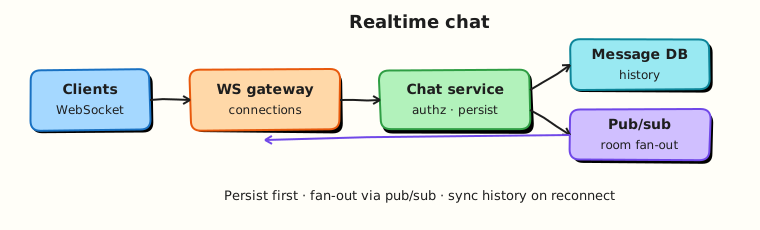
Chat needs low-latency delivery, durable history, and correct behaviour when users disconnect. Long polling works for demos; production usually uses WebSockets (or similar) plus a pub/sub backbone so any server can reach any online user.
Prerequisites
- Search / autocomplete (Part C complete)
- Messaging and async
Learning Objectives
By the end of this tutorial, you will be able to:
- Compare polling, long polling, and WebSockets for chat
- Design connection gateway + pub/sub + message store
- Reason about ordering, acknowledgements, and retries
- Handle offline users with inbox / push fallback
- Implement a toy multi-room chat hub in Python
Requirements sketch
| ID | Requirement |
|---|---|
| F1 | 1:1 and group rooms |
| F2 | Send/receive messages in near realtime when online |
| F3 | Persist history with cursor pagination |
| F4 | Deliver later when recipient reconnects |
| F5 | Basic read receipts (optional v1) |
NFRs (example): p95 online delivery < 200 ms in-region; at-least-once to clients with idempotent message IDs.
Theory
Transport choices
| Approach | Pros | Cons |
|---|---|---|
| Short polling | Simple | Wasteful, high latency |
| Long polling | Better latency | Connection churn |
| WebSocket / SSE | Persistent, bi/uni-directional | Sticky state, scale complexity |
Chat almost always wants a persistent duplex channel (WebSocket). SSE can work for server→client if clients send via HTTP.
High-level components
- Client — WS connection, local buffer, ack
- Gateway / connection service — terminates sockets; maps
user_id → connection - Chat service — authz, persist message, publish event
- Pub/sub (Redis, NATS, Kafka) — fan-out to gateways holding recipients
- Message store — history by
room_id + created_at - Push provider — offline mobile notifications (Module 15)
Send path
Persist before (or atomically with) fan-out intent (outbox) so crashes do not invent ghost messages or lose them silently.
Ordering
- Order per room (or per pair) is enough; global order is unnecessary
- Clients may see gaps on reconnect — heal via history sync since
last_seen_id - Use monotonic
message_id/ snowflake per room stream
Acknowledgements
- Server persists → returns
message_idto sender - Recipients ack delivery/read separately
- At-least-once WS frames + client de-dupe by
message_id
Scaling connections
- Horizontal gateways behind L4 LB with idle timeouts tuned for WS
- Sticky sessions help but pub/sub makes any gateway able to push
- Shard pub/sub channels by
room_id
Group fan-out
Large rooms: do not loop every member inside one request thread — publish once to room:{id} and let subscribed gateways deliver to local connections.
Architecture
Hands-on Lab
Objective
Build an in-process chat hub: join rooms, broadcast to online members, and queue messages for offline users until they reconnect.
Lab environment
Local Python 3.10+.
Real-world scenario
You need a teaching model of “online push + offline backlog” before introducing Redis and socket frameworks.
Step-by-step tasks
1. Workspace
2. Chat hub
#!/usr/bin/env python3
"""Toy chat hub: rooms, online delivery, offline backlog."""

from __future__ import annotations

from dataclasses import dataclass, field


@dataclass
class Message:
    message_id: int
    room: str
    sender: str
    body: str


@dataclass
class Hub:
    rooms: dict[str, set[str]] = field(default_factory=dict)
    online: set[str] = field(default_factory=set)
    inboxes: dict[str, list[Message]] = field(default_factory=dict)
    history: dict[str, list[Message]] = field(default_factory=dict)
    delivered: dict[str, list[int]] = field(default_factory=dict)
    _seq: int = 0

    def connect(self, user: str) -> list[Message]:
        self.online.add(user)
        pending = self.inboxes.pop(user, [])
        for msg in pending:
            self.delivered.setdefault(user, []).append(msg.message_id)
        return pending

    def disconnect(self, user: str) -> None:
        self.online.discard(user)

    def join(self, user: str, room: str) -> None:
        self.rooms.setdefault(room, set()).add(user)

    def send(self, room: str, sender: str, body: str) -> Message:
        self._seq += 1
        msg = Message(self._seq, room, sender, body)
        self.history.setdefault(room, []).append(msg)
        for user in self.rooms.get(room, set()):
            if user == sender:
                continue
            if user in self.online:
                self.delivered.setdefault(user, []).append(msg.message_id)
            else:
                self.inboxes.setdefault(user, []).append(msg)
        return msg


def main() -> None:
    hub = Hub()
    hub.join("alice", "r1")
    hub.join("bob", "r1")
    hub.join("cara", "r1")
    hub.connect("alice")
    hub.connect("bob")
    # cara offline
    m1 = hub.send("r1", "alice", "hello")
    hub.disconnect("bob")
    m2 = hub.send("r1", "alice", "bob left")
    pending = hub.connect("cara")
    bob_pending = hub.connect("bob")

    lines = [
        f"m1_id={m1.message_id}",
        f"bob_got_m1={'yes' if m1.message_id in hub.delivered.get('bob', []) else 'no'}",
        f"cara_inbox_on_connect={len(pending)}",
        f"cara_got_both={'yes' if {m1.message_id, m2.message_id} <= set(hub.delivered.get('cara', [])) else 'no'}",
        f"bob_backlog={len(bob_pending)}",
        f"history_len={len(hub.history['r1'])}",
        f"chat_ok={'yes' if len(pending) == 2 and len(bob_pending) == 1 else 'no'}",
    ]
    report = "\n".join(lines) + "\n"
    print(report, end="")
    open("chat-report.txt", "w", encoding="utf-8").write(report)


if __name__ == "__main__":
    main()
3. Run and verify
cd ~/rebash-system-design/module-14-chat
python3 chat_lab.py | tee chat-run.txt
grep chat_ok chat-report.txt
Expected output
chat_ok=yes — Cara receives two backlog messages; Bob receives one missed while offline.
Validation steps
- Online members get immediate delivery IDs
- Offline members receive backlog on connect
- Room history retains both messages
Challenge exercise
Add per-message client acks and redeliver unacked messages on a timer.
Cleanup
cd ~/rebash-system-design/module-14-chat
rm -f chat-run.txt chat-report.txt 2>/dev/null || true
Interview Questions
1. Why not store WebSocket connections in one monolithic process forever?
Reveal answer
Connection count and CPU/memory force horizontal gateways. A pub/sub layer routes messages to whichever gateway holds the recipient’s socket.
2. How do you avoid losing messages on crash?
Reveal answer
Persist to the message store (and/or outbox) before relying on in-memory fan-out. On reconnect, clients sync history since their last message ID.
3. How do you order messages in a group chat?
Reveal answer
Provide a total order per room via a single writer partition or monotonic IDs for that room stream. Do not promise a global order across all rooms.
4. WebSocket vs MQTT vs gRPC streaming?
Reveal answer
WebSockets are the common web/mobile choice. MQTT shines for IoT/presence at huge device counts. gRPC streaming fits internal services more than browsers. Choose for client ecosystem and ops skill.
Common Mistakes
Fan-out inside the HTTP request with no pub/sub
One slow recipient or large room blocks everyone.
No history sync protocol
Flaky networks need catch-up, not only live frames.
Summary
Chat is durable messaging + online fan-out. Persist first, route via pub/sub to connection gateways, and heal gaps with history sync.
What's Next
Notifications and presence — online status, typing indicators, and multi-channel notify.