Notifications and presence
Overview
Presence answers “who is online / typing?” Notifications answer “what should we tell the user?” across in-app, push, email, or SMS. Both are high-fan-out and easy to get wrong on cost, privacy, and spam.
Prerequisites
Learning Objectives
By the end of this tutorial, you will be able to:
- Design presence with heartbeats and TTLs
- Route notifications by channel preference and online state
- Avoid notification storms with aggregation and rate limits
- Separate urgent vs deferrable delivery
- Implement presence + notify routing in Python
Requirements sketch
| ID | Requirement |
|---|---|
| P1 | Show online/away/offline with short lag |
| P2 | Optional typing indicator in a room |
| N1 | In-app notification when online |
| N2 | Mobile push when offline (if enabled) |
| N3 | User preferences / quiet hours |
Theory
Presence model
Store user_id → {status, last_seen, device_ids}.
- Client sends heartbeats on the WS every N seconds
- Server sets a TTL; missing heartbeats → offline
- Broadcast presence changes on a pub/sub channel to interested watchers (friends, room members) — not the whole world
Typing indicators
Ephemeral events with short TTL; do not persist. Rate-limit per user/room. Drop under load before dropping chat messages.
Notification pipeline
Event (mention, DM, like)
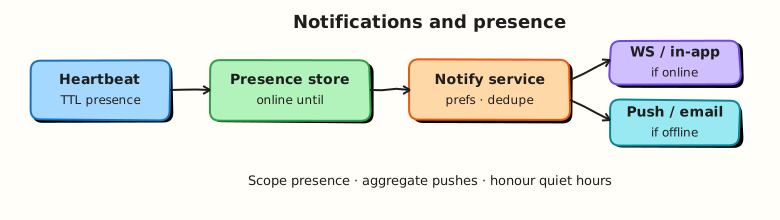
  → Notification service (prefs, dedupe, aggregate)
  → Channel routers: in-app WS / push / email
  → Delivery logs + unread counters
Online-aware routing
| State | Typical routing |
|---|---|
| Online in-app | WS / in-app inbox only |
| Background mobile | Push (APNs/FCM) |
| Quiet hours | Suppress or silent |
| Unsubscribed channel | Skip |
Aggregation
“Alice and 12 others liked your post” beats 13 pushes. Aggregate windows (e.g. 2 minutes) cut cost and annoyance.
Idempotency and dedupe
Use notification_id / event key so retries do not double-push. Collapse identical unread items in the inbox.
Scale and privacy
- Presence subscriptions are graph-scoped
- Do not leak “last seen” if the product promises privacy modes
- Push payloads should minimise sensitive body text
Architecture
WS Gateway → Presence service (heartbeat TTL store)
Events → Notification service → WS (online)
                              → Push provider (offline)
                              → Email worker (digest)
Hands-on Lab
Objective
Model presence with TTL expiry and a notifier that chooses ws vs push based on online state and preferences.
Lab environment
Local Python 3.10+.
Real-world scenario
Product wants “push only if they’re not looking at the app.” You prototype the decision table.
Step-by-step tasks
1. Workspace
mkdir -p ~/rebash-system-design/module-15-presence
cd ~/rebash-system-design/module-15-presence
2. Presence + notify
#!/usr/bin/env python3
"""Presence TTL + notification channel routing."""

from __future__ import annotations

import time
from dataclasses import dataclass, field


@dataclass
class Presence:
    online_until: dict[str, float] = field(default_factory=dict)

    def heartbeat(self, user: str, ttl: float = 0.2, now: float | None = None) -> None:
        now = time.time() if now is None else now
        self.online_until[user] = now + ttl

    def is_online(self, user: str, now: float | None = None) -> bool:
        now = time.time() if now is None else now
        return self.online_until.get(user, 0) > now


@dataclass
class Notifier:
    presence: Presence
    prefs: dict[str, dict]
    sent: list[tuple[str, str, str]] = field(default_factory=list)

    def notify(self, user: str, kind: str, body: str, now: float | None = None) -> str:
        pref = self.prefs.get(user, {"push": True, "quiet": False})
        if pref.get("quiet"):
            channel = "suppressed"
        elif self.presence.is_online(user, now=now):
            channel = "ws"
        elif pref.get("push", True):
            channel = "push"
        else:
            channel = "inbox_only"
        self.sent.append((user, channel, kind))
        return channel


def main() -> None:
    presence = Presence()
    prefs = {
        "alice": {"push": True, "quiet": False},
        "bob": {"push": True, "quiet": False},
        "cara": {"push": False, "quiet": False},
        "dan": {"push": True, "quiet": True},
    }
    n = Notifier(presence, prefs)
    t0 = time.time()
    presence.heartbeat("alice", ttl=1.0, now=t0)
    # bob no heartbeat → offline

    c_alice = n.notify("alice", "dm", "hi", now=t0)
    c_bob = n.notify("bob", "dm", "hi", now=t0)
    c_cara = n.notify("cara", "dm", "hi", now=t0)
    c_dan = n.notify("dan", "dm", "hi", now=t0)
    # alice TTL expired
    c_alice_later = n.notify("alice", "dm", "again", now=t0 + 2.0)

    lines = [
        f"alice_online_channel={c_alice}",
        f"bob_offline_channel={c_bob}",
        f"cara_no_push_channel={c_cara}",
        f"dan_quiet_channel={c_dan}",
        f"alice_expired_channel={c_alice_later}",
        f"routing_ok={'yes' if (c_alice, c_bob, c_cara, c_dan, c_alice_later) == ('ws', 'push', 'inbox_only', 'suppressed', 'push') else 'no'}",
    ]
    report = "\n".join(lines) + "\n"
    print(report, end="")
    open("presence-report.txt", "w", encoding="utf-8").write(report)


if __name__ == "__main__":
    main()
3. Run and verify
cd ~/rebash-system-design/module-15-presence
python3 presence_lab.py | tee presence-run.txt
grep routing_ok presence-report.txt
Expected output
routing_ok=yes
Validation steps
- Online →
ws - Offline + push enabled →
push - Quiet hours →
suppressed
Challenge exercise
Aggregate multiple like events for the same target within 2 seconds into one notification.
Cleanup
cd ~/rebash-system-design/module-15-presence
rm -f presence-run.txt presence-report.txt 2>/dev/null || true
Interview Questions
1. How do you implement presence efficiently?
Reveal answer
Heartbeats update a TTL key in a fast store; expiry implies offline. Broadcast changes only to relevant subscribers. Avoid writing every heartbeat to durable OLTP.
2. When do you send push vs in-app only?
Reveal answer
Prefer in-app/WS when a live session exists. Use push when the user is offline/background and has opted in. Honour quiet hours and per-channel preferences.
3. How do you prevent notification spam?
Reveal answer
Aggregate similar events, rate-limit per user/topic, dedupe by event key, and offer preference controls. Drop ephemeral noise (typing) before durable alerts.
4. What is the difference between delivery and read?
Reveal answer
Delivery means the device/inbox received it; read means the user opened it. Track separately for badges and receipts; both need idempotent updates.
Common Mistakes
Broadcasting every presence change globally
Presence traffic can exceed chat traffic. Scope subscriptions.
Pushing every like immediately
Aggregate or users disable notifications — and blame your product.
Summary
Presence is a TTL heartbeat problem; notifications are a preference-aware routing problem. Keep ephemeral signals cheap and durable alerts respectful.
What's Next
Collaborative and streaming patterns — OT/CRDT intuition, live cursors, and stream fan-out.