File / media upload
Overview
Uploading photos and videos through your API servers wastes bandwidth and couples you to file size limits. Modern designs use direct uploads to object storage, metadata in your database, and async pipelines for scan/transcode, then CDN delivery.
Prerequisites
Learning Objectives
By the end of this tutorial, you will be able to:
- Explain why bytes bypass the app tier
- Design presigned/direct upload + metadata records
- Sketch virus scan / transcode as async stages
- Serve media via CDN with correct cache headers
- Implement a toy presign → upload → process pipeline in Python
Requirements sketch
Functional (v1)
| ID | Requirement |
|---|---|
| F1 | User requests upload permission for a content type/size |
| F2 | Client uploads bytes to object storage |
| F3 | System confirms upload and stores metadata |
| F4 | Async processing: validate/scan; optional thumbnails |
| F5 | Client reads media via CDN URL when ready |
Non-functional
- Support multi-100 MB videos without exhausting API RAM
- Processing may take minutes — UI polls or gets a webhook/event
- Private objects by default; signed or CDN-auth URLs for read
Theory
Anti-pattern: POST /upload through app servers
Problems:
- Double bandwidth (client→app→storage)
- Sticky timeouts and memory pressure
- Hard to scale horizontally for large bodies
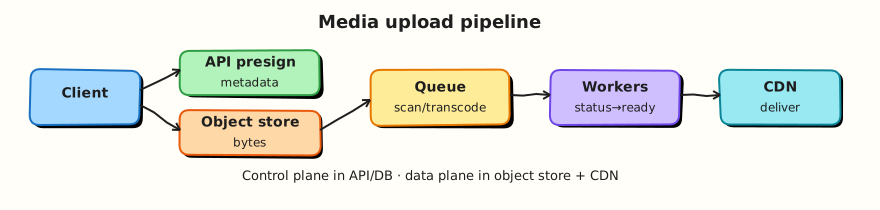
Direct-to-object-store flow
- Client → API: “I want to upload
image/jpeg, 3 MB” - API checks auth/quota; creates
mediarow (pending); returns presigned URL (or upload session) - Client
PUTs bytes to object storage - Client (or storage event) notifies API: upload complete
- API verifies object exists/size/etag; enqueues processing
- Workers scan/transcode; mark
ready; write CDN path
Metadata model
media(id, owner_id, status, content_type, size, object_key,
      cdn_url?, created_at, error?)
status: pending | uploaded | processing | ready | rejected
Never treat object storage as your only source of truth for ownership and status.
Multipart and resumable uploads
Large files use multipart upload or resumable protocols so flaky mobile networks can retry parts. The API issues part URLs or a session id; completion assembles the object.
Processing pipeline
| Stage | Purpose |
|---|---|
| Validate | Content-type sniffing, size limits |
| AV scan | Malware |
| Transcode / thumbs | Derivatives for feed/player |
| Promote | Move to public/CDN prefix or attach signed read |
Use a queue (Module 7). Idempotent workers keyed by media_id.
Delivery
- CDN in front of the bucket (or origin shield)
- Cache-Control for immutable object versions
- Separate processing bucket vs public bucket when possible
Security
- Short-lived presigned URLs
- Content-type and max size enforced in the signature policy
- Do not trust client-declared MIME alone
- AuthZ on metadata before issuing read URLs for private media
Architecture
Client → API (presign + metadata) → DB
Client → Object store (bytes)
Object store / API → Queue → Workers (scan/transcode) → DB status=ready
Client → CDN → Object store (read)
Hands-on Lab
Objective
Model presign, “upload”, and async processing with status transitions — without real S3.
Lab environment
Local Python 3.10+.
Real-world scenario
Product wants avatar uploads. You prove the state machine before wiring cloud SDKs.
Step-by-step tasks
1. Workspace
2. Upload pipeline
#!/usr/bin/env python3
"""Direct-upload style media pipeline (in-memory toy)."""

from __future__ import annotations

import hashlib
import queue
import threading
import time
import uuid
from dataclasses import dataclass


@dataclass
class Media:
    media_id: str
    owner: str
    content_type: str
    size: int
    status: str = "pending"
    object_key: str = ""
    cdn_url: str = ""
    error: str = ""


class MediaService:
    def __init__(self) -> None:
        self.media: dict[str, Media] = {}
        self.blob_store: dict[str, bytes] = {}
        self.q: queue.Queue[str] = queue.Queue()
        self._stop = threading.Event()
        self.worker = threading.Thread(target=self._process, daemon=True)
        self.worker.start()

    def presign(self, owner: str, content_type: str, size: int) -> dict:
        if size > 5_000_000:
            raise ValueError("too large")
        if content_type not in {"image/jpeg", "image/png"}:
            raise ValueError("unsupported type")
        mid = uuid.uuid4().hex[:12]
        key = f"uploads/{owner}/{mid}"
        m = Media(media_id=mid, owner=owner, content_type=content_type, size=size, object_key=key)
        self.media[mid] = m
        # toy "presigned" token
        token = hashlib.sha256(f"{mid}:{key}".encode()).hexdigest()[:16]
        return {"media_id": mid, "upload_token": token, "object_key": key}

    def client_upload(self, media_id: str, token: str, data: bytes) -> None:
        m = self.media[media_id]
        expect = hashlib.sha256(f"{media_id}:{m.object_key}".encode()).hexdigest()[:16]
        if token != expect:
            raise PermissionError("bad token")
        if len(data) != m.size:
            raise ValueError("size mismatch")
        self.blob_store[m.object_key] = data
        m.status = "uploaded"
        self.q.put(media_id)

    def _process(self) -> None:
        while not self._stop.is_set():
            try:
                mid = self.q.get(timeout=0.05)
            except queue.Empty:
                continue
            m = self.media[mid]
            m.status = "processing"
            raw = self.blob_store.get(m.object_key, b"")
            # reject "malware" marker
            if raw.startswith(b"MALWARE"):
                m.status = "rejected"
                m.error = "failed_scan"
            else:
                m.cdn_url = f"https://cdn.example/{m.object_key}"
                m.status = "ready"
            self.q.task_done()

    def wait_ready(self, media_id: str, timeout: float = 1.0) -> Media:
        deadline = time.time() + timeout
        while time.time() < deadline:
            m = self.media[media_id]
            if m.status in {"ready", "rejected"}:
                return m
            time.sleep(0.01)
        raise TimeoutError("processing slow")

    def close(self) -> None:
        self.q.join()
        self._stop.set()
        self.worker.join(timeout=1)


def main() -> None:
    svc = MediaService()
    meta = svc.presign("user1", "image/jpeg", 4)
    svc.client_upload(meta["media_id"], meta["upload_token"], b"\xff\xd8\xff\x00")
    ready = svc.wait_ready(meta["media_id"])

    bad = svc.presign("user1", "image/png", 10)
    svc.client_upload(bad["media_id"], bad["upload_token"], b"MALWAREXYZ")
    rejected = svc.wait_ready(bad["media_id"])
    svc.close()

    lines = [
        f"ready_status={ready.status}",
        f"cdn_url_set={'yes' if ready.cdn_url else 'no'}",
        f"rejected_status={rejected.status}",
        f"rejected_error={rejected.error}",
        f"objects_stored={len(svc.blob_store)}",
        f"pipeline_ok={'yes' if ready.status == 'ready' and rejected.status == 'rejected' else 'no'}",
    ]
    report = "\n".join(lines) + "\n"
    print(report, end="")
    open("upload-report.txt", "w", encoding="utf-8").write(report)


if __name__ == "__main__":
    main()
3. Run and verify
cd ~/rebash-system-design/module-12-upload
python3 upload_lab.py | tee upload-run.txt
grep pipeline_ok upload-report.txt
Expected output
pipeline_ok=yes, one ready and one rejected.
Validation steps
- Presign creates
pendingmedia - Upload moves to processing then ready/rejected
- Bad content does not get a usable “ready” happy path
Challenge exercise
Add multipart: accept two parts, concatenate in the blob store, then enqueue process once.
Cleanup
cd ~/rebash-system-design/module-12-upload
rm -f upload-run.txt upload-report.txt 2>/dev/null || true
Interview Questions
1. Why upload directly to object storage?
Reveal answer
Large bodies should not transit API servers — it doubles bandwidth, creates timeouts, and couples scale to file size. Presigned URLs let clients write to the store while the API retains authz and metadata control.
2. What belongs in the database vs the bucket?
Reveal answer
Database: ownership, status, content-type, keys, audit. Bucket: opaque bytes and derivatives. Status in DB drives the product UI; the bucket alone cannot express “processing” or “rejected” well.
3. How do you handle virus scanning?
Reveal answer
Keep objects private until scanned. Async workers pull new objects, scan, then mark ready or quarantine/reject. Never serve pending/uploaded as public CDN content.
4. How does the client know processing finished?
Reveal answer
Poll GET /media/{id}, subscribe to a websocket/event, or receive a webhook. Use timeouts and clear terminal states (ready / rejected).
Common Mistakes
Serving unscanned uploads from a public bucket
Attackers will host malware on your domain.
Trusting Content-Type from the client alone
Sniff and validate; bound size in the presign policy.
Summary
Media systems separate control plane (API + metadata) from data plane (object store + CDN) and push heavy work to async pipelines.
What's Next
Search / autocomplete — indexing, inverted indexes, and prefix suggest under latency budgets.