VPC Networking on Google Cloud
Overview
Your virtual machine on Google Cloud needs a network the same way an office needs corridors and doors. Without a network path, the computer can be “running” but nobody can reach the website on it.
A VPC network on Google Cloud is your private network fabric inside the cloud. This tutorial explains VPC for people who have never designed a cloud network: what a subnet is, how routes work, what makes a path “public”, and how firewall rules act as allow/deny filters.
This is Tutorial 1 in Module 3: Networking of the REBASH Academy Google Cloud for Cloud & DevOps Engineers series — practical Google Cloud for Cloud and DevOps work.
Cost
Do not create Cloud NAT or a TCP/UDP load balancer in this lab — they are common surprise bills. We use a custom VPC, one subnet, firewall rules, and a short-lived e2-micro VM that you delete in Cleanup.
Prerequisites
- IAM — you can run
gcloudas an allowed identity - Networking fundamentals — IP address, CIDR (for example
10.10.0.0/16), TCP port 80 - Sandbox permission for Compute Engine networking APIs
- Module 1 budget alert still recommended
Learning Objectives
By the end of this tutorial, you will be able to:
- Explain VPC network, subnet, route, and firewall rule with an office-building analogy
- Say what makes a Google Cloud subnet able to reach the internet
- Contrast firewall rules vs routes in plain English
- Build a small custom VPC with the CLI and prove HTTP reachability
- Break and restore a firewall rule (classic interview triage skill)
- Explain when Cloud NAT and Shared VPC appear in real designs (without building them yet)
Architecture
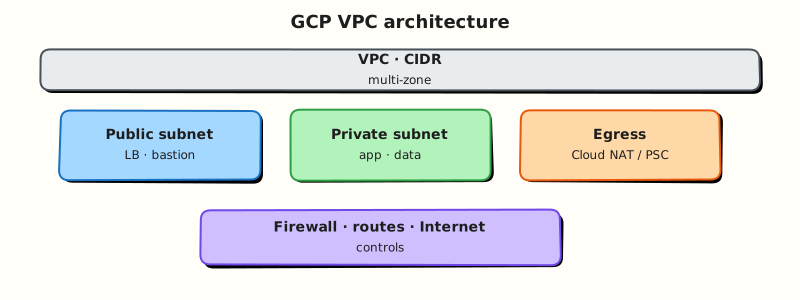
A VPC network contains subnets (regional IP ranges). Routes decide where packets go next. Firewall rules filter traffic to instances using network tags or other targets. Default internet routes allow egress from VMs with external IPs; ingress from the internet requires an explicit allow rule.
Theory
What it is
VPC means Virtual Private Cloud. On Google Cloud you create a VPC network, then subnets in regions, then attach VMs (and other services) to those subnets. Firewall rules are global to the network (not per-subnet like some people expect from other clouds).
Why it matters
Most “the site is down” tickets that are not app bugs are path tickets: wrong subnet, missing route, firewall deny, or no external IP when you expected one. Interviews love firewall direction and “why can I SSH from home but not from the office IP range?”
How it works
- Create a VPC network (custom mode for labs — you define subnets).
- Create a subnet with a CIDR in your home region.
- Create firewall rules (for example allow TCP 22/80 to VMs with a tag).
- Launch a VM on the subnet with an external IP and matching tags.
- Prove connectivity; then break a rule and watch it fail.
Key concepts
| Concept | Plain meaning |
|---|---|
| VPC network | Your private network fabric |
| Subnet | Regional IP slice (CIDR) inside the VPC |
| Route | Next hop for packets (local, internet gateway, appliance) |
| Firewall rule | Allow/deny for ingress or egress to targets |
| Network tag | Label on a VM used as a firewall target |
| External IP | Public address for internet ingress/egress without NAT |
| Cloud NAT | Managed egress for private VMs (not in this lab) |
| Shared VPC | Host project shares networks with service projects (production pattern) |
Public path vs private path
On Google Cloud, a VM can reach the internet if routing allows it. For a simple public web lab:
- VM has an external IP
- Default route to the internet exists on the network
- Ingress firewall allows the client IP (or
0.0.0.0/0for a disposable lab) to the service port
Private-only VMs (no external IP) need Cloud NAT or a proxy for egress, and typically Identity-Aware Proxy or a bastion for admin access. You will meet those patterns again in production modules.
Firewall mental model
- Rules are allow or deny, ingress or egress
- They target VMs by tag, service account, or all instances
- Priority numbers matter (lower number = higher priority)
- Implied deny ingress / allow egress defaults exist — still write explicit allows you can explain
Common pitfalls
- Editing the default network in a shared training project (avoid — create
rebash-m03-vpc) - Forgetting network tags so firewall rules never match
- Opening
0.0.0.0/0to SSH in production (lab only with cleanup) - Creating Cloud NAT “to be safe” and leaving it for a week
- Confusing firewall rules with IAM (different layers)
Hands-on Lab
Objective
Create a custom VPC and subnet, allow HTTP to tagged VMs, launch a short-lived VM that serves a page, prove curl works, break the firewall, restore it, then delete everything.
Prerequisites
| Tool | Notes |
|---|---|
| Modules 1–2 | Project + gcloud working |
| Compute Engine API | Will enable in the lab |
| Budget awareness | Delete the VM even if you stop early |
Lab environment
mkdir -p ~/rebash-gcp/module-03 && cd ~/rebash-gcp/module-03
export PROJECT_ID="${PROJECT_ID:-$(gcloud config get-value project)}"
export REGION="${REGION:-europe-west2}"
export ZONE="${ZONE:-europe-west2-a}"
export NETWORK="rebash-m03-vpc"
export SUBNET="rebash-m03-subnet"
export VM="rebash-m03-web"
gcloud config set project "$PROJECT_ID"
gcloud config set compute/region "$REGION"
gcloud config set compute/zone "$ZONE"
gcloud services enable compute.googleapis.com --project="$PROJECT_ID"
Real-world scenario
A product team wants a disposable “hello” VM on a non-default VPC to prove network understanding before they touch Shared VPC. You must show: custom network, subnet CIDR, firewall tag targeting, and a break/fix story for a blocked port.
Step-by-step tasks
Task 1 – Create custom VPC + subnet
cd ~/rebash-gcp/module-03
gcloud compute networks create "$NETWORK" \
  --subnet-mode=custom \
  --bgp-routing-mode=regional \
  --format=json | tee network.json
gcloud compute networks subnets create "$SUBNET" \
  --network="$NETWORK" \
  --region="$REGION" \
  --range="10.10.0.0/24" \
  --format=json | tee subnet.json
gcloud compute networks subnets describe "$SUBNET" --region="$REGION" \
  --format="yaml(name,ipCidrRange,network)" | tee subnet-proof.txt
grep -q "10.10.0.0/24" subnet-proof.txt
Expected output
subnet-proof.txt shows CIDR 10.10.0.0/24 on your custom network.
Task 2 – Firewall rules for SSH and HTTP
cd ~/rebash-gcp/module-03
gcloud compute firewall-rules create "${NETWORK}-allow-ssh" \
  --network="$NETWORK" \
  --direction=INGRESS \
  --priority=1000 \
  --action=ALLOW \
  --rules=tcp:22 \
  --source-ranges="0.0.0.0/0" \
  --target-tags="rebash-lab" \
  --format=json | tee fw-ssh.json
gcloud compute firewall-rules create "${NETWORK}-allow-http" \
  --network="$NETWORK" \
  --direction=INGRESS \
  --priority=1000 \
  --action=ALLOW \
  --rules=tcp:80 \
  --source-ranges="0.0.0.0/0" \
  --target-tags="rebash-lab" \
  --format=json | tee fw-http.json
gcloud compute firewall-rules list --filter="network:($NETWORK)" \
  --format="table(name,direction,allowed[].map().firewall_rule().list(),targetTags.list())" \
  | tee fw-list.txt
Lab-only source range
0.0.0.0/0 is for a short-lived training VM. In production, restrict SSH to bastion / IAP and HTTP to load balancers or known ranges.
Task 3 – VM + prove reachability
Create startup.sh in your editor (no shell heredoc):
#!/bin/bash
set -euo pipefail
apt-get update -y
apt-get install -y nginx
echo "rebash-m03 ok on $(hostname)" > /var/www/html/index.html
systemctl enable --now nginx
cd ~/rebash-gcp/module-03
chmod +x startup.sh
gcloud compute instances create "$VM" \
  --zone="$ZONE" \
  --machine-type=e2-micro \
  --network-interface="network=${NETWORK},subnet=${SUBNET},network-tier=PREMIUM" \
  --tags=rebash-lab \
  --image-family=debian-12 \
  --image-project=debian-cloud \
  --metadata-from-file=startup-script=startup.sh \
  --format=json | tee vm-create.json
EXTERNAL_IP=$(gcloud compute instances describe "$VM" --zone="$ZONE" \
  --format='get(networkInterfaces[0].accessConfigs[0].natIP)')
echo "$EXTERNAL_IP" | tee external-ip.txt
# Startup can take 1–2 minutes
for i in 1 2 3 4 5 6 7 8 9 10; do
  if curl -fsS --max-time 5 "http://${EXTERNAL_IP}/" | tee curl-allow.txt; then
    break
  fi
  sleep 15
done
grep -q "rebash-m03 ok" curl-allow.txt
Expected output
curl-allow.txt contains rebash-m03 ok and the hostname.
Task 4 – Break/fix the HTTP firewall rule
cd ~/rebash-gcp/module-03
EXTERNAL_IP=$(cat external-ip.txt)
gcloud compute firewall-rules delete "${NETWORK}-allow-http" --quiet
set +e
curl -fsS --max-time 8 "http://${EXTERNAL_IP}/" 2>&1 | tee curl-deny.txt
DENY_RC=$?
set -e
test "$DENY_RC" -ne 0

# Restore
gcloud compute firewall-rules create "${NETWORK}-allow-http" \
  --network="$NETWORK" \
  --direction=INGRESS \
  --priority=1000 \
  --action=ALLOW \
  --rules=tcp:80 \
  --source-ranges="0.0.0.0/0" \
  --target-tags="rebash-lab"
sleep 5
curl -fsS --max-time 8 "http://${EXTERNAL_IP}/" | tee curl-restored.txt
grep -q "rebash-m03 ok" curl-restored.txt
echo "firewall break/fix OK" | tee evidence.txt
Expected output
After delete, curl fails. After restore, curl-restored.txt shows rebash-m03 ok again.
Validation steps
- Custom VPC and
10.10.0.0/24subnet exist (before cleanup) - Firewall list shows SSH/HTTP rules targeting
rebash-lab - HTTP worked, failed when the rule was removed, then worked again
-
evidence.txtpresent
Common errors and fixes
| Error you see | Plain meaning | What to do |
|---|---|---|
| curl timeouts forever | Startup still running or firewall/tag mismatch | Wait; verify tags on VM; check fw-list.txt |
| VM create: subnet not found | Wrong region | Subnet region must match REGION |
| SSH works, HTTP fails | nginx not ready or port 80 blocked | Retry Task 3 loop; confirm allow-http |
| Quota errors | Project compute quota | Use another region or delete leftover VMs |
Challenge exercise
List routes for your VPC and save them:
cd ~/rebash-gcp/module-03
gcloud compute routes list --filter="network:($NETWORK)" \
  --format="table(name,destRange,nextHopGateway,priority)" | tee routes.txt
test -s routes.txt
Learning outcomes
- You built a non-default VPC path end-to-end
- You used network tags as firewall targets
- You performed firewall break/fix with evidence
- You can explain public ingress without Cloud NAT
Cleanup
cd ~/rebash-gcp/module-03
export PROJECT_ID="${PROJECT_ID:-$(gcloud config get-value project)}"
export REGION="${REGION:-europe-west2}"
export ZONE="${ZONE:-europe-west2-a}"
export NETWORK="rebash-m03-vpc"
export SUBNET="rebash-m03-subnet"
export VM="rebash-m03-web"
gcloud compute instances delete "$VM" --zone="$ZONE" --quiet 2>/dev/null || true
gcloud compute firewall-rules delete "${NETWORK}-allow-http" --quiet 2>/dev/null || true
gcloud compute firewall-rules delete "${NETWORK}-allow-ssh" --quiet 2>/dev/null || true
gcloud compute networks subnets delete "$SUBNET" --region="$REGION" --quiet 2>/dev/null || true
gcloud compute networks delete "$NETWORK" --quiet 2>/dev/null || true
rm -f network.json subnet.json subnet-proof.txt fw-ssh.json fw-http.json fw-list.txt \
  vm-create.json external-ip.txt curl-allow.txt curl-deny.txt curl-restored.txt \
  evidence.txt routes.txt
# Keep startup.sh if you want it for Module 4
Validation
- Lab folder
~/rebash-gcp/module-03used - You can draw VPC → subnet → VM → firewall on paper
- Break/fix story ready for interviews
- No leftover VM or custom VPC after cleanup
Code Walkthrough
- Custom mode VPC — you own the CIDR story instead of using
default. - Tags on VM + target-tags on firewall — rules only hit intended instances.
- Startup script — proves the data plane, not only that APIs accepted JSON.
- Delete HTTP rule — classic triage: distinguish “VM down” from “packet filtered”.
- Delete VM before network — dependency order matters in cleanup.
Security Considerations
- Do not leave SSH open to the world on long-lived VMs; prefer IAP TCP forwarding.
- Prefer load balancers and restricted source ranges for HTTP in production.
- Separate admin and application firewall rules.
- Remember firewalls are not IAM — compromised guest OS still needs hardening.
Common Mistakes
Firewall rules are per subnet
On Google Cloud they belong to the VPC network and select targets (tags, service accounts, or all instances).
No external IP means the firewall is broken
Private VMs need a different access pattern (IAP, bastion, Private Google Access, Cloud NAT). Missing external IP is often intentional.
Default network is fine forever
Training projects often share default. Production designs use custom networks and often Shared VPC.
Best Practices
- Custom mode networks with planned CIDRs
- Tag-based firewall targets
- Deny by default for ingress; open only what you can explain
- Avoid Cloud NAT until a private subnet design needs it
- Document routes and firewall intent next to diagrams
Troubleshooting
| Symptom | Likely cause | Fix |
|---|---|---|
CONNECTION_TIMED_OUT | Firewall, wrong IP, or nginx not up | Re-check tags, rules, startup serial log |
| Wrong CIDR overlap | Clashes with on-prem/VPN later | Plan non-overlapping ranges |
| Cannot delete VPC | Resources still attached | Delete VMs/rules/subnets first |
| SSH permission denied | OS login / keys | Use gcloud compute ssh after metadata settles |
Summary
A Google Cloud VPC network holds regional subnets, routes, and firewall rules. Public labs usually combine an external IP, an internet route, and an explicit ingress allow. Firewall break/fix is a core interview skill. Next you will go deeper on Compute Engine, startup scripts, and managed instance patterns.
Interview Questions
1. What is a VPC network on Google Cloud?
Reveal answer
A VPC network is your private virtual network fabric in Google Cloud. It contains subnets, routes, and firewall rules, and is where you attach resources such as Compute Engine VMs.
2. How do subnets work differently from “one big flat network”?
Reveal answer
Subnets carve regional CIDR ranges inside the VPC. Resources in a subnet get addresses from that range. Custom mode requires you to create subnets explicitly before launching VMs into them.
3. What makes a VM reachable from the internet on port 80?
Reveal answer
Typically: the VM has a path for ingress (often an external IP), routing allows the traffic, a process listens on port 80, and an ingress firewall rule allows TCP 80 to that VM (commonly via a network tag).
4. How are firewall rules targeted?
Reveal answer
Rules apply to a VPC network and select targets such as all instances, network tags, or service accounts. Priority and direction (ingress/egress) determine evaluation. Tags are a common lab and production targeting mechanism.
5. What is Cloud NAT, and why did this lab avoid it?
Reveal answer
Cloud NAT provides managed egress for VMs without external IPs. It is useful for private subnets but can create ongoing cost. This lab used a short-lived public VM instead.
6. What is Shared VPC at a high level?
Reveal answer
A host project owns the VPC and shares selected subnets with service projects. Application teams deploy into shared subnets while a network team keeps central control — a common landing-zone pattern.
7. How do you triage “curl times out” to a VM?
Reveal answer
Check VM running state, external IP, listening process, firewall rules and tags, routes, and source IP assumptions. Serial logs help confirm startup scripts. Removing and restoring a firewall rule is a clean isolation test.
8. Firewall deny vs IAM deny — which did this lab demonstrate?
Reveal answer
Firewall deny (network path). IAM deny would be PERMISSION_DENIED from the API when creating/describing resources. Both matter; they sit at different layers.
Related Tutorials
- Previous: IAM
- Next: Compute Engine, MIGs, and Load Balancing
- Networking course
- Parallel: VPC Networking on AWS