Cost Optimisation on Google Cloud
Overview
Cloud bills grow quietly: idle VMs, forgotten Cloud SQL, Autopilot clusters “for a quick test”, unlabelled shared projects. FinOps is the practice of making cloud spend visible, attributable, and intentional.
This is Tutorial 1 in Module 14: Cost Optimisation of the REBASH Academy Google Cloud for Cloud & DevOps Engineers series. You will review budgets, apply labels, hunt idle compute, capture recommender-style evidence, and leave the project cleaner than you found it.
Cost hygiene
This module should reduce spend. Do not create large instances to “generate” billing data. Prefer listing, labelling, and deleting leftovers from earlier modules.
Prerequisites
- CI/CD on Google Cloud
- Module 1 budget alert (still ideal)
- Billing Viewer / Project Editor on a sandbox
Learning Objectives
By the end of this tutorial, you will be able to:
- Explain unit cost drivers for Compute Engine, Cloud SQL, GKE, and Cloud Run
- List and apply resource labels for attribution
- Review budgets and export a billing-linked project check
- Find and delete idle lab resources
- Describe CUDs, sustained use, and Recommender at interview depth
Architecture
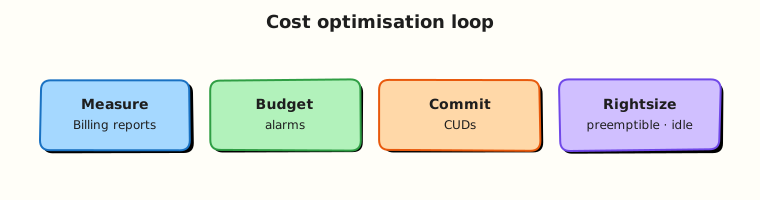
Usage meters into a billing account. Budgets alert on thresholds. Labels attribute spend to teams. Recommender suggests rightsizing and idle cleanup. Engineers act — labels alone do not save money.
Theory
What it is
Cost optimisation is continuous: observe → attribute → optimise → govern. Google Cloud tools include Billing reports, Budgets, labels, quotas, and active Assist / Recommender insights.
Why it matters
Students and startups get surprised by NAT, load balancers, and SQL. Professionals who cannot explain last month’s bill do not get trusted with production accounts.
How it works
- Link projects to billing (Module 1).
- Label resources (
env,owner,tutorial). - Set budgets with thresholds.
- Review idle VMs, unattached disks, old IPs, empty clusters.
- Commit use discounts (CUDs) only when usage is steady — not for labs.
Cost drivers (interview table)
| Service | Common waste |
|---|---|
| Compute Engine | Idle VMs, oversized machine types, orphan disks/IPs |
| Cloud SQL | Left running after demos |
| GKE Autopilot | Clusters forgotten for days |
| Cloud Run | Usually fine; watch min instances |
| Cloud NAT / LB | Always-on charges |
| BigQuery | Wide scans, long-lived datasets |
Common pitfalls
- No labels → “whose VM is this?”
- Budgets without humans who act
- Buying CUDs for spiky student workloads
- Deleting production “idle” without change windows
Hands-on Lab
Objective
Confirm billing link and budgets, label a disposable bucket, hunt idle compute/SQL/GKE leftovers from earlier modules, delete what is safe, and write a short cost review artefact.
Prerequisites
| Tool | Notes |
|---|---|
| Project Owner/Editor | Sandbox only for deletes |
| Module history | Leftovers from Modules 4–13 are the hunt targets |
Lab environment
mkdir -p ~/rebash-gcp/module-14 && cd ~/rebash-gcp/module-14
export PROJECT_ID="${PROJECT_ID:-$(gcloud config get-value project)}"
export REGION="${REGION:-europe-west2}"
gcloud config set project "$PROJECT_ID"
Real-world scenario
FinOps asks for a Friday hygiene pass: show the budget still exists, label one shared artefact store, list idle candidates, and delete confirmed lab leftovers before the weekend.
Step-by-step tasks
Task 1 – Billing + budget review
cd ~/rebash-gcp/module-14
gcloud billing projects describe "$PROJECT_ID" --format=json | tee billing-link.json
BILLING_ACCOUNT=$(gcloud billing projects describe "$PROJECT_ID" \
  --format='value(billingAccountName)' | sed 's#.*/##')
echo "$BILLING_ACCOUNT" | tee billing-account.txt
gcloud billing budgets list --billing-account="$BILLING_ACCOUNT" \
  --format="table(displayName,amount.specifiedAmount)" 2>/dev/null | tee budgets.txt \
  || printf '%s\n' 'budgets-list-denied-use-console' | tee budgets.txt
test -s billing-link.json
Task 2 – Labels on a disposable bucket
cd ~/rebash-gcp/module-14
BUCKET="rebash-m14-${PROJECT_ID}"
gcloud storage buckets create "gs://${BUCKET}" --location="$REGION" \
  --uniform-bucket-level-access 2>/dev/null || true
gcloud storage buckets update "gs://${BUCKET}" \
  --update-labels=tutorial=rebash-m14,owner=student,env=lab
gcloud storage buckets describe "gs://${BUCKET}" --format=json | tee bucket.json
grep -q rebash-m14 bucket.json
echo "gs://${BUCKET}" | tee labelled-bucket.txt
Task 3 – Idle resource hunt
cd ~/rebash-gcp/module-14
gcloud compute instances list --format="table(name,zone,status,machineType)" | tee vms.txt
gcloud compute disks list --format="table(name,zone,sizeGb,users)" | tee disks.txt
gcloud compute addresses list --format="table(name,region,status,address)" | tee addresses.txt
gcloud sql instances list --format="table(name,region,state)" 2>/dev/null | tee sql.txt || true
gcloud container clusters list --format="table(name,location,status)" 2>/dev/null | tee gke.txt || true
gcloud run services list --format="table(metadata.name,status.url)" 2>/dev/null | tee run.txt || true
# Save a hunt summary (editor): idle-hunt.md with what you will delete vs keep
test -s idle-hunt.md
Create idle-hunt.md in your editor listing each leftover rebash-m* resource and delete or keep with a one-line reason.
Task 4 – Safe deletes + recommender glance
cd ~/rebash-gcp/module-14
# Delete ONLY resources you own from earlier REBASH labs (examples — uncomment as needed)
# gcloud compute instances delete NAME --zone=ZONE --quiet
# gcloud sql instances delete NAME --quiet
# gcloud container clusters delete NAME --region=REGION --quiet
# gcloud run services delete NAME --region=REGION --quiet
gcloud recommender insights list --project="$PROJECT_ID" \
  --location=global \
  --insight-type=google.compute.diagnostics.IdleResourceInsight \
  --format="table(name,severity)" 2>/dev/null | tee recommender.txt \
  || printf '%s\n' 'recommender-unavailable-or-empty' | tee recommender.txt
gcloud storage rm -r "gs://rebash-m14-${PROJECT_ID}" 2>/dev/null || true
echo "cost hygiene pass OK" | tee evidence.txt
Validation steps
- Billing link evidence saved
- Labels visible on the lab bucket (before delete)
-
idle-hunt.mdcompleted - Obvious
rebash-*leftovers removed or explicitly kept with reason
Common errors and fixes
| Error you see | Plain meaning | What to do |
|---|---|---|
| Budgets permission denied | Not Billing Admin | Use Console screenshot note in budgets.txt |
| Recommender empty | No insights yet | Fine for new projects — hunt manually |
| Delete denied | Org policy / IAM | Stop; ask mentor — do not force production |
Challenge exercise
Write cud-notes.txt: when Committed Use Discounts help, and why they are a bad fit for a one-week training spike.
Learning outcomes
- You attributed a resource with labels
- You practised an idle hunt with evidence files
- You can talk FinOps without only saying “use spot VMs”
Cleanup
cd ~/rebash-gcp/module-14
gcloud storage rm -r "gs://rebash-m14-${PROJECT_ID}" 2>/dev/null || true
rm -f billing-link.json budgets.txt bucket.json labelled-bucket.txt \
  vms.txt disks.txt addresses.txt sql.txt gke.txt run.txt recommender.txt \
  evidence.txt challenge.txt
# Keep idle-hunt.md and cud-notes.txt for your portfolio
Validation
- Lab folder
~/rebash-gcp/module-14used - No unintentional production deletes
- Budget story ready for interviews
Code Walkthrough
- Billing describe first — unlinked projects fail mysteriously and still surprise later.
- Labels — attribution before optimisation debates.
- List-wide hunt — VMs, disks, IPs, SQL, GKE, Run.
- Recommender optional — automation helps; ownership still decides.
- Delete the lab bucket — do not leave Module 14 artefacts forever.
Security Considerations
- Billing data is sensitive — restrict Billing Viewer.
- Do not grant broad delete to every engineer without change control.
- Labels can leak internal structure — avoid secret data in label values.
Common Mistakes
Labels reduce the bill by themselves
Labels enable attribution. Deleting idle resources and rightsizing reduce the bill.
Free Trial means FinOps is optional
Habits formed on Free Trial prevent expensive production mistakes.
Kill anything with low CPU
Batch jobs and warm standbys can look idle. Confirm purpose before delete.
Best Practices
- Budget + alert from day one
- Mandatory labels via policy where possible
- Weekly idle hunt in non-prod
- Separate projects per environment for blast radius and bills
- Review BigQuery bytes and Run min instances monthly
Troubleshooting
| Symptom | Likely cause | Fix |
|---|---|---|
| Bill high, lists empty | Other projects on billing account | Filter Billing reports by project |
| Cannot label | IAM | Need resource update permission |
| Recommender API denied | API/IAM | Enable Recommender; or skip |
Summary
FinOps on Google Cloud is budgets, labels, idle hunts, and deliberate architecture choices — not only discounts. Next: production landing zones — how organisations structure projects and guardrails.
Interview Questions
1. What is FinOps in one sentence?
Reveal answer
A practice that brings engineering, finance, and product together to make cloud spend visible, attributable, and optimised against business value.
2. Why label resources?
Reveal answer
Labels attribute cost and ownership (team, env, app) so reports and cleanup are possible. Without labels, shared projects become ungovernable.
3. What should a student budget alert do?
Reveal answer
Notify humans when spend crosses a small threshold so forgotten labs are caught early — ideally set in Module 1 before compute.
4. Name three idle resources that often waste money.
Reveal answer
Stopped-but-disk-retained patterns, unused external IPs, forgotten Cloud SQL instances, leftover GKE clusters, and orphan persistent disks are common examples.
5. What is a Committed Use Discount (CUD)?
Reveal answer
A pricing commitment for steady usage over a term in exchange for lower unit prices. Poor fit for spiky short training workloads.
6. How does Cloud Run cost differently from a VM?
Reveal answer
Cloud Run often charges mainly for request time/allocated CPU/memory (and can scale to zero). A VM charges while allocated even if idle.
7. What is Recommender for?
Reveal answer
Google Cloud insights that suggest actions such as idle VM cleanup or rightsizing. Humans still verify and apply changes safely.
8. How do you approach a sudden bill spike?
Reveal answer
Identify the project and service in Billing reports, correlate with recent deploys or leaked keys, stop bleeding resources, then add budgets/labels/guards to prevent recurrence.
Related Tutorials
- Previous: CI/CD on Google Cloud
- Next: Production GCP Landing Zones
- Fundamentals
- Parallel: AWS cost optimisation