Google Cloud Fundamentals and Global Infrastructure
Overview
Google Cloud is a set of rented building blocks — compute, storage, networking, data, and managed services — that run in Google’s data centres. You create a project, choose a region (and usually a zone), and pay mainly for what you use.
This module answers four practical questions before you launch anything expensive:
- Where your stuff runs in the world (regions and zones)
- How resources are organised (organisation → folder → project)
- How you talk to Google Cloud from a terminal (
gcloud) - How you stop a student lab from creating a surprise bill (budget alert)
This is Tutorial 1 in Module 1: Google Cloud Fundamentals of the REBASH Academy Google Cloud for Cloud & DevOps Engineers series — practical Google Cloud for Cloud and DevOps work.
Cost hygiene (read this before any lab)
Google Cloud is not a free playground by default. Prefer Free Trial credits and Always Free limits. Create a budget alert in this module before you launch virtual machines later. Always run Cleanup at the end of each lab.
Prerequisites
- Linux — comfortable with a terminal
- Networking — IP address and CIDR at a basic level
- Git — you will not commit secrets
- A Google Cloud account you control (Free Trial is fine)
- Google Cloud SDK /
gcloudinstalled (install guide)
Learning Objectives
By the end of this tutorial, you will be able to:
- Explain region vs zone with a simple building analogy
- Describe organisation → folder → project → billing account in plain English
- Authenticate with
gcloudand show the active project and account - List regions and zones for your project with the CLI
- Create a small budget alert (or a documented billing fallback)
- State shared responsibility for Google Cloud with one example
Architecture
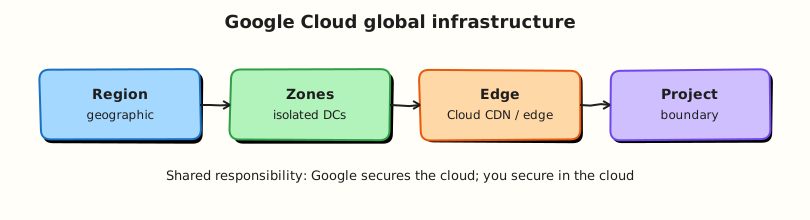
Google Cloud runs in geographic regions. Inside a region, zones are isolated failure domains (separate buildings with independent power and networking). Your resources live in a project. Billing attaches to a billing account. You manage everything with the Console, Cloud Shell, or gcloud.
Theory
What it is
Google Cloud (often still called GCP) is Google’s public cloud. You rent services over the internet instead of only buying physical servers. Common services you will meet in this course: Compute Engine (virtual machines), Cloud Storage (object files), Virtual Private Cloud (VPC) networking, Google Kubernetes Engine (GKE), and Cloud Run.
Why it matters
Cloud and DevOps interviews expect you to place workloads correctly (region for latency and data residency; multi-zone for availability), name the right control plane (gcloud / Console), and prove you will not burn money. Day-one engineers who skip project/billing hygiene create outages and invoices.
How it works
- You sign in as a Google identity (user or service account later).
- You select a project — the hard boundary for APIs, quotas, and IAM.
- You enable APIs (Compute, Billing Budgets, and so on).
- You create resources in a region/zone (or multi-region for some services).
- Usage meters against the billing account linked to the project.
Regions and zones
Analogy: A region is a city. A zone is a separate building in that city with its own power and networking. If one building has a power cut, another building can keep working — if you designed your app to use both.
| Term | Meaning | Example |
|---|---|---|
| Region | Geographic area with multiple zones | europe-west2, asia-south1 |
| Zone | Isolated location inside a region | europe-west2-a, asia-south1-b |
| Multi-region | Wider placement used by some storage/data services | eu, us |
Why interviews ask this: “Is one VM in one zone highly available?” → No. High availability usually means at least two zones (and a design that can fail over).
Practical tip: Pick one home region for all labs (for example europe-west2 or asia-south1) and stick to it. Beginners often create a VM in us-central1, then open the Console filtered to another region and panic because “Google deleted my instance”. It is still there — wrong filter.
Projects, organisations, folders, billing
| Concept | Plain meaning |
|---|---|
| Organisation | Company root in Resource Manager (often tied to a Cloud Identity / Workspace domain) |
| Folder | Grouping for teams or environments under the organisation |
| Project | Where you enable APIs and create almost all resources |
| Billing account | Who pays; linked to one or more projects |
Personal Free Trial accounts often look like: one billing account + one (or few) projects, with no organisation. That is fine for this course. Production companies almost always use organisations and folders.
Shared responsibility
Google secures the physical buildings, hypervisors, and the managed service control planes. You secure identities, firewall rules, data classification, encryption choices you control, and application configuration.
| Example | You | |
|---|---|---|
| Compute Engine VM | Host hardware + hypervisor | Guest OS patches, SSH keys, firewall tags |
| Cloud Storage | Durable object service | Public access, IAM, encryption settings |
| Credentials | Provides IAM and Secret Manager | No keys in GitHub, least privilege |
gcloud and Cloud Shell
gcloud is the primary CLI. Cloud Shell is a browser terminal with gcloud already authenticated to your user — useful when your laptop SDK is broken. Professionals still install the SDK locally for real work.
Key habit — run this before every lab and every incident change:
Common pitfalls
- Treating Free Trial as “everything is free forever”
- Creating resources in the wrong project
- Console region filter ≠ CLI default region/zone
- Leaving billing unlinked, then wondering why APIs fail
- Skipping budget alerts before Compute Engine labs
Hands-on Lab
Objective
Prove you can authenticate, set a project and home region/zone, list where Google Cloud can place resources, and create a real budget alert — the same hygiene a good junior engineer shows in week one.
Prerequisites
| Tool | Notes |
|---|---|
| Google Cloud project | Free Trial fine; billing must be linked |
gcloud SDK | gcloud --version works |
| Billing Admin (or Owner) | Needed to create budgets on the billing account |
Lab environment
mkdir -p ~/rebash-gcp/module-01 && cd ~/rebash-gcp/module-01
# Set these to YOUR values once, then reuse in later modules
export PROJECT_ID="${PROJECT_ID:-YOUR_PROJECT_ID}"
export REGION="${REGION:-europe-west2}"
export ZONE="${ZONE:-europe-west2-a}"
gcloud config set project "$PROJECT_ID"
gcloud config set compute/region "$REGION"
gcloud config set compute/zone "$ZONE"
Choose your region
If you live in India, asia-south1 is a common lab choice. If in the UK/EU, europe-west2 is common. Keep REGION and ZONE consistent for the whole course.
Real-world scenario
Your mentor will not let you launch servers until you can show: (1) which identity and project the CLI uses, (2) which region/zone you work in, and (3) that a budget alert will fire if spend crosses a small limit. That is this lab.
Step-by-step tasks
Task 1 – Who am I, and where can I run resources?
cd ~/rebash-gcp/module-01
gcloud auth list --format=json | tee auth.json
gcloud config list --format=json | tee config.json
test -s auth.json
grep -q account auth.json
gcloud projects describe "$PROJECT_ID" --format=json | tee project.json
gcloud compute regions list --format="table(name,status,zones)" | tee regions.txt
gcloud compute zones list --filter="region:($REGION)" \
  --format="table(name,status)" | tee zones.txt
Expected output
auth.json shows an active account. project.json includes your projectId. zones.txt lists at least two zones for your home region (for example …-a and …-b) in UP state.
What to notice: If gcloud says you are not authenticated, run gcloud auth login (and for local apps later, gcloud auth application-default login) before anything else.
Task 2 – Confirm billing is linked
cd ~/rebash-gcp/module-01
gcloud billing projects describe "$PROJECT_ID" --format=json | tee billing-link.json
BILLING_ACCOUNT=$(gcloud billing projects describe "$PROJECT_ID" \
  --format='value(billingAccountName)' | sed 's#.*/##')
echo "$BILLING_ACCOUNT" | tee billing-account.txt
test -n "$BILLING_ACCOUNT"
test "$BILLING_ACCOUNT" != ""
Expected output
billing-link.json shows billingEnabled: true (or equivalent) and billing-account.txt holds a billing account ID such as 0X0X0X-0X0X0X-0X0X0X.
Task 3 – Create a small monthly budget alert
Enable the Billing Budgets API, then create a £/$5-style budget filtered to this project:
cd ~/rebash-gcp/module-01
gcloud services enable billingbudgets.googleapis.com --project="$PROJECT_ID"
BILLING_ACCOUNT=$(cat billing-account.txt)
gcloud billing budgets create \
  --billing-account="$BILLING_ACCOUNT" \
  --display-name="rebash-m01-monthly" \
  --budget-amount=5USD \
  --threshold-rule=percent=0.5 \
  --threshold-rule=percent=0.9 \
  --threshold-rule=percent=1.0 \
  --filter-projects="projects/${PROJECT_ID}" \
  --format=json | tee create-budget.json
gcloud billing budgets list --billing-account="$BILLING_ACCOUNT" \
  --format="table(displayName,amount.specifiedAmount)" | tee budgets.txt
Expected output
create-budget.json is non-empty. budgets.txt includes rebash-m01-monthly. Billing Account Admins receive threshold emails by default unless disabled.
Task 3b – Fallback if Budgets is denied
Some student or organisation accounts block budget create. Prove billing hygiene another way and keep the evidence:
cd ~/rebash-gcp/module-01
gcloud billing accounts list --format=json | tee billing-accounts.json
gcloud billing projects describe "$PROJECT_ID" --format=json | tee billing-link.json
# In Console: Billing → Budgets & alerts → create a 5 USD budget for this project
# Then list again if your mentor grants permission later:
gcloud billing budgets list --billing-account="$(cat billing-account.txt)" \
  --format=json 2>/dev/null | tee budgets-fallback.json || \
  printf '%s\n' '{"fallback":"console-budget-or-mentor-required","project":"'"$PROJECT_ID"'"}' \
    | tee budgets-fallback.json
test -s budgets-fallback.json
Validation steps
- You can explain project / region / zone without looking at notes
-
auth.jsonmatches the account you expect - You listed zones for your home region
- Billing is linked to the project
- A budget named
rebash-m01-monthlyexists (or fallback evidence is saved)
Common errors and fixes
| Error you see | Plain meaning | What to do |
|---|---|---|
| Not authenticated / Reauthentication required | CLI not logged in | gcloud auth login |
| Permission denied on budgets | Missing Billing Admin | Use Task 3b or ask mentor |
| API not enabled | Service disabled on project | gcloud services enable billingbudgets.googleapis.com |
| Empty zones list | Wrong region variable | echo $REGION and set compute/region |
| Billing disabled | Project not linked | Link a billing account in Console |
Challenge exercise
Write region-choice.txt with five short lines: which region you chose and why (latency, data residency, or mentor guidance). Use your editor — do not use a shell heredoc.
cd ~/rebash-gcp/module-01
test -s region-choice.txt
wc -l region-choice.txt | tee challenge.txt
Learning outcomes
- You used the same identity/project checks professionals use in outages
- You can draw region vs zone on paper
- You created a real cost safety net (or documented the fallback)
- You pinned
PROJECT_ID,REGION, andZONEfor later modules
Cleanup
cd ~/rebash-gcp/module-01
BILLING_ACCOUNT=$(cat billing-account.txt 2>/dev/null || true)
if [[ -n "${BILLING_ACCOUNT:-}" ]]; then
  BUDGET_NAME=$(gcloud billing budgets list --billing-account="$BILLING_ACCOUNT" \
    --filter='displayName:rebash-m01-monthly' --format='value(name)' | head -n1)
  if [[ -n "${BUDGET_NAME:-}" ]]; then
    gcloud billing budgets delete "$BUDGET_NAME" --billing-account="$BILLING_ACCOUNT" --quiet || true
  fi
fi
rm -f auth.json config.json project.json regions.txt zones.txt \
  billing-link.json create-budget.json budgets.txt budgets-fallback.json \
  billing-accounts.json challenge.txt
# Keep billing-account.txt and region-choice.txt for revision if you want
Optional: keep the budget
Many students keep rebash-m01-monthly for the rest of the course. That is fine — skip delete in that case.
Validation
- Lab folder
~/rebash-gcp/module-01used - You can teach region vs zone to a classmate in two minutes
- Budget created (and deleted, or kept on purpose)
- No service-account keys committed to Git
Code Walkthrough
gcloud auth list+config listfirst — stops “wrong project” mistakes before they cost money.- Pin
REGION/ZONE— one pair prevents Console/CLI confusion. - Budget before Compute Engine — juniors who care about cost get trusted faster.
- Billing link check — many “API failed” errors are really “no billing”.
- Cleanup is part of the lab — leaving resources running is a real junior failure mode.
Security Considerations
- Prefer organisation login / 2-Step Verification on the Google account.
- Do not download service-account JSON keys for daily labs unless a module requires it — prefer user ADC or Workload Identity later.
- Treat
~/.config/gcloud/like a credentials directory. - Never paste access tokens into GitHub, chat, or resume PDFs.
Common Mistakes
One zone = highly available
One virtual machine in one building is not highly available. Say “single point of failure” and propose a second zone.
Free Trial means I cannot get a bill
Credits and Always Free have limits. Budgets exist because overages happen to students.
Project ID vs project name vs project number
Scripts need the project ID. The pretty name is for humans. The number appears in some resource names.
Best Practices
- One documented home region for learning
- Enable only the APIs you need
- Budget + labels + cleanup habit from week one
- Prefer CLI evidence files (
auth.json,project.json) when you practise explaining incidents - Read Google’s shared responsibility / security foundations pages once after this lab
Troubleshooting
| Symptom | Likely cause | Fix |
|---|---|---|
| CLI works, Console empty | Console project/region filter differs | Match project and region |
PERMISSION_DENIED on compute list | Compute API off or IAM missing | Enable compute.googleapis.com; need Viewer+ |
| Budget create denied | Not Billing Admin | Task 3b or mentor grant |
| Zone list shorter than a blog post | Normal — regions differ | Design for the region you use |
Summary
Google Cloud is rented cloud building blocks inside a project and region. Zones are separate buildings for reliability. Shared responsibility means Google secures the platform and you secure how you use it. The habit pair gcloud config list + a budget alert is your first professional baseline. Next you will learn who is allowed to do what — IAM.
Interview Questions
1. What is Google Cloud, in simple words?
Reveal answer
Google Cloud is a public cloud platform where companies rent computing, storage, networking, and managed services over the internet instead of only owning physical servers. You work inside a project, choose regions and zones, and pay mainly based on usage.
2. What is the difference between a region and a zone?
Reveal answer
A region is a geographic area (for example London or Mumbai). A zone is an isolated location inside that region — think separate data-centre buildings with independent power and networking. You choose a region for latency and data residency; you use multiple zones for higher availability.
3. Is one Compute Engine VM in one zone “highly available”? Why or why not?
Reveal answer
No. If that zone has a serious failure, your only VM can go down. High availability designs place capacity in at least two zones (and often use a load balancer). Interviewers want you to separate “it is running on Google Cloud” from “it survives a zone failure”.
4. Explain organisation, folder, project, and billing account.
Reveal answer
The organisation is the company root in Resource Manager. Folders group projects (teams or environments). Projects are where APIs and resources live. A billing account is who pays and can be linked to one or more projects. Personal labs may only show a project plus billing account.
5. Why might someone “lose” a resource in the Console?
Reveal answer
The Console has project and region filters. Resources created in asia-south1 do not appear when the Console is set to europe-west2. Check the project picker and region, then confirm with gcloud using your pinned PROJECT_ID and REGION.
6. What do gcloud auth list and gcloud config list tell you?
Reveal answer
auth list shows which Google accounts the SDK knows and which is active. config list shows the active project and defaults such as compute region/zone. Use both at the start of every lab and during incidents before you change anything.
7. Why should a student create a budget alert before launching VMs?
Reveal answer
Labs can leave billable resources running (VMs, load balancers, Cloud SQL). A small budget emails billing admins when spend crosses thresholds so a learning mistake does not become a large invoice. It also shows interviewers you think about cost.
8. Give one shared-responsibility example on Google Cloud.
Reveal answer
For Compute Engine, Google secures the physical host and hypervisor; you patch the guest operating system, manage SSH access, and configure VPC firewall rules. For Cloud Storage, Google provides the durable service; you decide IAM, public access, and encryption settings you control.
Related Tutorials
- Next: IAM, Identity Access, and Resource Hierarchy
- Parallel track: AWS Fundamentals
- Later in this course: Cost Optimisation · Troubleshooting Google Cloud