Troubleshooting Google Cloud
Overview
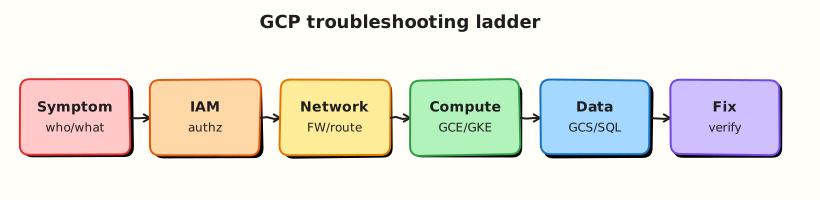
Production issues rarely announce the root cause. Good operators use a decision tree: confirm identity and project, decide whether the failure is control plane (API/PERMISSION_DENIED) or data plane (timeout/connect), then narrow to IAM, network, workload, or cost/quota.
This is Tutorial 1 in Module 16: Troubleshooting of the REBASH Academy Google Cloud for Cloud & DevOps Engineers series — the final module. You will practise a timed triage checklist and a small firewall break/fix that reunites Modules 1–4 skills.
Cost hygiene
The lab VM is short-lived. Delete it even if you stop mid-triage.
Prerequisites
- Production GCP Landing Zones
- VPC Networking
- IAM
- Earlier modules completed (or enough to recognise symptoms)
Learning Objectives
By the end of this tutorial, you will be able to:
- Run a first-five-minutes checklist on any Google Cloud incident
- Separate IAM failures from VPC/firewall failures
- Triage Cloud Run and GKE symptom patterns
- Break and restore HTTP via firewall with evidence
- Explain quota and billing “outages” that are not app bugs
Architecture
Incidents present as user pain → on-call checks identity/project/region → classifies control vs data plane → inspects IAM, VPC/firewall, workload logs/metrics, then quotas/billing. Evidence files beat memory.
Theory
What it is
Troubleshooting is structured elimination, not random CLI hope. Google Cloud gives you gcloud, Cloud Logging, Monitoring, and Connectivity Tests.
Why it matters
Interviews simulate: “curl times out”, “ImagePullBackOff”, “PERMISSION_DENIED on deploy”. They want your order of operations and what evidence you would collect.
First five minutes
gcloud auth list+gcloud config list— wrong project/account?- Confirm region/zone assumptions.
- Reproduce with one command; save output.
- Control plane error (
PERMISSION_DENIED,NOT_FOUND) vs data plane (timeout)? - Check recent deploys / IAM changes / budgets (hard disable).
Symptom → likely layer
| Symptom | First layer to check |
|---|---|
PERMISSION_DENIED on gcloud | IAM / API enablement |
| TCP timeout to VM IP | Firewall, route, external IP, process down |
| Cloud Run 403 | Invoker IAM / auth |
| Cloud Run 503 | Crash loop, wrong port, revision |
GKE ImagePullBackOff | AR URI / IAM |
GKE CrashLoopBackOff | App/config/secrets |
| APIs suddenly fail | Billing disabled / quota / org policy |
Common pitfalls
- Debugging the wrong project
- Blaming DNS when the firewall denies
- Restarting Pods before reading logs
- Ignoring serial console for startup-script failures
Hands-on Lab
Objective
Create a tiny public HTTP VM path, capture a healthy curl, break the firewall, prove failure, restore, then complete a written triage checklist covering IAM, Run/GKE, and cost.
Prerequisites
| Tool | Notes |
|---|---|
| Compute Engine API | Enabled |
| Budget awareness | Delete VM in cleanup |
Lab environment
mkdir -p ~/rebash-gcp/module-16 && cd ~/rebash-gcp/module-16
export PROJECT_ID="${PROJECT_ID:-$(gcloud config get-value project)}"
export REGION="${REGION:-europe-west2}"
export ZONE="${ZONE:-europe-west2-a}"
export NETWORK="rebash-m16-vpc"
export SUBNET="rebash-m16-subnet"
export VM="rebash-m16-web"
gcloud config set project "$PROJECT_ID"
gcloud config set compute/region "$REGION"
gcloud config set compute/zone "$ZONE"
gcloud services enable compute.googleapis.com --project="$PROJECT_ID"
Real-world scenario
Pager: “Marketing site on a lab VM is down.” You have fifteen minutes. Prove whether it is firewall or guest process, restore service, and file evidence.
Step-by-step tasks
Task 1 – Baseline identity + healthy path
Create startup.sh in your editor:
#!/bin/bash
set -euo pipefail
apt-get update -y
apt-get install -y nginx
printf '%s\n' 'rebash-m16 ok' > /var/www/html/index.html
systemctl enable --now nginx
cd ~/rebash-gcp/module-16
gcloud auth list --format=json | tee auth.json
gcloud config list --format=json | tee config.json
chmod +x startup.sh
gcloud compute networks create "$NETWORK" --subnet-mode=custom
gcloud compute networks subnets create "$SUBNET" \
  --network="$NETWORK" --region="$REGION" --range="10.40.0.0/24"
gcloud compute firewall-rules create "${NETWORK}-allow-ssh" \
  --network="$NETWORK" --allow=tcp:22 --target-tags=rebash-lab \
  --source-ranges=0.0.0.0/0
gcloud compute firewall-rules create "${NETWORK}-allow-http" \
  --network="$NETWORK" --allow=tcp:80 --target-tags=rebash-lab \
  --source-ranges=0.0.0.0/0
gcloud compute instances create "$VM" \
  --zone="$ZONE" --machine-type=e2-micro \
  --network-interface="network=${NETWORK},subnet=${SUBNET}" \
  --tags=rebash-lab \
  --image-family=debian-12 --image-project=debian-cloud \
  --metadata-from-file=startup-script=startup.sh
EXTERNAL_IP=$(gcloud compute instances describe "$VM" --zone="$ZONE" \
  --format='get(networkInterfaces[0].accessConfigs[0].natIP)')
echo "$EXTERNAL_IP" | tee external-ip.txt
for i in $(seq 1 12); do
  if curl -fsS --max-time 5 "http://${EXTERNAL_IP}/" | tee curl-ok.txt; then break; fi
  sleep 15
done
grep -q "rebash-m16 ok" curl-ok.txt
Task 2 – Break/fix firewall (data plane)
cd ~/rebash-gcp/module-16
EXTERNAL_IP=$(cat external-ip.txt)
gcloud compute firewall-rules delete "${NETWORK}-allow-http" --quiet
set +e
curl -fsS --max-time 8 "http://${EXTERNAL_IP}/" 2>&1 | tee curl-deny.txt
DENY_RC=$?
set -e
test "$DENY_RC" -ne 0
# Restore
gcloud compute firewall-rules create "${NETWORK}-allow-http" \
  --network="$NETWORK" --allow=tcp:80 --target-tags=rebash-lab \
  --source-ranges=0.0.0.0/0
sleep 5
curl -fsS --max-time 8 "http://${EXTERNAL_IP}/" | tee curl-restored.txt
grep -q "rebash-m16 ok" curl-restored.txt
echo "firewall triage OK" | tee evidence.txt
Task 3 – Control-plane contrast (IAM)
cd ~/rebash-gcp/module-16
# Show what a control-plane denial looks like (expected fail as unprivileged SA if you create one quickly)
SA_EMAIL="rebash-m16-deny@${PROJECT_ID}.iam.gserviceaccount.com"
gcloud iam service-accounts create rebash-m16-deny --display-name="m16 deny" 2>/dev/null || true
CALLER=$(gcloud config get-value account)
gcloud iam service-accounts add-iam-policy-binding "$SA_EMAIL" \
  --member="user:${CALLER}" --role="roles/iam.serviceAccountTokenCreator" --quiet
set +e
gcloud compute instances list --impersonate-service-account="$SA_EMAIL" \
  2>&1 | tee iam-deny.txt
set -e
grep -Ei 'PERMISSION_DENIED|denied' iam-deny.txt
Task 4 – Written triage checklist
Create triage-checklist.md in your editor covering branches for:
- IAM / API enablement / wrong project
- VPC firewall / routes / external IP
- Cloud Run port / invoker / revision logs
- GKE ImagePullBackOff / CrashLoop
- Billing disabled / quota / budget cutoffs
cd ~/rebash-gcp/module-16
test -s triage-checklist.md
grep -qi 'ImagePullBackOff' triage-checklist.md
grep -qi firewall triage-checklist.md
wc -l triage-checklist.md | tee challenge.txt
Validation steps
- Healthy curl, denied curl, restored curl evidence
- IAM deny evidence differs from firewall timeout story
-
triage-checklist.mdcomplete - VM and VPC deleted
Common errors and fixes
| Error you see | Plain meaning | What to do |
|---|---|---|
| curl fails before break | Startup not done | Wait; check serial port output |
| SSH fails | Firewall/tag | Confirm rebash-lab tag and allow-ssh |
| Impersonation fails | Token Creator | Re-bind Task 3 |
Challenge exercise
Timebox yourself: from a clean shell, run identity checks + list VMs in under three minutes; save commands to speed-run.txt.
Learning outcomes
- You restored a data-plane outage with firewall evidence
- You contrasted it with IAM deny
- You own a reusable triage checklist for on-call
Cleanup
cd ~/rebash-gcp/module-16
export PROJECT_ID="${PROJECT_ID:-$(gcloud config get-value project)}"
export ZONE="${ZONE:-europe-west2-a}"
export REGION="${REGION:-europe-west2}"
export NETWORK="rebash-m16-vpc"
export SUBNET="rebash-m16-subnet"
export VM="rebash-m16-web"
gcloud compute instances delete "$VM" --zone="$ZONE" --delete-disks=all --quiet 2>/dev/null || true
gcloud compute firewall-rules delete "${NETWORK}-allow-http" --quiet 2>/dev/null || true
gcloud compute firewall-rules delete "${NETWORK}-allow-ssh" --quiet 2>/dev/null || true
gcloud compute networks subnets delete "$SUBNET" --region="$REGION" --quiet 2>/dev/null || true
gcloud compute networks delete "$NETWORK" --quiet 2>/dev/null || true
gcloud iam service-accounts delete "rebash-m16-deny@${PROJECT_ID}.iam.gserviceaccount.com" --quiet 2>/dev/null || true
rm -f auth.json config.json external-ip.txt curl-ok.txt curl-deny.txt curl-restored.txt \
  evidence.txt iam-deny.txt challenge.txt
# Keep triage-checklist.md and speed-run.txt
Validation
- Lab folder
~/rebash-gcp/module-16used - No
rebash-m16VM/network left - You can narrate the decision tree without reading
Code Walkthrough
- Identity first — wrong project wastes the hour.
- Healthy baseline — never break what you have not proved.
- Firewall delete — classic data-plane incident.
- IAM deny — classic control-plane incident.
- Checklist artefact — transferable to any service.
Security Considerations
- Lab
0.0.0.0/0SSH/HTTP is temporary only. - Do not paste production logs with secrets into tickets.
- Prefer IAP for admin access in real estates.
Common Mistakes
Restart everything
Restarts lose evidence. Capture logs/status first.
Timeout means the app is broken
Often firewall, route, or wrong IP. Prove layers.
PERMISSION_DENIED means Google is down
Usually your identity, API, org policy, or billing.
Best Practices
- One changing variable at a time
- Timestamped evidence files
- Pair Monitoring alerts with runbooks
- Practise game days on sandbox projects
- Close with cleanup and a short post-incident note
Troubleshooting
| Symptom | Likely cause | Fix |
|---|---|---|
| Serial log apt errors | Startup race | Retry; simplify script |
| Restore curl still fails | Wrong tag / rule priority | Describe VM tags; list firewall rules |
| Quota errors mid-lab | Leftover resources | Module 14 hunt; delete leftovers |
Summary
Troubleshooting Google Cloud is a disciplined loop: identity → project/region → control vs data plane → IAM / VPC / workload / quota. This lab made firewall and IAM failures visible and left you with a checklist. Congratulations — you have completed the Google Cloud course modules.
Interview Questions
1. What do you run in the first five minutes of a GCP incident?
Reveal answer
Confirm account/project/region with gcloud auth list and config list, reproduce once with saved output, classify control-plane vs data-plane, then check recent changes, IAM, network, and billing/quota.
2. How do firewall timeouts differ from IAM denials?
Reveal answer
Firewall/data-plane issues usually look like hangs or TCP timeouts. IAM issues return explicit PERMISSION_DENIED (or 403) from the API or authenticated HTTP frontends.
3. Cloud Run returns 403 — what do you check?
Reveal answer
Whether the service requires authentication and whether the caller has roles/run.invoker. Also confirm you are hitting the correct service/region URL.
4. Cloud Run returns 503 — what do you check?
Reveal answer
Revision logs for crashes, container port mismatch, startup CPU/memory limits, and whether the latest revision is healthy.
5. Pod shows ImagePullBackOff — first checks?
Reveal answer
Image URI/tag, Artifact Registry IAM for the node/workload identity, and network path to the registry.
6. How can billing cause an “outage”?
Reveal answer
Disabled billing or hard quota/budget enforcement can block API creates or disable services, looking like platform failure when the root is account state.
7. Why capture evidence files during triage?
Reveal answer
Memory is unreliable under pressure; evidence supports rollback decisions, handoffs, and post-incident reviews.
8. What did the Module 16 lab prove?
Reveal answer
A working HTTP path, a firewall-induced failure and restore, and an IAM denial contrast — plus a reusable written triage checklist.
Related Tutorials
- Previous: Production GCP Landing Zones
- Course overview: Google Cloud
- Monitoring · Cost · CI/CD
- Parallel: Troubleshooting AWS