Infrastructure as Code on Google Cloud
Overview
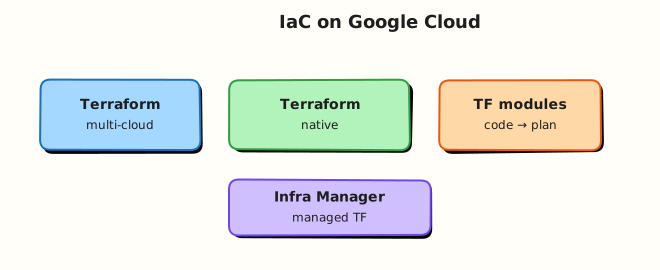
Infrastructure as Code (IaC) means you define cloud resources in files, review them like application code, and apply changes through automation. On Google Cloud, Terraform with the google / google-beta providers is the common choice for Cloud and DevOps teams. Deployment Manager is legacy; Infrastructure Manager is Google’s managed Terraform offering (awareness).
This is Tutorial 1 in Module 12: Infrastructure as Code of the REBASH Academy Google Cloud for Cloud & DevOps Engineers series. It is not a second full Terraform course — it proves the Google Cloud patterns: provider auth, a small VPC + bucket module-shaped root, plan / apply / destroy.
Cost hygiene
Always terraform destroy (or delete state-tracked resources) before you stop. Orphan networks and buckets from failed applies still cost or clutter projects.
Prerequisites
- Google Cloud Security Services
- Terraform course recommended (state, plan, apply basics)
- Terraform CLI 1.5+ installed (
terraform version) gcloud auth application-default logincompleted for local applies
Learning Objectives
By the end of this tutorial, you will be able to:
- Explain why IaC beats ClickOps for Google Cloud changes
- Configure the
googleprovider with project/region - Apply a VPC, subnet, and Cloud Storage bucket with Terraform
- Prove resources with
gcloudand destroy them cleanly - Describe remote state and Infrastructure Manager at interview depth
Architecture
Engineers write .tf files → Terraform builds a plan against Google APIs using Application Default Credentials (ADC) → apply creates VPC/subnet/bucket → state tracks IDs → destroy removes them. Production adds remote state (GCS backend) and CI plans.
Theory
What it is
Terraform declares desired resources. The google provider maps resources such as google_compute_network and google_storage_bucket to Google Cloud APIs.
Why it matters
Console-only changes drift, lack review, and do not reproduce. Interviews expect: state, plan before apply, destroy for labs, and “never commit credentials”.
How it works
- Authenticate (ADC user or SA in CI).
terraform initdownloads providers.terraform planshows create/change/destroy.terraform applymutates the cloud.- State file remembers real IDs for future plans.
Google Cloud IaC options
| Tool | Note |
|---|---|
Terraform (google) | Default for multi-cloud / most teams |
| Infrastructure Manager | Google-managed Terraform deployments |
| Deployment Manager | Legacy — know the name, avoid new work |
| Config Connector / Pulumi / CDKTF | Alternatives — out of v1 lab scope |
Common pitfalls
- Local state lost → orphan resources
- Wrong project in provider → surprises in another bill
applywithout reading plan- Forgetting
force_destroyon non-empty buckets when destroying labs
Hands-on Lab
Objective
Create a Terraform root that provisions a custom VPC, subnet, and Cloud Storage bucket; apply; prove with gcloud; destroy everything.
Prerequisites
| Tool | Notes |
|---|---|
| Terraform | terraform version |
| ADC | gcloud auth application-default login |
| APIs | compute.googleapis.com, storage.googleapis.com |
Lab environment
mkdir -p ~/rebash-gcp/module-12 && cd ~/rebash-gcp/module-12
export PROJECT_ID="${PROJECT_ID:-$(gcloud config get-value project)}"
export REGION="${REGION:-europe-west2}"
gcloud config set project "$PROJECT_ID"
gcloud services enable compute.googleapis.com storage.googleapis.com --project="$PROJECT_ID"
gcloud auth application-default login # if not already done
Real-world scenario
A teammate asks for a disposable network + artefact bucket defined in Git, not clicked together. You must show plan → apply → prove → destroy with no leftovers.
Step-by-step tasks
Task 1 – Terraform files
Create these files with your editor (no shell heredocs).
versions.tf:
terraform {
  required_version = ">= 1.5.0"
  required_providers {
    google = {
      source  = "hashicorp/google"
      version = "~> 5.0"
    }
  }
}
providers.tf:
variables.tf:
variable "project_id" {
  type        = string
  description = "Google Cloud project ID"
}

variable "region" {
  type        = string
  description = "Default region"
}

variable "name_prefix" {
  type        = string
  description = "Prefix for lab resources"
  default     = "rebash-m12"
}
main.tf:
resource "google_compute_network" "lab" {
  name                    = "${var.name_prefix}-vpc"
  auto_create_subnetworks = false
}

resource "google_compute_subnetwork" "lab" {
  name          = "${var.name_prefix}-subnet"
  ip_cidr_range = "10.30.0.0/24"
  region        = var.region
  network       = google_compute_network.lab.id
}

resource "google_storage_bucket" "lab" {
  name                        = "${var.name_prefix}-${var.project_id}"
  location                    = var.region
  uniform_bucket_level_access = true
  public_access_prevention    = "enforced"
  force_destroy               = true

  labels = {
    tutorial = "rebash-m12"
  }
}
outputs.tf:
output "network_name" {
  value = google_compute_network.lab.name
}

output "subnet_name" {
  value = google_compute_subnetwork.lab.name
}

output "bucket_name" {
  value = google_storage_bucket.lab.name
}
terraform.tfvars (your values — do not commit real secrets; project id is OK for a private sandbox):
Task 2 – Init, plan, apply
cd ~/rebash-gcp/module-12
# Fix project_id in terraform.tfvars before continuing
terraform init | tee init.txt
terraform plan -out=tfplan | tee plan.txt
terraform apply tfplan | tee apply.txt
terraform output -json | tee outputs.json
grep -q bucket_name outputs.json
Expected output
Plan creates 3 resources; apply succeeds; outputs list network, subnet, bucket.
Task 3 – Prove with gcloud + break/fix mindset
cd ~/rebash-gcp/module-12
NETWORK=$(terraform output -raw network_name)
BUCKET=$(terraform output -raw bucket_name)
gcloud compute networks describe "$NETWORK" --format=json | tee network.json
gcloud storage buckets describe "gs://${BUCKET}" --format=json | tee bucket.json
grep -q "$NETWORK" network.json
printf 'rebash-m12\n' > prove.txt
gcloud storage cp prove.txt "gs://${BUCKET}/prove.txt"
gcloud storage cat "gs://${BUCKET}/prove.txt" | tee prove-read.txt
grep -q rebash-m12 prove-read.txt
# Intentional drift note: do NOT hand-edit the VPC in Console without a plan
echo "terraform gcp proof OK" | tee evidence.txt
Validation steps
-
terraform applycreated network, subnet, bucket -
gclouddescribe matches outputs - Object upload/read works
-
terraform destroycompleted in cleanup
Common errors and fixes
| Error you see | Plain meaning | What to do |
|---|---|---|
| 403 / billing | ADC or API | application-default login; enable APIs |
| Bucket name taken | Global namespace | Prefix already includes project; change name_prefix |
| Provider project empty | tfvars wrong | Set project_id correctly |
| Destroy fails on bucket | Objects remain / force_destroy false | Empty bucket; ensure force_destroy = true |
Challenge exercise
Write remote-state.txt explaining why a GCS backend is better than local terraform.tfstate for a team of three, and name the bucket/prefix pattern you would use (do not create it unless you already know the cost).
cd ~/rebash-gcp/module-12
test -s remote-state.txt
wc -l remote-state.txt | tee challenge.txt
Learning outcomes
- You applied Google provider resources end-to-end
- You proved cloud state with
gcloud, not only Terraform output - You destroyed lab infra as part of the job
Cleanup
cd ~/rebash-gcp/module-12
terraform destroy -auto-approve | tee destroy.txt
gcloud compute networks list --filter="name~rebash-m12" --format=json | tee networks-after.json
gcloud storage buckets list --filter="name~rebash-m12" --format=json | tee buckets-after.json
# Expect empty lists (or only unrelated resources)
rm -f tfplan init.txt plan.txt apply.txt destroy.txt outputs.json network.json \
  bucket.json prove.txt prove-read.txt evidence.txt challenge.txt
# Keep .tf files for your portfolio; delete local state if you want a clean folder:
# rm -rf .terraform terraform.tfstate terraform.tfstate.backup .terraform.lock.hcl
Validation
- Lab folder
~/rebash-gcp/module-12used - No
rebash-m12VPC/bucket left - Local state not committed to a public git repo
Code Walkthrough
- Pinned provider — reproducible plans.
- Custom VPC —
auto_create_subnetworks = falsematches Module 3 habits. force_destroyon lab bucket — destroy does not strand on one object.- Outputs — feed CI or humans without scraping JSON state.
- Destroy evidence — list filters after destroy.
Security Considerations
- Prefer workload identity / SA keys in CI over long-lived user ADC on shared runners.
- Remote state in GCS with IAM + optional customer-managed encryption.
- Never commit
terraform.tfvarswith secrets; project id alone is usually OK. - Use least-privilege deploy SAs (not Owner) in real pipelines.
Common Mistakes
Terraform apply from a laptop is the only workflow
Teams need remote state, code review, and CI plans. Laptops are for learning and break-glass.
State file is disposable
State maps real resources. Losing it causes duplicates or blocked destroys.
This module replaces the Terraform course
It does not. Use Terraform for depth; this module is Google Cloud application of IaC.
Best Practices
- One root per environment or use modules carefully
terraform fmt/validatein CI- Plan on PR; apply on merge with protection
- Label all resources
- Import sparingly; prefer recreate in labs
Troubleshooting
| Symptom | Likely cause | Fix |
|---|---|---|
| Provider 400 on network | Naming / duplicate | Change prefix; import or destroy leftover |
| ADC token expired | Login aged out | Re-run application-default login |
| State lock (remote) | Concurrent apply | Wait or break lock with care |
Summary
Terraform on the google provider turns Google Cloud builds into reviewable code. This lab applied a VPC and bucket, proved them, and destroyed them. Next (Phase E): CI/CD, cost, landing zones, and troubleshooting.
Interview Questions
1. What is Infrastructure as Code?
Reveal answer
Defining and managing infrastructure through machine-readable files and automation instead of only clicking in a console, so changes are reviewable, repeatable, and auditable.
2. Why use Terraform on Google Cloud?
Reveal answer
The google provider covers most resources, state tracks real IDs, plans show diffs before apply, and the same workflow spans clouds and tools many teams already know.
3. What is Terraform state?
Reveal answer
A snapshot mapping configuration resources to real cloud object IDs and attributes so Terraform knows what to change on the next plan.
4. Local state vs GCS backend?
Reveal answer
Local state lives on one machine and does not share locks well. A GCS backend shares state with the team, supports locking, and survives laptop loss.
5. What is Infrastructure Manager?
Reveal answer
Google Cloud’s managed service for deploying infrastructure defined with Terraform, reducing some DIY orchestration of Terraform runs.
6. Why set force_destroy on a lab bucket?
Reveal answer
So terraform destroy can delete the bucket even if it still contains objects. Use carefully in production.
7. How do you authenticate Terraform to Google Cloud locally?
Reveal answer
Commonly Application Default Credentials via gcloud auth application-default login, or a service account in CI with workload identity federation.
8. What should you do before every apply?
Reveal answer
Read the plan. Confirm project/region, resource counts, and destroys. Accidental destroys are how IaC incidents happen.
Related Tutorials
- Previous: Google Cloud Security Services
- Next: CI/CD on Google Cloud
- Terraform course
- Parallel: IaC on AWS